

VEVOR KF-H2C,KF-H2D Counting Scale
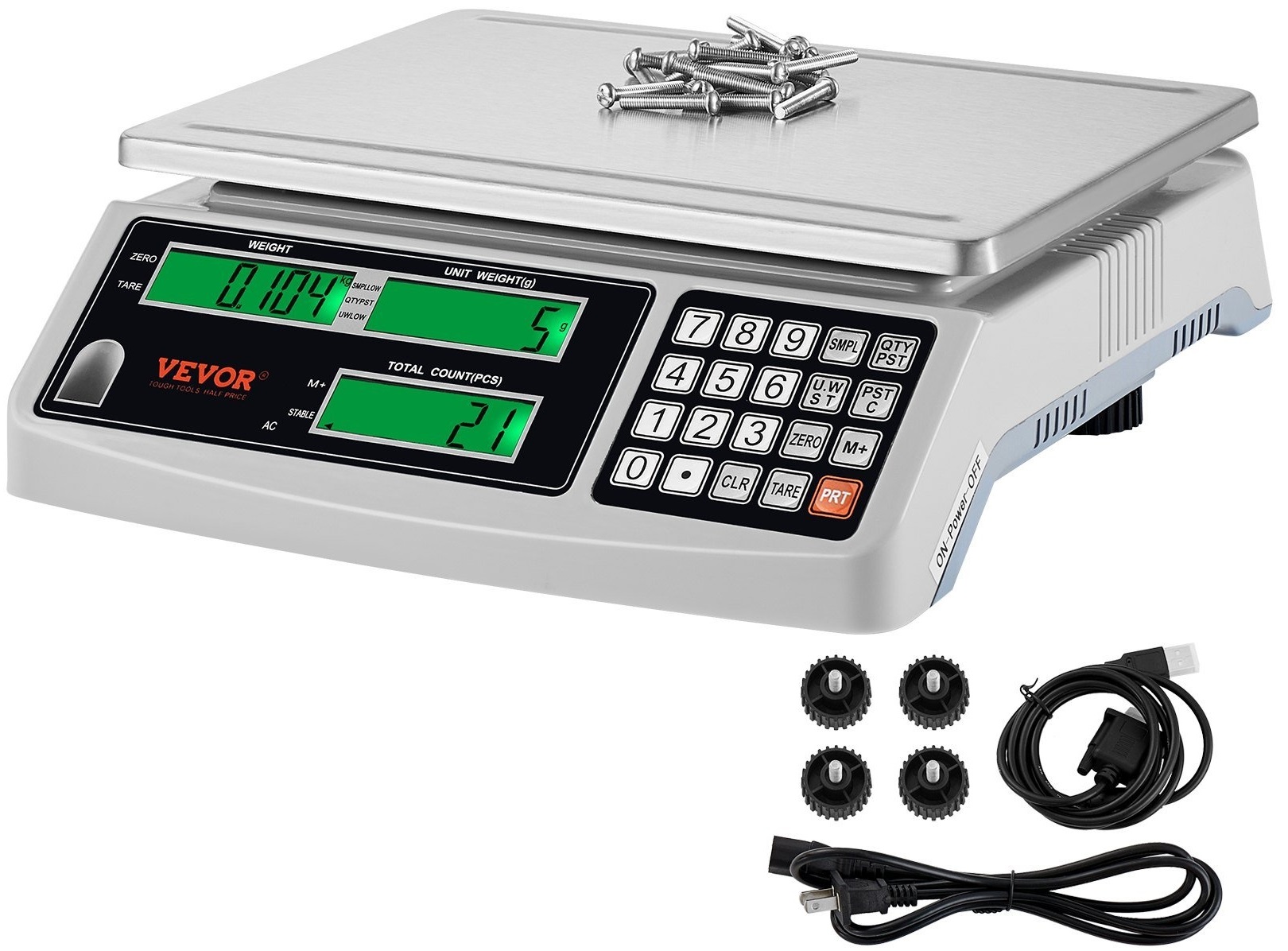
Manylebau
- Model: KF-H2C / KF-H2D
- Swyddogaeth: Autozero; Counting; ADD; TARE; Backlight
- Pwer: DC 6V/4AH rechargeable battery
- Defnydd pŵer: DC 38 mA (DC 58 mA with backlight)
- Cynhwysedd: 1g - 30.009kg
- Dewis Uned: Kg/g/lb
Cyfarwyddiadau Defnydd Cynnyrch
- Prif Swyddogaeth Dechnegol
- Swyddogaeth: Autozero; Counting; ADD; TARE; Golau cefn
- Pwer: DC 6V/4AH rechargeable battery
- Defnydd pŵer: DC 38 mA (DC 58 mA gyda cefn golau)
- Larwm Pwer Isel: Pan mae'n dangos “()” mae'n golygu bod angen i wefru. Os byddwch yn dal i ddefnyddio, mae'n hawdd torri'r raddfa.
- Data Technegol
- Cynhwysedd: 1g - 30.009kg
- Dewis Uned: Pwyswch y botymau perthnasol i dewiswch rhwng unedau kg, g, neu lb.
- Cyfri
- Cyn Cyfrif: Cael sampllai i benderfynu pwysau'r uned neu'r pcs.
- Pan nad yw Pwysau'r Uned yn Anhysbys:
- Rhowch sampllai o nwyddau perthnasol ar y plât gyda'r un peth pwysau.
- Eg, for unit G, put 30 pcs of screws of the same weight on y plât.
- Mewnbynnwch nifer yr samples (eg, PCS 30) to display weight, pwysau uned, a chyfanswm y cyfrif.
- Parhewch i ychwanegu nwyddau at y plât; bydd cyfanswm y pwysau a'r cyfrif yn newid tra bod pwysau'r uned yn aros yn gyson.
Cwestiynau Cyffredin
- C: Sut ydw i'n gwybod pryd i wefru'r raddfa?
- A: Bydd y larwm pŵer isel yn dangos pryd mae angen gwefru. Os caiff ei anwybyddu, gall niweidio'r raddfa.
- C: Sut ydw i'n dewis yr uned (kg/g/lb)?
- A: Pwyswch y botymau cyfatebol i ddewis rhwng unedau kg, g, neu lb.
“`
Cefnogaeth Dechnegol ac E-Wrant Tystysgrif www.vevor.com/cefnogi
LLAWLYFR DEFNYDDWYR Graddfa Gyfrif
MODEL: KF-H2C / KF-H2D
Rydym yn parhau i fod wedi ymrwymo i ddarparu offer i chi am bris cystadleuol. Dim ond amcangyfrif o'r arbedion y gallech eu elwa o brynu offer penodol gyda ni o'i gymharu â'r prif frandiau yw "Arbedwch Hanner", "Hanner Pris" neu unrhyw ymadroddion tebyg eraill a ddefnyddir gennym ni, ac nid yw o reidrwydd yn golygu ei fod yn cwmpasu pob categori o offer a gynigir gennym. Atgoffir chi'n garedig i wirio'n ofalus pan fyddwch chi'n gosod archeb gyda ni os ydych chi...
arbed hanner mewn gwirionedd o gymharu â'r brandiau mawr gorau.
MODEL: KF-H2C / KF-H2D
GRADDFA GYFRIF
(Mae'r llun ar gyfer cyfeirio yn unig, cyfeiriwch at y gwrthrych gwirioneddol)
ANGEN CYMORTH? CYSYLLTU Â NI! Oes gennych chi gwestiynau am gynnyrch? Angen cymorth technegol? Mae croeso i chi gysylltu â ni:
Cefnogaeth Dechnegol ac E-Wrant Tystysgrif www.vevor.com/cefnogi
Dyma'r cyfarwyddyd gwreiddiol, darllenwch yr holl gyfarwyddiadau llaw yn ofalus cyn gweithredu. Mae VEVOR yn cadw dehongliad clir o'n llawlyfr defnyddiwr. Bydd ymddangosiad y cynnyrch yn amodol ar y cynnyrch a gawsoch. Maddeuwch i ni na fyddwn yn eich hysbysu eto os oes unrhyw ddiweddariadau technoleg neu feddalwedd ar ein cynnyrch.
-1-
Prif Swyddogaeth Dechnegol
A. Prif Swyddogaeth Dechnegol.
1.Swyddogaeth:
Sero awtomatig; Cyfrif; YCHWANEGU; TARE; Goleuadau cefn
2. Grym
AC 220-240V (±10%) 50Hz ± 1 Hz
AC 110V (±10%) 60Hz ± 1 Hz
Batri ailwefradwy DC 6V / 4AH
3. Defnydd pŵer
DC 38 mA DC 58 mA gyda golau cefn
4. Watt0.4W gyda golau cefn 5. Larwm pŵer isel
When it shows (
)yn golygu bod angen codi tâl. Os ydych chi'n dal i ddefnyddio, mae'n hawdd
broke the scale.
B. Data Technegol
Capasiti 1
gallu
(n)
(d) (d)
(uchafswm) (isafswm) sero Tare (uchafswm) Gorlwytho (uchafswm+9e)
15000.0g 15000.0g 0.5g 0.5g 15000.0g 10g ±300g 0~15000.0g
15004.5g
30,000kg 30,000kg 1g 1g 30,000kg 20g ±600g 0~30,000kg
30.009kg
NotesFS= MAX WEIGHT of division
Sylw ychwanegol
When the division 1g, generally the unit is KG(eg 1g, 2g, 5g), When the
division<1g, generally the unit is G(eg 0.1g, 0.2g, 0.5g)
-2-
Cyfarwyddyd gweithredu
C. Operation instructions.
1. Cyn defnyddio
(1). Rhowch y glorian ar le gwastad a chadarn. Gall dynhau neu lacio'r pedair troedfedd i wneud yn siŵr ei bod ar yr un lefel. Mae pêl lefel arni. (2). Peidiwch â'i defnyddio mewn amgylcheddau anodd fel gwynt cryf a heulwen. (3). Defnyddiwch y cyflenwr pŵer yn unig. (4). Peidiwch â rhoi unrhyw beth ar y plât pan fyddwch chi'n ei droi ymlaen. (5). Wrth bwyso, ceisiwch eich gorau i roi'r peth gorau yng nghanol y plât, peidiwch â'i orbwyso. (6). Trowch y glorian ymlaen ar ôl 15-20 munud; mae pwyso'n well.
(7). Dangos
angen codi tâl yn gyntaf.
2. Arddangosfa:
A: Pan fo'r uned yn KG, bydd y Pwysau yn dangos 0.000 fel llun:

or
-3-
B: Pan fydd yr uned yn G, bydd y Pwysau yn dangos 0.0 fel llun:
or
(1). PWYSAU
6 digital for the goods weight and add weight and the left digital can display[- ]
(2).UNIT WEIGHT
5 digidol ar gyfer pwysau'r uned ac amseroedd ychwanegu. Y pwynt yw y gall newid.
(3). MAINT
6digital ar gyfer y darnau o'r nwyddau
3.Symbol” ”
(1). or Net or Taremeans has been cut the weight of packing (2). or Zeromeans no weight (3).+ or M+means ADD (4). or Stable or ~: Means on stable (5).SMPLOWmeans sampNid yw le yn ddigon. pwysau'r sampMae'r pwysau ar y plât yn llai na phwysau min sample, ychwanegwch yr uned darnau os gwelwch yn dda bydd y symbol hwn yn diflannu. (6).QTYPST UWLOWPan fydd y darnau'n isel fel y gosodwch, bydd yn larwm ac yn QTYPST UWLOW.
(7).
Yn golygu bod y pŵer yn isel, angen codi tâl.
Sylw
Graddfa gyfrif manwl gywir: Min samppwysau uned lleiaf = 20d
0.2d ( d=division) counting scale Min samppwysau uned lleiaf = 40d Pwysau uned lleiaf = 0.8d (d = rhaniad)
-4-
KEYBOARDFUNCTION
4. ALLWEDDAR
AUR
(Heb RS-232)
(gyda RS-232)

4.1 Disgrifiad o swyddogaeth allwedd gyfansawdd
+Allweddi rhif0–2trosi unedau
+Allweddi rhifau4–6addasu'r disgleirdeb
+ gosod terfynau uchaf ac isaf larwmLong
Pwyswch i fynd i mewn i'r gosodiad larwm Pwyswch i gau Pwyswch i osod
tu allan i derfynau uchaf ac isaf y larwm Pwyswch i osod tu mewn i
terfynau uchaf ac isaf y larwmPwyswch i osod terfynau uchaf y
larwmPwyswch i gadarnhau
4.2 Allwedd swyddogaeth
Pan nad yw pwysau'r uned yn hysbysGosodwch nifer yr eitemau i'w samparwain
:When the unit weight is knownConfirm the input weight:Use this key to set the alarm value when a fixed number of alarms are required
-5-
Analluogi swyddogaeth larwm
:Add up the quantity of goods :Cancel the total amount of the accumulated items :Remove the weight of tare :Return the scale to zero as far as possible :Clear the number :Print the current weight, single weight, quantity ,and the cumulative data (Note: with the RS232)
SWYDDOGAETH
5. SWYDDOGAETH
5.1. Botwm YMLAEN-DIFFODD
Rhoi ON/OFF i “” yn golygu troi ymlaen.
Rhoi ON/OFF i “O” Yn golygu diffodd y pŵer.
5.2. Auto Backlight
Press, when it displays “
"pwyso
, Byddaf yn arddangos”
“. Rhowch y
goods on the plateweight >10d, the light is on auto, when it is zero, the light is
auto off.
Golau ymlaen drwy'r amser
Gwasgwch
when it displays”
"pwyso
bydd yn arddangos ““, Goleuni ar bawb
yr amser.
Light off all the time press, when it display “off all the time.
“Gwasgwch
bydd yn arddangos ” “, y golau
When you turn off the scale, it will memory what you have chosen
-6-
Dewis uned 5.3.Kg/g/lb
Gwasgwch
pryd mae'n cael ei arddangos"
" yna pwyswch
, yr uned yw “kg”.
Gwasgwch
pryd mae'n cael ei arddangos"
” yna pwyswch , yr uned yw “g”.
Gwasgwch
pryd mae'n cael ei arddangos"
” yna pwyswch , yr uned yw “lb”.
5.4. Cyfrif
5.4.1 Cyn cyfrif, mae angen i chi gael rhywfaint o wybodaethampllai i wybod pwysau'r pcs neu'r uned (1) Pan nad yw pwysau'r uned yn hysbys
Rhowch y sampllai o nwyddau perthnasol ar y plât (pwysau pob unample must be the same): Eg (A): when the unit is G, put 30pcs screws of each same weight on the plate, It will display:
Pwysau
Pwysau uned Cyfanswm y cyfrif
[ 53.1g ] [ 0 ]
[0 ]
Mewnbwnwch y PCS “30” o’r samples(Sgriwiau), bydd yn arddangos:
Pwysau
Pwysau uned Cyfanswm y cyfrif
[53.1g]
[30]
[0]
Yna pwyswch , bydd yn arddangos:
Pwysau
Pwysau uned Cyfanswm y cyfrif
[53.1g]
[1.77g]
[ 30 ]
At this moment you can continue to put the more goods (eg: screws) on the plate, the Total weight & Total count will change constantly, the unit weight won’t be changed.
Eg (B): when the unit is KG, put 30pcs screws of each same weight on the plate, It will display:
Pwysau
Pwysau uned Cyfanswm y cyfrif
[ 0.053kg ] [ 0 ]
[0 ]
-7-
Mewnbwnwch y PCS “30” o’r samples (Sgriwiau), bydd yn arddangos:
Pwysau
Pwysau uned Cyfanswm y cyfrif
[0.053kg]
[30]
[0]
Yna pwyswch , bydd yn arddangos:
Pwysau
Pwysau uned Cyfanswm y cyfrif
[0.053kg]
[1.766g]
[ 30 ]
At this moment you can continue to put the more goods (eg screws) on the plate, the Total weight & Total count will change constantly, the unit weight won’t be changed.
(2) Know the unit weight(eg screws)
Pan fyddwch chi'n gwybod bod pwysau un sgriw yn 1.766g,
A: if the unit is G, Input the unit weight 1.766, it will display:
[0.0g]
[1.766g] [0]
Then Press, and put the more goods(eg:30 pcs screws) on the plate,
[53.0g] [1.766g] [30] If at this moment you continue to put the more pcs, the Total weight & Total count on the window will change constantly, the unit weight won’t change. B:If the unit is KG, Input the unit weight 1.766, it will display:
[0.000kg]
[1.766g] [0]
Yna Gwasgwch
, and put the more goods(eg:30 pcs screws) on the plate,
[0.053kg] [1.766g] [30]
Yn olaf, pan fyddwch chi'n tynnu'r holl nwyddau oddi ar y plât, mae ffenestr yr uned yn dal i fod
yn dangos gwerth, gallwch bwyso
.
-8-
Y sample is more, the precision is more high
PWYNT NULL
When you using the scale, sometimes the weight window is not [0.0], you can
wasg
to make it into [0.0], Zero range =capacity ×+ 4%
5.4.2 Cyfrif nwyddau sydd wedi'u pacio
(1).When the packing box /carton weight is unknown (eg the unit is KG)
has. Put the packing box of 500g on the plate, it will display
[0.500kg]
[0 ]
[0]
b. Gwasg
, Bydd yn arddangos
OR At this moment you can follow 5.4.1 to continue the counting. When the packing box/carton weight is unknown (eg the unit is G) a. Put the packing box of 500g on the plate, It will display
[500.0g]
[0 ]
[0]
b. Pwyswch , bydd yn dangos:
[0.0g]
[0 ]
[0]
-9-
Clear the TARE history Take down the goods and package on the plate, the weight will be [- 0.500kg ] on the basis of KG or [- 500.0g ] on the basis of G, Press, The weight will be [0.0], and this to TARE will disappear.
(2) on the plate, it will display 0.000(it means tared),
and at this moment you start to follow the way of 5.4.1 for counting. (3).1-B. When The weight of packing box/carton is known (eg the unit is G)
There is nothing on the plate, it display [0.0 g] [0] [0] The packing box is 500g, Input 5000, it will display [0.0g ] [5000] [0] Press, it will display [-500.0g] [—-] [—-]
Attention: when weight window display “0.0”(it means the unit is G), input the weight of packing box must be 10 times of the actual weight. (eg:500g package box, you need to input 5000)
Ar hyn o bryd gallwch chi roi'r blwch pacio hwnnw yn gyntaf, bydd yn dangos “0.0” ar sail G neu “0.000” ar sail KG, mae'n golygu bod y ddau wedi'u tario. Yna dechreuwch ddilyn cam 5.4.1 i barhau â'r cyfrif. Mae rhai nwyddau gan gynnwys y blwch/carton pacio ar y plât.
– 10 –
Eg Packing box is 500g, on the basis of KG, packing box(500g)+goods(30PCS screws)= 0.553kg, it will display
[0.553kg] [0] [0]
Input the weight 1.766 of one screw, press, it will display
[0.553kg] [1.766g] [313]
Input 500(packing box is 500g
)
[553.0g] [1.766g] [313]
Input 5000(actual packing box is 500g), Press the key, it will display
[53.0g] [1.766g] [30] Attention: When weight window display “0.0” (it means the unit is G), input the weight of packing box must be 10 times of the actual weight.(eg:500g package box, you need to input 5000) Clear the TARE history
Tynnwch y nwyddau a'r pecyn i lawr ar y plât, bydd y pwysau'n [-
0.500kg], press, The weight will be [0.0].
5.5. YCHWANEGU
99 Gwaith YCHWANEGOL, 6 Digidol
5.5.1 ADD maint cyfrif dro ar ôl tro
5.1.1.1 YCHWANEGU PCS
Put the goods on the plate, follow as 5.4.1 counting, then press
, Ailadrodd
5.1.1.1, yna pwyswch
,on the unit weight window will show [2], it means, 2
– 11 –
times ADD. THE Total COUNT(PCS) will show the two times pcs.(eg put 10pcs
screws on the plate, input 10, press SMPL, press
unwaith, yna ewch i ffwrdd
10pcs screws, put again another 10pcs screws, press
eto. Y cyfanswm cyfrif
bydd yn arddangos y 20 darn hynny eu bod nhw'n y tro cyntaf a chyfrif yr 1il dro, wrth gwrs,
y pwysau cyfan yw'r tro cyntaf + yr ail dro)
Pan fyddwch chi wedi gorffen cyfrif yr holl nwyddau, does dim nwyddau ar y plât, Pwyswch
i wirio'r cyfanswm pwysau a'r amseroedd a'r meintiau. Pwyswch
a
i
clirio'r hanes ADD.
5.5.2 Ychwanegu Pwysau
Eg the unit is G
Rhowch y nwyddau ar y plât fel 500g, pwyswch
Bydd yn dangos [500.0] [1] [0] am 5 eiliad, yna i [500.0] [0] [0]
Yna tynnwch y nwyddau i ffwrdd, rhowch nwyddau eraill ar y plât fel 100g, pwyswch
Bydd yn dangos [600.0g] [2] [0] am 5 eiliad, yna [100.0g] [0] [0].
Ond pan fyddwch chi'n tynnu'r nwyddau hynny i ffwrdd, pwyswch
eto, gallwch chi wirio'r
cyfanswm y gwerth yw: [600.0g] [2] [0], wrth gwrs, gallwch barhau i roi'r
nwyddau newydd arno, pwyswch i'w cyfrif.
Yn olaf pan fyddwch chi'n gorffen YCHWANEGU, does dim nwyddau ar y plât, Pwyswch
i
Check the total weight. Press
i glirio'r hanes ADD.
Eg the basis is KG
Rhowch y nwyddau ar y plât Fel 500g, pwyswch
Bydd yn dangos [0.500kg] [1] [0] am 5 eiliad, yna i [0.500] [0] [0]
Yna tynnwch y nwyddau i ffwrdd, rhowch nwyddau eraill ar y plât fel 100g, pwyswch
Bydd yn dangos [0.600kg] [2] [0] am 5 eiliad, yna [0.100g] [0] [0].
– 12 –
Ond pan fyddwch chi'n tynnu'r nwyddau hynny i ffwrdd, pwyswch
eto, gallwch chi wirio'r
cyfanswm y gwerth yw: [0.600kg] [2] [0], wrth gwrs, gallwch barhau i roi'r newydd
nwyddau arno, pwyswch
ar gyfer cyfrif.
Yn olaf pan fyddwch chi'n gorffen YCHWANEGU, does dim nwyddau ar y plât, Pwyswch
i
check the total weight. Press
i glirio'r hanes ADD.
5.6. Larwm maint
Eg If over the goods of 30pcs on the plate, you want alarm.
Yn gyntaf, mewnbwnwch 30 darn, pwyswch
,Bydd yn arddangos
[0.000] [0] [30] for 3 seconds,
yna dangoswch [0.000] [0] [0]
Put the goods on the plate, when counting (follow the way of 5.4.1 eg: put 10pcs
goods on the plate, input 10, press
, yna parhau i roi mwy o nwyddau ymlaen
fe), pan fydd y cyfrifiaduron dros 30pcs bydd yn larwm.
Gwasgwch
a
i ganslo'r larwm maint.
5.7. graddnodi
1. Trowch y raddfa ymlaen, pan fydd y ffenestr yn dangos “0”, mewnbwnwch 52411 a gwasgwch
allwedd i fynd i mewn i'r modd calibradu.
2. Gwasg
i ddewis y capasiti mwyaf, pwyswch i gadarnhau, er enghraifftample:
30kg, input “30000”, press to confirm
3.Pwyso
i ddewis rhannu, pwyswch i gadarnhau, er enghraifftample, pan fyddwch
wasg
continuously, it will display “1,2,5,10,” then you choose the division
sydd ei angen arnoch. Yna pwyswch .
– 13 –
4.Pwyso
i ddewis safle pwynt, ar ôl pwyso'n gyson, mae'n arddangos
“0””1″”2″”3″”4″”0″ gallwch ddewis y safle sydd ei angen arnoch, yna pwyswch
i gadarnhau.”0″yn golygu “0”, “1”yn golygu “0.0” “2”yn golygu “0.00”, “3”yn golygu “0.000”,
Mae “4” yn golygu “0.0000” Os nad oes angen i chi newid y capasiti, y rhaniad a’r pwynt, gallwch chi
gallai bwyso'n uniongyrchol
i fynd i mewn i'r cam nesaf
5.Weight window will show the data which poise will load on scale(If you what change load poise, you could input the data you will load on scale). press
,the unit price window will display “LOAD”, then put load/weight, finally press
i gadarnhau.
5.8. Larymau Terfyn Uchaf ac Isaf
5.8.1 Dewis Mathau o Larwm
Hir-wasg y
allwedd i fynd i mewn i'r gosodiadau. Mae'r ffenestr pwysau sengl yn dangos:
Glanhau sych
yn dangos OFF i analluogi, gan wasgu
yn dangos OUT am allan o ystod
larwm, pwyso
yn dangos IN ar gyfer larwm o fewn yr ystod, ac yn pwyso
yn dangos UP
ar gyfer larwm terfyn uchaf yn unig. Pwyswch
i achub ac ymadael.
Byr-wasg y
allwedd i osod y terfyn uchaf ar gyfer y swm.
5.8.2Inputting Alarm Values (Note: Long-press the
allwedd i actifadu'r larwm,
yr un fath â'r cam cyntaf uchod)
Byr-wasg y
allwedd i fynd i mewn i osodiadau, gan arddangos (A-FF-O-dn). Y pwysau
mae ffenestri'n dangos mathau o larymau: mae A-OUT yn dynodi larwm allan o'r ystod, mae A-IN yn dynodi larwm o fewn yr ystod, mae A-UP yn dynodi larwm terfyn uchaf yn unig.
– 14 –
A. Pan fydd y ffenestr maint yn dangos DN, mewnbwnwch y gwerth terfyn isaf, pwyswch
i gadarnhau a symud ymlaen i'r cam nesaf. B. Pan fydd ffenestr y pwysau sengl yn dangos UP, mewnbwnwch y gwerth terfyn uchaf, pwyswch
i gadarnhau ac ymadael.
5.8.3Gwasg
I ddadactifadu'r larwm ac ailosod y terfyn uchaf ac isaf
gwerthoedd.
5.9. Gosodiadau UART 5.9.1 Ar ôl troi ymlaen a sero, pwyswch yr allwedd. ac yna'r allwedd rifiadol 8. Bydd y ffenestr pwysau yn dangos “argraffu” sy'n nodi'r modd argraffydd allanol. 5.9.2 Ar ôl troi ymlaen a sero, pwyswch yr allwedd. ac yna'r allwedd rifiadol 9. Bydd y ffenestr pwysau yn dangos “PC” sy'n nodi'r cyfrifiadur
modd uwchlwytho data, y gellir ei uwchlwytho i'r cyfrifiadur gan ddefnyddio Excel
taenlenni.
5.10. Swyddogaeth Argraffu (Nodyn: gyda'r RS232)
Pan fydd UART yn newid i'r modd "argraffu":
5.10.1Argraffiad Sengl
Pan nad yw'r pwysau'n sero, pwyswch yr allwedd Argraffu i argraffu'r pwysau cyfredol, pwysau'r uned, a'r maint. Dyma'r fformat:
– 15 –
5.10.2Argraffu Cronedig
Pan fydd pwysau lluosog yn cael eu cronni, addaswch y pwysau, pwysau'r uned, a nifer yr eitemau yn gyntaf, pwyswch yr allwedd Ychwanegu dro ar ôl tro i gronni, yna pwyswch yr allwedd Argraffu i argraffu'r pwysau, pwysau'r uned, a nifer yr eitemau sawl gwaith. Yn y modd "Argraffu", bydd pwyso'r allwedd "PRT" ar ôl argraffu yn clirio'r croniad yn awtomatig, neu pwyswch yr allwedd gyfuniad "M+"+"CLR" i glirio'r croniad. Y fformat argraffu yw fel a ganlyn:
6. Swyddogaeth Lanlwytho Data Cyfrifiadurol (Nodyn: gyda'r RS232)
Pan fydd UART yn newid i'r modd "PC", defnyddiwch gebl data protocol RS232 i HID i gysylltu'r cyfrifiadur â'r raddfa (Nodyn: Daw graddfeydd cyfrif gyda phorthladdoedd RS232 gyda'r cebl data hwn). Agorwch daenlen Excel ar y cyfrifiadur ar ôl i'r raddfa electronig droi ymlaen a sero, rhowch yr eitemau pwyso ar y raddfa. Pan fydd y pwysau'n sefydlogi, bydd sain "bîp", a bydd taenlen Excel y cyfrifiadur yn ysgrifennu'r data pwysau a ddangosir yn ffenestr pwysau'r raddfa electronig yn awtomatig. Tynnwch yr eitemau o'r raddfa, ac ar ôl iddi ddychwelyd i sero, pwyswch eto. Bydd y daenlen Excel yn ysgrifennu'r ail ddata pwysau (nid oes angen pwyso'r allwedd Argraffu). Dyma'r fformat:
– 16 –
7. Sylw:
1. Keep away from the rain and wash by water if happens, please dry it, and find it cannot work, return to the seller to repair).
2. Please do not store in the high temperature and wet place. 3. Do not let insects into the body. 4. Do not heavy shock and overload. 5. No need using for a long time. please clear it, and take it into the bag, and
charge it each 3 months. Reload it before using . 6. If you have good advise please feel free to tell us.
– 17 –
Common trouble shootingWW
8. Common trouble shooting:
Dim TRWBL
Turn 1 on, show “LB
"a larwm
CYMHELLION
LOW BATTERY (POWER)
Turn 2 on, show “ED WEIGHING ERROR
“
RHESWM Dim pŵer ar y batri
Batri wedi torri
SELIO LLINELL CELL LLWYTH
CYFFWRDD CELL LLWYTHO Â RHYWBETH
CELL LLWYTH WEDI THORRI
PCB WEDI'I DORRI
rhy wlyb
RHY DDWYR
3
Turn on, hop counting
Rhif y ffenestr pwysau wrth newid
cannot weigh
CYFFWRDD CELL LLWYTHO Â RHYWBETH LLINELL CELL LLWYTHO
SELIO I FFWRDD
CELL LLWYTH WEDI THORRI
Pryd
Y ffenestr pwysau
4 charging, co number on changing
untio
ni all godi tâl
PCB BROKEN Adapter
Digidol 8 ddim
5
sioe lawn
Digital 8 not full show, or less
LCD byr cylched electronig wedi torri
Gyriant wedi torri
the key is stuck
the key cannot spring
yn ol
6
key cannot work
Press the key can’t work
cylched electronig allweddol byr
PCB WEDI'I DORRI
BWRDD ALLWEDDOL
CORRODES
y llinell gell llwyth a'r PCB
7 DIM PWYSAU
dim pwysau
broken link
LLINELL LLWYTHO CELL
CYNGOR AIL-WEFRU
newid y batri
AIL-SELIO
GWIRIO
NEWID Y GELL LLWYTH
NEWID Y PCB SYCHU'R PCB a'i lwytho
celloedd yn tynnu'r PCB i lawr, gan ddefnyddio glanhau Alcohol
first, then dry it
GWIRIO
AIL-SELIO
NEWID Y GELL LLWYTH
NEWID Y PCB
change the adapter
gan ddefnyddio cyswllt gwifren wedi'i inswleiddio â rwber gyda'i gilydd newid y LED
newid y gwiriad bwrdd arddangos
newid yr allwedd
gan ddefnyddio cyswllt gwifren wedi'i inswleiddio â rwber gyda'i gilydd
NEWID Y PCB NEWID YR ALLWEDD
BWRDD
gwirio
AIL-SELIO
– 18 –
can’t turn
pwyswch y botwm ymlaen/i ffwrdd
8
we
button, can’t turn on
pan fydd yn cael ei droi ymlaen
DID DID DID
pan fyddwch chi'n troi DI DI ymlaen
9 sain yr holl
sain drwy'r amser
amser
trowch y sain ymlaen
10 normal, but no words
trowch ymlaen 11 sioe”8″pob un
yr amser
turn on the sound normal, but no words
when turn on the scale, all the window
show 8, can not weighing, and the sound it is normal When charging AC light is working, but can not charge
ni all
12
ad-daliad
Pan nad yw golau gwefru AC yn gweithio,
dim golau cefn 13 ar gyfer yr LCD
Turn on, there is no light for the LCD
CELL LLWYTH SELIO WEDI THORRI
PCB WEDI TORRI'R BOTWM YMLAEN/DIFFODD
WEDI TORRI GWIRIWCH BOD PŴER Y BATRI YN DDIGONOL
PCB WEDI TORRI GWIRIWCH BOD PŴER Y BATRI YN DDIGONOL
PCB WEDI TORRI gwiriwch y bwrdd arddangos i
Mae'r cyswllt PCB yn iawn, mae'r bwrdd arddangos wedi torri, gwiriwch y bwrdd arddangos i
Mae'r cyswllt PCB yn iawn
bwrdd arddangos wedi torri
Adapter Battery broken
adapter adapter charging connect broken the charging connect to the PCB link off PCB BROKEN Battery broken power save function check the LCD part if have sealing-off LCD Broken
NEWID Y GELL LLWYTH
NEWID Y PCB NEWID YR YMLAEN/DIFFODD
BOTWM ISEL
FOLT, AIL-WEFRU
BATRI WEDI TORRI NEWID EF, V<5.25V
NEWID Y PCB ISEL
FOLT, AIL-WEFRU BATRI WEDI TORRI NEWID EF, V<5.25V NEWID Y PCB
diffoddwch, ailgysylltwch gyswllt y bwrdd arddangos
newid y bwrdd arddangos
diffoddwch, ailgysylltwch gyswllt y bwrdd arddangos
newid y bwrdd arddangos
change the adapter
newid y batri
change the adapter take down recharging change the connect part
ail-selio
NEWID Y PCB newid y batri ailosod y golau cefn ymlaen
swyddogaeth
AIL-SELIO
NEWID YR LCD
– 19 –
Eitemau
Disgrifiad
1 Tiriogaeth gwerthu Gogledd America
2 Enw
Graddfa Cyfrif
Model 3
KF-H2D
4 Paramedr
Sgôr(iau): AC110V/60HzCapasiti: 30kgRhannu: 1gRS232
Eitemau
Disgrifiad
1 Tiriogaeth gwerthu Gogledd America
2 Enw
Graddfa Cyfrif
Model 3
KF-H2C
4 Paramedr
Sgôr(iau): AC110V/60HzCapasiti: 30kgRhannu: 1gRS232
Eitemau
Disgrifiad
1 Tiriogaeth gwerthu Ewrop
2 Enw
Graddfa Cyfrif
Model 3
KF-H2C
4 Paramedr
Sgôr(iau): AC220-240V/50HzCapasiti: 30kgRhannu: 1g RS232
Eitemau
Disgrifiad
1 Tiriogaeth gwerthu Awstralia
2 Enw
Graddfa Cyfrif
Model 3
KF-H2C
4 Paramedr
Sgôr(iau): AC220-240V/50HzCapasiti: 30kgRhannu: 1g RS232
– 20 –
Eitemau
Disgrifiad
1 Tiriogaeth gwerthu Gogledd America
2 Enw
Graddfa Cyfrif
Model 3
KF-H2C
4 Paramedr
Sgôr(iau): AC110V/60HzCapasiti: 30kgRhannu: 1g
Eitemau
Disgrifiad
1 Tiriogaeth gwerthu Ewrop
2 Enw
Graddfa Cyfrif
Model 3
KF-H2C
4 Paramedr
Sgôr(iau): AC220-240V/50HzCapasiti: 30kgRhannu: 1g
Eitemau
Disgrifiad
1 Tiriogaeth gwerthu Gogledd America
2 Enw
Graddfa Cyfrif
Model 3
KF-H2C
4 Paramedr
Sgôr(iau): AC110V/60HzCapasiti: 15kgRhannu: 0.5g RS232
– 21 –
Gwneuthurwr: Shanghaimuxinmuyeyouxiangongsi Cyfeiriad: Shuangchenglu 803nong11hao1602A-1609shi, baoshanqu, shanghai 200000 CN. Wedi'i fewnforio i AUS: SIHAO PTY LTD. 1 ROKEVA STREETEASTWOOD NSW 2122 Awstralia wedi'i Mewnforio i UDA: Sanven Technology Ltd. Suite 250, 9166 Anaheim Place, Rancho Cucamonga, CA 91730
EC REP E-CrossStu GmbH Mainzer Landstr.69, 60329 Frankfurt am Main. YH YMGYNGHORI CYFYNGEDIG.
REP DU D/O YH Consulting Limited Swyddfa 147, Centurion House, London Road, Staines-upon-Thames, Surrey, TW18 4AX
– 22 –
Cefnogaeth Dechnegol ac E-Wrant Tystysgrif www.vevor.com/cefnogi
-1-
Technical support and electronic warranty certificate www.vevor.com/cefnogi
Counting balance USER MANUAL
MODEL: KF-H2C / KF-H2D
Rydym yn parhau i fod wedi ymrwymo i ddarparu offer i chi am bris cystadleuol. Dim ond amcangyfrif o'r arbedion y gallech eu elwa o brynu offer penodol gyda ni o'i gymharu â'r prif frandiau yw "Arbedwch Hanner", "Hanner Pris" neu unrhyw ymadroddion tebyg eraill a ddefnyddir gennym ni, ac nid yw o reidrwydd yn golygu ei fod yn cwmpasu pob categori o offer a gynigir gennym. Atgoffir chi'n garedig i wirio'n ofalus pan fyddwch chi'n gosod archeb gyda ni os ydych chi...
arbed hanner mewn gwirionedd o gymharu â'r brandiau mawr gorau.
-2-
MODEL: KF-H2C / KF-H2D
GRADDFA GYFRIF
(Mae'r llun ar gyfer cyfeirio yn unig, cyfeiriwch at y gwrthrych gwirioneddol)
ANGEN CYMORTH? CYSYLLTU Â NI! Oes gennych chi gwestiynau am gynnyrch? Angen cymorth technegol? Mae croeso i chi gysylltu â ni:
Cefnogaeth Dechnegol ac E-Wrant Tystysgrif www.vevor.com/cefnogi
Dyma'r cyfarwyddyd gwreiddiol, darllenwch yr holl gyfarwyddiadau llaw yn ofalus cyn gweithredu. Mae VEVOR yn cadw dehongliad clir o'n llawlyfr defnyddiwr. Bydd ymddangosiad y cynnyrch yn amodol ar y cynnyrch a gawsoch. Maddeuwch i ni na fyddwn yn eich hysbysu eto os oes unrhyw ddiweddariadau technoleg neu feddalwedd ar ein cynnyrch.
-1-
ONE. Main technical function.
1. Swyddogaeth:
Auto Zero; Count; ADD; TARE; Backlight
2. pŵer:
AC 220-240V (±10%) 50Hz ± 1Hz AC
110V (± 10%) 60Hz ± 1Hz
Rechargeable Battery DC 6V / 4AH
3. Defnydd Pwer
38mA DC DC 58mA with backlight
4. Watt 0.4W with backlight 5. Low power alarm
When the indicator (
) is displayed, this means that it needs to be loaded. If you
keep using it, it is easy to break the scale.
B. Technical data
Capacity 1:
gallu
(n)
(f) (ch)
(uchafswm)
(min) zero Tare (max) Overload (max+9e)
15000 .0 15000 .0 0.5 0.5
0 ~ 1500 0.0
15000.0g 10g ±300g
g
g
gg
g
30,000 kg
30,000
0 i 30,000
1 g 1 g 30,000 kg 20g ±600g
kg
kg
1500 4.5 g 30,009 kg
Notes: FS = MAXIMUM WEIGHT; d = division
Nodyn ychwanegol
When division 1 g, the unit is usually KG (e.g. 1 g, 2 g, 5 g), when division < 1 g, the unit is usually G (e.g. 0.1 g, 0.2 g, 0.5 g)
-2-
C. Instructions for use.
1. Cyn defnyddio
(1). Please place the scale on a flat and firm place. You can tighten or loosen the four feet to make sure they are on the same level. there is a level ball on it. (2). Do not use it in harsh environments such as strong wind and sun. (3). Please use only the electricity supplier. (4). Do not put anything on the plate when you turn it on. (5). When weighing, try to place the food in the center of the plate as best as possible, without overloading it. (6). Turn on the scale after 15 to 20 minutes, the weighing is better.
(7) . Show
must first be loaded.
2. Arddangos:
A: When the unit is KG, the weight will display 0.000 as shown in the picture:
or
-3-
B: When the unit is G, the weight will display 0.0 as shown in the picture:
or (1). WEIGHT
6 digital for goods weight and add weight and the left digital can display [- ]
(2). UNIT WEIGHT
5 digital for unit weight and adding times. The point is they can change.
(3). QUANTITY
6digital for goods pieces
3. Symbol “ ”
(1). or Net or Tare: means the package weight has been reduced (2). or Zero means no weight (3).+ or M+ means ADD (4). or Stable or ~: Means on stable (5). SMPLOW: means the sample is not enough. the sample weight on the plate is less than the minimum sample weight, please add the pieces, this symbol will disappear. (6). QTYPST UWLOW When the pieces number is low as you set, it will alarm and QTYPST UWLOW .
(7).
Means power is low, need to charge.
Wedi sylwi
-4-
High precision counting scale: Minimum sample weight = 20d Minimum unit weight = 0.2d (d= division )
counting scale: Minimum sample weight = 40d Minimum unit weight = 0.8d (d= division )
4. ALLWEDDAR
OR
(Without RS-232) (with RS-232)
4.1 Disgrifiad o swyddogaeth allwedd gyfansawdd
+ Numeric keys (0 to 2) convert units. + Numeric keys (4 to 6) adjust brightness. + set the upper and lower limits of the alarm. Long press to enter the alarm setting. Press to close. Press to set the outside of the upper and lower limits of the alarm. Press to set the inside of the upper and lower limits of the alarm. Press to set the upper limits of the alarm. Press to confirm.
4.2 Allwedd swyddogaeth
-5-
: When the unit weight is unknown, set the number of items to be samparwain.
: When the unit weight is known, confirm the entered weight; : Use this key to set the alarm value when a fixed number of alarms is required;
: Turn off the alarm function;
: Add up the quantity of goods; : Cancel the total amount of accumulated items; : Remove the tare weight; : Reset the scale to zero as much as possible; : Clear the number; : Print the current weight, single weight, quantity, and cumulative data. (Note: with RS232)
5. SWYDDOGAETH
5.1. ON-OFF button n
Switching ON/OFF to “ ” means turning on.
“Turn ON/OFF” also means power off.
5.2. Auto Backlight
Press , when it displays “
» press
, I will display ” “
. Place the goods on the plate, weight > 10d, light is
automatically on, when it is at zero, the light is automatically off.
Golau ymlaen drwy'r amser
-6-
Press when it displays “
“, press it will display
” “, the light will be on permanently.
Lights off all the time
Press , when it displays “
» Press , it will display “
“, the light will go out all the time.
When you turn off the scale, it remembers what you chose
5.3. Unit Kg/g/lb to choose
Press , when is displayed “
» then press , the unit is
“kg”.
Press , when is displayed “
» then press , the unit is
“g”.
Press , when is displayed “
» then press , the unit is
“lb”.
5.4. Counting 5.4.1 Before counting, you must obtain samples to know the number of pieces or unit weight. (1) When the unit weight is unknown
Gosodwch y samples of the relevant goods on the plate (the weight of each sample must be the same): For example (A): when the unit is G, place 30 screws of the same weight on the plate. It will display:
Weight Unit weight Total number
[ 53.1 g ] [ 0 ] [ 0 ]
Enter the PCS “30” of the sample s(Vis), it will display:
Weight Unit weight Total number
[ 53.1 g] [ 3] [0]
-7-
then on , it will display:
Weight Unit weight Total number
[ 53.1 g ] [ 1.77 g ]
[ 30 ]
At this time, you can continue to put more goods (eg: screws) on the plate, the total weight and total number will constantly change, the unit weight will not be changed. For example (B): when the unit is KG, put 30 screws of the same weight on the plate. The following message will be displayed:
Weight Unit weight Total number
[ 0.053 kg ] [ 0 ] [ 0 ]
Enter the PCS “30” of the sample s (screw), it will display:
Weight Unit weight Total number
[ 0.053 kg] [ 3 0] [0]
then on , it will display:
Weight Unit weight Total number
[ 0.053 kg ] [ 1.766 g ]
[ 30 ]
At this time, you can continue to put more goods (eg screws) on the plate, the total weight and total number will constantly change, the unit weight will not be changed.
(3) Now know the unit weight (e.g. screws)
When we know that the weight of a screw is 1.766 g,
A: If the unit is G, I enter the unit weight 1.766, it will display:
[0.0 g] [1.766 g] [0]
Then press , and place as many products (eg: 30 screws) on the plate,
[ 53.0 g ] [ 1.766 g ] [ 3 0 ]
-8-
If at this time you continue to put more pieces, the total weight and total number on the window will constantly change, the unit weight will not change.
B: If the unit is KG , I input the unit weight 1.766, it will display: [0.0 00 kg] [ 1.766 g ] [0] Then press , and put the most goods (for example: 30 screws) on the plate, [ 0.053 kg ] [ 1.766 g ] [ 3 0 ] Finally, when you remove all the goods from the plate, the unit window still displays the value, you can press .
Y sample is larger, the accuracy is higher
ZERO POINT When using the scale, sometimes the weight window is not [0.0], you can press to change it to [0.0], Zero range = capacity × + 4%
5.4.2 Counting packed goods
(1). When the weight of the packing box/carton is unknown (for example, the unit is KG) a. Put the 500g packing box on the plate, it will display [0.500kg] [0] [0] b. Press , I will display it
-9-
OR At this time, you can follow 5.4.1 to continue counting. When the weight of the packing box/carton is unknown (for example, the unit is G) a. Put the 500g packing box on the plate, It will display [500.0g] [0] [0] b. Press , it will display: [0.0g] [0] [0] Clear TARE History
Take out the goods and pack them on the plate, the weight will be [-0.500kg] based on KG or [-500.0g] based on G, press , the weight will be [0.0] and this TARE will disappear. (2). 1-A. When the weight of the packaging box/carton is known (for example, the unit is KG) There is nothing in the plate, it is displayed [0.00 0 ] [0] [0]
– 10 –
The packaging box is 500g, enter 500, it will be displayed
[0.00 0] [50 0] [0]
Pres [TARE], it will display
[- 0.500 ] [—-] [—-] Then place this packing box on the plate, it will display 0.000 (this means tared), and at this time you start to follow the method of 5.4.1 to count. (3).1-B. When the weight of the packing box/carton is known (by
example, the unit is G)
There is nothing on the plate, it is displayed
[0.0 g] [0] [0]
The packaging box weighs 500g, enter 5000, it will be displayed
[0.0 g] [50 0 0] [0]
Gwasgwch
, it will display
[- 500.0 g ] [—-] [—-]
Attention: When the weighing window displays “0.0” (it means the unit is G), the weight of the packing box should be 10 times the actual weight. (For example: for a 500 g packing box, you should input 5000) At this time, you can first place the packing box, it will display “0.0” based on G or “0.000” based on KG, which means both are tared. Then start to follow step 5.4.1 to continue counting.
There are some goods including the packing box/carton on the plate. For example, the packing box weighs 500g, based on KG, packing box (500g) + goods (30 screws) = 0.553kg, it will display [0.553kg] [0] [0]
Enter the weight 1.766 of a screw, press , it will display
[0.553 kg] [1.766 g] [313]
– 11 –
Input 500 (the packing box weighs 500g), press , it will display
[ 0.053kg ] [ 1.766g ] [ 30 ] For example, the packing box weighs 500g, based on G, packing box (500g) + goods (30 screws) = 553.1g , it will display [ 553.0g ] [ 0 ] [ 0 ]
Input the weight 1.766 of a screw , press , it will display
[ 553.0g ] [ 1.766g ] [ 313 ] Input 5000 (the actual weight of the packing box is 500g ), press
the key, it will display
[ 53.0g ] [ 1.766g ] [ 30 ] Attention: when the weight window displays “0.0” (this means the unit is G), the weight of the packing box should be 10 times the actual weight (for example: for a 500g packing box, you should enter 5000). Clear TARE history
Remove the goods and pack them on the plate, the weight will be [- 0.500
kg], press ,The weight will be [0.0].
5.5. YCHWANEGU
99 times ADD, 6 digital
5.5.1 Repeat Count ADD Quantity
5.1.1.1 ADDING PCS
Place the goods on the plate, follow the counting as shown in
point 5.4.1, then press
, Repeat 5.1.1.1, then press
,on
the unit weight window, [2] will be displayed, that means, 2 times ADD. The number
total (PCS) will display both parts. (e.g., place 10 screws on the
plate, enter 10, press SMPL, press once, then remove 10 screws,
– 12 –
put back 10 more screws, press again. The total number will show 20 pieces is the 1st time and the number of 2nd time , of course, the total weight is the 1st time + the 2nd time) When you finish counting all the goods , there is nothing in the plate, Press to check the total weight, times and quantities. Press
and to clear the ADD history. 5.5.2 Weight ADD For example, the unit is G
Put the goods into the plate as 500g, press It will display [ 500.0 ] [1] [0] for 5 seconds, then to [ 500.0 ] [0] [0] Then remove the goods, put another goods into the plate, for example 100g, press It will display [ 600.0g ] [2] [0] for 5 seconds, then to [ 100.0g ] [0] [0]. But when you remove these goods, press again, you can just check the total value is still: [ 600.0g ] [2] [0], of course, you can continue to put the new goods into it, press to count. Finally, when you finish ADD, there is nothing in the plate, Press to check the total weight. Press to clear the ADD history. For example, the base is KG Put the goods in the plate Like 500g, press It will display [ 0.500 kg ] [1] [0] for 5 seconds, then to [ 0.500 ] [0] [0] Then remove the goods, put another goods on the plate, for example 100g, press
– 13 –
It will display [ 0.600 kg ] [2] [0] for 5 seconds, then to [ 0.100 g ] [0] [0]. But when you take out these goods, press again, you can just check the total value is still: [ 0.600 kg ] [2] [0], of course, you can continue to put the new goods in it, press to count. Finally, when you finish ADHD, there is nothing in the plate, Press to check the total weight. Press to clear ADD history.
5.6. Larwm maint
Am gynample, if the quantity of goods in the plate exceeds 30 pieces,
you want to trigger an alarm.
First, enter 30 coins, press
,Bydd yn arddangos
[0.000] [0] [30] for 3 seconds,
yna dangoswch [0.000] [0] [0]
Put the goods on the plate, when counting (follow the method of
5.4.1 ar gyfer cynample: place 10 pieces of goods on the plate, enter 10,
press , then continue to put more goods in it), when the
If the number of coins exceeds 30 coins, an alarm is triggered.
Press and to cancel the quantity alarm.
5.7. graddnodi
1. Turn on the scale, when the window displays “0”, enter 52411 and press the key to enter calibration mode.
– 14 –
2. Press to choose the maximum capacity, press to confirm, for example: 30 kg, enter “30000”, press to confirm 3. Press to choose the division, press to confirm, for example, when you press continuously, “1, 2, 5, 10” is displayed, then choose the division you want. Then press . 4. Press to choose the point position, after pressing continuously, it displays “0”, “1”, “2”, “3”, “4”, “0”, you can choose the position you need, then press to confirm. “0” means “0”, “1” means “0.0”, “2” means “0.00”, “3” means “0.000”, “4” means “0.0000” (If you don’t need to change the capacity, division and point, you can directly press to go to the next step 5. The weight window will display the data that the weight will be loaded on the scale (if you want to change the load weight, you can input the data that you will load on the scale). Press , the unit price window will display “LOAD”, then input the load/weight, finally press to confirm.
5.8. Upper and lower limit alarms
5.8.1 Alarm types selection Long press the key to enter the settings. The
single weight window displays: Press OFF to turn off, press
OUT to display the out of range alarm, press IN to display
– 15 –
the alarm in the range and press UP to display the
upper limit alarm only. Press to save and exit.
Short press the key to set the upper limit of the quantity. 5.8.2 Entering alarm values (Note: Long press the
key to activate the alarm, as in the first step above)
Short press the key to enter the settings and display (A-FF-O-dn). The weight window displays the alarm types: A-OUT indicates an out-of-range alarm, A-IN indicates an in-range alarm, A-UP indicates only an upper limit alarm. A. When the quantity window displays DN, enter the lower limit value, press to confirm and go to the next step. B. When the single weight window displays UP, enter the upper limit value, press to confirm and exit.
5.8.3 Press to deactivate the alarm and reset the upper and lower limit values.
5.9. UART Settings 5.9.1 After powering up and zeroing, press the . key followed by the number 8 key. The weight window will display “print” indicating external printer mode. 5.9.2 After powering up and zeroing, press the . key followed by the number 9 key. The weighing window will display “PC” indicating computer data download mode, which
– 16 –
can be downloaded to the computer using Excel spreadsheets
.
5. 10 .Print function (Note: with RS232 ) When the UART enters “print” mode:
5. 10 .1 Single print
When the weight is not zero, press the Print key to print the current weight, unit weight and quantity. The format is as follows:
5.10.2
Argraff
cronnus
When multiple weights are accumulated, first adjust the weight, unit weight and quantity of the items, press the A dd key repeatedly to accumulate, and then press the Print key to print the weight, unit weight and quantity of the items repeatedly. In “Print” mode, press the “PRT” key after printing to automatically clear the accumulation, or press the “M+”+”CLR” combination key to clear the accumulation. The print format is as follows:
– 17 –
6. Computer data download function (Note: with RS232 )
When the UART switches to “PC” mode, use an RS232 to HID protocol data cable to connect the computer to the scale (Note: Counting scales with RS232 ports are supplied with this data cable). Open an Excel spreadsheet on the computer After the electronic scale is powered on and zeroed, place the items to be weighed on the scale. When the weight stabilizes, a “beep” will sound, and the computer’s Excel spreadsheet will automatically write the displayed weight data to the weighing window of the electronic scale. Remove the items from the scale, and after it returns to zero, weigh again. The Excel spreadsheet will write the second weight data (no need to press the Print key). The format is:
7 . Caution:
7. Keep away from rain and water washing ( if this happens , Please dry it easily , and find it can not work , return to seller for repair ) .
8. Please do not store in high temperature and humid place . 9. Do not let insects enter the body .
– 18 –
10. Do not subject to strong shock or overload. 11. No need to use it for a long time. Please erase it,
and put it in the bag, and charge it every 3 months. Recharge it before using it. 12. If you have any good advice, please let us know.
– 19 –
8. Routine troubleshooting:
Nac ydw
WORRY
To light up,
arddangos
1
“LB” and
larwm
LOW BATTERY MEANS
(Grym)
Trowch ymlaen,
2
arddangos “
WEIGHING ERROR
ED »
3
Turn on, count the
neidiau
Weight window number changes, cannot
pwyso
4
When charging, counting
Weight window number changes, cannot
llwyth
Digital 8 5 is not
cyflawn
Digital 8 is not complete, or less
the key does not
pwyswch yr allwedd
6
yn gweithio
methu
REASON Battery without power
Broken battery
LOAD CELL LINE SEALING
– OFF LOAD CELL
IN CONTACT WITH SOMETHING BROKEN LOAD
CELL BROKEN PCB TOO WET
TOO STRONG LOAD
CELL IN CONTACT WITH SOMETHING
LOAD CELL LINE SEALING – OFF BROKEN
CELL LLWYTH
BROKEN PCB
Addasydd
electronic short circuit
Broken LCD display Broken disk
Key is stuck Key can’t return
ADVISOR CHARGING
newid batri
RE-CLOSING
GWIRIO
CHANGE LOAD CELL
CHANGE PCB DRY PCB and
load cell disassemble PCB using alcohol cleaner first, then
dry it CHECK RE-CLOSING
NEWID CELL LLWYTH CHANGE PCB change adapter using rubber insulated wire connecting together change LED change display board check change key
– 20 –
ddim
swyddogaeth
yn ol
short circuit of the key electronic circuit
using a rubber insulated wire connecting together
BROKEN PCB
NEWID Y PCB
KEYBOARD CORROSION
CHANGE THE KEYBOARD
the cell line of
load and PCB link are
gwirio
wedi torri
DIM
7
PWYSAU
no weight
LOAD CELL LINE SEALING
- I ffwrdd
RE-CLOSURE
LOAD CELL CHANGE CELL
TORRI
DYMP
BROKEN PCB
NEWID Y PCB
the on/off button CHANGE THE BUTTON
yn cael ei dorri
YMLAEN / I FFWRDD
CHECK THAT THE
8
can’t turn on
press the on/off button,
cannot turn on
BATTERY POWER IS QUITE
UCHEL
VOL ISELTAGE, CHARGING
BROKEN BATTERY
CHANGE IT, V<5.25V
BROKEN PCB
NEWID Y PCB
CHECK THAT THE
when we turn on DI DI when we turn on DI DI 9 DI its all the DI its all the time
amser
BATTERY POWER IS QUITE
UCHEL
VOL ISELTAGE, RECHARGE
BROKEN BATTERY CHANGE IT, V<5.25V
BROKEN PCB
NEWID Y PCB
turn on the sound normally 10, but no
geiriau
turn on the sound normally, but
no words
check that the connection between the display panel and the PCB is ok wedi torri
panel arddangos
turn off, connect the billboard link
change the billboard
11
Turn on the show “8” all the
amser
when the scale is turned on, all windows display 8, cannot weigh, and the noise is normal
check that the connection between the display panel and the PCB is ok wedi torri
panel arddangos
turn off, connect the billboard link
change the billboard
12 cannot When charging, the
Addasydd
change the adapter
– 21 –
ad-daliad
AC light works, but cannot charge
When the AC charging indicator light does not work,
13
no backlight
for the LCD screen
Turn on, there is no light on the
Sgrin LCD
Broken battery
adapter plug adapter broken charging connection
cysylltiad codi tâl
to PCB link is disabled BROKEN PCB
Broken battery power saving function
check if LCD part
is sealed
Broken LCD screen
newid batri
change adapter disassemble charging change
connection part
re-sealing CHANGE PCB change battery reset cefn golau
swyddogaeth RE-SEAL CHANGE LCD SCREEN
Items 1 Sale Territory 2 Name 3 Model
4 Paramedr
Disgrifiad
Gogledd America
KF-H2D Counting Scale Rated Power: 110V AC/60Hz, Capacity: 30kg, Division: 1g, RS 232
Items Territory of 1 sale 2 Name 3 Model
Description North America KF-H2C Counting Scale
– 22 –
4 Paramedr
Rated power: 110 V AC/60 Hz, capacity: 30 kg, division: 1 g, RS 232
Items 1 Sale Territory 2 Name 3 Model
4 Paramedr
Disgrifiad
Ewrop
Counting Scale KF-H2C Rated power: 220-240 V AC/50 Hz, capacity: 30 kg, division: 1 g, RS 232
Items 1 Sale Territory 2 Name 3 Model
4 Paramedr
Disgrifiad
Awstralia
Counting Scale KF-H2C Rated power: 220-240V AC/50Hz, Capacity: 30kg, Division: 1g, RS 232
Items 1 Sale Territory 2 Name 3 Model
4 Paramedr
Disgrifiad
Gogledd America
KF-H2C Counting Scale Rated Power: 110V AC/60Hz, Capacity: 30kg, Division: 1g
– 23 –
Items 1 Sale Territory 2 Name 3 Model
4 Paramedr
Disgrifiad
Ewrop
Counting Scale KF-H2C Rated power: 220-240 V AC/50 Hz, capacity: 30 kg, division: 1 g
Items 1 Sale Territory 2 Name 3 Model
4 Paramedr
Disgrifiad
Gogledd America
KF-H2C Counting Scale Rated power: 110V AC/60Hz, Capacity: 15kg, Division: 0.5g, RS 232
– 24 –
Manufacturer: Shanghaimuxinmuyeyouxiangongsi Address: Shuangchenglu 803nong11hao1602A-1609shi, baoshanqu, Shanghai 200000 CN. Imported into Australia: SIHAO PTY LTD. 1 ROKEVA STREETWOOD NSW 2122 Australia Imported into the USA: Sanven Technology Ltd. Suite 250, 9166 Anaheim Place, Rancho Cucamonga, CA 91730
EC REP E-CrossStu GmbH Mainzer Landstr.69, 60329 Frankfurt am Main. YH YMGYNGHORI CYFYNGEDIG.
REP DU D/O YH Consulting Limited Swyddfa 147, Centurion House, London Road, Staines-upon-Thames, Surrey, TW18 4AX
– 25 –
Technical Support and Electronic Warranty Certificate www.vevor.com/cefnogi
-1-
Technischer Support und E-Garantie-Certifikat www.vevor.com/cefnogi
Llawlyfr Defnyddwyr
MODEL: KF-H2C / KF-H2D
Rydym yn parhau i fod wedi ymrwymo i ddarparu offer i chi am bris cystadleuol. Dim ond amcangyfrif o'r arbedion y gallech eu elwa o brynu offer penodol gyda ni o'i gymharu â'r prif frandiau yw "Arbedwch Hanner", "Hanner Pris" neu unrhyw ymadroddion tebyg eraill a ddefnyddir gennym ni, ac nid yw o reidrwydd yn golygu ei fod yn cwmpasu pob categori o offer a gynigir gennym. Atgoffir chi'n garedig i wirio'n ofalus pan fyddwch chi'n gosod archeb gyda ni os ydych chi...
arbed hanner mewn gwirionedd o gymharu â'r brandiau mawr gorau.
-2-
MODEL: KF-H2C / KF-H2D
GRADDFA GYFRIF
(Das Bild dient nur als References, bitte beziehen Sie sich auf das tatsächliche Objekt)
ANGEN CYMORTH? CYSYLLTU Â NI! Oes gennych chi gwestiynau am gynnyrch? Angen cymorth technegol? Mae croeso i chi gysylltu â ni:
Cefnogaeth Dechnegol ac E-Wrant Tystysgrif www.vevor.com/cefnogi
Dyma'r cyfarwyddyd gwreiddiol, darllenwch yr holl gyfarwyddiadau llaw yn ofalus cyn gweithredu. Mae VEVOR yn cadw dehongliad clir o'n llawlyfr defnyddiwr. Bydd ymddangosiad y cynnyrch yn amodol ar y cynnyrch a gawsoch. Maddeuwch i ni na fyddwn yn eich hysbysu eto os oes unrhyw ddiweddariadau technoleg neu feddalwedd ar ein cynnyrch.
Dogfennau / Adnoddau
 |
VEVOR KF-H2C,KF-H2D Counting Scale [pdfLlawlyfr Defnyddiwr sku4, sku10, KF-H2C KF-H2D Counting Scale, KF-H2C KF-H2D, Counting Scale, Scale |