


Ffrent Smart Plug Mini

Disgrifiad o'r cynnyrch
Mae Smart Plug Mini Frient yn addasydd deallus a reolir o bell.
Mae'r Smart Plug Mini yn monitro'r defnydd o bŵer ac yn caniatáu i'r defnyddiwr droi ymlaen ac i ffwrdd ar unwaith unrhyw ddyfais o bob rhan o'r byd - neu o'r soffa.
Mae'r Smart Plug Mini ar gael mewn fersiynau amrywiol.
Rhagofalon
- Peidiwch â thynnu label y cynnyrch gan ei fod yn cynnwys gwybodaeth bwysig.
- Ceisiwch osgoi newid y llwythi uchaf yn aml ymlaen neu i ffwrdd, er mwyn cynnal oes hir i'r Plug Smart.
- Byddwch yn ofalus nad oes unrhyw hylif yn mynd i mewn i'r Plug Smart oherwydd gallai niweidio'r offer.
- Os defnyddir y ddyfais fel signal amplifier, gosodwch y ddyfais rhwng y ddyfais ganolog a'r synhwyrydd (au).
Dechrau arni
- Cysylltwch y Smart Plug Mini â'r allfa bŵer.
- Bydd y Smart Plug Mini nawr yn dechrau chwilio (hyd at 15 munud) am rwydwaith Zigbee i ymuno ag ef.
- Sicrhewch fod rhwydwaith Zigbee ar agor ar gyfer ymuno â dyfeisiau a bydd yn derbyn y Smart Plug Mini.
- Tra bod y Smart Plug Mini yn chwilio am y rhwydwaith, mae'r botwm LED yn fflachio'n goch.
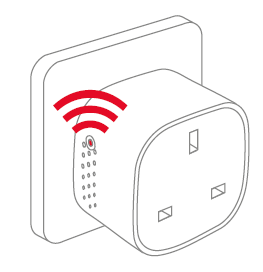
NODYN: Mae pwyso'r botwm yn troi'r Smart Plug Mini ymlaen. Mae'r golau LED yn dechrau fflachio coch a gwyrdd ar yr un pryd. Gall hyn achosi i'r lliw ymddangos fel oren/melyn, tra bod y ddyfais yn chwilio am rwydwaith. - Pan fydd y botwm LED yn stopio fflachio, mae'r Smart Plug Mini wedi ymuno â rhwydwaith Zigbee yn llwyddiannus.
Lleoliad
- Rhowch y Plwg Clyfar dan do ar dymheredd rhwng 0-50°C.
- Os defnyddir y ddyfais fel signal amplifier, gosodwch y ddyfais rhwng y ddyfais ganolog a'r synhwyrydd (au).
Ailosod
Mae angen ailosod os ydych chi am gysylltu eich Smart Plug Mini â phorth arall, os oes angen i chi berfformio ailosodiad ffatri i gael gwared ar ymddygiad annormal, neu os oes angen ailosod cofrestrau a logiau cronnus.
CAMAU AR GYFER AILOSOD
- Cysylltwch y Smart Plug Mini â'r allfa bŵer.
- Pwyswch a dal y botwm ar y ddyfais i lawr.
- Daliwch y botwm i lawr nes bod y LED coch yn fflachio'n barhaus, yna rhyddhewch y botwm.

- Ar ôl rhyddhauasing the button, the red LED will stay on for 2-5 seconds. During that time, the device must not be switched off or unplugged.
Moddau
MODD PORTH CHWILIO
- Mae LED coch yn fflachio bob eiliad

MODD ARFEROL
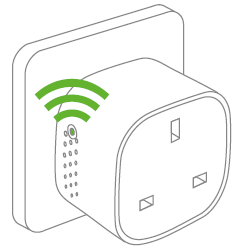
Mae LED Gwyrdd yn golygu bod allbwn y Plug Smart yn weithredol (mae'r ras gyfnewid ymlaen). Gellir troi'r ras gyfnewid ymlaen ac i ffwrdd trwy wthio'r botwm LED.
ODDI AR MODE
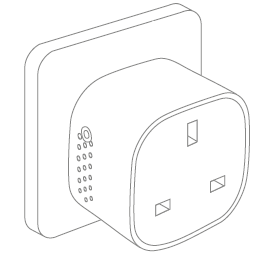
Pan nad oes golau yn y botwm LED, mae'n golygu bod y ras gyfnewid i ffwrdd (nid oes allbwn). Gellir troi'r ras gyfnewid ymlaen ac i ffwrdd trwy wthio'r botwm LED.
Canfod namau
• Mewn achos o fethiant pŵer, bydd y ddyfais yn adfer ei hun i'r statws ymlaen / i ffwrdd oedd ganddi cyn y methiant pŵer.
• Yn achos signal gwael neu wan, newidiwch leoliad y Smart Plug Mini neu'ch porth.
• Os yw'r chwilio am borth wedi dod i ben, bydd gwasgiad byr ar y botwm LED yn ei ailgychwyn.
Gwybodaeth arall
• Mae'r Smart Plug Mini wedi'i raddio am 10 A llwyth parhaus, a 16 A (~3500 W) llwyth amser byr.
• Bydd yn diffodd yn awtomatig os yw'r llwyth yn uwch na 16 A neu os yw'r tymheredd mewnol yn mynd yn rhy uchel.
• Mewn achos o fethiant pŵer, bydd y ddyfais yn adfer ei hun i'r statws ymlaen / i ffwrdd oedd ganddi cyn y methiant pŵer.
Gwaredu
Cael gwared ar y cynnyrch yn iawn ar ddiwedd oes. Gwastraff electronig yw hwn y dylid ei ailgylchu.
Ardystiad CE
Mae'r marc CE sydd wedi'i osod ar y cynnyrch hwn yn cadarnhau ei fod yn cydymffurfio â'r Cyfarwyddebau Ewropeaidd sy'n berthnasol i'r cynnyrch ac, yn benodol, ei gydymffurfiad â'r safonau a'r manylebau wedi'u cysoni.
YN UNOL Â'R CYFARWYDDIADAU
• Cyfarwyddeb Offer Radio (COCH) 2014/53 / EU
• Cyfrol Iseltage Cyfarwyddeb (2014/35 / EU)
• Cyfarwyddeb RoHS 2015/863 / UE yn diwygio 2011/65 / EU
Ardystiadau eraill
Awtomeiddio Cartref Zigbee 1.2 wedi'i ardystio
Cedwir pob hawl.
nid yw frient yn cymryd unrhyw gyfrifoldeb am unrhyw wallau, a all ymddangos yn y llawlyfr hwn. At hynny, mae frient yn cadw'r hawl i newid y caledwedd, meddalwedd, a / neu'r manylebau y manylir arnynt yma ar unrhyw adeg heb rybudd, ac nid yw'r frient yn gwneud unrhyw ymrwymiad i ddiweddaru'r wybodaeth a gynhwysir yma. Mae'r holl nodau masnach a restrir yma yn eiddo i'w perchnogion priodol.
Dogfennau / Adnoddau
 | Mini Plug Smart |
Cyfeiriadau
- frient - synwyryddion, larymau, plygiau craff - gofal cartref a diogelwchwww.frient.com
- Llawlyfr Defnyddiwrmanual.tools
The socket SH-P01 stopped working after about a year of use. Does not start despite resetting. The LED remains completely dark. Also the same thing happened with SH-P01E about 2 years ago.
Replaced with new SH-P01 sockets. Load Max230VAC/ 1A. The new sockets work flawlessly in the same WiFi network. The devices have a CE mark, but not from an inspection body
rhif?
Pistorasia SH-P01 lakkasi toimimasta noin vuoden käytön jälkeen. Ei käynnisty resetoinnista huolimatta. LED pysyy täysin pimeänä. Myös sama tapahtui SH-P01E noin 2-vuotta sitten.
Korvattu uusilla SH-P01 pistorasioilla. Kuomitus Max230VAC/ 1A. Uudet pistorasiat toimivat samassa WiFi-verkossa moitteettomasti. Laitteissa on CE-merkintä, mutta ei tarkastuslaitoksen
numeroa ?
Replaced with new SH-P01 sockets. Load Max230VAC/ 1A. The new sockets work flawlessly in the same WiFi network. The devices have a CE mark, but not from an inspection body
rhif?
Pistorasia SH-P01 lakkasi toimimasta noin vuoden käytön jälkeen. Ei käynnisty resetoinnista huolimatta. LED pysyy täysin pimeänä. Myös sama tapahtui SH-P01E noin 2-vuotta sitten.
Korvattu uusilla SH-P01 pistorasioilla. Kuomitus Max230VAC/ 1A. Uudet pistorasiat toimivat samassa WiFi-verkossa moitteettomasti. Laitteissa on CE-merkintä, mutta ei tarkastuslaitoksen
numeroa ?
Why has my Smart Plug Mini stopped working with a dark LED, and why is there no inspection body number next to the CE mark?
Based on the frient Smart Plug Mini manual, if the LED remains completely dark and the device does not respond to a factory reset, it likely indicates a hardware failure or a triggered safety cutoff. Please note the following regarding your SH-P01 model:
Since your new units work on the same network with the same 1A load, and the old units remain unresponsive, we recommend contacting frient support or your retailer for warranty claims, as the manual does not provide further repair steps for a non-responsive LED.
Read the full Q&A page