

 DBL Quick Start Guide
Beth sydd yn y blwch:
 Cofnodwr Data DBL Cofnodwr Data DBL |
 1 AA Lithium Battery 1 AA Lithium Battery |
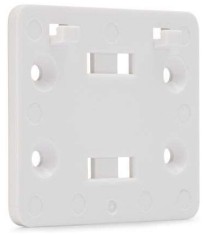 Braced Mowntio a Chaledwedd Mowntio Braced Mowntio a Chaledwedd Mowntio |
 DicksonWare (non-secure) DicksonWare (non-secure) |
Ategolion (heb eu cynnwys):
 AC Adapter & Power Cable
Nodyn: DicksonWare Secure, which is 21CFR Part 11 compliant, sold separately
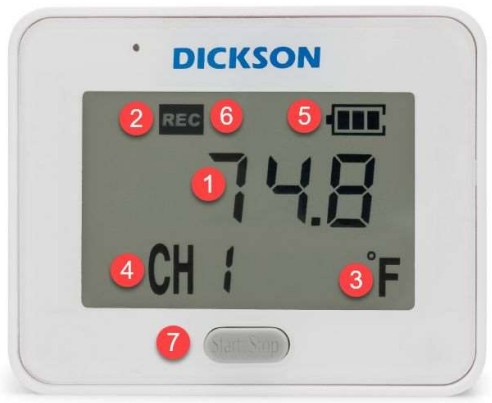
- Darlleniad diweddar
- Dangosydd recordio
- Unedau tymheredd (yn cylchdroi rhwng unrhyw sianeli ar y ddyfais)
- Channel number; rotates between CH1 (temperature) and CH2 (relative Humidity, if active)
- Dangosydd batri
- Alarm Icon (bell, not pictured)
- Start/Stop button used to begin and pause data logging
Getting Started with the DBL
Follow these easy steps to begin logging data quickly:
- Open the rear battery compartment door and add 1 AA battery
- The device will power on and flash the current firmware version on the screen for a few sends
- 4 static dashes along with a wrench icon will appear on the screen
- To configure the DBL, using a USB cable, connect the device to a computer (with DicksonWare 2.0 software installed)
Configuring Device Settings Using DicksonWare 2.0
Install DicksonWare 2.0 (if not already installed)
- Plug the USB stick that contains the file i mewn i'ch cyfrifiadur
- Agorwch y gyriant USB allanol i view y gosodiad file
- Cliciwch ar y gosodiad Dicksonware file i ddechrau lawrlwytho
- Once the download is complete
Nodyn: DicksonWare 2.0 Version 20.3.2.0 or greater required
Nodyn: The DicksonWare 2.0 USB includes a manual for DicksonWare 2.0 operation.
Ffurfweddu Gosodiadau Dyfais
Launch DicksonWare 2.0
- Launch the program by clicking the icon on your desktop or by finding it in the Start menu
- Connect the DBL to your computer using the USB cable. The software will recognize the connected device
- Cliciwch y botwm “Ffurfweddu” ar frig y sgrin. Rhowch enw i’r cofnodwr
Sample Cyfradd
- On the “Configure” screen of Dicksonware 2.0, go to the “Samptab “Le Rate” yn y bar ochr
- Dewiswch felampcyfnod (pa mor aml mae'r ddyfais yn cymryd darlleniad) o'r rhestr ostwng
- (NODYN: selecting a faster sample rate will affect battery life.)
- Dewiswch a ydych chi eisiau i'r ddyfais STOPIO cofnodi pan fydd yn llawn, neu WRAP (trosysgrifo) pan fydd yn llawn
Note on battery life
The two year battery life specification with a regular AA battery is based on the following assumptions:
- 5 munud eiliadampcyfradd le
- 3 second display refresh rate
- 3 Audible/visual alarms per month
- Operating at ambient temperature
Sianeli
- On the “Configuration” screen of Dicksonware, go to the “Channels” tab in the sidebar
- Addaswch yr unedau tymheredd mewn Fahrenheit neu Celsius
- Humidity channel recording can be turned off/on via this tab
Larymau
- Ar y sgrin “Gosodiadau Cofnodwr”, ewch i’r tab “Larymau” yn y bar ochr
- Ar gyfer pob larwm, dewiswch naill ai:
- Min = trothwy isaf (mae'r ddyfais yn larwm pan fydd y tymheredd yn mynd islaw'r pwynt hwn)
- Uchafswm = trothwy uchaf (mae'r ddyfais yn larwm pan fydd y tymheredd yn mynd uwchlaw'r pwynt hwn)
- Input the temperature value or humidity % for the threshold
- Cliciwch "Cadw"
- Ar gyfer pob larwm, dewiswch naill ai:
- Bydd y ddyfais yn seinio larwm pan fydd y darlleniadau tymheredd a/neu leithder yn croesi'r trothwy wedi'i ragdiffinio
- Bydd yr eicon larwm yn goleuo yn yr arddangosfa
- The unit will blink a specific color to indicate the type of alarm:
- Red = Temperature alarm
- Green = Humidity alarm
- Blue Calibration past due
- Alarm will sound for 1 minute until readings fall back within the set range.
- If the DBL continues logging and the device remains in an alarm state after 1 minute then the device will continue to beep twice every 5 minutes.
- Audible/Visual alarm will clear automatically when the current reading no longer exceeds min/max limits
Dechrau Logio
- Once the device is properly configured click Save
- It is now safe to disconnect the device
- 4 flashing dashes will appear on the screen signaling the device is ready to begin logging data
- To begin logging data, hold Start/Stop button for 5 seconds
- “Strt” will appear on the screen to signal that datalogging has begun
- To stop or pause logging, hold the Start/Stop button for 5 seconds. Logging will continue when you again press the Start/Stop button for 5 seconds
Lawrlwytho Data
Downloading data from the data logger requires DicksonWare 2.0 or DicksonWare 2.0 Secure and a USB cable, both are sold separately.
To download data from the device:
- Launch DicksonWare 2.0
- Connect the DBL via the USB cable
- Ar sgrin gartref Dicksonware, cliciwch y botwm “Lawrlwytho”
- Data will automatically start downloading from the device. This may take a few minutes depending on the amount of data stored on the logger
Once download is complete, you will be able to view y data yn y rhyngwyneb a dewis ystod
You can extend the battery life up to 6 years by using a Lithium AA battery with the same assumptions above.
Firmware
The DBL comes preloaded with up-to-date firmware. When the unit is powered on, the current version number will flash on the screen. You should not normally have to update the firmware on the unit, but on the rare occasion where a new update is available, you can visit our websafle am wybodaeth: https://dicksondata.com/product/compact-data-logger/
Am gefnogaeth ychwanegol
Ymweld: support.dicksonone.com
E-bost: cymorth@dicksonone.com
Galwch: 630.543.3747
Dogfennau / Adnoddau
 |
DICKSON DBL Data Logger [pdfCanllaw Defnyddiwr 6345283, 16345283, 16341730, DBL Data Logger, DBL, Data Logger, Logger |