Rhagymadrodd
Welcome to the user manual for your TCL FLIP 4 5G (T440W) flip phone. This guide provides essential information to help you get started, understand your device's features, and troubleshoot common issues. Please read this manual thoroughly to ensure proper use and optimal performance of your phone.
Beth Sydd yn y Bocs
Your TCL FLIP 4 5G package includes the following items:
- Ffon
- Batri
- Gwefrydd
Cynnyrch Drosview
The TCL FLIP 4 5G is designed for straightforward communication with modern conveniences. It features a classic flip design with dual displays and large, tactile buttons for ease of use.
Nodweddion Allweddol:
- Arddangosfeydd deuol: A 1.77-inch external display for notifications and a 3.2-inch internal display with adjustable text size, colors, and brightness.
- Easy Navigation Keyboard: Large tactile keypad with intuitive shortcut keys for quick access to contacts and messages.
- Cysylltedd 5G: Reliable 5G network support for fast communication.
- Camera 5MP: Capture photos and videos of important moments.
- Llais HD: Yn sicrhau ansawdd galwadau clir.
- Batri hirhoedlog: Designed to keep you connected for extended periods.
- System Weithredu: Powered by KaiOS.
Cynllun Dyfais:
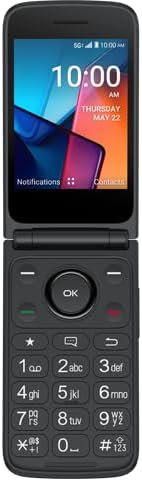
Ffigur 1: Blaen view of the TCL FLIP 4 5G phone when open, displaying the internal screen and the physical keypad.
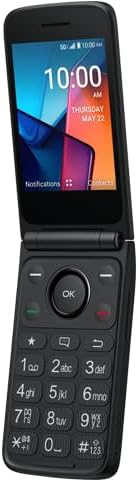
Ffigur 2: Ongl view of the TCL FLIP 4 5G phone in its open position, highlighting the screen and keypad layout.
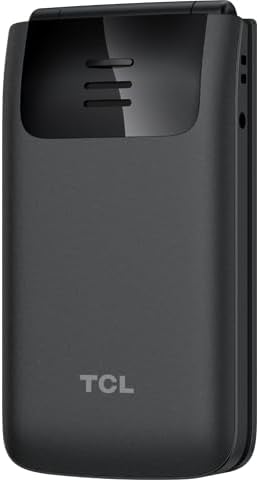
Ffigur 3: Cefn view of the TCL FLIP 4 5G phone when closed, showing the external display, camera, and TCL branding.
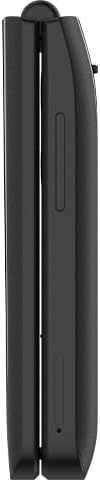
Ffigur 4: Ochr view of the closed TCL FLIP 4 5G phone, illustrating the device's slim profile a botymau ochr.
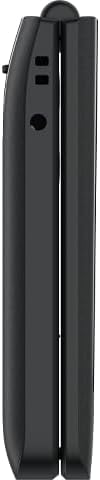
Ffigur 5: Yr ochr gyferbyn view of the closed TCL FLIP 4 5G phone, showing additional ports or buttons.
Gosod
1. Installing the Battery and SIM Card:
- Tynnwch glawr cefn y ffôn yn ysgafn.
- Insert your SIM card(s) into the designated slot(s). Ensure the gold contacts face downwards and the notched corner is correctly aligned.
- Mewnosodwch y batri yn ei adran, gan alinio'r cysylltiadau aur ar y batri â'r rhai yn y ffôn.
- Rhowch y clawr cefn yn ôl, gan wasgu'n gadarn nes iddo glicio i'w le.
2. Gwefru'r Ffôn:
- Connect the charger to your phone's charging port.
- Plygiwch y gwefrydd i mewn i allfa bŵer.
- Allow the phone to charge completely before initial use. The battery indicator on the screen will show charging status.
Gweithredu Eich Ffôn
1. Pŵer Ymlaen / i ffwrdd:
- I droi ymlaen, pwyswch a daliwch y botwm Pŵer/Diwedd Galwad nes bod y sgrin yn goleuo.
- I ddiffodd y pŵer, pwyswch a daliwch y botwm Pŵer/Diwedd Galwad, yna dewiswch "Diffodd" o'r opsiynau.
2. Gwneud Galwadau:
- Open the phone to access the keypad.
- Deialwch y rhif ffôn a ddymunir gan ddefnyddio'r bysellbad rhifol.
- Pwyswch y botwm Galwad Gwyrdd i gychwyn yr alwad.
- To end a call, press the Red End Call button or close the phone.
3. Sending Messages:
- From the main menu, navigate to "Messages".
- Dewiswch "Neges Newydd" neu "Creu Neges".
- Rhowch rif ffôn y derbynnydd neu dewiswch o'ch cysylltiadau.
- Teipiwch eich neges gan ddefnyddio'r bysellbad.
- Press the "Send" option to transmit the message.
4. Defnyddio'r Camera:
- Mynediad i'r rhaglen camera o'r brif ddewislen.
- Fframiwch eich llun gan ddefnyddio'r arddangosfa fewnol.
- Press the "OK" button or a designated camera button to capture a photo or start/stop video recording.
- Photos and videos are saved to the phone's gallery.
5. Internet and Applications (KaiOS):
- Your phone runs on KaiOS, providing access to essential applications.
- Navigate through the menu to find apps like Web Browser, Weather, News, and more.
- Use the directional keys and "OK" button to interact with applications.
Cynnal a chadw
- Keep your phone dry. Liquids can damage the device.
- Defnyddiwch wefrwyr ac ategolion cymeradwy yn unig.
- Osgoi tymereddau eithafol.
- Clean the screen and keypad with a soft, dry cloth.
- Do not attempt to disassemble or repair the phone yourself. Refer to authorized service centers.
Datrys problemau
| Problem | Ateb |
|---|---|
| Nid yw'r ffôn yn troi ymlaen. | Gwnewch yn siŵr bod y batri wedi'i osod a'i wefru'n gywir. Cysylltwch y gwefrydd a rhoi cynnig arall arni. |
| Methu gwneud na derbyn galwadau. | Check if the SIM card is properly inserted and activated. Verify network signal strength. Contact your service provider if issues persist. |
| Ansawdd galwad gwael. | Move to an area with better network coverage. Ensure the earpiece/microphone is not obstructed. |
| Mae'r batri yn draenio'n gyflym. | Reduce screen brightness, close unused applications, and limit background data usage. |
Manylebau
| Enw Model | TCL Flip 4 5G |
| Rhif Model yr Eitem | T440W |
| Brand | TCL |
| System Weithredu | KaiOS |
| Maint y Sgrin (Mewnol) | 3.2 modfedd |
| Maint yr Arddangosfa Allanol | 1.77 modfedd |
| Datrysiad | 480 x 320 |
| Cynhwysedd Storio Cof | 32 GB |
| Technoleg Cellog | 5G |
| Cludwr Di-wifr | T-Symudol |
| Gallu Batri | 3000 Miliamp Oriau |
| Pwysau Eitem | 6.4 owns |
| Lliw | Llwyd |
| Gwneuthurwr | TCL |
Gwarant a Chefnogaeth
Am wybodaeth am warant a chymorth i gwsmeriaid, cyfeiriwch at y ddogfennaeth a ddarparwyd gyda'ch pryniant neu ewch i wefan gymorth swyddogol TCL websafle. Cadwch eich prawf prynu ar gyfer hawliadau gwarant.


