Rhagymadrodd
This manual provides detailed instructions for the setup, operation, and maintenance of your LIGE EF21-B Smart Watch. Please read this manual thoroughly before using the device to ensure proper function and to maximize your user experience. Keep this manual for future reference.
Beth Sydd yn y Bocs
Upon opening your LIGE EF21-B Smart Watch package, you should find the following items:
- 1 x LIGE EF21-B Smart Watch
- 1 x Strap Dur Di-staen
- 1 x strap silicon
- 1 x Cebl Codi Tâl Magnetig USB
- 1 x Cebl Gwefru Magnetig Math-C
- 1 x Llawlyfr Cyfarwyddiadau

Image: The LIGE EF21-B Smart Watch shown with both USB and Type-C magnetic charging cables, highlighting the included accessories.
Gosod
1. Gwefru'r Oriawr Clyfar
Before initial use, fully charge your smart watch. Connect the magnetic charging cable to the charging contacts on the back of the watch and plug the USB or Type-C end into a compatible power source (e.g., computer, wall adapter). The watch display will indicate charging status. A full charge typically takes approximately 3 hours.

Image: The LIGE EF21-B Smart Watch connected to its magnetic charger, displaying a charging animation and indicating its 600mAh battery capacity.
2. Gosod App
To unlock the full functionality of your LIGE EF21-B Smart Watch, you need to install the companion application, FitCloudPro, on your smartphone.
- Scan the QR code provided in the watch's interface or in the included manual to download the FitCloudPro app.
- Alternatively, search for "FitCloudPro" in your smartphone's app store (Google Play Store for Android, Apple App Store for iOS).
- Install the application and grant necessary permissions when prompted.
3. Pâr Dyfais
After installing the app and fully charging your watch:
- Agorwch yr ap FitCloudPro ar eich ffôn clyfar.
- Sicrhewch fod Bluetooth wedi'i alluogi ar eich ffôn clyfar.
- Yn yr ap, ewch i'r adran "Dyfais" neu "Ychwanegu Dyfais".
- The app will search for available devices. Select "EF21-B" from the list to initiate pairing.
- Follow any on-screen prompts on both your phone and watch to confirm the pairing.
Cyfarwyddiadau Gweithredu
Llywio Sylfaenol
The LIGE EF21-B Smart Watch features a 1.43-inch AMOLED touchscreen display and a rotary encoder crown for navigation.
- Sgrin gyffwrdd: Sweipiwch i'r chwith, i'r dde, i fyny, neu i lawr i lywio trwy ddewislenni a chael mynediad at wahanol nodweddion. Tapiwch i ddewis eitemau.
- Rotary Encoder Crown: Rotate the crown to scroll through lists, adjust settings, or zoom in/out on certain interfaces. Press the crown to return to the home screen or confirm selections.
- Botymau Ochr: The watch includes additional side buttons that can be customized for quick access to specific functions or apps.

Delwedd: Llun agos view of the LIGE EF21-B Smart Watch's 1.43-inch AMOLED display, showcasing its vibrant colors and sharp resolution.
Galwadau a Hysbysiadau Bluetooth
Once paired with your smartphone, the watch supports Bluetooth calling and message notifications.
- Gwneud/Ateb Galwadau: You can answer or reject incoming calls directly from your watch. Use the built-in microphone and speaker for hands-free communication.
- Nodiadau Atgoffa Negeseuon: Receive real-time notifications for calls, SMS, and various social media apps directly on your watch display.

Image: A user interacting with the LIGE EF21-B Smart Watch to answer a Bluetooth call, demonstrating its clear two-way communication capabilities.

Image: The LIGE EF21-B Smart Watch showing incoming notifications from various social media applications, ensuring discreet awareness of important messages.
Monitro Iechyd
The watch provides comprehensive health tracking features:
- Monitro Cyfradd y Galon: Yn monitro cyfradd eich calon yn barhaus drwy gydol y dydd. View real-time data and historical trends in the FitCloudPro app.
- Monitro Cwsg: Automatically records your sleep patterns, including deep sleep, light sleep, and wake times. Provides insights to help improve sleep quality.
- Olrhain Ocsigen Gwaed (SpO2): Yn mesur lefelau ocsigen eich gwaed.
- Monitro Lefel Straen: Tracks daily stress levels to help you manage well-being.
Nodyn: Nid dyfais feddygol yw'r ddyfais hon. At ddibenion cyfeirio yn unig y mae data iechyd ac ni ddylid ei ddefnyddio ar gyfer diagnosis na thriniaeth feddygol.

Image: The LIGE EF21-B Smart Watch displaying continuous heart rate monitoring data, showing BPM and historical trends.

Image: The LIGE EF21-B Smart Watch displaying sleep monitoring data, including total sleep time and sleep stage breakdown over several days.
Moddau Chwaraeon
The watch supports over 200 sports modes to accurately track your physical activities.
- Select your desired sport from the watch's menu.
- The watch will record data such as distance, steps, calories burned, and heart rate during your workout.
- Review detailed analysis of your training results in the FitCloudPro app.

Image: The LIGE EF21-B Smart Watch displaying its interface for selecting from over 100 sports modes, with examples of users engaged in golf, climbing, and running.
Nodweddion Eraill
The LIGE EF21-B Smart Watch includes several additional smart features:
- Cynorthwyydd Llais AI: Interact with your watch using voice commands for various tasks.
- Flashlight: Utilize the built-in LED flashlight for convenience in low-light conditions.
- Rheoli Cerddoriaeth: Rheolwch chwarae cerddoriaeth ar eich ffôn clyfar yn uniongyrchol o'ch oriawr.
- Rhagolwg y Tywydd: Cael diweddariadau tywydd amser real.
- Cloc Larwm: Set alarms and reminders.
- Dod o Hyd i Fy Ffôn: Lleolwch eich ffôn clyfar coll.
- Anghysbell Camera: Defnyddiwch eich oriawr fel caead o bell ar gyfer camera eich ffôn.
- Nodyn atgoffa dŵr: Receive prompts to drink water throughout the day.
- Cyfrifiannell: A basic calculator function is available.

Image: The LIGE EF21-B Smart Watch showcasing its diverse range of smart features, including music control, weather, health monitoring, and a flashlight icon.
Fideo: Dros benview of the LIGE EF21-B Smart Watch's key features, including its AMOLED display, rotary crown, health monitoring, sports modes, and charging capabilities.
Cynnal a chadw
Glanhau
I gynnal ymddangosiad a swyddogaeth eich oriawr:
- Sychwch sgrin a chorff yr oriawr gyda lliain meddal, di-lint.
- Ar gyfer baw ystyfnig, ychydig yn dampgolchwch y brethyn gyda dŵr. Osgowch ddefnyddio cemegau llym neu ddeunyddiau sgraffiniol.
- Clean the charging contacts regularly to ensure efficient charging.
Gwrthiant Dŵr (IP68)
The LIGE EF21-B Smart Watch is rated IP68, meaning it is resistant to dust and can withstand immersion in water up to 1.5 meters for up to 30 minutes. This makes it suitable for daily use, such as washing hands or light rain exposure. However, it is not recommended for hot showers, saunas, or diving, as steam and high water pressure can compromise the seals.
Gofal Batri
I ymestyn oes y batri:
- Osgowch ollwng y batri'n llwyr yn aml.
- Storiwch yr oriawr mewn lle oer, sych pan nad yw'n cael ei defnyddio am gyfnodau hir.
- Use only the provided charging cables.
Datrys problemau
If you encounter issues with your LIGE EF21-B Smart Watch, refer to the following common solutions:
| Problem | Ateb Posibl |
|---|---|
| Nid yw gwylio yn troi ymlaen | Gwnewch yn siŵr bod yr oriawr wedi'i gwefru'n llawn. Pwyswch a daliwch y botwm pŵer am sawl eiliad. |
| Methu paru â ffôn | Ensure Bluetooth is enabled on your phone and the watch. Restart both devices. Make sure the FitCloudPro app has necessary permissions. |
| Hysbysiadau heb eu derbyn | Check app permissions for notifications on your phone. Ensure the watch is connected via Bluetooth. Verify notification settings within the FitCloudPro app. |
| Data iechyd anghywir | Ensure the watch is worn snugly on your wrist. Clean the sensor on the back of the watch. Remember, this is not a medical device. |
| Bywyd batri byr | Reduce screen brightness, disable unnecessary features (e.g., always-on display), and limit frequent heart rate monitoring. |
Os yw'r broblem yn parhau, cysylltwch â chymorth cwsmeriaid.
Manylebau
Key technical specifications for the LIGE EF21-B Smart Watch:
- Model: EF21-B
- Arddangos: AMOLED 1.43 modfedd, 466x466 picsel
- Cynhwysedd Batri: Polymer Lithiwm 600mAh
- Bywyd batri: 10+ days (typical use), 30+ days (standby)
- Amser Codi Tâl: Tua 3 awr
- Gwrthiant Dŵr: IP68
- Cysylltedd: Bluetooth
- Cydnawsedd: Android 8.0+ / iOS 12.0+ (via FitCloudPro App)
- Synwyryddion: Heart Rate, Blood Oxygen, Pedometer
- Nodweddion arbennig: Bluetooth Call, Voice Assistant, 200+ Sports Modes, Flashlight, Music Control, Notifications, Sleep Monitor, Activity Tracker
- Dimensiynau: Watch case approx. 47-48mm diameter, 22mm lug width. Max wrist circumference: 250mm, Min wrist circumference: 150mm.
- Pwysau: 180 Gram (tua 6.3 owns)
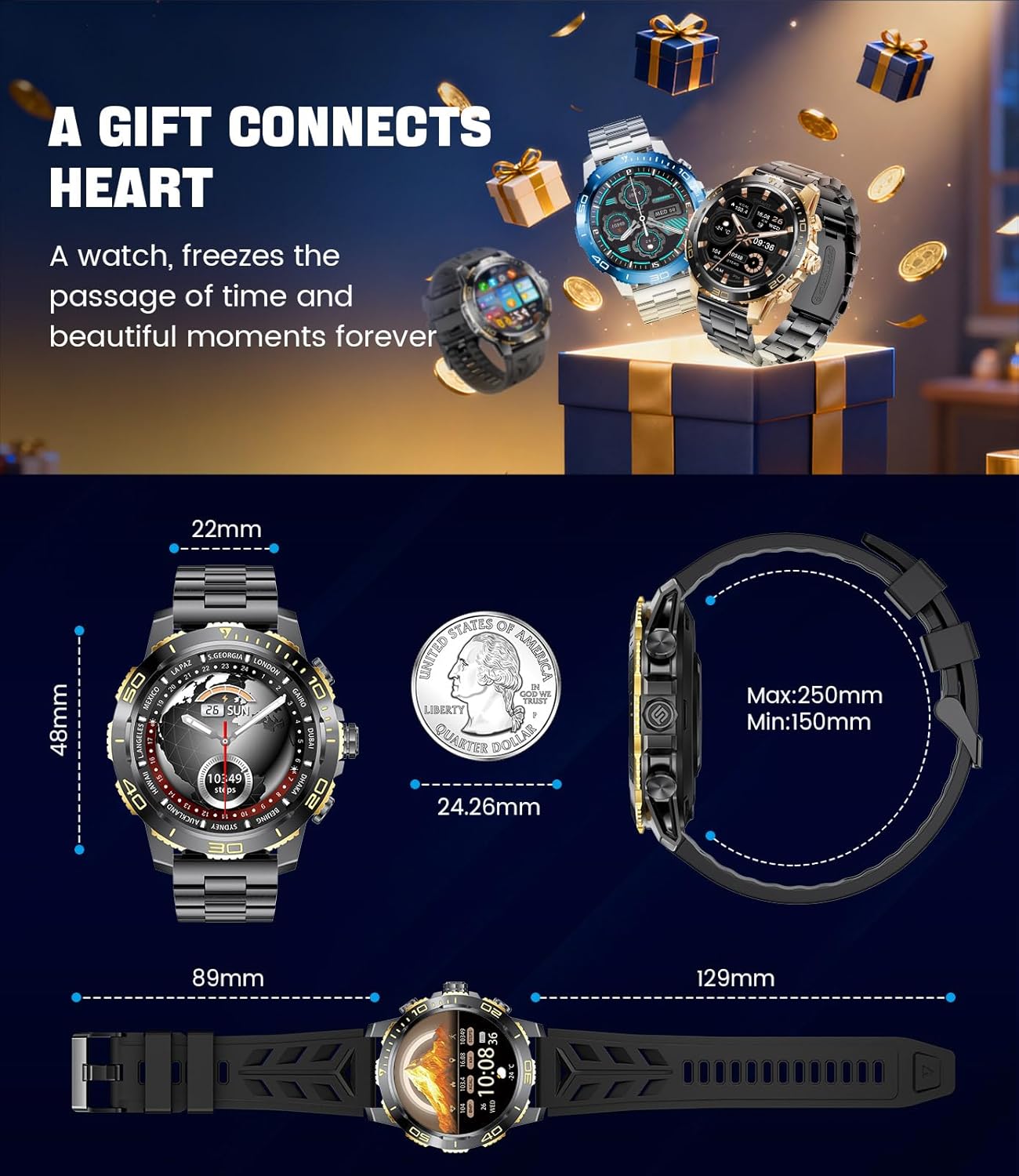
Image: Detailed dimensions of the LIGE EF21-B Smart Watch, including case diameter, strap width, and wrist circumference range.
Gwarant a Chefnogaeth
Your LIGE EF21-B Smart Watch comes with a manufacturer's warranty. Please refer to the warranty card included in your packaging for specific terms and conditions.
For any questions, technical support, or warranty claims, please contact LIGE customer service through the platform where you purchased the product. Our professional customer service team is available to assist you.


