1. Rhagymadrodd
Diolch am brynuasing the LG 43-Inch Class QNED AI 4K Smart TV. This manual provides essential information for the safe and efficient operation of your television. Please read it thoroughly before use and keep it for future reference.
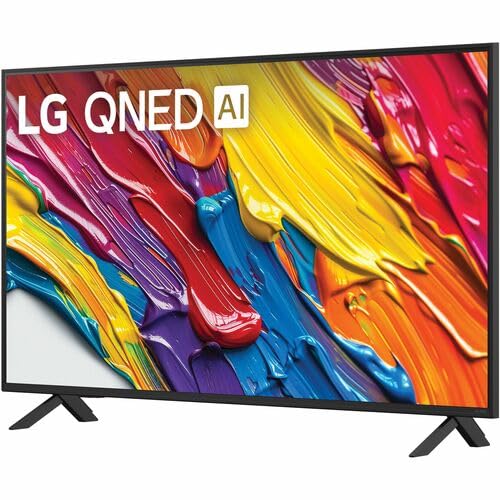
The LG QNED AI 4K TV offers vivid, immersive color with its wide color gamut technology, enhanced by the α7 AI Processor Gen8. It intelligently optimizes picture and sound based on content. Powered by LG webOS 24, it provides a streamlined streaming experience with customizable Quick Cards and the Magic Remote. Enjoy virtual 5.1 surround sound, FILMMAKER MODE, and advanced gaming features like FreeSync, VRR, and GeForce NOW.
2. Gwybodaeth Diogelwch
Dilynwch ragofalon diogelwch sylfaenol bob amser wrth ddefnyddio'r cynnyrch hwn i leihau'r risg o dân, sioc drydanol, neu anaf.
- Peidiwch â gwneud y teledu yn agored i law neu leithder.
- Peidiwch ag agor y teledu casing; cyfeiriwch yr holl waith cynnal a chadw at bersonél cymwys.
- Sicrhewch awyru digonol a pheidiwch â rhwystro agoriadau awyru.
- Defnyddiwch y cebl pŵer a gyflenwir gyda'r teledu yn unig.
- Cadwch y teledu i ffwrdd o ffynonellau gwres a golau haul uniongyrchol.
- Avoid placing heavy objects on the power cord or TV.
3. Beth sydd yn y Bocs
Gwiriwch fod yr holl gydrannau yn bresennol:
- Teledu Clyfar 4K Dosbarth QNED AI 43-Modfedd LG
- Cebl Pŵer
- Rheolydd o Bell (2 fatri AAA wedi'u cynnwys)
- Cydrannau stondin
- Llawlyfr Defnyddiwr (y ddogfen hon)
4. Gosod
4.1 Atodi'r Stondin
Carefully place the TV screen-down on a soft, flat surface. Attach the stand components to the designated slots on the bottom of the TV using the provided screws. Ensure the stand is securely fastened before placing the TV upright.
Delwedd: Cefn view of the LG 43QNED82AUA TV with its stand.
4.2 Gosod ar y Wal (Dewisol)
This TV supports VESA mount standard 200 x 200 mm. For wall mounting, remove the stand and use a compatible wall mount bracket (sold separately). Follow the instructions provided with your wall mount.
4.3 Cysylltu Dyfeisiau
Connect your external devices (cable box, Blu-ray player, gaming console, etc.) to the appropriate ports on the TV. The TV features 3 HDMI ports, 1 USB port, Ethernet, and S/PDIF (Optical) for audio output.

Image: Connectivity ports on the back of the LG 43QNED82AUA TV.
4.4 Pwer Ymlaen
Plug the power cable into the TV and then into a wall outlet. Press the power button on the remote control or on the TV to turn it on. Follow the on-screen instructions for initial setup, including network connection and channel scanning.
5. Gweithredu Eich Teledu
5.1 Rheoli o Bell
The included Magic Remote allows for intuitive control with point-and-click functionality, voice commands, and a scroll wheel. Insert the two AAA batteries (included) into the remote control.
5.2 WebPlatfform Clyfar OS 24
Mae eich teledu yn rhedeg ar LG webOS 24 operating system. Navigate through apps, settings, and inputs using the customizable Quick Cards. Access popular streaming services like Netflix, Prime Video, Disney Plus, HBO Max, and Apple TV directly from the home screen.
5.3 Gosodiadau Llun a Sain
Access the settings menu to adjust picture modes (e.g., Standard, Vivid, Cinema, Filmmaker Mode) and sound modes (e.g., AI Sound Pro, Standard, Cinema). The α7 AI Processor Gen8 automatically optimizes these settings based on the content being viewgol.

Image: Dynamic QNED Color representation.
6. Smart Features and AI
6.1 AI Picture and Sound
The α7 AI Processor Gen8 enhances brightness, improves sound, and refines picture detail with 4K upscaling and Dynamic Tone Mapping. AI Sound Pro provides virtual 5.1 surround sound, and WOW Orchestra integrates TV speakers with compatible LG soundbars for an enhanced audio experience.
6.2 Voice Assistance and AI Search
Your TV has Alexa Built-in. Press the Alexa button on your remote to activate voice commands. Utilize AI Chwiliwch am personalized recommendations and to find content quickly. The TV also supports Google Assistant, Apple AirPlay 2, and Google Cast for seamless integration with your smart home ecosystem.

Image: LG AI Search interface.
7. Nodweddion Hapchwarae
The LG QNED AI 4K TV is designed for an optimal gaming experience with a 60 Hz native refresh rate, which can be boosted up to 144 Hz with VRR (Variable Refresh Rate) enabled. It supports FreeSync and features LG Game Optimizer and Game Dashboard for quick access to gaming settings.
- FreeSync a VRR: Yn lleihau rhwygo sgrin a thatwtio am gêm llyfnach.
- Optimeiddiwr Gêm a Dangosfwrdd: Centralized hub for adjusting game settings, including genre-specific picture modes.
- Hapchwarae Cwmwl: Access GeForce NOW and Xbox Cloud Gaming (subscriptions and compatible controllers required).
- ALLM (Modd Cudd Isel Awtomatig): Yn newid yn awtomatig i fodd hwyrni isel pan ganfyddir consol gêm.

Image: Gaming experience on the LG 43QNED82AUA TV.
8. Cysylltedd
Your LG QNED AI 4K Smart TV offers a variety of connectivity options:
- HDMI: 3 ports for connecting external devices.
- USB: 1 porthladd ar gyfer chwarae cyfryngau neu gysylltu dyfeisiau USB.
- Ethernet: Ar gyfer cysylltiad rhyngrwyd gwifrau.
- Wi-Fi: Built-in for wireless internet access.
- Bluetooth 5.0: Ar gyfer cysylltu clustffonau diwifr, bariau sain, neu ddyfeisiau Bluetooth eraill.
- Optegol (S/PDIF): Ar gyfer allbwn sain digidol i systemau sain.
- Drych Sgrin: Supports AirPlay 2 and Google Cast for casting content from mobile devices.
9. cynnal
9.1 Glanhau'r teledu
Unplug the TV before cleaning. Use a soft, dry cloth to wipe the screen and exterior. For stubborn marks, lightly dampgolchwch y lliain gyda dŵr neu lanhawr sgrin arbenigol. Osgowch ddefnyddio cemegau llym neu ddeunyddiau sgraffiniol.
9.2 Diweddariadau Meddalwedd
Ensure your TV's software is up to date for optimal performance and new features. Software updates auto-download when connected to the internet. If "auto-update" is disabled, you will receive a prompt to update manually.
10. Datrys Problemau
Os byddwch chi'n dod ar draws problemau gyda'ch teledu, cyfeiriwch at yr atebion cyffredin canlynol:
| Problem | Ateb |
|---|---|
| Dim pŵer | Check power cable connection, wall outlet, and remote batteries. |
| Dim llun, ond mae sain yn bresennol | Verify input source, check cable connections, try a different HDMI port. |
| Dim sain, ond mae llun yn bresennol | Check volume, mute status, audio output settings, and external audio device connections. |
| Rheolaeth bell ddim yn gweithio | Replace batteries, ensure no obstructions between remote and TV, re-pair Magic Remote if necessary. |
| Ansawdd llun gwael | Adjust picture settings, check source resolution, ensure strong signal for broadcast channels. |
| Methu cysylltu â Wi-Fi | Restart router, check Wi-Fi password, ensure TV is within range, try wired Ethernet connection. |
For further assistance, please refer to the full electronic manual available on the LG support websafle neu cysylltwch â chymorth cwsmeriaid LG.
11. manylebau
| Nodwedd | Manylyn |
|---|---|
| Maint Sgrin | 43 modfedd |
| Technoleg Arddangos | LED (QNED) |
| Datrysiad | 4K (3840 x 2160) |
| Cyfradd Adnewyddu | 60 Hz (Native), up to 144 Hz (VRR) |
| Prosesydd | α7 AI Prosesydd Gen8 |
| Cefnogaeth HDR | HDR10, HLG |
| System Weithredu | webAO 24 |
| Cysylltedd | Wi-Fi, Bluetooth 5.0, Ethernet, 3x HDMI, 1x USB, Optical (S/PDIF) |
| Cynorthwywyr Llais | Alexa Built-in, Google Assistant compatible |
| Dimensiynau (gyda stand) | 10.1"D x 38.1"W x 25"H |
| Pwysau (heb stand) | 20.7 Bunt |
| Safon Mowntio VESA | 200 x 200 mm |
| Defnydd Pŵer | 82 Wat |
| Defnydd Ynni Blynyddol | 152 Cilowat Awr y Flwyddyn |

Image: LG 43QNED82AUA TV dimensions.
12. Gwarant a Chefnogaeth
12.1 Gwybodaeth Gwarant
This LG TV comes with a 1 Year Parts & Labor Limited Warranty. Please retain your proof of purchase for warranty claims. For full warranty terms and conditions, refer to the warranty card included with your product or visit the official LG websafle.
12.2 Cefnogaeth i Gwsmeriaid
For technical support, product registration, or service inquiries, please visit the LG support website or contact their customer service hotline. Contact information can be found on the LG official webgwefan neu yn y ddogfennaeth a ddarparwyd gyda'ch teledu.