1. Rhagymadrodd
Thank you for choosing the VAVA 5.5" 720P HD Video Baby Monitor. This manual provides essential information for the safe and effective use of your device. Please read it thoroughly before operation and retain it for future reference.
This monitor offers a secure and clear way to observe your baby with its 5.5-inch 720p display, two-way audio, night vision, and pan/tilt/zoom capabilities. It operates on a dedicated wireless connection, ensuring privacy and reliability.
Beth Sydd yn y Bocs
- Baby Monitor (Parent Unit)
- Camera (Baby Unit)
- Addasydd Pŵer AC x2
- Kit Mount
- Mount Camera
- Cebl Pwer x2
- Canllaw Defnyddiwr

Image 1.1: VAVA 5.5" 720P HD Video Baby Monitor components, including the parent unit (monitor) and baby unit (camera).
2. Gwybodaeth Diogelwch
Please observe the following safety precautions to prevent electric shock, injury, or damage to the product:
- Keep the monitor and camera out of reach of children.
- Do not place the camera or power cords within 3 feet (1 meter) of the crib.
- Use only the provided AC power adapters.
- Peidiwch â gwneud y cynnyrch yn agored i ddŵr neu leithder.
- Ceisiwch osgoi gosod y cynnyrch ger ffynonellau gwres neu olau haul uniongyrchol.
- Ensure proper ventilation; do not cover the product with blankets or other materials.
- Do not attempt to repair or modify the product yourself. Contact customer support for assistance.
3. Cynnyrch Drosview
Uned Rhieni (Monitro)
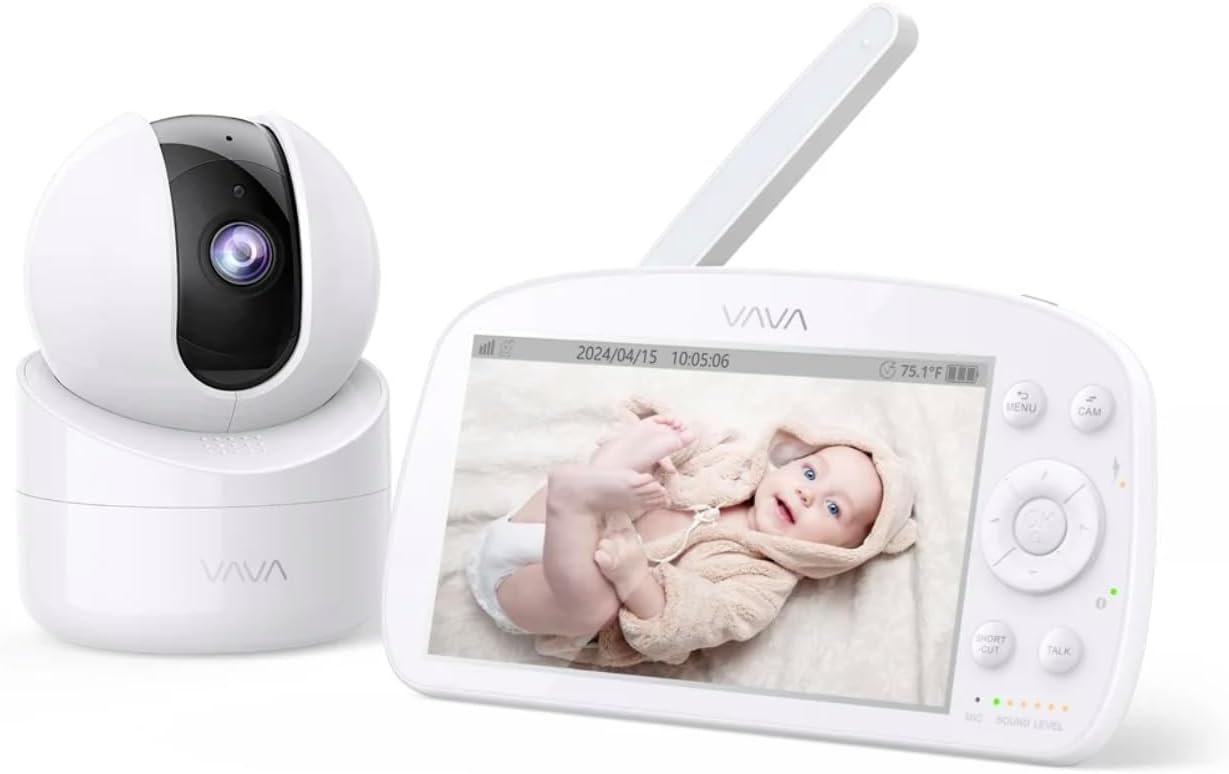
Image 3.1: The VAVA parent unit (monitor) and baby unit (camera) shown together.
The parent unit features a 5.5-inch HD display, control buttons, a microphone, speaker, and an antenna for signal reception.
Uned Babanod (Camera)

Image 3.2: The VAVA baby unit (camera) with its pan/tilt base, featuring the lens and microphone.
The baby unit includes a 720p camera with infrared LEDs for night vision, a microphone, speaker, and a temperature sensor. It supports pan, tilt, and digital zoom functions.
4. Gosod
4.1 Lleoliad y Camera
Rhowch yr uned babanod (camera) mewn lleoliad sy'n darparu golygfa glir view of your baby in the crib. Ensure it is at least 3 feet (1 meter) away from the crib to prevent entanglement with cords. The camera can be placed on a flat surface or mounted to a wall using the included mount kit.

Delwedd 4.1: Enghraifftample of camera placement, mounted above a crib for optimal viewing.
4.2 Pweru Ymlaen
- Connect one AC power adapter to the baby unit and plug it into a power outlet.
- Connect the second AC power adapter to the parent unit and plug it into a power outlet. The parent unit has a built-in rechargeable battery for portable use.
- Press and hold the power button on the parent unit to turn it on. The display will activate.
4.3 Paru (Os oes angen)
The baby unit and parent unit are pre-paired at the factory. If the connection is lost or you are adding an additional camera (up to 4 cameras supported), follow these steps:
- Ar yr uned rhiant, pwyswch y BWYDLEN botwm.
- Navigate to the camera icon (Pairing) and select it.
- Choose an available camera channel (e.g., CAM 2, CAM 3, CAM 4).
- Press the pairing button on the back of the baby unit within 10 seconds.
- Once paired, the image from the camera will appear on the parent unit display.
5. Cyfarwyddiadau Gweithredu
5.1 Rheolyddion Uned Rhieni

Image 5.1: The parent unit in use, displaying the live feed from the baby unit.
- Botwm BWYDLEN: Access settings, pairing, lullabies, and other functions.
- Botymau Llywio (I Fyny/I Lawr/Chwith/Dde): Move through menus and control camera pan/tilt.
- Botwm Iawn: Cadarnhau detholiadau.
- Botwm SIARAD: Press and hold to speak to your baby through the camera's speaker (Two-Way Audio).
- Botwm ZOOM: Magnify the image (2X-4X digital zoom).
- Modd VOX: Voice Operated eXchange. The screen will turn on automatically when sound is detected from the baby unit. Adjust sensitivity in the menu.
- hwiangerddi: Select and play lullabies from the menu to soothe your baby.
- Gweledigaeth Nos: Automatically activates in low light conditions, providing a clear black and white image.
- Modd Auto-Peilot: Cycles through connected cameras automatically.
5.2 Camera Control (Pan & Tilt)
From the parent unit, use the navigation buttons to remotely adjust the camera's viewongl ing:
- Gwasgwch Fyny / Lawr to tilt the camera vertically.
- Gwasgwch Chwith/Dde to pan the camera horizontally.
6. cynnal
6.1 Glanhau
- Datgysylltwch y ddwy uned o'r pŵer cyn glanhau.
- Use a soft, dry cloth to wipe the surfaces of the monitor and camera.
- For the camera lens, use a lens cleaning cloth to avoid scratches.
- Peidiwch â defnyddio glanhawyr neu doddyddion sgraffiniol.
6.2 Gofal Batri (Uned Rhiant)
- Er mwyn ymestyn oes y batri, osgoi rhyddhau'r batri'n llwyr yn aml.
- Gwefrwch yr uned rhiant yn rheolaidd.
- Os ydych chi'n storio'r uned am gyfnod hir, gwefrwch y batri i tua 50% a'i storio mewn lle oer, sych.
7. Datrys Problemau
| Problem | Achos Posibl | Ateb |
|---|---|---|
| Dim delwedd ar yr uned rhiant | Parent unit is off; Camera is off; Out of range; Not paired. | Ensure both units are powered on. Move units closer. Re-pair the camera (see Section 4.3). |
| Ansawdd delwedd wael | Weak signal; Obstructions; Dirty lens. | Move units closer. Remove obstructions. Clean camera lens. |
| Dim sain na sain ystumiedig | Volume too low; Out of range; Interference. | Increase parent unit volume. Move units closer. Avoid placing near other electronic devices. |
| Mae batri'r uned rhiant yn draenio'n gyflym | High screen brightness; VOX mode off; Old battery. | Reduce screen brightness. Enable VOX mode. Contact support for battery replacement if necessary. |
| Camera not responding to pan/tilt | Connection issue; Camera malfunction. | Check connection. Power cycle both units. If issue persists, contact support. |
8. manylebau
| Nodwedd | Manylyn |
|---|---|
| Enw Model | VAVA 5.5" 720P Video Baby Monitor |
| Rhif Model | 83-24011-022 |
| Maint Arddangos | 5.5 modfedd |
| Datrysiad Fideo | 720p HD |
| Ystod Trosglwyddo | Hyd at 900 tr (llinell y golwg) |
| Technoleg Cysylltedd | Wireless (Dedicated 2.4GHz FHSS) |
| Ffynhonnell Pwer | Corded Electric, Rechargeable (Parent Unit) |
| Nodweddion Arbennig | 2-Way Audio, Night Vision, Pan & Tilt, Zoom (2X-4X), VOX Mode, Lullabies, Temperature Sensor |
| Defnydd Dan Do / Awyr Agored | Dan do |
| Math Mowntio | Mynydd Pen bwrdd |
| Dimensiynau Cynnyrch | 8.46 x 8 x 5 modfedd |
| Pwysau Eitem | 2.2 pwys |
| UPC | 191280045666 |
9. Gwarant a Chefnogaeth
9.1 Gwybodaeth Gwarant
VAVA products are designed and manufactured to the highest quality standards. This product is covered by a manufacturer's warranty from the date of purchase. Please refer to the warranty card included in your package or visit the official VAVA websafle am delerau ac amodau gwarant manwl.
9.2 Cefnogaeth i Gwsmeriaid
If you encounter any issues or have questions regarding your VAVA 5.5" 720P HD Video Baby Monitor, please contact VAVA Customer Support. Our team is available to assist you with troubleshooting, technical support, and warranty claims.
For the most up-to-date contact information, please visit: www.vava.com/support


