1. Rhagymadrodd
Thank you for choosing the TCL 32V4C 32-inch HD Smart QLED Android TV. This manual provides essential information for setting up, operating, and maintaining your new television. Please read it thoroughly before use and keep it for future reference.
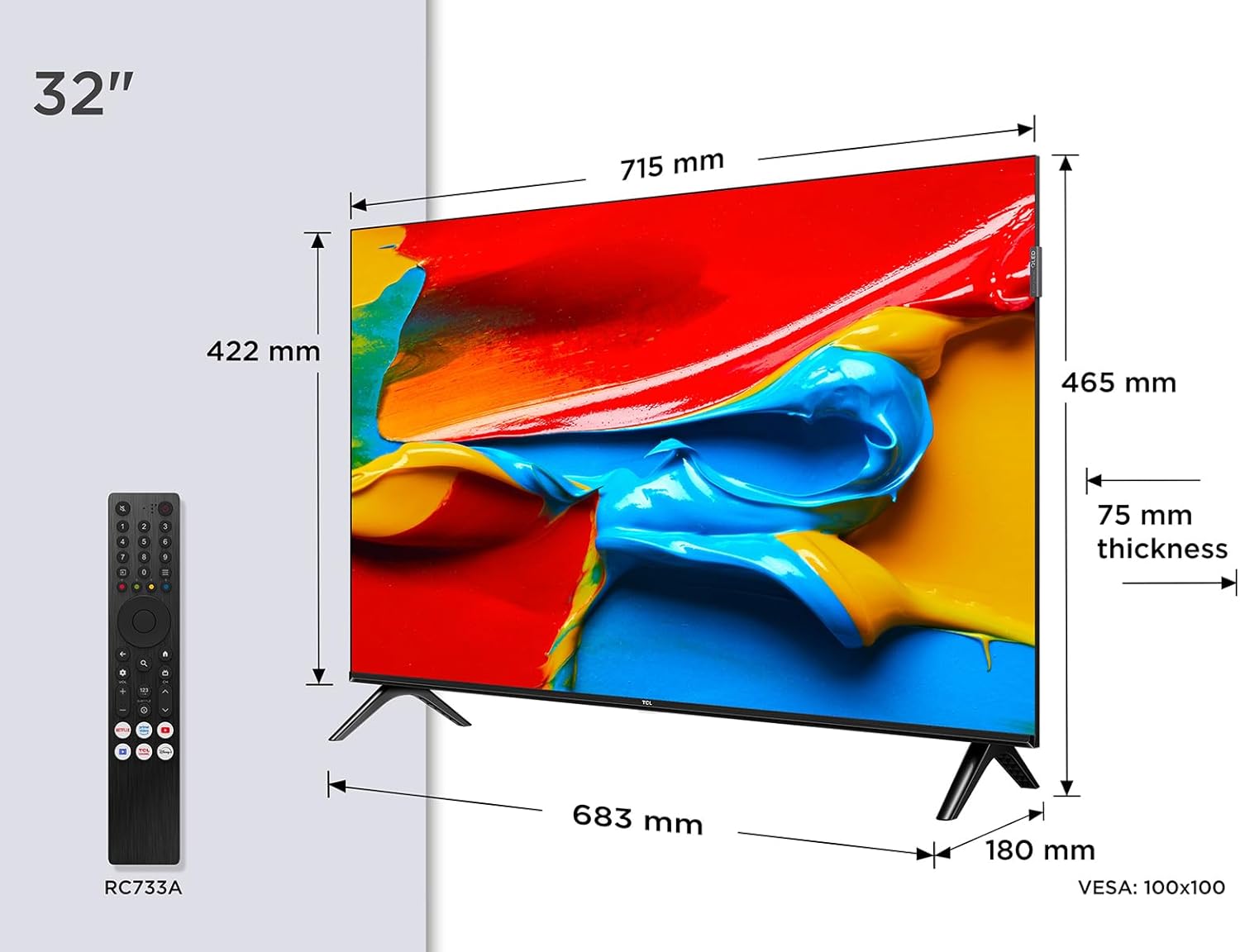
Delwedd: Blaen view of the TCL 32V4C 32-inch HD Smart QLED Android TV.
2. Gwybodaeth Diogelwch
Dilynwch ragofalon diogelwch sylfaenol bob amser wrth ddefnyddio'r cynnyrch hwn i leihau'r risg o dân, sioc drydanol ac anaf.
- Peidiwch â gwneud y teledu yn agored i law neu leithder.
- Peidiwch â rhwystro agoriadau awyru.
- Sicrhewch seilio priodol ar gyfer y llinyn pŵer.
- Keep the TV away from direct sunlight, heat sources, and open flames.
- Defnyddiwch atodiadau/ategolion a nodir gan y gwneuthurwr yn unig.
- Datgysylltwch y teledu yn ystod stormydd mellt a phan na chaiff ei ddefnyddio am gyfnodau hir.
3. Beth sydd yn y Bocs
Wrth ddadbacio, gwnewch yn siŵr bod yr holl eitemau canlynol yn bresennol:
- TCL 32V4C 32-inch HD Smart QLED Android TV
- Rheolaeth Anghysbell
- Cebl Pŵer
- Stand (with screws)
- Llawlyfr Defnyddiwr (y ddogfen hon)
4. Gosod
4.1. Installing the Stand
Place the TV screen-down on a soft, flat surface. Attach the stand bases to the bottom of the TV using the provided screws. Ensure the stand is securely fastened.
4.2. Gosod Wal (Dewisol)
If you choose to wall-mount your TV, please refer to the instructions provided with your wall-mount bracket. The TV supports VESA 100x100mm mounting. Ensure the wall mount is installed by qualified personnel.

Image: TCL 32V4C TV placed on its stand.
4.3. Cysylltu Dyfeisiau
Connect your external devices (e.g., cable box, Blu-ray player, gaming console) to the TV's ports. The TCL 32V4C features multiple connectivity options including HDMI, USB, Ethernet, and Wi-Fi.

Image: Close-up of the TCL 32V4C TV's connectivity ports, including HDMI, USB, Optical, Cable, Satellite, AV Input, Headphone, and CI Slot.
- HDMI: Connect high-definition devices.
- USB: Ar gyfer chwarae cyfryngau o yriannau USB.
- Ethernet/Wi-Fi: For internet connection and Smart TV features.
- Antena/Lloeren: Connect your antenna or satellite dish for broadcast TV.
4.4. Troi Ymlaen a Chyflunio Cychwynnol
Plug the power cable into the TV and a power outlet. Press the power button on the remote control. Follow the on-screen instructions to select your language, connect to a network, and complete the initial setup of Android TV.
5. Cyfarwyddiadau Gweithredu
5.1. Android TV Features
Your TCL 32V4C TV comes with Android TV, providing access to a vast library of content. You can stream from popular services, use Google Cast to mirror content from your smart devices, and utilize Google Home compatibility for voice control.

Image: Screenshot of the Android TV interface displaying various streaming applications and content.
5.2. Picture Quality (QLED & HDR)
The QLED technology uses quantum dots to deliver intense, vibrant colors and exceptional visual perception. Combined with Direct LED backlighting, this ensures improved image quality and brightness. HDR (High Dynamic Range) further enhances contrast and detail, especially in bright and dark scenes.

Image: Visual explanation of TCL QLED technology, highlighting vibrant colors compared to traditional displays.

Image: Demonstrates the enhanced detail and contrast provided by HDR 10 technology.
5.3. Audio Quality (Dolby Audio)
Experience high-quality, immersive sound thanks to the integrated Dolby Audio processing. This technology ensures clear and detailed audio for all your entertainment, from movies to sports.

Image: Visual representation of immersive Dolby Audio technology.
5.4. Lluosog Viewmodau ing
The TV offers personalized viewing modes to optimize your experience for different content types:
- Modd Gêm: Yn lleihau oedi mewnbwn am brofiad hapchwarae mwy ymatebol.
- Modd Chwaraeon: Enhances motion clarity and color for live sports.
- Modd Ffilm: Yn optimeiddio gosodiadau llun ar gyfer sinematig viewing.

Image: Depiction of various viewing modes (Game, Sports, Movie) available on the TV.
5.5. Fideo Cynnyrch Swyddogol
Video: An official TCL video showcasing features like QLED, HDR, Android TV, and Slim Design. This video provides a visual overview of the TV's capabilities and user experience.
6. cynnal
6.1. Glanhau'r Sgrin
Sychwch y sgrin yn ysgafn gyda lliain meddal, di-flwff. Ar gyfer marciau ystyfnig, sychwch yn ysgafnampgolchwch y lliain gyda dŵr neu lanhawr sgrin arbenigol. Peidiwch byth â chwistrellu hylif yn uniongyrchol ar y sgrin.
6.2. Glanhau'r Cabinet
Wipe the TV cabinet with a soft, dry cloth. Avoid using abrasive cleaners or solvents that may damage the finish.
6.3. Rheoli Ceblau
Ensure all cables are neatly organized and not tangled to prevent damage or accidental disconnections.
7. Datrys Problemau
Os byddwch chi'n dod ar draws problemau gyda'ch teledu, cyfeiriwch at y problemau a'r atebion cyffredin canlynol:
| Problem | Ateb Posibl |
|---|---|
| Dim pŵer | Gwiriwch a yw'r cebl pŵer wedi'i gysylltu'n ddiogel a bod yr allfa bŵer yn gweithio. |
| Dim llun/sain | Verify input source, check cable connections, and ensure volume is not muted. |
| Rheolaeth bell ddim yn gweithio | Replace batteries, ensure no obstructions between remote and TV, and check remote sensor. |
| Ansawdd llun gwael | Adjust picture settings (brightness, contrast, sharpness), check antenna/cable signal. |
| Methu cysylltu â Wi-Fi | Restart your router, check Wi-Fi password, or try a wired Ethernet connection. |
8. manylebau
Detailed technical specifications for the TCL 32V4C TV:
| Nodwedd | Disgrifiad |
|---|---|
| Brand | TCL |
| Rhif Model | 5901292526764 |
| Maint Sgrin | 32 modfedd |
| Technoleg Sgrin | QLED |
| Datrysiad | 2K (HD) |
| Cyfradd Adnewyddu | 60 Hz |
| Nodweddion Arbennig | QLED, Android TV, HDR |
| Technoleg Cysylltedd | Bluetooth, Ethernet, HDMI, USB, Wi-Fi |
| Cymhareb Agwedd | 16:9 |
| Dimensiynau Cynnyrch | 18 x 71.5 x 46.5 cm |
| Pwysau | 5 kg |
| Graddfa Effeithlonrwydd Ynni | F |
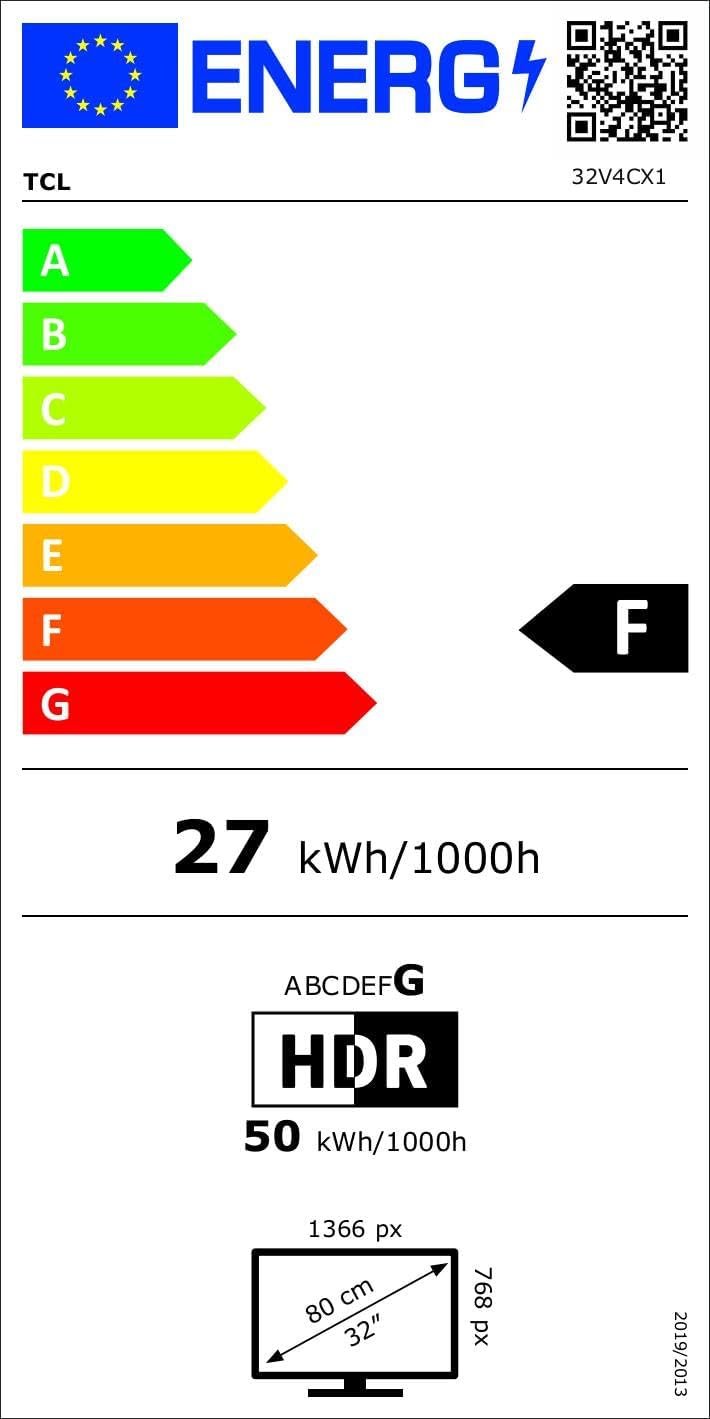
Image: Energy efficiency label for the TCL 32V4C TV, showing a rating of F and energy consumption details. For more details, visit the Cronfa ddata EPREL.
9. Gwarant a Chefnogaeth
Your TCL 32V4C TV comes with a 2-year general warranty from the manufacturer. For specific warranty terms, service, or technical support, please refer to the warranty card included with your product or visit the official TCL support websafle.
For spare parts and software/firmware updates, availability is guaranteed for 8 years from the date of market introduction.