Rhagymadrodd
This manual provides detailed instructions for the GOBOULT Mirage Smart Watch. Please read this guide thoroughly to ensure proper setup, operation, and maintenance of your device. This smartwatch features a 1.39-inch HD display, Bluetooth calling, comprehensive health monitoring, and various sports modes.
Beth Sydd yn y Bocs
- GOBOULT Mirage Smart Watch
- Cebl Codi Tâl
- Llawlyfr Defnyddiwr
- Cerdyn Gwarant
Gosod
1. Codi Tâl y Dyfais
Before initial use, fully charge your GOBOULT Mirage Smart Watch. Connect the provided charging cable to the charging port on the back of the watch and to a standard USB power adapter (not included). The watch typically charges within 120 minutes.

Image: GOBOULT Mirage Smart Watch displaying its features, including charging capability.
2. Paru â'ch Ffôn Clyfar
- Download the official GOBOULT companion app from your smartphone's app store (available for iOS and Android).
- Sicrhewch fod Bluetooth wedi'i alluogi ar eich ffôn clyfar.
- Open the app and follow the on-screen instructions to search for and connect to your GOBOULT Mirage Smart Watch.
- Cadarnhewch y cais paru ar eich oriawr a'ch ffôn clyfar.
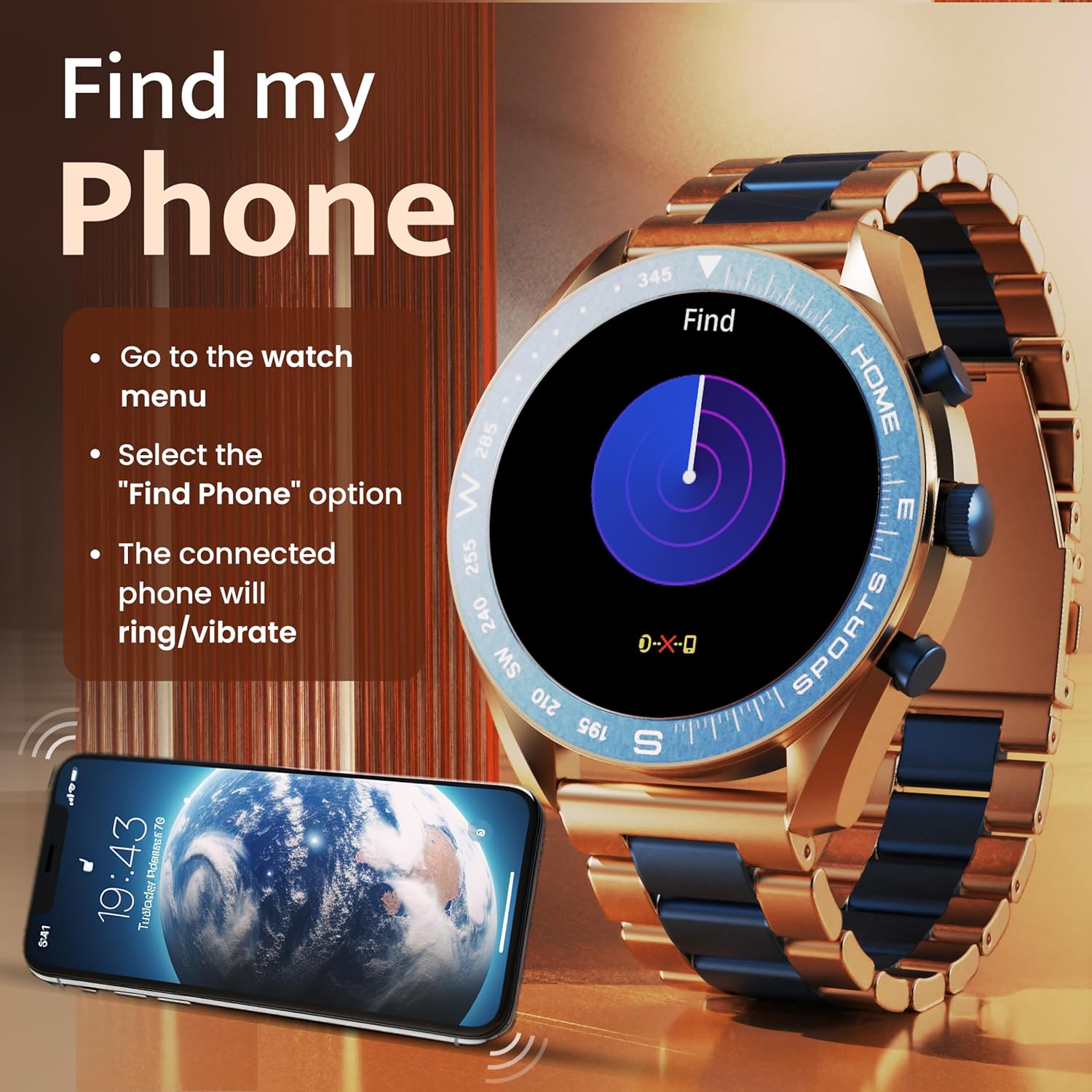
Image: The GOBOULT Mirage Smart Watch connected to a smartphone, illustrating connectivity.
Cyfarwyddiadau Gweithredu
1. Arddangos a Llywio
The GOBOULT Mirage features a 1.39-inch HD display with 360x360 pixels resolution and 500 nits peak brightness for clear visibility. Navigate the watch interface using touch gestures and the digital crown.
- Coron Ddigidol: Press to power on/off, switch UIs, and navigate menus. Rotate to scroll through options.
- Botymau Ochr: Use for quick access to specific functions, such as launching sports modes.

Image: GOBOULT Mirage Smart Watch highlighting the digital crown and its various functions.
2. Galwadau Bluetooth
With the built-in speaker and microphone, you can make and receive calls directly from your wrist once paired with your smartphone via Bluetooth 5.3.
- To answer a call, tap the green icon on the watch screen.
- To reject a call, tap the red icon.
- To make a call, access the dial pad or contacts through the watch menu.
Image: GOBOULT Mirage Smart Watch showing an incoming call notification.
3. Monitro Iechyd
The GOBOULT Mirage provides comprehensive health tracking features:
- SpO2 Blood Oxygen Monitor: Yn mesur lefelau ocsigen yn y gwaed.
- Monitor cyfradd curiad y galon: 24/7 heart rate tracking.
- Monitor Cwsg: Yn olrhain patrymau ac ansawdd cwsg.
- Breath Training Mode: Yn eich tywys trwy ymarferion anadlu.
- Nodyn Atgoffa Dŵr Yfed: Yn eich annog i aros yn hydradol.
- Nodyn atgoffa eisteddog: Alerts you after periods of inactivity.
- Olrhain Gweithgaredd: Yn cofnodi camau, pellter, a chalorïau a losgwyd.
- Olrhain Beiciau Mislif: Helps monitor menstrual cycles.

Image: GOBOULT Mirage Smart Watch showcasing its complete health suite on the display.
4. Moddau Chwaraeon
Track your performance across over 120 sports modes. Access these modes quickly using the shortcut buttons.
- Examples include Running, Cycling, Yoga, Cricket, Badminton, and Basketball.

Image: GOBOULT Mirage Smart Watch showing the selection of over 120 sports modes.
5. Wynebau Oriawr
Personalize your watch with over 300 cloud-based watch faces. You can also customize the dial to match your style.

Image: GOBOULT Mirage Smart Watch illustrating the variety of 300+ cloud watch faces.
6. Hysbysiadau Clyfar
Receive SMS and other smart notifications directly on your watch. Ensure your watch is connected to your phone via Bluetooth for this feature to function.

Image: GOBOULT Mirage Smart Watch showing a push notification from a messaging app.
7. Cynorthwyydd Llais AI
Access an intelligent AI voice assistant for hands-free control. Long press the designated button or use the voice assistant icon on the screen to activate.
8. Dod o Hyd i Fy Ffôn
If you misplace your connected smartphone, use the 'Find My Phone' feature on your watch:
- Go to the watch menu.
- Select the "Find Phone" option.
- The connected phone will ring or vibrate, helping you locate it.
Image: GOBOULT Mirage Smart Watch showing the 'Find My Phone' interface.
9. Gwrthiant Dŵr
The GOBOULT Mirage Smart Watch is IP67 water-resistant, offering protection against dust and temporary immersion in water. It is suitable for daily wear and activities like hand washing or light rain.

Image: GOBOULT Mirage Smart Watch demonstrating its IP67 water resistance.
10. Mini Games
The watch includes several mini-games for entertainment during leisure time.
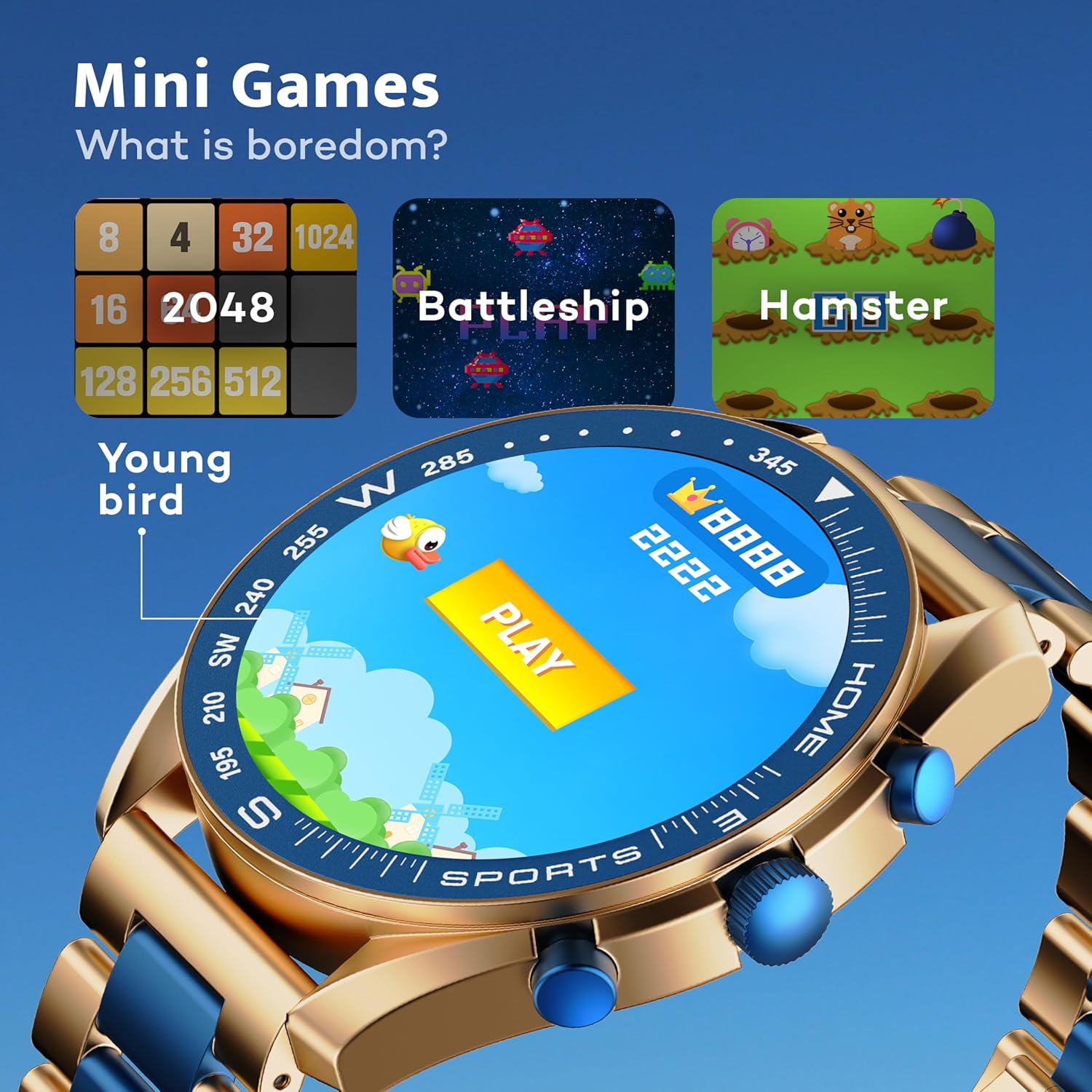
Image: GOBOULT Mirage Smart Watch showing the selection of mini-games.
Cynnal a chadw
1. Glanhau
- Wipe the watch screen and body with a soft, dry cloth.
- Ar gyfer baw ystyfnig, defnyddiwch ychydig damp cloth and immediately dry the watch.
- Osgowch ddefnyddio cemegau llym neu ddeunyddiau sgraffiniol, gan y gall y rhain niweidio'r gorffeniad.
2. Canllawiau Gwrthsefyll Dŵr
- The IP67 rating means the watch is protected from dust and can withstand immersion in water up to 1 meter for 30 minutes.
- Do not use the watch for swimming, showering with hot water, or diving.
- Avoid exposing the watch to high-pressure water or steam.
- If the watch gets wet, dry it thoroughly before charging or using any buttons.
Datrys problemau
- Oriawr ddim yn troi ymlaen: Gwnewch yn siŵr bod yr oriawr wedi'i gwefru'n llawn. Cysylltwch hi â'r gwefrydd am o leiaf 30 munud.
- Methu paru â ffôn: Gwnewch yn siŵr bod Bluetooth wedi'i alluogi ar eich ffôn a bod yr oriawr o fewn cyrraedd. Ailgychwynwch y ddwy ddyfais a cheisiwch baru eto.
- Data iechyd anghywir: Gwnewch yn siŵr bod yr oriawr yn cael ei gwisgo'n glyd ar eich arddwrn, nid yn rhy dynn nac yn rhy llac. Glanhewch y synwyryddion yn rheolaidd.
- Bywyd batri byr: Lleihau disgleirdeb y sgrin, analluogi hysbysiadau diangen, a chyfyngu ar fonitro cyfradd curiad y galon yn barhaus os nad oes ei angen.
- Problemau arddangos: Restart the watch. If the problem persists, contact customer support.
Manylebau
| Nodwedd | Manylyn |
|---|---|
| Brand | GOBOULT |
| Rhif Model | 8906133853464 |
| Maint Arddangos | 1.39 modfedd |
| Disgleirdeb | 500 o Nits |
| Deunydd Ffrâm | Aloi Sinc |
| Math Di-wifr | Bluetooth 5.3 |
| System Weithredu | iOS, Android |
| Gwrthiant Dŵr | IP67 |
| Amser Codi Batri | 120 Munud |
| Math Batri | Polymer Lithiwm |
| Pwysau Eitem | 106 g |
Gwarant a Chefnogaeth
Your GOBOULT Mirage Smart Watch comes with a warranty card included in the box. Please refer to this card for details regarding warranty coverage and terms.
For technical support, troubleshooting assistance, or warranty claims, please contact GOBOULT customer service through their official websafle neu'r wybodaeth gyswllt a ddarperir ar eich cerdyn gwarant.


