1. Rhagymadrodd
This manual provides essential information for the operation and maintenance of your HOTWAV R8 Rugged Tablet. The HOTWAV R8 is designed for durability and performance, featuring a 10.1-inch HD+ display, Android 14 operating system, 12GB RAM, 128GB internal storage (expandable up to 1TB), a 10800mAh battery, and IP68/IP69K ratings for water and dust resistance. It is equipped with a Unisoc T606 Octa-Core processor, 4G Dual SIM support, 5G WiFi, Face ID, and OTG functionality.
Darllenwch y llawlyfr hwn yn drylwyr cyn defnyddio'r ddyfais i sicrhau ei bod yn gweithio'n iawn ac yn para'n hir.

Delwedd 1.1: Blaen a chefn view of the HOTWAV R8 Rugged Tablet, showcasinei ddyluniad a'i arddangosfa gadarn.
2. Cynnwys Pecyn
Gwiriwch fod yr holl eitemau yn bresennol yn y pecyn:
- 1x HOTWAV R8 Rugged Tablet
- 1x Llawlyfr Defnyddiwr/Cerdyn Gwarant
- Gwefrydd 1x
- Cebl USB Math-C 1x
- 1x OTG Cable
- 1x Explosion-proof Film (Screen Protector)

Image 2.1: All items included in the HOTWAV R8 Tablet package, laid out on a wooden surface.
3. Gosodiad Cychwynnol
3.1. Codi Tâl y Dabled
Before first use, fully charge the tablet using the provided charger and USB Type-C cable. Connect the USB cable to the tablet's charging port and the charger to a power outlet. The charging indicator will show the charging status.
3.2. Gosod Cardiau SIM a Cherdyn MicroSD
The HOTWAV R8 supports Dual SIM cards and a MicroSD card for expanded storage (up to 1TB). Locate the SIM card tray on the side of the tablet. Use the provided SIM ejector tool (if applicable, otherwise carefully open the tray) to open the tray. Insert your SIM cards and MicroSD card into the designated slots, ensuring correct orientation. Close the tray securely.

Image 3.1: Illustration of inserting SIM cards and a MicroSD card into the tablet's tray.
3.3. Pweru Ymlaen / I ffwrdd
- I Bweru Ymlaen: Press and hold the Power button until the HOTWAV logo appears.
- I Bweru i ffwrdd: Pwyswch a daliwch y botwm Pŵer, yna dewiswch "Diffoddwch" o'r opsiynau ar y sgrin.
- I ailgychwyn: Pwyswch a daliwch y botwm Pŵer, yna dewiswch "Ailgychwyn" o'r opsiynau.
4. Cyfarwyddiadau Gweithredu
4.1. Arddangos a Llywio
The tablet features a 10.1-inch HD+ display with 800 x 1200 pixels resolution. Navigate the Android 14 interface using touch gestures: tap, swipe, pinch-to-zoom. The display supports glove mode for operation in various conditions.

Image 4.1: The HOTWAV R8 tablet displaying the Android 14 operating system interface.
4.2. Perfformiad a Storio
Powered by a Unisoc T606 Octa-Core processor and 12GB RAM (4GB physical + 8GB virtual), the tablet handles multitasking efficiently. It comes with 128GB of internal storage, expandable up to 1TB via a MicroSD card.

Image 4.2: Diagram illustrating the Unisoc T606 Octa-Core processor, 12GB RAM, and 128GB ROM (expandable to 1TB).
4.3. Swyddogaethau'r Camera
The tablet is equipped with a 13MP rear camera and a 5MP front camera. Open the Camera application to capture photos and videos. Various modes and settings are available within the app.

Image 4.3: Visual representation of the 13MP rear camera and 5MP front camera on the HOTWAV R8 tablet.
4.4. Cysylltedd
- SIM Deuol 4G: Supports 4G LTE connectivity for mobile data and calls. Note: Not compatible with AT&T.
- WiFi 5G: Connect to wireless networks using 2.4GHz and 5GHz Wi-Fi bands.
- Bluetooth 5.1: Pair with Bluetooth accessories such as headphones and speakers.
- GPS: Integrated Beidou, Galileo, Glonass, and GPS for accurate navigation.

Image 4.4: The HOTWAV R8 tablet displaying a GPS map, highlighting its navigation capabilities.
4.5. Battery and OTG Functionality
The 10800mAh battery provides extended usage time. The tablet also supports OTG (On-The-Go) reverse charging, allowing it to act as a power bank to charge other devices using the provided OTG cable.

Image 4.5: Diagram illustrating the large 10800mAh battery capacity of the HOTWAV R8 tablet.

Image 4.6: The HOTWAV R8 tablet demonstrating its OTG reverse charging capability, charging a smartphone.
5. Cynnal a Chadw a Gwydnwch
The HOTWAV R8 is built to withstand challenging environments, featuring IP68/IP69K water and dust resistance and MIL-STD-810H compliance for drop protection.
- Gwrthiant Dŵr: The tablet can be submerged in up to 2 meters of water for at least 30 minutes. Ensure all ports are securely sealed before exposure to water.
- Ymwrthedd Llwch: Mae'r ddyfais wedi'i diogelu rhag llwch rhag dod i mewn.
- Gwarchodaeth Gollwng: Wedi'i gynllunio i wrthsefyll cwympiadau o hyd at 1.2 metr.
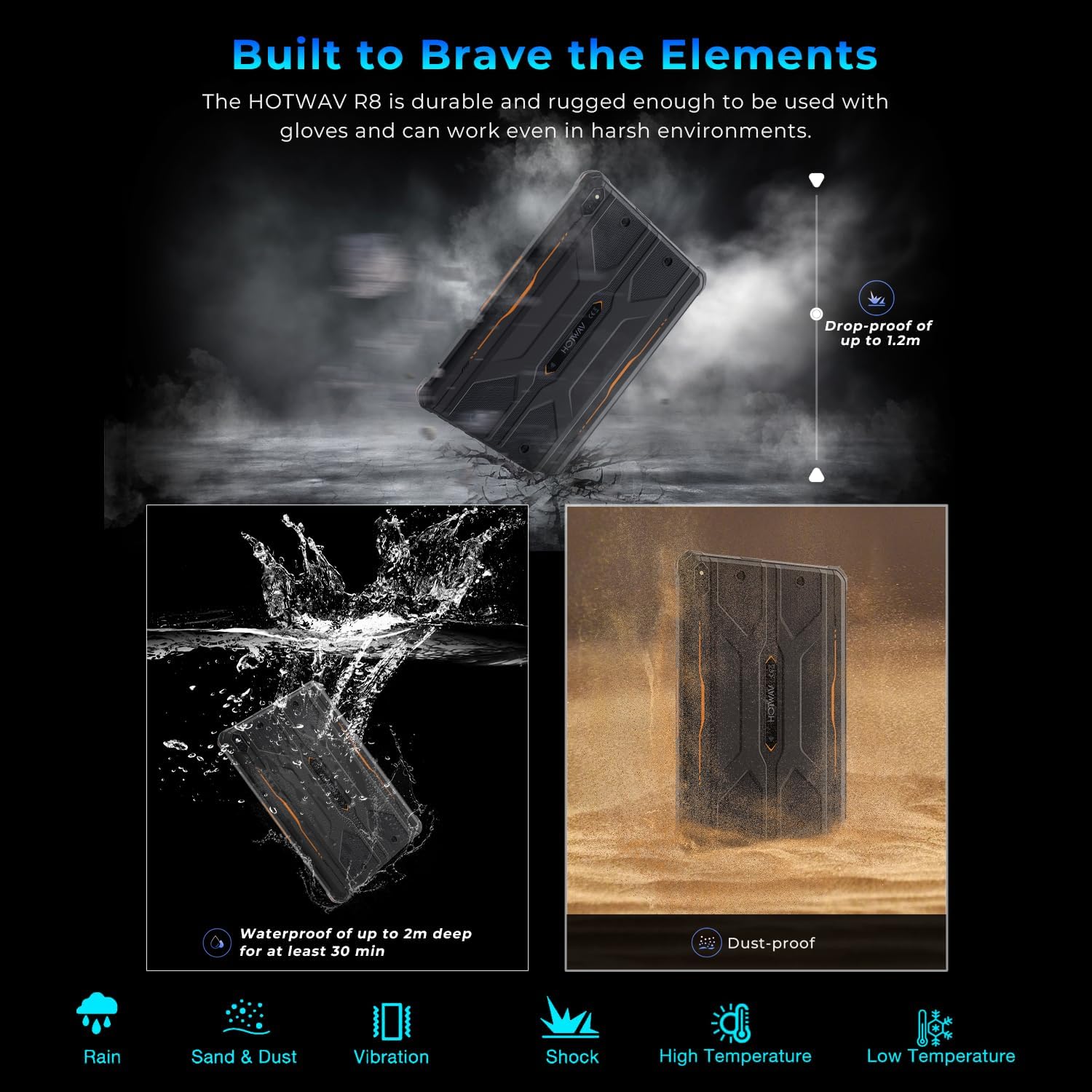
Image 5.1: Visual representation of the HOTWAV R8 tablet's resistance to drops, water immersion, and dust.
5.1. Glanhau
Defnyddiwch feddal, damp cloth to clean the tablet's surface. Avoid harsh chemicals or abrasive materials that could damage the device or its protective coatings.
5.2. Storio
Store the tablet in a cool, dry place away from direct sunlight and extreme temperatures when not in use for extended periods.
6. Datrys Problemau
6.1. Dyfais Ddim yn Troi Ymlaen
- Ensure the battery is charged. Connect the tablet to the charger for at least 30 minutes.
- Pwyswch a daliwch y botwm Pŵer am 10-15 eiliad i gyflawni ailgychwyn gorfodol.
6.2. Cysylltedd Rhwydwaith Gwael
- Check if SIM cards are correctly inserted and activated.
- Verify Wi-Fi connection settings and router functionality.
- Restart the tablet and try connecting again.
6.3. Sgrin Gyffwrdd Ddim yn Ymatebol
- Ailgychwyn y tabled.
- Ensure the screen is clean and free of debris or excessive moisture.
6.4. Draenio Batri yn Gyflym
- Lleihau disgleirdeb sgrin.
- Cau cymwysiadau nas defnyddir sy'n rhedeg yn y cefndir.
- Analluogwch Wi-Fi, Bluetooth, neu GPS pan nad ydynt yn cael eu defnyddio.
7. manylebau
| Nodwedd | Manylyn |
|---|---|
| Enw Model | R8 |
| System Weithredu | Android 14 |
| Maint Sgrin | 10.1 modfedd |
| Cydraniad Sgrin | 800 x 1200 picsel |
| Prosesydd | Unisoc T606 Octa-Craidd |
| HWRDD | 12GB (4GB ffisegol + 8GB rhithwir) |
| Storio Mewnol | 128GB |
| Storfa Ehangadwy | Hyd at 1TB trwy gerdyn MicroSD |
| Camera Cefn | 13 AS |
| Camera blaen | 5 AS |
| Gallu Batri | 10800mAh |
| Math Di-wifr | 802.11ax (5G WiFi), Bluetooth 5.1 |
| Cysylltedd Cellog | 4G Dual SIM (Note: Not compatible with AT&T) |
| Mordwyo | Beidou, Galileo, Glonass, GPS |
| Graddfeydd Gwydnwch | IP68, IP69K, MIL-STD-810H |
| Pwysau Eitem | 2.72 pwys (tua 1.23 kg) |
| Dimensiynau Cynnyrch | 9.9 x 6.6 x 0.6 modfedd (tua 25.1 x 16.8 x 1.5 cm) |
8. Gwarant a Chefnogaeth
The HOTWAV R8 Rugged Tablet typically comes with a manufacturer's warranty. Please refer to the included Warranty Card in your package for specific terms and conditions. For technical support or warranty claims, please contact HOTWAV customer service.
- Gwasanaeth Cwsmer: Refer to the contact information provided on the Warranty Card or the official HOTWAV websafle.
- Cynlluniau Diogelu: Additional protection plans may be available for purchase separately.
- Yn dychwelyd: Standard return policies apply. Please check with your retailer for details.

Image 8.1: HOTWAV customer support shield logo, indicating 24-hour customer service, 30-day return policy, and 2-year warranty.


