Croeso
Thank you for choosing the BYTECH BICONIC True Wireless Earbuds. This manual provides essential information on how to set up, operate, maintain, and troubleshoot your new earbuds. Please read this manual thoroughly before use to ensure optimal performance and longevity of your device.
Cyfarwyddiadau Diogelwch Pwysig
- Peidiwch ag amlygu'r clustffonau na'r cas gwefru i dymheredd, lleithder na hylifau eithafol.
- Osgowch ollwng, taro, neu ddadosod y ddyfais.
- Do not use abrasive cleaners or harsh chemicals to clean the earbuds or case.
- Listen at moderate volume levels to prevent hearing damage. Prolonged exposure to loud sounds can cause irreversible hearing loss.
- Cadwch allan o gyrraedd plant ac anifeiliaid anwes.
- Dispose of the device responsibly according to local regulations. Do not dispose of with household waste.
Beth sy'n Gynwysedig
Gwiriwch gynnwys y pecyn i sicrhau bod yr holl eitemau yn bresennol:
- BYTECH BICONIC True Wireless Earbuds (Left and Right)
- Achos Codi Tâl
- Cebl Codi Tâl
- Llawlyfr Defnyddiwr
Cynnyrch Drosview
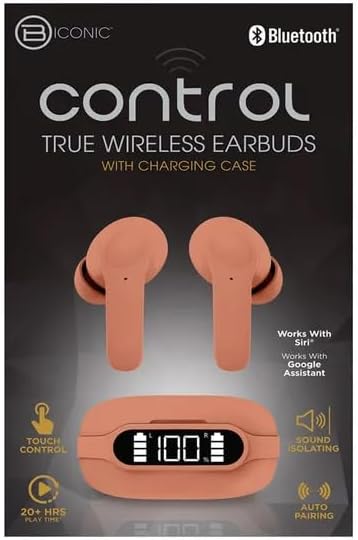
Familiarize yourself with the components of your BYTECH BICONIC True Wireless Earbuds.

Cychwyn Arni
Cyhuddo'r Earbuds a Case
The BYTECH BICONIC earbuds come with a rechargeable battery in both the earbuds and the charging case. Ensure both are fully charged before first use.
- Rhowch y clustffonau yn y cas gwefru, gan sicrhau eu bod wedi'u gosod yn gywir yn eu slotiau priodol (Ch am chwith, D am dde).
- Connect the provided charging cable to the charging port on the case and the other end to a USB power source (e.g., computer USB port, wall adapter).
- The digital display on the charging case will show the battery level. Allow sufficient time for a full charge.
- Ar ôl ei wefru'n llawn, datgysylltwch y cebl gwefru.
Pâr Bluetooth
Follow these steps to pair your earbuds with your Bluetooth-enabled device:
- Gwnewch yn siŵr bod y clustffonau wedi'u gwefru ac y tu mewn i'r cas gwefru.
- Open the charging case. The earbuds will automatically enter pairing mode, and an indicator light on the earbuds will flash.
- Ar eich dyfais (ffôn clyfar, tabled, ac ati), ewch i'r gosodiadau Bluetooth a throwch Bluetooth ymlaen.
- Chwiliwch am available devices. You should see "BYTECH BICONIC" or a similar name appear in the list.
- Select "BYTECH BICONIC" to connect. Once connected, a voice prompt will confirm the successful pairing, and the indicator lights on the earbuds will stop flashing.
- Bydd y clustffonau'n ailgysylltu'n awtomatig â'r ddyfais a barwyd ddiwethaf pan gânt eu tynnu allan o'r cas, ar yr amod bod Bluetooth wedi'i alluogi ar y ddyfais.
Cyfarwyddiadau Gweithredu
Rheolaethau Cyffwrdd
The BYTECH BICONIC earbuds feature intuitive touch controls for easy management of your audio and calls.
| Gweithred | Swyddogaeth |
|---|---|
| Tap Sengl (Clustffon Chwith/Dde) | Chwarae / Saib cerddoriaeth, Ateb / Diwedd galwad |
| Tap dwbl (Clust i'r Dde) | Trac Nesaf |
| Tap Dwbl (Clust Chwith) | Trac Blaenorol |
| Tap Driphlyg (Clustffon Chwith/Dde) | Actifadu Cynorthwyydd Llais (Siri/Cynorthwyydd Google) |
| Pwyswch Hir (Clustffon Chwith/Dde) | Gwrthod Galwad |
Pweru Ymlaen ac i ffwrdd
- Pŵer Ymlaen: Bydd y earbuds yn pweru ymlaen yn awtomatig wrth eu tynnu o'r achos gwefru.
- Pwer i ffwrdd: Rhowch y clustffonau yn ôl yn y cas gwefru a chau'r caead. Byddant yn diffodd yn awtomatig ac yn dechrau gwefru.
Cynnal a Chadw a Gofal
Proper care will extend the life of your BYTECH BICONIC True Wireless Earbuds.
- Glanhau: Use a soft, dry, lint-free cloth to clean the earbuds and charging case. Do not use liquids or aerosol cleaners.
- Storio: Pan nad ydynt yn cael eu defnyddio, storiwch y clustffonau yn eu cas gwefru bob amser i'w hamddiffyn a'u cadw'n wefredig.
- Osgoi Amodau Eithafol: Do not expose the device to extreme heat, cold, or direct sunlight.
- Gwrthiant Dŵr: These earbuds are not waterproof. Avoid contact with water or excessive moisture.
Datrys problemau
If you encounter any issues with your earbuds, refer to the following common solutions:
| Problem | Ateb |
|---|---|
| Clustffonau ddim yn paru | Gwnewch yn siŵr bod y clustffonau wedi'u gwefru. Diffoddwch a throwch Bluetooth ymlaen ar eich dyfais. Anghofiwch am y ddyfais yn y gosodiadau Bluetooth ac ail-bariwch. |
| Dim ond un earbud yn gweithio | Rhowch y ddau glustffon yn ôl yn y cas gwefru, caewch y caead, arhoswch ychydig eiliadau, yna tynnwch nhw allan eto. Gwnewch yn siŵr bod y ddau wedi'u gwefru. |
| Dim sain | Gwiriwch lefelau'r sain ar eich dyfais a'r clustffonau. Gwnewch yn siŵr bod y clustffonau wedi'u cysylltu'n iawn. Rhowch gynnig ar chwarae sain gwahanol. |
| Achos codi tâl nid codi tâl | Ensure the charging cable is securely connected to both the case and the power source. Try a different USB port or power adapter. |
Manylebau Technegol
Detailed specifications for your BYTECH BICONIC True Wireless Earbuds:
| Nodwedd | Manylyn |
|---|---|
| Rhif Model | BC-AU-BE-144-TN |
| Technoleg Cysylltedd | Diwifr (Bluetooth) |
| Ffactor Ffurf | In-Ear (Intraurales) |
| Lliw | Caffi |
| Nodweddion Arbennig | Rechargeable Battery, Touch Control, Sound Isolating, Auto Pairing |
| Cydrannau wedi'u Cynnwys | Cebl |
| Estimated Play Time | 20+ Awr (gyda chas gwefru) |
Gwybodaeth am Warant a Chymorth i Gwsmeriaid
BYTECH products are designed and manufactured to the highest quality standards. For information regarding warranty coverage, please refer to the warranty card included with your purchase or visit the official BYTECH websafle.
If you require further assistance or have questions not covered in this manual, please contact BYTECH customer support through their official channels. Please have your model number (BC-AU-BE-144-TN) and purchase details ready when contacting support.


