1. Rhagymadrodd
This manual provides essential information for the proper installation, operation, and maintenance of your Lapcare LM22WHD 22-inch FHD IPS LED Monitor. Please read this manual thoroughly before using the product and retain it for future reference.
2. Gwybodaeth Diogelwch
- Gwnewch yn siŵr bod y monitor wedi'i osod ar arwyneb sefydlog, gwastad i atal cwympiadau damweiniol.
- Peidiwch ag amlygu'r monitor i law, lleithder, na thymheredd eithafol.
- Osgoi rhwystro agoriadau awyru i atal gorboethi.
- Defnyddiwch yr addasydd pŵer a gyflenwir gyda'r monitor yn unig.
- Disconnect the power cable from the outlet before cleaning or if the monitor will not be used for an extended period.
- Peidiwch â cheisio atgyweirio'r monitor eich hun. Cyfeiriwch bob gwasanaethu at bersonél cymwys.
3. Cynnwys Pecyn
Gwiriwch fod yr holl eitemau yn bresennol yn y pecyn:
- Lapcare LM22WHD LED Monitor
- Stand Monitor (Sylfaen a Gwddf)
- Addasydd/Cebl Pŵer
- Cebl HDMI
- Llawlyfr Defnyddiwr (y ddogfen hon)
4. Cynnyrch Drosview
The Lapcare LM22WHD is a 22-inch (54.61CM) IPS LED monitor featuring Full HD (1920 x 1080) resolution. It offers a flick-free viewing experience and a wide 178-degree viewing angle for consistent image quality from various positions. The monitor boasts a slim, frameless design and includes both VGA and HDMI ports for versatile connectivity.

Ffigur 4.1: Blaen view of the Lapcare LM22WHD monitor.

Ffigur 4.2: Ochr view sioeasing the monitor's slim design.
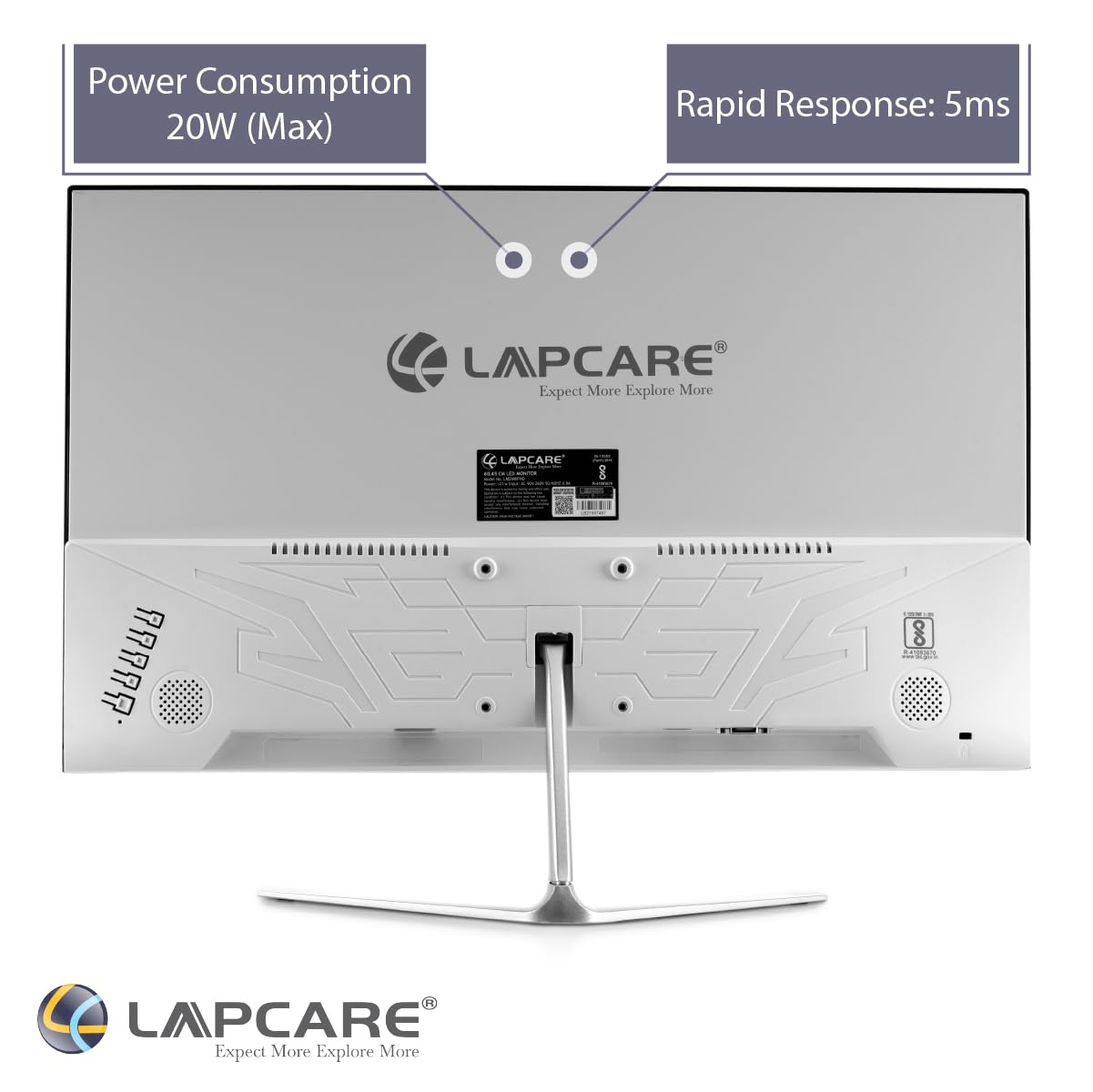
Ffigur 4.3: Cefn view with connectivity ports and VESA mounting options.

Ffigur 4.4: Manwl view of the VGA and HDMI input ports.

Figure 4.5: The sturdy metal stand for the monitor.

Figure 4.6: The monitor supports wall mounting for flexible placement.
5. Gosod
5.1 Cydosod y Stand
- Tynnwch gydrannau'r monitor a'r stondin o'r pecynnu yn ofalus.
- Attach the stand neck to the monitor's rear panel by aligning the tabs and securing with screws (if provided).
- Connect the stand base to the stand neck, ensuring it clicks into place or is secured with the provided screw.
- Rhowch y monitor wedi'i ymgynnull ar arwyneb sefydlog, gwastad.
5.2 Cysylltu Ceblau
- Cysylltiad Pwer: Cysylltwch y cebl pŵer â mewnbwn pŵer y monitor ac yna ag allfa bŵer.
- Cysylltiad Fideo:
- HDMI: Connect one end of the HDMI cable to the HDMI port on your computer or device and the other end to the HDMI port on the monitor.
- VGA: Connect one end of the VGA cable to the VGA port on your computer or device and the other end to the VGA port on the monitor.
- Sicrhewch fod pob cysylltiad yn ddiogel.
6. Cyfarwyddiadau Gweithredu
6.1 Pweru Ymlaen/Diffodd
Pwyswch y botwm pŵer sydd wedi'i leoli ar y monitor i'w droi ymlaen neu i ffwrdd. Bydd y golau dangosydd pŵer yn goleuo pan fydd y monitor ymlaen.
6.2 Dewis Mewnbwn
Use the monitor's control buttons (usually located on the bottom or back) to access the On-Screen Display (OSD) menu. Navigate to the 'Input' or 'Source' option and select your desired input (HDMI or VGA).
6.3 Addasu Gosodiadau Arddangos
The OSD menu allows you to adjust various display settings such as brightness, contrast, color temperature, and aspect ratio. Refer to the OSD menu for detailed options.
Mae'r monitor yn cynnwys a Heb Flicker display technology, which reduces eye strain during prolonged use. Its 178-gradd Eang Viewongl ing ensures consistent color and clarity from almost any perspective.
Fideo 6.1: Dros benview of the Lapcare LM22WHD monitor's key features and specifications, including display quality, ports, and design elements.
7. cynnal
7.1 Glanhau'r Monitor
- Tynnwch y plwg bob amser o'r monitor cyn glanhau.
- Defnyddiwch frethyn meddal, di-lint yn ysgafn dampwedi'i lanhau â dŵr neu lanhawr sgrin ysgafn, nad yw'n sgraffiniol.
- Peidiwch â chwistrellu glanhawr yn uniongyrchol ar y sgrin.
- Sychwch y sgrin yn ysgafn i gael gwared â llwch a staeniau.
8. Datrys Problemau
| Problem | Achos Posibl | Ateb |
|---|---|---|
| Dim delwedd ar y sgrin | Power cable disconnected; Video cable loose; Incorrect input selected | Gwiriwch y cysylltiadau pŵer a fideo; Dewiswch y ffynhonnell fewnbwn gywir drwy'r ddewislen OSD. |
| Mae'r ddelwedd yn aneglur neu wedi'i gwyrdroi | Incorrect resolution; Video cable faulty | Set display resolution to 1920x1080; Try a different video cable. |
| Nid yw'r monitor yn troi ymlaen | No power; Faulty power adapter | Ensure power cable is securely connected and outlet is working; Test with another power adapter if available. |
9. manylebau
| Nodwedd | Manyleb |
|---|---|
| Brand | Lapcare |
| Rhif Model | LM22WHD |
| Maint Sgrin | 22 modfedd (54.61 CM) |
| Math Arddangos | IPS LEDs |
| Datrysiad | 1920 x 1080 (HD Llawn) |
| Cymhareb Agwedd | 16:9 |
| Viewongl ing | 178 Degrees (Wide) |
| Heb Flicker | Oes |
| Porthladdoedd | 1x HDMI, 1x VGA |
| Dylunio | Slim, Frameless Body |
| Math o Stondin | Stondin Fetel |
| Wal Gosodadwy | Oes |
| Dimensiynau Eitem (LxWxH) | 17 x 38 x 34 cm |
| Pwysau Eitem | 230 g |
| Cyftage | 220 folt |
10. Gwarant a Chefnogaeth
The Lapcare LM22WHD LED Monitor comes with a Gwarant 3 Flynedd o ddyddiad y pryniant. Cadwch eich prawf prynu ar gyfer hawliadau gwarant.
For technical support, service, or warranty inquiries, please contact Lapcare customer service through their official websafle neu'r wybodaeth gyswllt a ddarparwyd gyda dogfennaeth eich cynnyrch.