1. Rhagymadrodd
The CALEX Smart Home Indoor Ambiance Aroma Diffuser 590100500 is designed to enhance your indoor environment by improving air quality, diffusing pleasant aromas, and providing ambient lighting. This smart device integrates seamlessly into your smart home ecosystem, offering control through the Calex app, voice commands, and programmable features.
Mae nodweddion allweddol yn cynnwys:
- Aroma diffusion with essential oils.
- Realistic flame effect for ambiance.
- Adjustable ambient lighting with 16 million color options.
- Smart control via Calex app (timers, programmable scenarios).
- Voice control compatibility with Google Assistant, Siri, and Amazon Alexa.
- 300ml water tank capacity with automatic shut-off.
2. Gwybodaeth Diogelwch
Please read all safety instructions before using the device to prevent injury or damage.
- Always place the diffuser on a stable, flat surface away from direct sunlight, heat sources, and electronic devices.
- Do not exceed the maximum water fill line (300ml) to prevent overflow.
- Defnyddiwch ddŵr tap glân neu ddŵr distyll yn unig. Peidiwch â defnyddio dŵr poeth.
- Only use 100% pure, water-soluble essential oils. Other oils or corrosive liquids may damage the device.
- Cadwch y ddyfais allan o gyrraedd plant ac anifeiliaid anwes.
- Do not cover the mist outlet during operation.
- Unplug the device from the power outlet before cleaning or refilling.
- The device features an automatic shut-off function when the water tank is empty, and sends a notification to your phone.
- A built-in safety configuration will cause the diffuser to flash if the remaining water in the tank needs to cool down after a maximum of 72 hours of continuous operation.
- Peidiwch â cheisio atgyweirio na newid y ddyfais eich hun. Cysylltwch â chymorth cwsmeriaid i gael cymorth.
3. Cynnwys Pecyn
Gwiriwch fod yr holl eitemau yn bresennol yn y pecyn:
- CALEX Smart Home Indoor Ambiance Aroma Diffuser (Model 5901000500)
- Addasydd Pŵer
- Llawlyfr Defnyddiwr
4. Cynnyrch Drosview
Familiarize yourself with the components of your aroma diffuser.
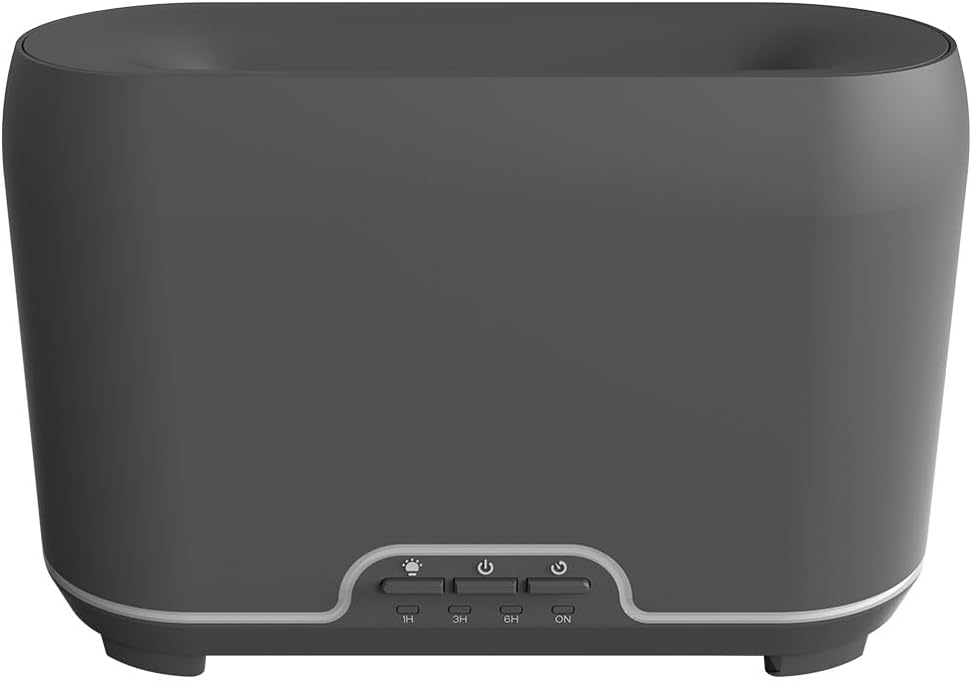
Delwedd: Blaen view of the CALEX Smart Home Aroma Diffuser, showing the control panel with buttons for light, power, and timer settings (1H, 3H, 6H, ON).

Image: The CALEX Smart Home Aroma Diffuser operating on a wooden table, displaying its ambient flame effect and mist output.
The diffuser typically consists of a water tank, an ultrasonic plate, a mist outlet, and a control panel with buttons for power, light, and timer functions. The power input port is usually located at the back or bottom of the device.
5. Gosod
Dilynwch y camau hyn ar gyfer gosod cychwynnol:
- Lleoliad: Rhowch y tryledwr ar arwyneb gwastad, sefydlog.
- Caead Agored: Gently remove the top cover of the diffuser.
- Llenwch y tanc dŵr: Fill the water tank with clean water up to the 300ml maximum fill line. Do not overfill.
- Ychwanegu Olew Hanfodol: Add a few drops of your preferred essential oil directly into the water tank.
- Caewch y clawr: Amnewid y clawr uchaf yn ddiogel.
- Pwer Cysylltu: Plug the power adapter into the diffuser's power input port, then plug the adapter into a wall outlet.
- Download Calex App: Download the free Calex Smart app from your smartphone's app store (available for iOS and Android).
- Cysylltu â WiFi: Follow the in-app instructions to connect your diffuser to your home WiFi network. Ensure your WiFi is 2.4GHz.
6. Cyfarwyddiadau Gweithredu
The CALEX Smart Home Aroma Diffuser can be operated via the Calex app or its integrated control buttons.
6.1 Using the Calex Smart App
The Calex app provides full control over your diffuser's functions:
- Pŵer ymlaen / i ffwrdd: Turn the diffuser on or off remotely.
- Rheoli Niwl: Adjust the mist output level.
- Rheoli Golau: Change the ambient light color from over 16 million options, adjust brightness, and select lighting modes.
- Effaith Fflam: Activate or deactivate the flame effect.
- Amseryddion: Set schedules for the diffuser to turn on or off automatically.
- Programmable Scenarios: Create custom scenarios based on time, weather, or other smart home triggers.
- Hysbysiadau: Receive alerts when the water tank is empty.
6.2 Rheoli Llais
Integrate your diffuser with voice assistants for hands-free control:
- Cynorthwyydd Google: Link your Calex account in the Google Home app. Use commands like "Hey Google, turn on the diffuser."
- Siri: Create custom shortcuts in the Apple Home app or through the Calex app for Siri commands.
- Amazon Alexa: Enable the Calex skill in the Alexa app. Use commands like "Alexa, set diffuser light to blue."
6.3 Manual Control Buttons
The control panel on the diffuser allows for basic operation:
- Botwm Pŵer: Press once to turn on/off the mist and flame effect.
- Botwm Golau: Press to cycle through light colors or turn the light on/off.
- Timer Buttons (1H, 3H, 6H, ON): Select a desired operating duration. The diffuser will automatically shut off after the selected time. 'ON' typically means continuous operation until water runs out or manually turned off.
7. cynnal
Mae glanhau rheolaidd yn sicrhau perfformiad gorau posibl ac yn ymestyn oes eich tryledwr.
- Glanhau dyddiol: After each use, empty any remaining water from the tank. Wipe the inside of the tank with a clean, soft cloth.
- Glanhau Wythnosol: For a more thorough clean, unplug the device. Add a small amount of white vinegar (about 10ml) to the water tank and let it sit for 10-15 minutes to dissolve mineral buildup. Gently wipe the ultrasonic plate with a cotton swab or soft brush. Rinse the tank thoroughly with clean water, avoiding the air outlet.
- Glanhau Allanol: Wipe the exterior of the diffuser with a soft, damp brethyn. Peidiwch â defnyddio glanhawyr neu doddyddion sgraffiniol.
- Ensure the device is completely dry before refilling or storing.
8. Datrys Problemau
Os byddwch chi'n dod ar draws problemau, cyfeiriwch at y problemau a'r atebion cyffredin canlynol:
| Problem | Achos Posibl | Ateb |
|---|---|---|
| Dim niwl na niwl gwan | Lefel dŵr isel Plât uwchsonig yn fudr Allfa niwl wedi'i blocio | Refill water to the appropriate level. Clean the ultrasonic plate as per maintenance instructions. Ensure the mist outlet is clear. |
| Nid yw dyfais yn troi ymlaen | Dim pŵer Tanc dŵr yn wag Dyfais yn camweithio | Check power connection and wall outlet. Ail-lenwi'r tanc dŵr. Cysylltwch â'r tîm cymorth cwsmeriaid os yw'r broblem yn parhau. |
| Problemau cysylltiad ap | Cyfrinair WiFi anghywir Router too far 2.4GHz vs 5GHz WiFi | Gwiriwch gyfrinair WiFi. Move diffuser closer to the router. Ensure your router is broadcasting a 2.4GHz network and connect to it. |
| Effaith fflam ddim yn gweithio | Feature deactivated in app Dyfais yn camweithio | Check app settings to ensure flame effect is enabled. Cysylltwch â chymorth cwsmeriaid. |
9. manylebau
| Nodwedd | Manyleb |
|---|---|
| Rhif Model | 5901000500 |
| Brand | CALEX |
| Gallu | 300 Mililitr |
| Deunydd | Plastig |
| Auto Diffodd | Oes |
| Cysylltedd | WiFi (2.4GHz) |
| Dulliau Rheoli | Calex Smart App, Voice Control (Google Assistant, Siri, Amazon Alexa), Manual Buttons |
| Opsiynau Golau | 16 Miliwn o Lliwiau |
| Recommended Use Area | Medium space |
| Cod Erthygl Rhyngwladol (EAN/UPC) | 08712879157090 |
10. Gwarant a Chefnogaeth
Am wybodaeth am warant neu gymorth technegol, cyfeiriwch at y ddogfennaeth a ddarparwyd gyda'ch pryniant neu cysylltwch â'r manwerthwr/gwneuthurwr yn uniongyrchol. Cadwch eich prawf prynu ar gyfer hawliadau gwarant.


