Rhagymadrodd
The Optoma GT2100HDR is a compact and powerful laser projector designed for home theater and gaming. It features DuraCore laser light technology, offering up to 30,000 hours of maintenance-free operation and an IPX6 dust resistance rating for enhanced durability. Its short throw lens allows for large image projection from minimal distances, making it suitable for various room sizes. Enjoy sharp 1080p HD resolution, 4K HDR input compatibility for rich colors, and a high contrast ratio. This energy-efficient projector includes HDMI and USB connectors for broad compatibility.

Image: Optoma GT2100HDR projector highlighting key features like Full HD 1080p, DuraCore Laser, HDR compatibility, DLP technology, and sustainable design.
Gosod
Dadbacio
Carefully remove the projector and all accessories from the packaging. Ensure all components listed in the packing list are present. Retain the original packaging for future transport or storage.
Lleoliad
The Optoma GT2100HDR is a short throw projector, capable of projecting a large image from a short distance. For example, a 120-inch image can be projected from approximately 4 feet 4 inches away. This flexibility allows for placement on a table or ceiling mount, even in smaller rooms.

Image: Short throw projection distance guide for the GT2100HDR, showing required distances for 100-inch and 120-inch screen sizes.
Cysylltedd
Connect your source devices (e.g., gaming console, streaming device, laptop) to the projector using the appropriate ports on the rear panel. The projector supports various input types for versatile use.

Delwedd: O'r brig i lawr view of the Optoma GT2100HDR with dimensions and a labeled diagram of its rear connectivity ports.
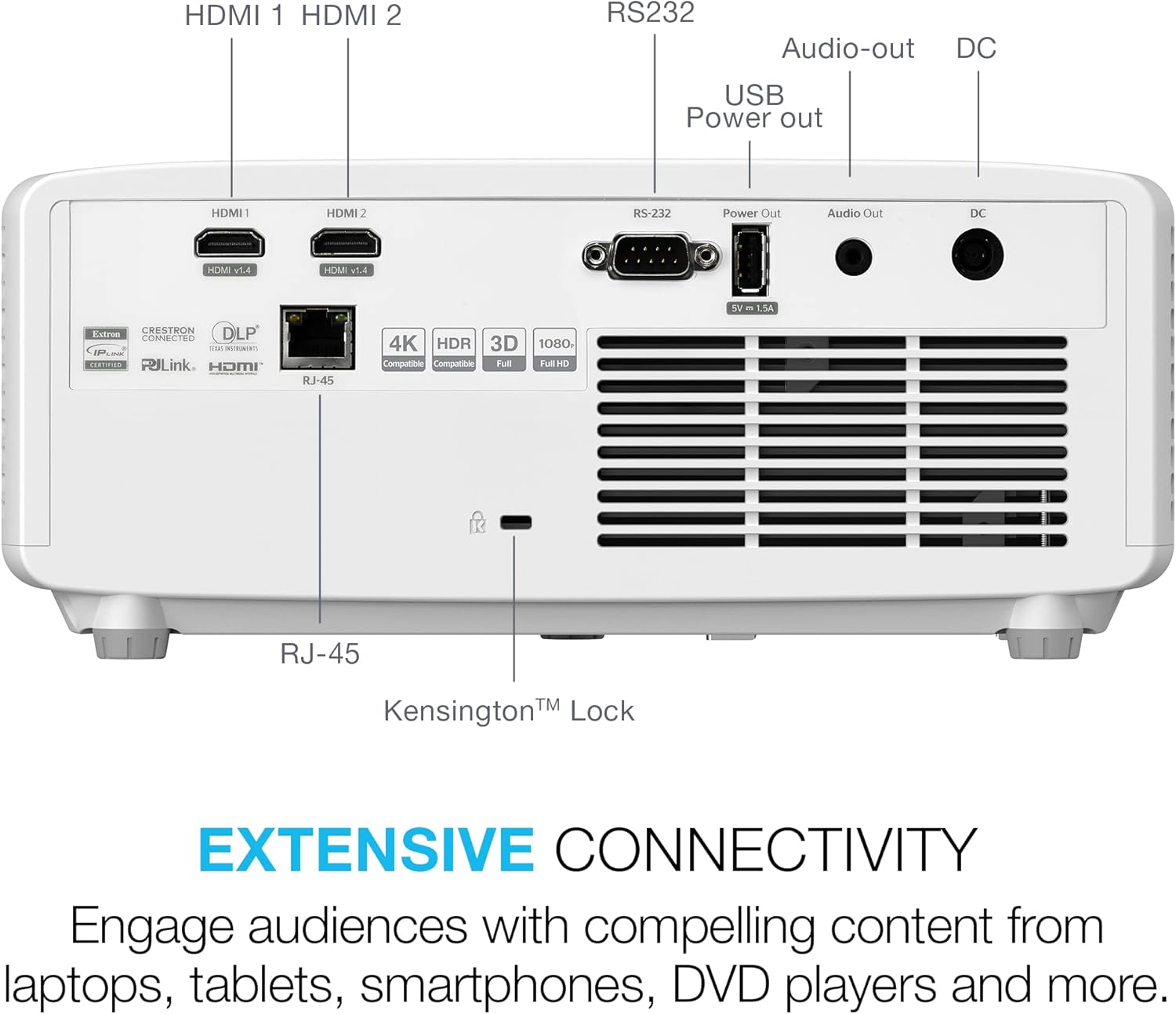
Delwedd: Manwl view of the rear panel of the Optoma GT2100HDR, showing various input and output ports.
- HDMI 1 a 2: For connecting high-definition sources (HDCP2.2 / 4K 60Hz compatible).
- RS-232: Ar gyfer integreiddio system reoli.
- USB Power OUT (5V/1.5A): For powering external devices.
- Sain Allan: Jac 3.5mm ar gyfer systemau sain allanol.
- DC: Mewnbwn pŵer.
- RJ-45: Ar gyfer rheoli rhwydwaith.
Operating Your Projector
Gweithrediad Sylfaenol
Power on the projector using the power button on the unit or the remote control. Select the desired input source using the 'Source' button. Adjust focus and zoom as needed for a clear image.
Modd Hapchwarae Gwell
The GT2100HDR features an enhanced game mode designed to minimize input lag, providing a smooth and responsive gaming experience. This mode also optimizes color and contrast for immersive gameplay.
Fideo: Sioe fideo cynnyrch swyddogolasing the Optoma GT2100HDR's features, including enhanced gaming mode and image quality.
Addasiad Delwedd
Utilize the keystone correction and four-corner correction features to achieve a perfectly rectangular image, even if the projector is not perfectly aligned with the screen. Refer to the on-screen display menu for these adjustments.

Image: Demonstration of flexible installation features, including keystone and four-corner correction, ensuring a perfectly aligned image.
Color and Clarity
The projector delivers sharp and detailed content with 1080p HD resolution, without downscaling or compression. It supports 4K HDR input, providing rich cinematic colors and an impressive 300,000:1 contrast ratio, covering 99% of the Rec. 709 color gamut.

Image: Visual representation comparing standard definition (SD), high definition (HD), and Full HD 1080p resolutions, highlighting the superior clarity of 1080p.
Cynnal a chadw
The Optoma GT2100HDR utilizes DuraCore laser technology, providing up to 30,000 hours of virtually maintenance-free operation. The projector also features an IPX6 dust resistance rating, reducing the need for frequent cleaning of internal components. For external cleaning, use a soft, lint-free cloth. Avoid abrasive cleaners or solvents.
Datrys problemau
Os byddwch chi'n dod ar draws problemau gyda'ch taflunydd, cyfeiriwch at y problemau a'r atebion cyffredin canlynol:
- Dim Delwedd: Ensure all cables are securely connected and the correct input source is selected. Check power connections.
- Ansawdd Delwedd Gwael: Adjust focus and keystone settings. Verify the resolution of the input source. Ensure the lens is clean.
- Dim Sain: Check audio cable connections. Adjust the projector's volume and ensure the source device's volume is not muted. If using external speakers, ensure they are properly connected and powered.
- Rheolaeth Anghysbell Ddim yn Gweithio: Replace batteries. Ensure there are no obstructions between the remote and the projector's IR receiver.
For more complex issues, consult the full user manual or contact Optoma customer support.
Manylebau
| Nodwedd | Manylyn |
|---|---|
| Dimensiynau Cynnyrch | 10.79 x 8.5 x 4.49 modfedd |
| Pwysau Eitem | 6.61 pwys |
| Rhif Model yr Eitem | GT2100HDR |
| Cydraniad Arddangos | 1920 x 1080 (HD Llawn) |
| Disgleirdeb | 4200 o Lumens |
| Ffynhonnell Golau | DuraCore Laser Technology |
| Bywyd Ffynhonnell Ysgafn | Hyd at 30,000 awr |
| Technoleg Cysylltedd | HDMI, USB, RS-232, RCA |
| Nodweddion Arbennig | DuraCore Laser Technology, Energy-Efficiency, Full 3D, Ultra Compact Design |
| Defnyddiau a Argymhellir | Busnes, Addysg, Gemau, Sinema Gartref |
Gwarant a Chefnogaeth
Warranty information for the Optoma GT2100HDR projector is typically provided with your purchase documentation. Please refer to the warranty card or the official Optoma website for detailed terms and conditions. For technical support, service, or further inquiries, please visit the official Optoma support page or contact their customer service department.


