1. Rhagymadrodd
This manual provides instructions for the VINABTY replacement remote control, designed for use with SANSUI LED TV model ES24Z1. This remote control offers direct functionality without the need for programming, ensuring a straightforward user experience.
2. Cynnyrch Drosview
The VINABTY replacement remote control is a dedicated device for controlling your SANSUI LED TV ES24Z1. It features an ergonomic design for comfortable handling and clearly labeled buttons for intuitive operation.
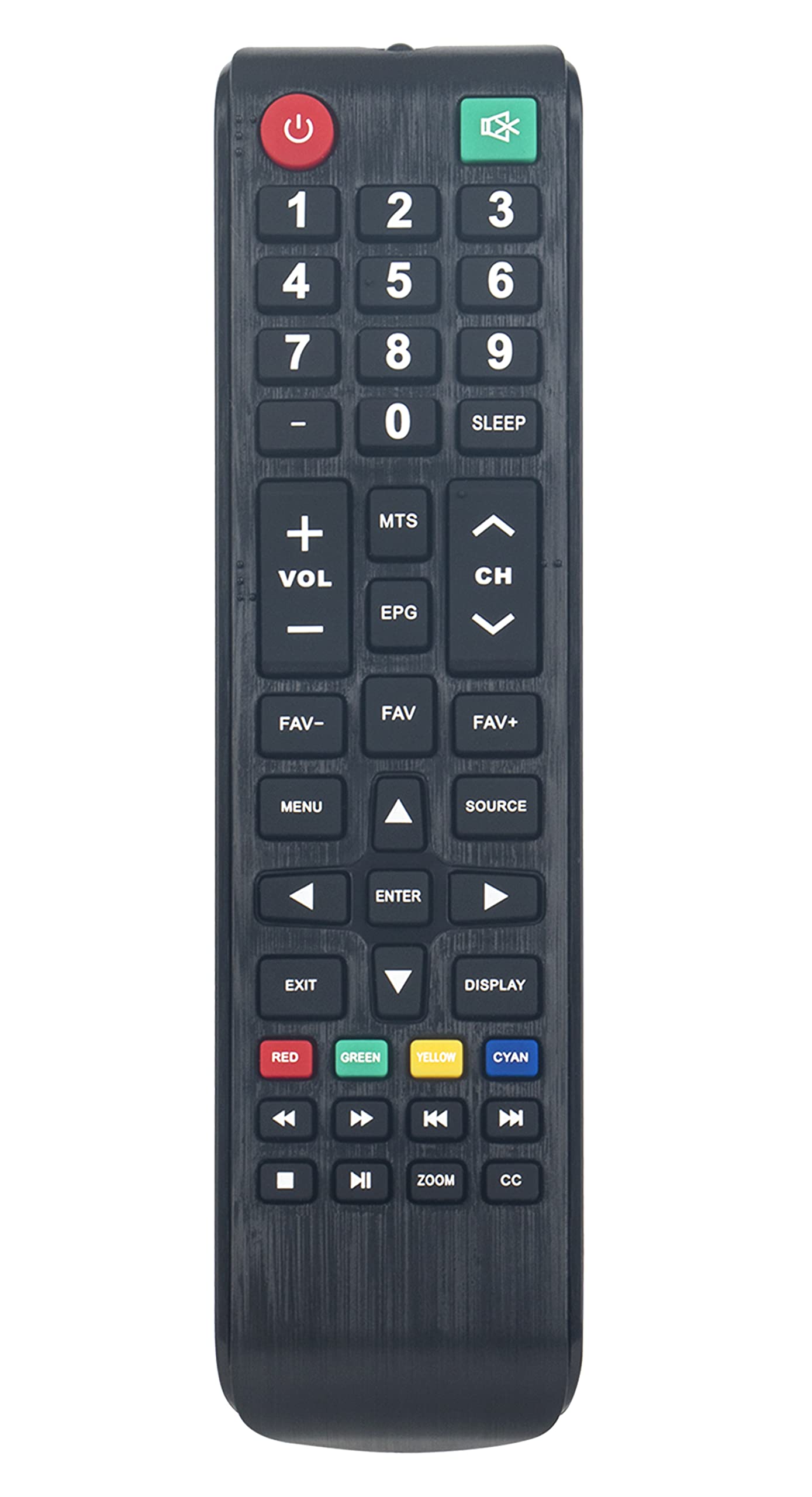
Delwedd 2.1: Blaen view of the VINABTY remote control, highlighting its button layout.
3. Gosod
3.1. Gosod Batri
To begin using your remote control, you must install two AAA batteries. Follow these steps:
- Lleolwch y clawr compartment batri ar gefn y teclyn rheoli o bell.
- Pwyswch i lawr ar y tab a llithro'r clawr i lawr i agor yr adran.
- Insert two new AAA batteries, ensuring the positive (+) and negative (-) terminals align correctly with the markings inside the compartment.
- Llithrwch glawr adran y batri yn ôl i'w le nes ei fod yn clicio'n ddiogel.

Delwedd 3.1: Cefn view y teclyn rheoli o bell, gan nodi adran y batri.
3.2. Defnydd Cychwynnol
This remote control requires no programming. Once batteries are installed, it is ready for immediate use with your SANSUI LED TV ES24Z1. Point the remote control directly at your television and press the desired function button.
4. Cyfarwyddiadau Gweithredu
Familiarize yourself with the primary functions of the remote control:
- Botwm Pŵer (⏻): Yn troi'r teledu ymlaen neu i ffwrdd.
- Botymau Rhif (0-9): Dewiswch sianeli teledu yn uniongyrchol.
- VOL +/-: Yn addasu lefel y sain.
- CH +/-: Yn newid y sianel deledu i fyny neu i lawr.
- MUTE: Yn tewi neu'n dad-dewi'r sain teledu.
- BWYDLEN: Yn cyrchu prif ddewislen y teledu.
- FFYNHONNELL: Selects input sources (e.g., HDMI, AV).
- EPG: Yn arddangos y Canllaw Rhaglen Electronig.
- CYSGU: Sets a timer for the TV to turn off automatically.
- Botymau Llywio (I Fyny, I Lawr, Chwith, Dde, ENTER): Llywio drwy'r ddewislenni a chadarnhau dewisiadau.
- Allanfa: Gadael y ddewislen neu swyddogaeth gyfredol.
- ARDDANGOS: Shows current channel information.
- Color Buttons (RED, GREEN, YELLOW, CYAN): Access specific functions within certain TV menus or applications, as indicated on your TV screen.
- Botymau Rheoli Cyfryngau (Chwarae, Saib, Stopio, Ail-ddirwyn, Ymlaen yn Gyflym, Blaenorol, Nesaf): Control media playback if supported by your TV and content.
- CHWYDDO: Yn addasu lefel chwyddo'r sgrin.
- CC: Yn actifadu neu'n dadactifadu Capsiynau Caeedig.
5. cynnal
5.1. Glanhau
Er mwyn cynnal ymddangosiad a swyddogaeth y teclyn rheoli o bell, glanhewch ef yn rheolaidd:
- Defnyddiwch lliain meddal, sych i sychu'r wyneb.
- Ar gyfer baw ystyfnig, ychydig yn dampjw.org cy y brethyn â dŵr neu lanhawr ysgafn nad yw'n sgraffiniol.
- Avoid using harsh chemicals, solvents, or abrasive materials, as these can damage the remote's finish or internal components.
5.2. Amnewid Batri
Amnewidiwch y batris pan fydd ymateb y teclyn rheoli o bell yn mynd yn araf neu'n rhoi'r gorau i weithio. Amnewidiwch y ddau fatri ar yr un pryd bob amser gyda batris AAA newydd. Peidiwch â chymysgu batris hen a newydd, na gwahanol fathau o fatris.
5.3. Storio
If the remote control will not be used for an extended period, remove the batteries to prevent leakage and potential damage to the device. Store the remote in a cool, dry place away from direct sunlight and extreme temperatures.
6. Datrys Problemau
If you encounter issues with your remote control, refer to the following common solutions:
- Ddim yn Ymateb o Bell:
- Check if the batteries are correctly installed with the correct polarity (+/-).
- Amnewid y batris gyda rhai newydd.
- Gwnewch yn siŵr nad oes unrhyw rwystrau rhwng y teclyn rheoli o bell a synhwyrydd is-goch y teledu.
- Confirm you are pointing the remote directly at the TV.
- Botymau Ddim yn Gweithio:
- Clean the remote control surface and buttons to remove any dirt or debris that might be obstructing button presses.
- If only specific buttons are not working, it might indicate internal damage; consider replacing the remote.
- TV Not Responding to All Commands:
- Verify that the remote control is indeed compatible with your specific SANSUI LED TV model ES24Z1.
- Some advanced TV functions might require the original TV remote or specific TV menu navigation.
7. manylebau
| Brand | VINABTY |
| Rhif Model | ES24Z1 |
| Dyfeisiau Cydnaws | SANSUI LED TV ES24Z1 |
| Technoleg Cysylltedd | Is-goch (IR) |
| Ffynhonnell Pwer | 2 x Batri AAA (heb eu cynnwys) |
| Dimensiynau Cynnyrch | 7.5 x 2 x 0.7 modfedd |
| Pwysau Eitem | 2.3 owns |
| Nodwedd Arbennig | Ergonomig |
8. Gwarant a Chefnogaeth
For information regarding warranty coverage or technical support, please refer to the documentation provided with your purchase or contact the retailer. Keep your purchase receipt as proof of purchase.
