1. Rhagymadrodd
This manual provides comprehensive instructions for the OMAIC BN59-01312A Replacement Voice Remote Control. It covers setup, operation, compatibility, and troubleshooting to ensure optimal performance with your compatible Samsung television.
2. Cynnyrch Drosview
The OMAIC BN59-01312A remote control is designed as a direct replacement for various Samsung Smart TV remotes, offering voice control functionality and quick access buttons for popular streaming services. It features a durable design tested for extensive use.

Figure 1: OMAIC Replacement Voice Remote Control with highlighted shortcut buttons.

Ffigur 2: Cydnawsedd drosview of the remote with different Samsung Smart TV types.
3. Gosod a Pharu
To use your OMAIC Replacement Voice Remote Control, it must first be paired with your Samsung TV. Follow these steps:
- Gwnewch yn siŵr bod eich teledu wedi'i droi ymlaen.
- Point the new remote control towards your Samsung TV.
- Pwyswch a dal y Nôl/Ymadael botwm a'r Chwarae/Saib button simultaneously for 5-8 seconds.
- A "Pairing complete" message should appear on your TV screen, indicating successful pairing.
- If pairing fails, repeat the steps. It may be helpful to turn the TV off and then on again before re-attempting the pairing process.

Figure 3: Visual guide for pairing the remote control with a Samsung Smart TV.
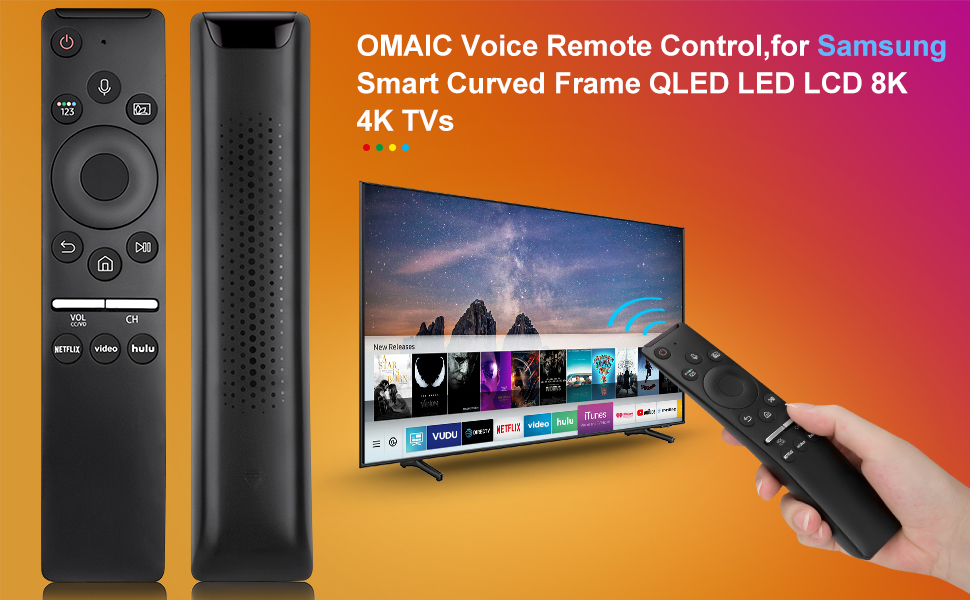
Figure 4: Detailed steps for connecting your Smart TV remote.
4. Cyfarwyddiadau Gweithredu
The remote control offers intuitive navigation and quick access to various functions:
- Rheoli llais: Press the microphone button and speak your commands to interact with your Smart TV.
- Botymau llwybr byr: Dedicated buttons for Netflix, Prime Video, and Hulu provide instant access to these streaming applications.
- Volume and Channel: Use the dedicated volume (VOL) and channel (CH) buttons to adjust audio levels and navigate channels.
- Pad Llywio: The circular navigation pad allows for easy menu navigation and selection.
- Full-Angle Control: The remote is tested to control your TV from any angle within 40 feet.

Figure 5: Key features including voice search and streaming service shortcuts.

Figure 6: Demonstrating voice control functionality to open applications.
5. Gosod Batri
The remote control requires 2 AA batteries for operation. These batteries are typically included with your purchase.
- Slide open the battery cover located on the back of the remote control.
- Mewnosodwch ddau fatri AA, gan sicrhau'r polaredd cywir (+ a -).
- Sleidiwch y clawr batri yn ôl i'w le nes ei fod yn clicio'n ddiogel.
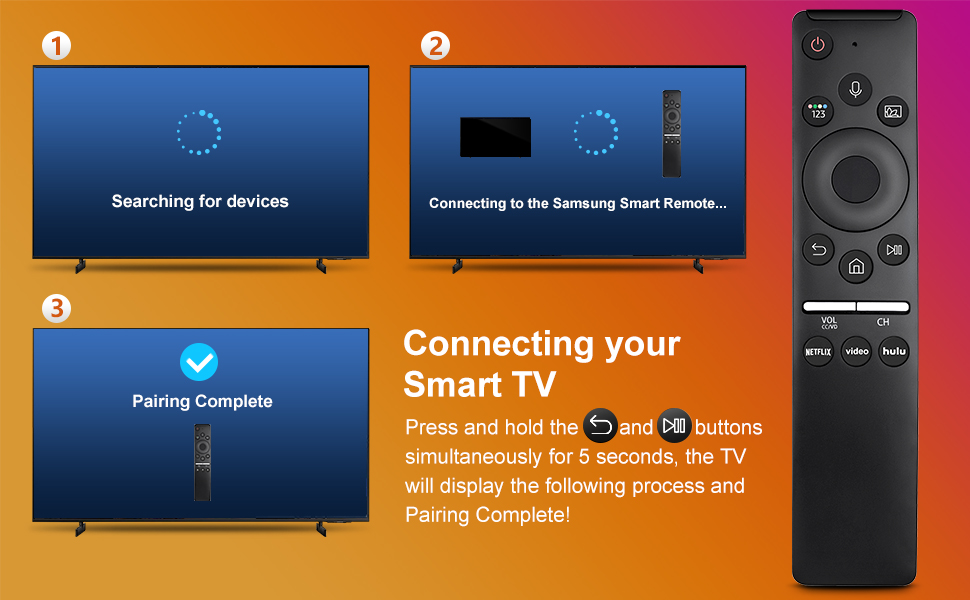
Figure 7: Battery installation and other key features.
6. Cydweddoldeb
This remote control is compatible with a wide range of Samsung TV models and original remote control models. Refer to the lists below for specific compatibility:
Compatible Samsung TV Remote Control Models:
- BN59-01312A, BN59-01312F, BN59-01312D, BN59-01312E, BN59-01312G, BN59-01312K, BN59-01312L, BN59-01312M, BN59-01312X, BN59-01312U, BN59-01312T
- BN59-01329A, BN59-01329C, BN59-01329F
- BN59-01330A, BN59-01330C, BN59-01330H, BN59-01330N, BN59-01330Q, BN59-01330M, BN59-01330H, BN59-01312Q
Compatible Samsung TV Models:
- QN75Q60RAFX, QN43Q60RAFX, QN49Q60RAFX, QN49Q70RAFX, QN55Q60RAFX, QN55Q70RAFX, QN55Q80RAFX, QN65Q60RAFX, QN65Q70RAFX, QN65Q80RAFX, QN65Q90RAFX, QN75Q70RAFX, QN75Q80RAFX, QN75Q90RAFX, QN82Q60RAFX, QN82Q70RAFX, QN82Q80RAFX, QN82Q90RAFX
- QN55Q900RBFX, QN65Q900RBFX, QN75Q900RBFX, QN82Q900RBFX, QN85Q900RBFX, QN98Q900RBFX
7. Datrys Problemau
- Ddim yn Ymateb o Bell: Gwiriwch a yw'r batris wedi'u gosod yn gywir a bod digon o wefr arnynt. Amnewidiwch y batris os oes angen.
- Materion paru: If the remote does not pair, ensure no other remotes are actively paired with the TV. Turn the TV off and on, then re-attempt the pairing process as described in Section 3.
- Rheoli Llais Ddim yn Gweithio: Ensure the remote is properly paired. Some TV models may require specific settings to enable voice control. Consult your TV's user manual for details.
- Amrediad Cyfyngedig: Ensure there are no obstructions between the remote and the TV. The remote is designed for optimal performance within 40 feet.
8. manylebau
| Nodwedd | Manylyn |
|---|---|
| Dimensiynau Cynnyrch | 6.35 x 1.42 x 0.66 modfedd |
| Pwysau Eitem | 1.76 owns |
| Rhif Model yr Eitem | BN59-01312A |
| Batris | Angen 2 batris AA (wedi'u cynnwys) |
| Nodwedd Arbennig | Chwiliad Llais |
| Uchafswm Nifer y Dyfeisiau â Chymorth | 18 |
| Dyfeisiau Cydnaws | Teledu |

Figure 8: Physical dimensions of the OMAIC Replacement Voice Remote Control.
9. Gwarant a Chefnogaeth
OMAIC provides 100 days of after-sales support for this product. If you have any questions or encounter issues, please contact us. We aim to reply within 12 hours and are committed to assisting you.


