1. Cynnyrch Drosview
The Alcatel 1B 2022 is a reliable smartphone designed for essential communication and daily tasks. It operates on Android 11 (Go Edition), offering an optimized experience for devices with 2GB RAM. Key features include a 5.5-inch HD+ display, 32GB of internal storage, and an 8MP rear camera.
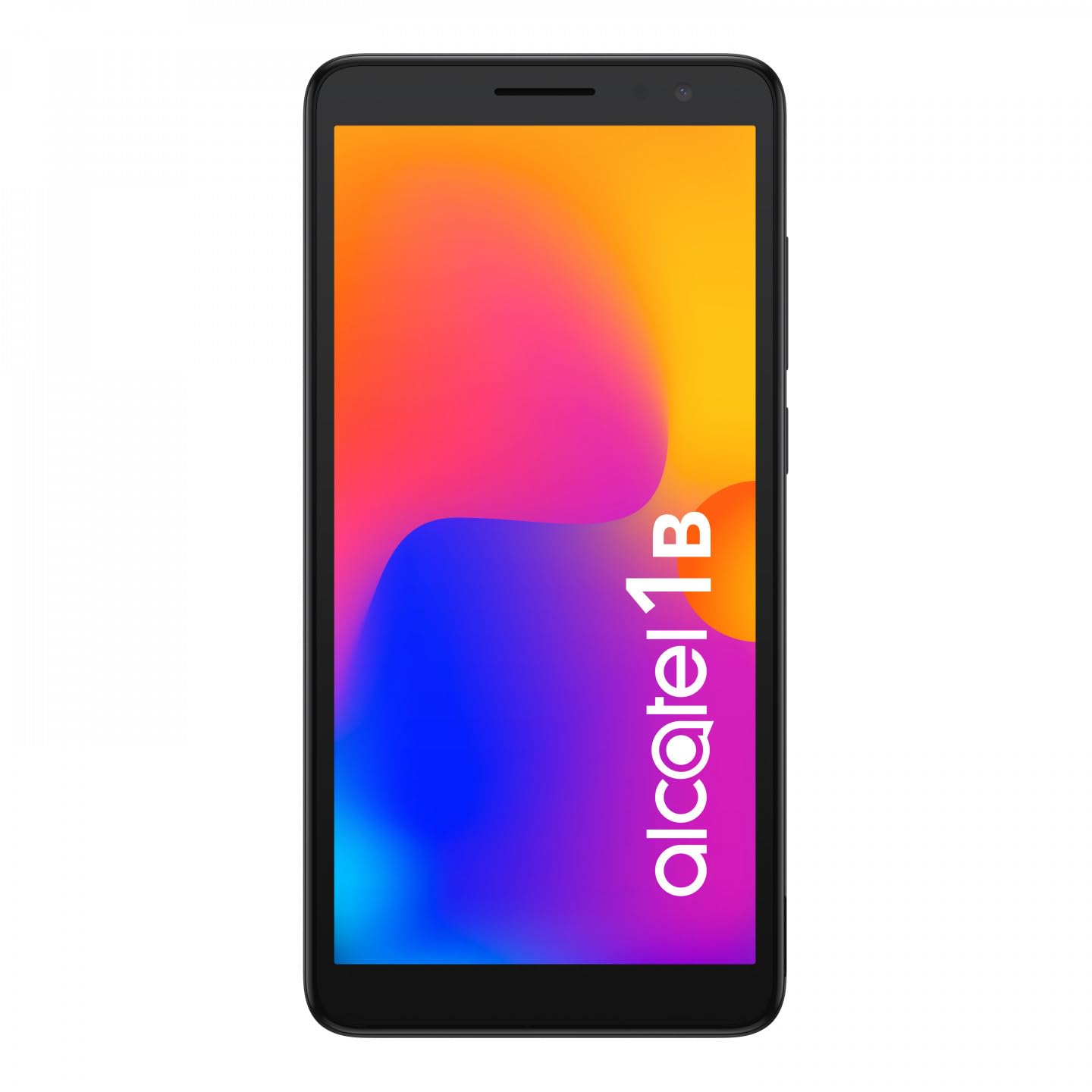
Delwedd 1.1: Blaen view of the Alcatel 1B 2022 smartphone, showcasing ei arddangosfa a'i ddyluniad cain.
This manual provides comprehensive instructions to help you set up, operate, and maintain your device effectively.
2. Cychwyn Arni
2.1 Cynnwys Pecyn
Gwnewch yn siŵr bod eich pecyn yn cynnwys yr eitemau canlynol:
- Alcatel 1B 2022 Smartphone
- Cebl Codi Tâl USB
- Addasydd Pŵer
- Canllaw Cychwyn Cyflym (gall amrywio yn ôl rhanbarth)
- Gwybodaeth Diogelwch a Gwarant
2.2 Gosod Cerdyn SIM a Cherdyn MicroSD
The Alcatel 1B 2022 supports Nano SIM cards and a MicroSD card for expandable storage. The battery is removable to access the SIM and MicroSD slots.
- Tynnwch y Clawr Cefn: Carefully locate the small notch on the bottom right side of the phone. Use a thin, flat-blade tool (such as a 5mm flat-blade screwdriver or a plastic pry tool) to gently pry open the back cover.
- Tynnwch y Batri: Once the back cover is off, lift the battery out of its compartment.
- Mewnosodwch y cerdyn(iau) SIM: Locate the SIM card slot(s). Insert your Nano SIM card(s) into the designated slot(s) with the gold contacts facing down.
- Mewnosod cerdyn MicroSD: Locate the MicroSD card slot. Insert your MicroSD card with the gold contacts facing down.
- Reinsert the Battery: Place the battery back into its compartment, ensuring the contacts align correctly.
- Amnewid y Clawr Cefn: Align the back cover with the phone's edges and press firmly around the perimeter until it clicks securely into place.

Delwedd 2.1: Cefn view of the Alcatel 1B 2022 smartphone, showing the camera module and the Alcatel logo. The back cover needs to be removed to access SIM and MicroSD slots.
2.3 Codi Tâl ar y Batri
Before first use, fully charge the phone's battery. Connect the USB cable to the phone's Micro USB port and the other end to the power adapter. Plug the adapter into a wall outlet. A full charge typically takes approximately two hours.
2.4 Pweru Ymlaen ac i ffwrdd
- I Bweru Ymlaen: Press and hold the Power button (usually on the right side of the device) until the Alcatel logo appears.
- I Bweru i ffwrdd: Pwyswch a daliwch y botwm Pŵer nes bod y ddewislen opsiynau pŵer yn ymddangos. Dewiswch "Diffodd" a chadarnhewch.
3. Gweithrediad Sylfaenol
3.1 Cloi Sgrin a Datgloi
To lock the screen, briefly press the Power button. To unlock, press the Power button and swipe up on the screen. You can set up various security methods, including a PIN, pattern, password, or facial recognition (if enabled).
3.2 Gwneud Galwadau ac Anfon Negeseuon
- Galwadau: Tap the Phone icon on the home screen, enter the number, and tap the call button.
- Negeseuon: Tap the Messages icon, tap "Start chat," enter the recipient's number or select from contacts, type your message, and tap send.
3.3 Cysylltu â Rhwydweithiau
- Wi-Fi: Ewch i Gosodiadau > Rhwydwaith a'r rhyngrwyd > Wi-Fi. Turn Wi-Fi on, select your desired network, and enter the password if required.
- Data Symudol (4G): Ewch i Gosodiadau > Rhwydwaith a rhyngrwyd > Rhwydwaith symudol. Ensure "Mobile data" is turned on.
- Hotspot (Tethering): To share your phone's internet connection, go to Gosodiadau > Rhwydwaith a rhyngrwyd > Man poeth a chlymu and enable "Wi-Fi hotspot."
3.4 Defnyddio'r Camera
The Alcatel 1B 2022 features an 8MP rear camera and a front camera. Tap the Camera icon to open the application. You can switch between photo and video modes, and access settings for flash, timer, and other options.
3.5 Nodweddion Sain
The phone includes a standard headphone jack for connecting earphones. You can also access the built-in FM Radio application (requires headphones to be plugged in as an antenna).
4. Cynnal a Chadw a Gofal
4.1 Glanhau Eich Dyfais
Use a soft, lint-free cloth to clean the screen and body of your phone. Avoid using harsh chemicals or abrasive materials, which can damage the device's surface.
4.2 Gofal Batri
The Alcatel 1B 2022 uses a Lithium-ion battery. To prolong battery life:
- Osgoi tymereddau eithafol.
- Peidiwch â gadael i'r batri ddraenio'n llwyr yn aml.
- Defnyddiwch y gwefrydd a ddarperir neu wefrydd cydnaws ardystiedig yn unig.
4.3 Diweddariadau Meddalwedd
Chwiliwch am ddiweddariadau meddalwedd a'u gosod yn rheolaidd i sicrhau bod gan eich dyfais y nodweddion, y clytiau diogelwch a'r gwelliannau perfformiad diweddaraf. Ewch i Gosodiadau > System > Diweddariad system.
4.4 Rheoli Storfa
The phone comes with 32GB of internal storage. You can expand this using a MicroSD card. To manage storage, go to Gosodiadau > Storio i view usage and free up space by uninstalling apps or deleting files.
5. Datrys Problemau
This section addresses common issues you might encounter with your Alcatel 1B 2022 smartphone.
5.1 Dyfais Ddim yn Troi Ymlaen
- Gwnewch yn siŵr bod y batri wedi'i wefru. Cysylltwch y ffôn â'i wefrydd ac aros ychydig funudau cyn ceisio ei droi ymlaen eto.
- Pwyswch a daliwch y botwm Pŵer am o leiaf 10-15 eiliad i gyflawni ailgychwyn gorfodol.
5.2 Problemau Cysylltedd Rhwydwaith
- Dim Arwydd: Check if your SIM card is properly inserted. Try restarting the phone. Ensure you are in an area with network coverage.
- Problemau Cysylltiad Wi-Fi: Restart your Wi-Fi router. Forget the network on your phone and reconnect.
5.3 Cymwysiadau'n Chwalu neu'n Rhewi
- Close and reopen the application.
- Clirio storfa a data'r ap (Settings > Apps & notifications > See all apps > [App Name] > Storage & cache).
- Uninstall and reinstall the problematic application.
5.4 Perfformio Ailosod Ffatri
Bydd ailosodiad ffatri yn dileu'r holl ddata o'ch ffôn ac yn ei adfer i'w osodiadau ffatri gwreiddiol. Gwnewch gopi wrth gefn o'r holl ddata pwysig cyn bwrw ymlaen.
- Ewch i Gosodiadau > System > Ailosod opsiynau.
- Select "Erase all data (factory reset)."
- Dilynwch yr awgrymiadau ar y sgrin i gadarnhau'r ailosodiad.
6. manylebau
Below are the technical specifications for the Alcatel 1B 2022 smartphone (Model: 5031G-2AALWE12).
| Nodwedd | Manylyn |
|---|---|
| Brand | Alcatel |
| Enw Model | 5031G 1B |
| Rhif Model | 5031G-2AALWE12 |
| System Weithredu | Android 11 (Go Edition) |
| Maint Arddangos | 5.5 modfedd |
| Cydraniad Arddangos | 1609 x 720 |
| HWRDD | 2 GB |
| Storio Mewnol | 32 GB |
| Storfa Ehangadwy | MicroSD (up to 128GB) |
| Camera Cefn | 8 Megapixels (AF, F2.0, FOV 81°) |
| Camera blaen | Oes |
| Processor (CPU Model) | Dimensiwn Mediatek 900 |
| Cysylltedd | 4G Cellular, Wi-Fi, Bluetooth |
| Math o Gysylltydd | Micro USB |
| Cyfansoddiad Batri | Lithium-ion (Removable) |
| Lliw | Du |
| Cludwr Di-wifr | Wedi'i ddatgloi |
Note: Some specifications, such as CPU model, may vary slightly by region or specific production batch. The phone supports 4G cellular connectivity.
7. Gwarant a Chefnogaeth
For detailed warranty information, please refer to the warranty card included in your product package or visit the official Alcatel websafle. Gall telerau ac amodau'r warant amrywio yn ôl rhanbarth.
For technical support, service, or further assistance, please contact Alcatel customer service through their official channels. Information regarding spare parts availability and guaranteed software updates is not available in this document; please consult the manufacturer's official resources for the most current details.
You can often find support resources, FAQs, and contact information on the official Alcatel support websafle.