Rhagymadrodd
This manual provides comprehensive instructions for the setup, operation, and maintenance of your Tesla Smart Pet Feeder (Model TSL-PC-BL4). Please read this manual thoroughly before using the device to ensure proper functionality and safety for your pet.
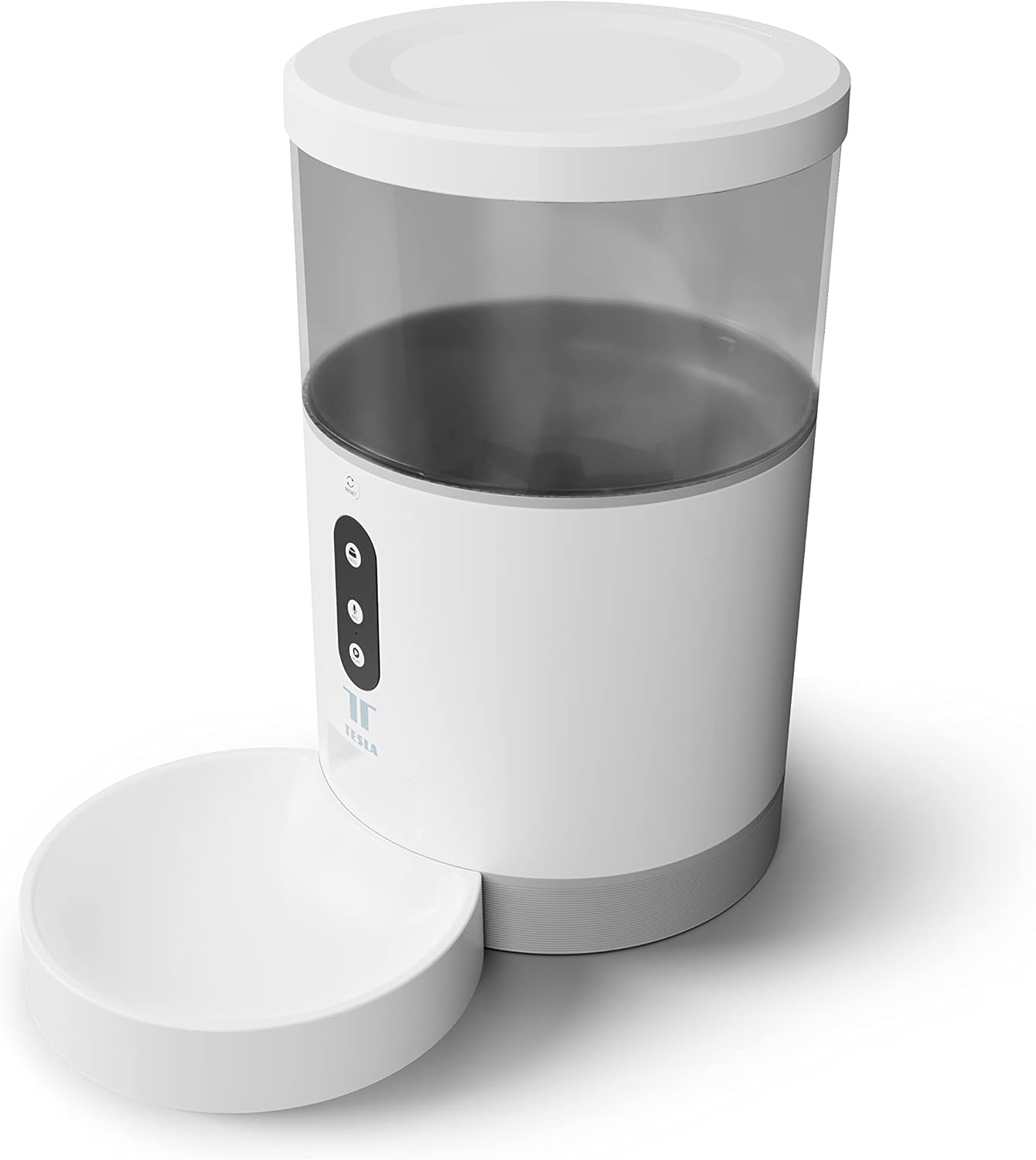
Delwedd: Blaen view of the Tesla Smart Pet Feeder, showing the main unit with a transparent food reservoir, control buttons, and an attached white food bowl.
Gwybodaeth Ddiogelwch Bwysig
Dilynwch y rhagofalon diogelwch canlynol i atal anaf neu ddifrod i'r ddyfais:
- Peidiwch â throchi'r brif uned mewn dŵr neu hylifau eraill.
- Gwnewch yn siŵr bod y porthwr wedi'i osod ar arwyneb sefydlog, gwastad.
- Keep out of reach of small children and pets when not in use or during assembly.
- Use only dry pet food with a kibble size up to 10 mm.
- Peidiwch â cheisio dadosod neu atgyweirio'r ddyfais eich hun. Cysylltwch â chymorth cwsmeriaid am gymorth.
- Datgysylltwch y porthiant bob amser cyn glanhau.
Cynnwys Pecyn
Gwiriwch fod yr holl gydrannau yn bresennol yn y pecyn:
- Tesla Smart Pet Feeder Main Unit
- Powlen Fwyd
- Addasydd Pŵer
- Llawlyfr Defnyddiwr (y ddogfen hon)
Canllaw Gosod
1. Cymanfa
- Place the main feeder unit on a flat, stable surface.
- Attach the food bowl to the designated slot at the base of the main unit. Ensure it clicks securely into place.

Delwedd: Blaen view of the feeder highlighting the control panel with feed, record, and play buttons.
2. Pweru'r Dyfais
- Pŵer AC: Cysylltwch yr addasydd pŵer â phorthladd mewnbwn pŵer y porthwr a'i blygio i mewn i soced wal safonol.
- Batri Wrth Gefn (Dewisol): For uninterrupted operation during power outages, insert three LR20 (D-cell) batteries into the battery compartment located at the bottom of the unit. Nid yw batris wedi'u cynnwys a rhaid eu prynu ar wahân.

Delwedd: Cefn view of the Tesla Smart Pet Feeder, showing the power input and battery compartment location.
3. Filling the Food Container
- Remove the lid from the top of the feeder.
- Pour dry pet food into the transparent container. The feeder has a capacity of 4 liters. Ensure kibble size does not exceed 10 mm to prevent jamming.
- Amnewid y caead yn ddiogel.

Delwedd: Llun agos view of dry pet food kibble in the feeder's bowl, demonstrating the type of food suitable for the device.
4. App Download and Wi-Fi Connection
- Download the Tesla Smart app from the App Store (iOS) or Google Play Store (Android).
- Open the app and follow the on-screen instructions to create an account and add your Tesla Smart Pet Feeder.
- Ensure your Wi-Fi network is 2.4 GHz for successful connection.
Cyfarwyddiadau Gweithredu
1. Scheduling Feeds via App
The primary method for controlling the feeder is through the Tesla Smart app. The app allows you to:
- Set feeding schedules: Define specific times for food dispensing.
- Adjust portion sizes: Control the amount of food dispensed per feeding. The feeder can dispense up to 10 portions per feeding.
- View feeding history.

Image: An orange cat resting beside the Tesla Smart Pet Feeder, illustrating the feeder in a home environment.
2. Bwydo â Llaw
To dispense food manually, press the "Feed" button on the feeder's control panel. Each press will dispense one portion of food.
3. Recordio a Chwarae Llais
The feeder includes a built-in microphone and speaker, allowing you to record a short message to call your pet at feeding times.
- Cofnod: Press and hold the "Record" button (microphone icon) on the control panel. Speak your message. Release the button to save.
- Chwarae: Press the "Play" button (speaker icon) to play your recorded message. The message will also play automatically at scheduled feeding times.
4. Integreiddio Cartref Clyfar
The Tesla Smart Pet Feeder is compatible with Google Assistant and Amazon Alexa. You can control the feeder using voice commands after linking it through the respective smart home applications.
Cynnal a Chadw a Glanhau
Regular cleaning ensures the longevity and hygienic operation of your pet feeder.
- Food Bowl: The food bowl can be detached and washed by hand with mild soap and water. Rinse thoroughly and dry completely before reattaching.
- Cynhwysydd Bwyd: The transparent food container can be wiped clean with a damp lliain. Gwnewch yn siŵr ei fod yn hollol sych cyn ei ail-lenwi â bwyd.
- Prif Uned: Wipe the exterior of the main unit with a soft, dry cloth. Peidiwch â defnyddio glanhawyr sgraffiniol na throchi'r brif uned mewn dŵr.
- Allfa Fwyd: Periodically check the food outlet for any blockages or food residue and clear as necessary.
Important: Always unplug the feeder from the power source before cleaning.
Datrys problemau
| Problem | Achos Posibl | Ateb |
|---|---|---|
| Nid yw'r porthwr yn troi ymlaen. | No power from outlet; batteries depleted or incorrectly installed. | Check power adapter connection and wall outlet. Replace or install D-cell batteries correctly. |
| Bwyd ddim yn cael ei ddosbarthu. | Food jammed; container empty; incorrect kibble size; feeder offline. | Check for food blockages in the outlet. Refill container. Ensure kibble is max 10mm. Check Wi-Fi connection and app status. |
| Methu cysylltu â Wi-Fi. | Incorrect Wi-Fi password; 5GHz network; feeder too far from router. | Verify Wi-Fi password. Ensure you are connecting to a 2.4 GHz network. Move feeder closer to router. Restart feeder and router. |
| Nid yw recordio llais yn gweithio. | Microphone issue; recording procedure incorrect. | Ensure you are pressing and holding the record button correctly. Try restarting the feeder. |
Manylebau
| Nodwedd | Manylyn |
|---|---|
| Rhif Model | TSL-PC-BL4 |
| Dimensiynau (L x W x H) | 30 x 30 x 20 cm |
| Pwysau | 1.92 Cilogram |
| Deunydd | Plastig |
| Lliw | Gwyn |
| Gallu | 4 litr |
| Maint Cibbl | Hyd at 10 mm |
| Ffynhonnell Pwer | AC Adapter, 3x LR20 (D-cell) batteries (not included) |
| Cysylltedd | Wi-Fi (2.4 GHz) |
| Nodweddion Arbennig | Wi-Fi and App Control, Voice Recording, Google Assistant/Amazon Alexa Compatible |
Gwarant a Chefnogaeth
For warranty information, technical support, or service inquiries, please refer to the official Tesla Smart websafle neu cysylltwch â'u hadran gwasanaeth cwsmeriaid. Cadwch eich derbynneb prynu fel prawf o brynu.
Am y wybodaeth a'r adnoddau cymorth diweddaraf, ewch i: www.teslasmart.com


