1. Rhagymadrodd
Thank you for choosing the Dalton 2000VA Uninterruptible Power Supply (UPS). This device is designed to provide reliable power backup and protection for your electronic equipment against power outages, surges, and fluctuations. Please read this manual thoroughly before installation and operation to ensure optimal performance and safety.
2. Cyfarwyddiadau Diogelwch Pwysig
Dilynwch y rhagofalon diogelwch sylfaenol hyn bob amser i leihau'r risg o dân, sioc drydanol ac anaf:
- Peidiwch ag agor yr UPS casing. Nid oes unrhyw rannau y gall y defnyddiwr eu gwasanaethu y tu mewn. Cyfeiriwch y gwaith cynnal a chadw at bersonél gwasanaeth cymwys.
- Do not use the UPS in environments with excessive dust, humidity, or extreme temperatures.
- Sicrhewch fod yr UPS wedi'i gysylltu â soced pŵer wedi'i seilio.
- Do not connect non-computer related items like medical equipment, life support equipment, or household appliances to the UPS.
- Position the UPS in a well-ventilated area, away from direct sunlight or heat sources.
- In case of emergency, press the power button to turn off the UPS and disconnect it from the AC power source.
3. Cynnwys Pecyn
Gwiriwch fod yr holl eitemau yn bresennol yn eich pecyn:
- Dalton 2000VA UPS Unit
- Cord Pŵer
- USB Communication Cable (if applicable)
- Llawlyfr Defnyddiwr (y ddogfen hon)

Ffigur 3.1: Blaen view of the Dalton 2000VA UPS unit, showing the display screen and power button.
4. Gosod a Gosod
Follow these steps to set up your UPS:
- Dadbacio: Carefully remove the UPS from its packaging. Inspect for any shipping damage.
- Lleoliad: Place the UPS on a flat, stable surface in a cool, dry, and well-ventilated area. Ensure there is adequate space around the unit for airflow.
- Tâl Cychwynnol: Before connecting any devices, plug the UPS power cord into a grounded wall outlet. Allow the unit to charge for at least 8 hours to ensure the battery is fully charged. The display will indicate charging status.
- Cysylltu Dyfeisiau:
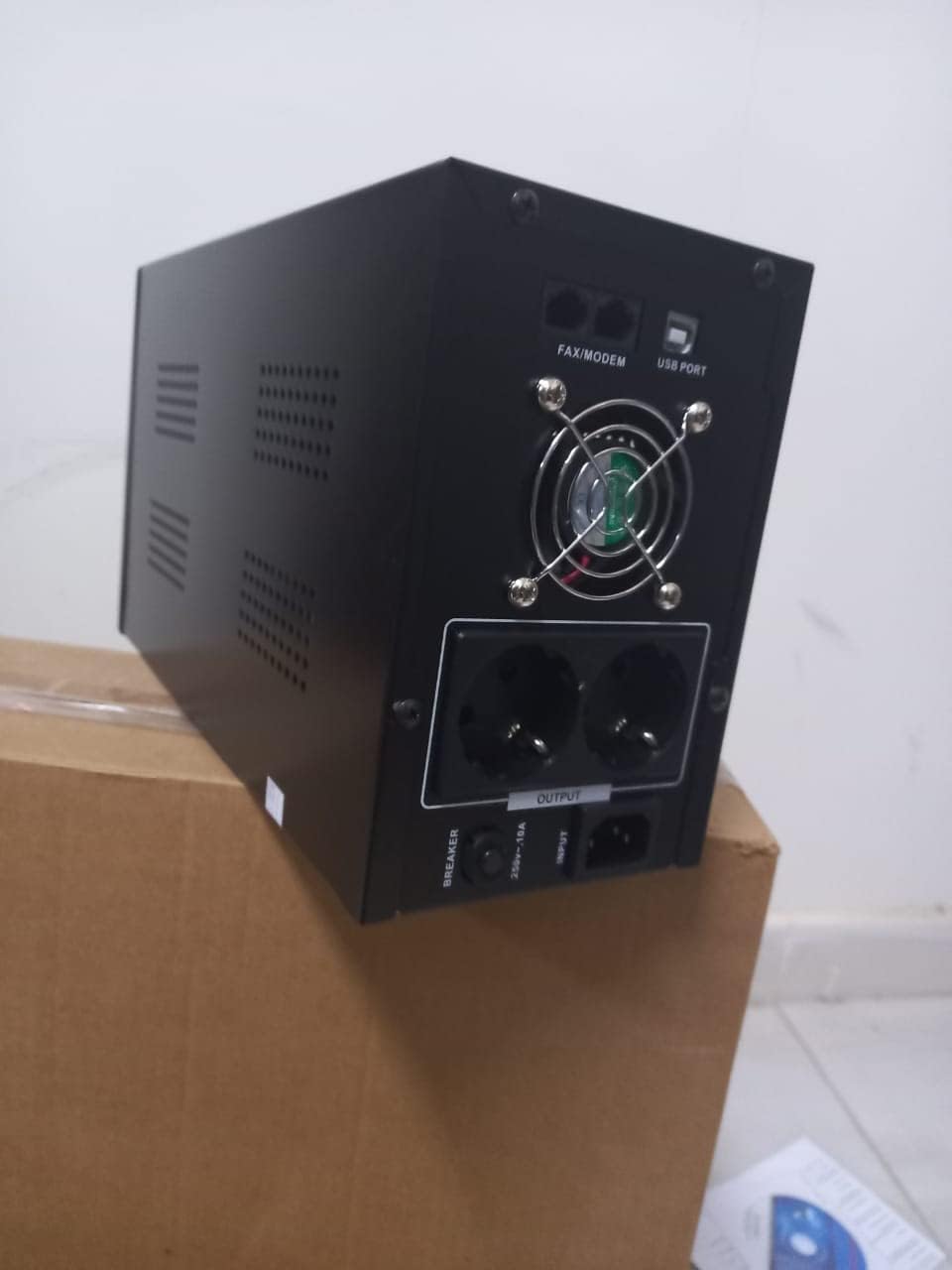
Ffigur 4.1: Cefn view of the Dalton 2000VA UPS, highlighting the input power port, output sockets, and USB/Modem ports.
- Once the battery is charged, connect your computer, monitor, and other critical electronic devices to the UPS output sockets.
- Do not overload the UPS. Refer to the specifications section for maximum load capacity.
- If applicable, connect the USB communication cable from the UPS to your computer for monitoring software (software not included, check manufacturer's websafle).
5. Gweithredu'r UPS
5.1 Pweru Ymlaen/Diffodd
- I Bweru Ymlaen: After connecting to AC power and charging, press and hold the power button on the front panel for approximately 3 seconds until you hear a beep and the display illuminates.
- I Bweru i ffwrdd: Press and hold the power button for approximately 3 seconds until you hear a beep and the display turns off. If the UPS is running on battery, it will shut down immediately. If connected to AC, it will switch to bypass mode before shutting down.
5.2 Deall yr Arddangosfa
The front panel LCD display provides real-time status information:
- YN: Yn dangos y mewnbwn cyftage from the utility power.
- ALLAN: Yn dangos y gyfrol allbwntage provided by the UPS to connected devices.
- ARFEROL: Indicates the UPS is operating on utility power.
- Ystlumod: Yn dangos lefel gwefr gyfredol y batri.
- Llwyth: Yn dangos y canrantage o gapasiti'r UPS sy'n cael ei ddefnyddio gan ddyfeisiau cysylltiedig.
- Battery Mode Icon: Appears when the UPS is running on battery power during an outage.

Ffigur 5.1: Ochr view of the UPS, showing the illuminated display with power status indicators.
5.3 Battery Backup Function
Mewn achos o bŵer outage, the UPS will automatically switch to battery power, providing continuous power to your connected devices. The duration of backup power depends on the load connected and the battery's charge level. The UPS will emit an audible alarm during battery operation.
When utility power returns, the UPS will automatically switch back to AC power and begin recharging its battery.
6. cynnal
- Gofal Batri: To maximize battery life, ensure the UPS is always connected to an AC outlet to keep the battery charged. If the UPS is stored for an extended period, recharge it every three months for at least 8 hours.
- Glanhau: Disconnect the UPS from all power sources before cleaning. Use a soft, dry cloth to wipe the exterior. Do not use liquid or aerosol cleaners.
- Awyru: Regularly check that the ventilation openings are not blocked by dust or debris to prevent overheating.
7. Datrys Problemau
Cyfeiriwch at y tabl isod am broblemau cyffredin a'u datrysiadau:
| Problem | Achos Posibl | Ateb |
|---|---|---|
| Nid yw UPS yn troi ymlaen. | Battery not charged or power cord disconnected. | Ensure power cord is securely plugged in and allow battery to charge for 8 hours. |
| UPS beeps continuously in normal mode. | Cyflwr gorlwytho. | Disconnect non-essential equipment until the alarm stops. Check total load. |
| Short backup time. | Battery not fully charged or battery nearing end of life. | Allow UPS to charge for 8 hours. If issue persists, battery may need replacement (contact service center). |
| UPS does not provide power during outage. | Battery discharged or internal fault. | Ensure UPS was fully charged. If problem persists, contact authorized service center. |
8. Manylebau Technegol
| Nodwedd | Manylyn |
|---|---|
| Dimensiynau Cynnyrch | 12.5 x 22.5 x 38 cm |
| Gwneuthurwr | Dalton |
| Enw Brand | Generig |
| Lliw | Du |
| Deunydd | Metel |
| Cyfredol | 5 Ampere |
| Ffactor Ffurf | Rac |
| Amrediad Amrediad | 50-60 Hz |
| Allbwn Voltage | 220 folt |
| Math o Gysylltydd | AC |
9. Gwarant a Chefnogaeth
Dalton provides an authorized maintenance center for all Uninterruptible Power Supply units. For warranty claims, technical support, or service inquiries, please contact your local Dalton authorized distributor or service center. Keep your purchase receipt as proof of purchase for warranty validation.
For further assistance, please visit the official Dalton websafle neu cysylltwch â chymorth cwsmeriaid.


