iHip 3ft PVC Micro USB High-Speed Data and Charging Cable
Model: WLG-PP27
Rhagymadrodd
This manual provides essential information for the proper use, setup, maintenance, and troubleshooting of your iHip 3ft PVC Micro USB High-Speed Data and Charging Cable. Please read this manual thoroughly before using the product.
The iHip Micro USB cable is designed for fast charging and high-speed data transfer, compatible with a wide range of devices including Android phones, tablets, gaming consoles, and other devices with a Micro USB interface. It features a durable rubber finish and a metal tip, engineered for longevity with a 10,000 bend test certification.
Cynnwys Pecyn
- 1 x iHip 3ft PVC Micro USB High-Speed Data and Charging Cable
Gosod
The iHip Micro USB cable is designed for plug-and-play functionality. Follow these steps to connect your device:
- Nodi Porthladdoedd: Locate the Micro USB port on your device (e.g., smartphone, tablet, game controller) and a standard USB-A port on your power adapter, computer, or other charging/data source.
- Cysylltu â Dyfais: Gently insert the Micro USB connector (the smaller, trapezoidal end) into the Micro USB port on your device. Ensure it is inserted horizontally and correctly to avoid damage.
- Cysylltu â Ffynhonnell Bŵer/Data: Insert the standard USB-A connector (the larger, rectangular end) into a compatible USB-A port on your power adapter, computer, or other charging/data source.
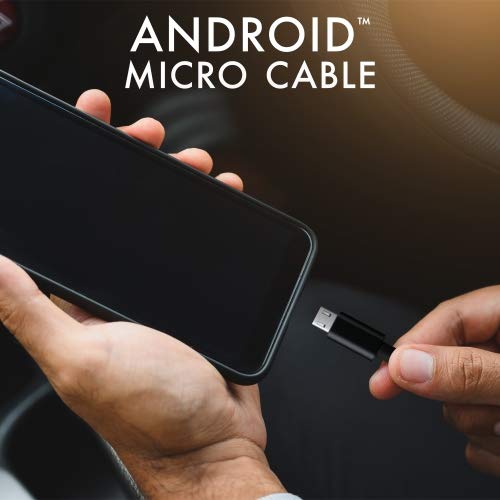
Image: Connecting the iHip Micro USB cable to a smartphone. The cable is designed for easy and secure connection.
Cyfarwyddiadau Gweithredu
Codi Tâl ar Eich Dyfais
To charge your device using the iHip Micro USB cable:
- Cysylltwch y cebl fel y disgrifir yn yr adran "Gosod".
- Ensure your power adapter or USB port provides sufficient power. For fast charging, use a Quick Charge compatible power adapter (e.g., 9V/2A output) or a standard power adapter with 5V/2.4A output.
- The device's charging indicator should activate, confirming that charging has begun.
Trosglwyddo Data
To transfer data between your device and a computer:
- Connect the Micro USB end to your device and the USB-A end to a USB port on your computer.
- Dylai eich cyfrifiadur adnabod y ddyfais gysylltiedig. Efallai y bydd angen i chi ddewis "File Transfer" or "MTP" mode on your device's screen if prompted.
- You can now access your device's storage to transfer files at speeds up to 480Mb/s.
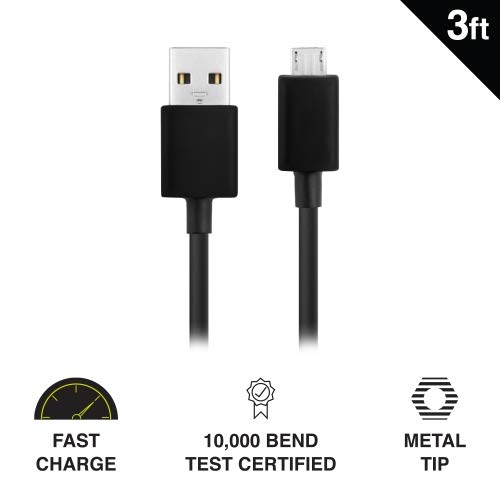
Image: Key features of the iHip Micro USB cable, highlighting its fast charge capability, durability, and robust metal tip.
Cynnal a Chadw a Gofal
To ensure the longevity and optimal performance of your iHip Micro USB cable, follow these maintenance guidelines:
- Trin yn gywir: Gafaelwch ym mhen y cysylltydd bob amser wrth blygio neu ddad-blygio'r cebl. Osgowch dynnu'n uniongyrchol ar y cebl ei hun, gan y gall hyn niweidio'r gwifrau mewnol.
- Storio: Store the cable in a clean, dry place away from extreme temperatures and direct sunlight. Avoid tightly coiling or bending the cable at sharp angles.
- Glanhau: If the connectors become dirty, gently wipe them with a dry, lint-free cloth. Do not use liquids or abrasive cleaners.
- Osgowch Straen: Do not place heavy objects on the cable or allow it to be pinched, which can lead to internal damage.
Datrys problemau
If you encounter issues with your iHip Micro USB cable, try the following troubleshooting steps:
- Dyfais Ddim yn Codi Tâl:
- Sicrhewch fod dau ben y cebl wedi'u cysylltu'n ddiogel.
- Ceisiwch ddefnyddio addasydd pŵer gwahanol neu borth USB.
- Test the cable with a different compatible device to rule out a device issue.
- Check the Micro USB port on your device for any debris or damage.
- Codi Tâl Araf:
- Ensure you are using a power adapter with adequate output (e.g., 5V/2.4A or Quick Charge compatible).
- Avoid charging from low-power USB ports (e.g., some laptop USB 2.0 ports).
- Materion Trosglwyddo Data:
- Verify that your device is set to "File Modd "Trosglwyddo" neu "MTP" pan fydd wedi'i gysylltu â chyfrifiadur.
- Rhowch gynnig ar borth USB gwahanol ar eich cyfrifiadur.
- Ailgychwynwch eich dyfais a'ch cyfrifiadur.
Manylebau
| Nodwedd | Manylyn |
|---|---|
| Rhif Model | WLG-PP27 |
| Hyd Cebl | 3 troedfedd (tua 0.91 metr) |
| Math o Gysylltydd | USB-A to Micro USB |
| Deunydd | PVC with Rubber Finish, Metal Tip |
| Cyflymder Trosglwyddo Data | Hyd at 480 Mb/s |
| Gwydnwch | 10,000+ bend lifespan certified |
| Cydweddoldeb | Android Cell Phones, Tablets, Windows Phones (Samsung Note/Galaxy, Nokia Lumia, LG, HTC), MP4, hard drives, PlayStation 4, Xbox One controller, and other Micro USB devices. |
| Dimensiynau Cynnyrch | 6.5 x 3 x 1 modfedd; 1.76 owns |

Image: The iHip 3ft PVC Micro USB cable, showcasing its compact and flexible design.
Gwarant a Chefnogaeth
The iHip Micro USB cable comes with a lifetime guarantee. For detailed warranty information and support, please visit the official iHip websafle:
For any further assistance or inquiries, please refer to the contact information provided on the iHip websafle.


