Rhagymadrodd
Diolch am brynuasing the Bytech True Wireless Bluetooth Boost Link True Speaker. This manual provides essential information for setting up, operating, and maintaining your new speakers. Please read this manual thoroughly before use to ensure proper operation and to maximize your listening experience. These speakers feature True Wireless Stereo (TWS) functionality, Bluetooth connectivity, FM Radio, and Bass Boost for rich audio.
Gwybodaeth Diogelwch
- Do not expose the speakers to extreme temperatures, humidity, or direct sunlight.
- Avoid dropping or subjecting the speakers to strong impacts.
- Do not disassemble, repair, or modify the speakers yourself. Refer all servicing to qualified personnel.
- Keep the speakers away from water and other liquids.
- Defnyddiwch y cebl gwefru a'r addasydd pŵer penodedig yn unig.
- Clean the speakers with a soft, dry cloth. Do not use abrasive cleaners or solvents.
- Listen at moderate volume levels to avoid hearing damage.
Cynnwys Pecyn

Image: The Bytech Boost Link True Wireless Speakers shown in their retail packaging, highlighting the two speakers and the Bluetooth connectivity feature.
Gwiriwch fod yr holl eitemau yn bresennol ac mewn cyflwr da:
- 2 x Bytech Boost Link True Wireless Speakers
- 1 x Cebl Gwefru (USB)
- 1 x Llawlyfr Defnyddiwr (y ddogfen hon)
Cynnyrch Drosview

Delwedd: Blaen agos view of the two Bytech Boost Link True Wireless Speakers, showing the speaker grilles and control buttons at the bottom.
Ymgyfarwyddwch â chydrannau a rheolyddion y siaradwr:
- Grille Siaradwr: Protects the speaker driver.
- Botymau Rheoli:
- Botwm Pŵer: Power On/Off, Play/Pause.
- Botwm Modd: Switch between Bluetooth, FM Radio, etc.
- Botwm Trac/Cyfrol Down Blaenorol: Pwyswch yn fyr am y trac blaenorol, pwyswch yn hir i ostwng y gyfrol.
- Botwm Trac/Cyfrol Nesaf Nesaf: Pwyswch yn fyr am y trac nesaf, pwyswch yn hir i gynyddu'r gyfrol.
- Porth Codi Tâl: Ar gyfer cysylltu'r cebl gwefru USB.
- Dangosydd LED: Shows power status, charging status, and pairing status.
Gosod
Codi Tâl ar y Siaradwyr
Before first use, fully charge both speakers. Connect the supplied USB charging cable to the charging port on each speaker and plug the other end into a USB power adapter (not included) or a computer's USB port. The LED indicator will show charging status and turn off or change color when fully charged.
Pweru Ymlaen/Diffodd
- I Bweru Ymlaen: Press and hold the Power button on each speaker until the LED indicator lights up and you hear a power-on prompt.
- I Bweru i ffwrdd: Press and hold the Power button on each speaker until the LED indicator turns off and you hear a power-off prompt.
Cyfarwyddiadau Gweithredu
Bluetooth Pairing (Single Speaker Mode)
- Gwnewch yn siŵr bod y siaradwr wedi'i bweru ymlaen ac yn y modd paru Bluetooth (bydd y dangosydd LED yn fflachio).
- Ar eich dyfais (ffôn clyfar, tabled, gliniadur), galluogwch Bluetooth a chwiliwch am ddyfeisiau sydd ar gael.
- Select "BYTECH BOOST LINK" (or similar name) from the list.
- Once paired, the LED indicator will stop flashing and remain solid, and you will hear a confirmation sound.
True Wireless Stereo (TWS) Pairing (Two Speakers)
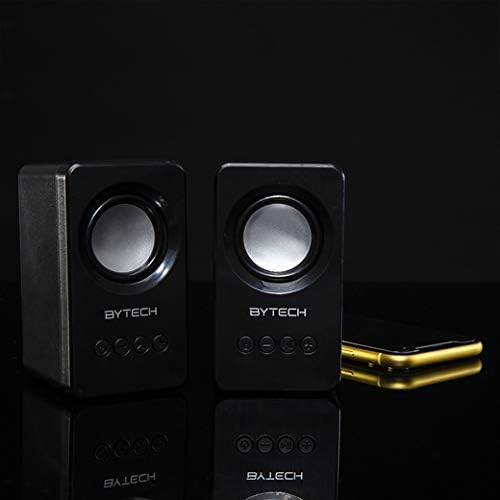
Image: The two Bytech Boost Link True Wireless Speakers positioned next to a smartphone, symbolizing their ability to connect wirelessly to each other and a device for stereo sound.
For a true stereo sound experience, you can pair both speakers together:
- Power on both Bytech Boost Link speakers. Do not connect them to your Bluetooth device yet.
- The speakers will automatically attempt to pair with each other. You will hear a confirmation sound when they are successfully linked for TWS. One speaker will become the master (left channel) and the other the slave (right channel).
- Once TWS paired, the master speaker will enter Bluetooth pairing mode (LED flashing).
- On your device, enable Bluetooth and search for "BYTECH BOOST LINK". Connect to this single entry.
- Both speakers will now play audio in stereo.
- Nodyn: If the speakers do not automatically pair, try double-pressing the Mode button on one of the speakers to initiate TWS pairing.
Gweithrediad Radio FM
- Power on the speaker(s).
- Gwasgwch y Modd button repeatedly until you hear the FM radio prompt.
- I sganio a chadw gorsafoedd yn awtomatig, pwyswch a daliwch y Chwarae/Saib button. The speaker will scan and store available FM stations.
- Defnyddiwch y Trac Blaenorol a Trac Nesaf botymau i lywio rhwng gorsafoedd sydd wedi'u cadw.
Chwarae Sain a Rheoli Cyfaint
- Chwarae/Seibiant: Pwyswch y botwm Power yn fyr.
- Trac Nesaf: Short press the Next Track/Volume Up button.
- Trac Blaenorol: Short press the Previous Track/Volume Down button.
- Cyfrol i Fyny: Long press the Next Track/Volume Up button.
- Cyfrol i Lawr: Long press the Previous Track/Volume Down button.
Cynnal a chadw
- Glanhau: Use a soft, dry, lint-free cloth to clean the surface of the speakers. Do not use liquid cleaners, aerosols, or solvents.
- Storio: Pan nad ydynt yn cael eu defnyddio am gyfnodau hir, storiwch y siaradwyr mewn lle oer, sych i ffwrdd o olau haul uniongyrchol a thymheredd eithafol.
- Gofal Batri: To prolong battery life, avoid fully discharging the battery frequently. Charge the speakers regularly, even if not in use.
Datrys problemau
| Problem | Achos Posibl | Ateb |
|---|---|---|
| Nid yw'r siaradwr yn troi ymlaen. | Batri isel. | Gwefrwch y siaradwr yn llawn. |
| Methu paru drwy Bluetooth. | Nid yw'r siaradwr yn y modd paru; Diffoddwch Bluetooth y ddyfais; Rhy bell o'r ddyfais. | Ensure speaker LED is flashing; Turn on Bluetooth on your device; Move speaker closer to device (within 10 meters). |
| Dim sain. | Volume too low; Speaker not connected; Incorrect mode. | Increase volume on speaker and device; Re-pair Bluetooth; Ensure correct mode (Bluetooth/FM). |
| Mae paru TWS yn methu. | Mae'r seinyddion eisoes wedi'u cysylltu â dyfais; Mae'r seinyddion yn rhy bell oddi wrth ei gilydd. | Disconnect speakers from any device; Power off and on both speakers, then try TWS pairing again; Ensure speakers are close to each other. |
| Derbyniad radio FM gwael. | Signal gwan; Ymyrraeth. | Relocate the speaker to an area with better reception; Extend the charging cable (can act as an antenna). |
Manylebau
- Model: GAN-AU-BS-152-BK
- Brand: Bytech
- Technoleg Cysylltedd: Diwifr (Bluetooth)
- Modd Allbwn Sain: Amgylchynu
- Math o Siaradwr: Sain Amgylch
- Nodweddion arbennig: Wireless Bluetooth, Bass Boost, FM Radio, True Wireless Stereo (TWS)
- Defnyddiau a Argymhellir: Ar gyfer Chwaraewyr Cerddoriaeth
- Dyfeisiau Cydnaws: Gliniadur, llechen, ffôn clyfar
- Math o Reolwr: On-device buttons
- Dimensiynau Pecyn: 20.7 x 16 x 9 cm
- Pwysau: 560 g
Gwarant a Chefnogaeth
Bytech products are designed and manufactured to the highest quality standards. For information regarding warranty coverage, technical support, or service inquiries, please refer to the warranty card included with your purchase or visit the official Bytech websafle. Cadwch eich prawf prynu ar gyfer hawliadau gwarant.
For further assistance, please contact Bytech customer support.


