1. Rhagymadrodd
This manual provides essential information for the safe and efficient operation of your DINGXUEMEI DXM STGU RD-806 Portable LED Projector. Please read this manual thoroughly before using the projector and retain it for future reference.
2. Gwybodaeth Diogelwch
- Do not block the ventilation openings. Ensure adequate space around the projector for proper airflow.
- Osgoi edrych yn uniongyrchol i mewn i'r lens taflunydd pan fydd y lamp is on, as it may cause eye damage.
- Do not place the projector on unstable surfaces.
- Cadwch y taflunydd i ffwrdd o ddŵr neu hylifau eraill.
- Defnyddiwch yr addasydd pŵer a gyflenwir gyda'r taflunydd yn unig.
- Datgysylltwch y taflunydd yn ystod stormydd mellt a phan na chaiff ei ddefnyddio am gyfnodau hir.
- Peidiwch â cheisio atgyweirio'r taflunydd eich hun. Cyfeiriwch bob gwasanaethu at bersonél cymwys.
3. Cynnyrch Drosview
3.1 Blaen ac Ochr View
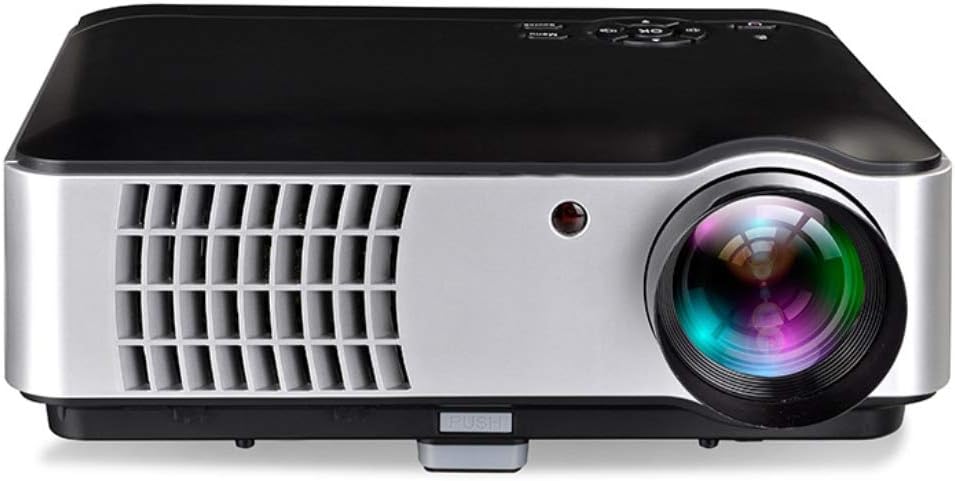
This image displays the front of the projector, highlighting the main projection lens and the infrared (IR) receiver for the remote control. The front also features ventilation grilles for cooling.

Mae'r ddelwedd hon yn dangos ochr view of the projector, emphasizing the large ventilation grilles on the left side, crucial for heat dissipation. The focus lens adjustment is visible near the front.
3.2 Panel Rheoli Uchaf

Y brig view illustrates the integrated control panel, featuring a central navigation cluster with an 'OK' button, surrounded by directional keys. Additional buttons for 'Menu', 'Source', and 'Power' are also present.

This detailed diagram labels the functions of each button on the top control panel: Indicator Light, Power Key, Direction Operation Keys, Confirm (OK), Volume Down, Volume Up, Sources, and Menu.
3.3 Front and Back Panel with Ports

This comprehensive diagram provides a labeled overview of the projector's front and back panels. Key features on the front include the Focus Lens, Height Adjustment, IR Receiver, Dustproof Net (for cleaning), and Cooling System Ventilation. The back panel features the Power ON/OFF button, Keystone adjustment, Power Switch, two USB Inputs, two HDMI Signal Inputs, VGA Input, AV/Audio Input/Output, and TV Input.
4. Gosod
4.1 Lleoliad
Place the projector on a stable, flat surface. Ensure there is sufficient space around the projector for proper ventilation. The optimal projection distance allows for a screen size ranging from 50 to 200 inches.
4.2 Cysylltiad Pwer
- Cysylltwch y llinyn pŵer â phorthladd mewnbwn pŵer y taflunydd.
- Plug the other end of the power cord into a standard electrical outlet (AC 100V-240V, 50/60Hz).
- Ensure the power switch on the back of the projector is in the 'ON' position.
4.3 Cysylltu Dyfeisiau Allanol

The projector supports a variety of input sources. Connect your desired device to the corresponding port on the back of the projector:
- HDMI: For laptops, gaming consoles (Xbox/PS), Blu-ray players, and set-top boxes. The projector has two HDMI inputs.
- VGA: For older desktop PCs or laptops.
- USB: For connecting USB drives or mobile hard disks to play media files directly. The projector has two USB inputs.
- O: For devices with composite video and stereo audio output (e.g., older DVD players, some set-top boxes).
- TV (ATV/DTV): For connecting to antenna or cable TV signals.
- Stereo Earphone: Ar gyfer cysylltu dyfeisiau sain allanol neu glustffonau.
5. Cyfarwyddiadau Gweithredu
5.1 Pŵer Ymlaen/Diffodd
- Pŵer Ymlaen: Press the 'Power' button on the top control panel or the remote control. The indicator light will illuminate.
- Pwer i ffwrdd: Press the 'Power' button again. The projector will shut down.
5.2 Rheolaeth Sylfaenol
Use the buttons on the top control panel or the remote control to navigate the projector's functions:
- Allweddi Cyfeiriad: Llywiwch drwy fwydlenni ac opsiynau.
- OK / Confirm: Dewiswch opsiwn neu cadarnhewch osodiad.
- Dewislen: Access the projector's main settings menu.
- Ffynhonnell: Select the input source (HDMI1, HDMI2, VGA, USB1, USB2, AV, TV).
- Cyfrol i fyny/i lawr: Addaswch lefel allbwn y sain.
5.3 Addasu Delwedd
- Ffocws: Rotate the focus lens ring on the front of the projector until the image appears sharp and clear.
- Carreg allwedd: Use the keystone adjustment knob on the back of the projector to correct trapezoidal distortion if the projector is not perfectly perpendicular to the screen.
5.4 Dewis Ffynhonnell Mewnbwn
After connecting your device, press the 'Source' button on the control panel or remote control. Use the direction keys to select the correct input source (e.g., HDMI1, VGA, USB1) and press 'OK' to confirm.
6. cynnal
6.1 Glanhau
- Dustproof Net: The projector features a dustproof net. It is recommended to clean this net once a month to ensure optimal cooling performance. Refer to the diagram in Section 3.3 for its location.
- Lens: Use a soft, lint-free cloth specifically designed for optical lenses to gently clean the projector lens. Do not use abrasive cleaners.
- Tu allan: Sychwch ochr allanol y taflunydd gyda lliain meddal, sych.
6.2 Storio
Pan nad yw'n cael ei ddefnyddio am gyfnodau hir, storiwch y taflunydd mewn lle oer, sych, i ffwrdd o olau haul uniongyrchol a thymheredd eithafol. Defnyddiwch y pecyn gwreiddiol neu gas amddiffynnol i atal llwch rhag cronni a difrod.
7. Datrys Problemau
- Dim pŵer: Check if the power cord is securely connected and the power switch is ON. Try a different power outlet.
- Dim Delwedd: Ensure the correct input source is selected. Check the connection cable between the projector and the source device.
- Delwedd aneglur: Adjust the focus lens. If the image is trapezoidal, adjust the keystone correction.
- Dim Sain: Check the volume settings on both the projector and the source device. Ensure external speakers are properly connected if used.
- Gorboethi: Ensure ventilation openings are not blocked. Clean the dustproof net if necessary.
8. manylebau
| Nodwedd | Manyleb |
|---|---|
| Model | RD-806 |
| Cydraniad Arddangos | 1280 x 800 picsel |
| Disgleirdeb | 2800 lumens |
| Cymhareb Cyferbyniad | 1500:1 |
| Cymhareb Agwedd | 4:3 a 16:9 |
| Maint Tafluniad | 50 - 200 modfedd |
| Ffynhonnell Golau | LED |
| Technoleg Cysylltedd | HDMI (x2), USB (x2), VGA, AV, TV (ATV/DTV) |
| Terfynell Allbwn | Ffôn clust stereo, ffynhonnell pŵer RV |
| Cyflenwad Pŵer | AC 100V-240V, 50 / 60Hz |
| Nodweddion Arbennig | Built-in Speaker, Portable |
| Dimensiynau Parseli | 33 x 33 x 12 cm |
| Pwysau | 5.29 kg |
8.1 Image Technology

The projector incorporates Six Color Matrix Technology and a high-speed color wheel designed to restore true color and enhance image fidelity.

This image highlights the projector's ultra-high contrast ratio, which contributes to superior image quality with deeper blacks and brighter whites, making colors more vivid and details clearer.
9. Gwarant a Chefnogaeth
Am wybodaeth am warant neu gymorth technegol, cyfeiriwch at y ddogfennaeth a ddarparwyd ar adeg y pryniant neu cysylltwch â'ch manwerthwr. Cadwch eich prawf prynu ar gyfer hawliadau gwarant.


