Rhagymadrodd
The Xfinity HD 720p Wireless Indoor/Outdoor Home Security Camera allows you to monitor your home environment with live video accessible from anywhere. Designed for both indoor and outdoor use, this camera provides essential security features to keep you informed.
Beth Sydd yn y Bocs
- Xfinity HD 720p Wireless Security Camera (Model: SCHC2AEW)
- Addasydd Pŵer
- Cebl USB
- Caledwedd Mowntio (sgriwiau ac angorau)

Image: Xfinity Home Security Camera and accessories neatly packaged in its box.
Canllaw Gosod
- Cysylltiad Pwer: Connect the camera to the power adapter using the provided USB cable, then plug the adapter into a standard electrical outlet.
- Lawrlwytho Ap: Download the official Xfinity Home app from your smartphone's app store (iOS App Store or Android Google Play).
- Paru Dyfais: Open the Xfinity Home app and follow the on-screen instructions to add a new device. You will typically need to scan a QR code on the camera or manually enter its details to pair it with your home Wi-Fi network. Ensure your Wi-Fi network is 2.4 GHz for compatibility.

Image: The Xfinity Home Security Camera placed on a surface, ready for setup.
Cyfarwyddiadau Gweithredu
Byw View and Basic Controls
Once paired, access the live video feed through the Xfinity Home app. The app provides controls for:
- Ffrydio byw: View foo amser realtage oddi wrth eich camera.
- Recordio: Manually record video clips.
- Sgrinlun: Tynnwch luniau llonydd o'r porthiant byw.
- Sain Dwyffordd: Speak through the camera's speaker and hear audio from its microphone.
Gweledigaeth y Nos
The camera features night vision capabilities for clear monitoring in low-light conditions. This feature automatically activates when ambient light is insufficient, providing a black-and-white image. Some models may offer color night vision depending on ambient light and settings.
Canfod Cynnig a Rhybuddion
Configure motion detection settings within the Xfinity Home app to receive alerts on your smartphone when activity is detected. You can customize sensitivity levels and notification preferences.
Opsiynau Storio
The camera supports local storage via a MicroSD card (not included). Insert a compatible MicroSD card into the designated slot to store recorded video clips directly on the device. Cloud storage options may also be available through your Xfinity Home service subscription.
Gosod a Mowntio
The Xfinity Home Security Camera can be placed on a flat surface or mounted to a wall. Use the included mounting hardware for secure wall installation. Ensure the camera is positioned to cover the desired monitoring area.
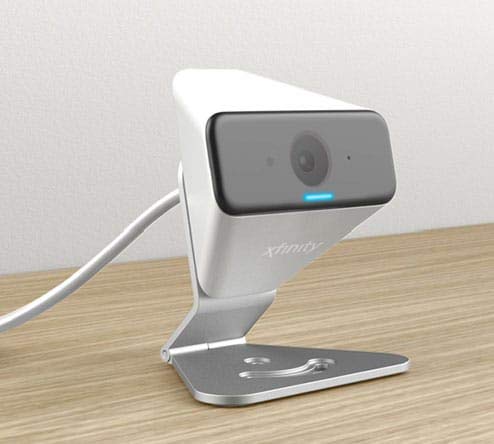
Image: The Xfinity Home Security Camera positioned on a desk, demonstrating its compact design.
Manylebau Cynnyrch
| Nodwedd | Manylyn |
|---|---|
| Rhif Model | SCHC2AEW |
| Datrysiad Dal Fideo | 720p |
| Technoleg Cysylltedd | Diwifr (Wi-Fi) |
| Protocol Cysylltedd | Wi-Fi (2.4 GHz compatible) |
| Defnydd Dan Do / Awyr Agored | Dan Do, Awyr Agored |
| Nodweddion Arbennig | Synhwyrydd Symudiad, Gweledigaeth Nos |
| Ffynhonnell Pwer | DC (12 Volts, 1 Watt) |
| Dimensiynau (L x W x H) | 3 x 3 x 2 modfedd |
| Pwysau Eitem | 1.57 pwys |
| Sgôr Diogelu Rhyngwladol | IP65 |
Datrys problemau
- Dim pŵer: Ensure the power adapter is securely connected to both the camera and a working electrical outlet.
- Materion Cysylltedd: Verify your Wi-Fi network is 2.4 GHz. Restart your router and the camera. Ensure the camera is within range of your Wi-Fi signal.
- Ap ddim yn ymateb: Close and reopen the Xfinity Home app. If the issue persists, try reinstalling the app.
- Ansawdd Fideo Gwael: Gwiriwch gryfder eich signal Wi-Fi. Gwnewch yn siŵr bod lens y camera yn lân ac yn rhydd o rwystrau.
Gwarant a Chymorth i Gwsmeriaid
For warranty information, please refer to the documentation included with your purchase or visit the official Xfinity support website. For technical assistance or customer service, please contact Xfinity customer support directly.