Rhagymadrodd
This manual provides essential information for the safe and efficient operation of your Behringer EUROPORT MPA200BT portable PA system. Please read these instructions thoroughly before using the device to ensure proper setup, usage, and maintenance. Retain this manual for future reference.
The Behringer EUROPORT MPA200BT is an all-in-one portable PA system designed for various applications, featuring 200 watts of power, Bluetooth connectivity for audio streaming, and a wireless microphone for vocal performances or presentations. Its battery operation allows for use in locations without direct power access.
Cyfarwyddiadau Diogelwch Pwysig
Dilynwch y rhagofalon diogelwch sylfaenol hyn bob amser wrth ddefnyddio offer trydanol:
- Darllenwch yr holl gyfarwyddiadau cyn gweithredu'r cynnyrch.
- Do not use this product near water or in wet environments.
- Glanhewch â lliain sych yn unig.
- Peidiwch â rhwystro unrhyw agoriadau awyru. Gosodwch yn unol â chyfarwyddiadau'r gwneuthurwr.
- Peidiwch â gosod yn agos at unrhyw ffynonellau gwres fel rheiddiaduron, cofrestrau gwres, stofiau, neu gyfarpar arall (gan gynnwys amplifyddion) sy'n cynhyrchu gwres.
- Peidiwch â threchu pwrpas diogelwch y plwg polariaidd neu'r math o sylfaen. Mae gan blwg polariaidd ddau lafn gydag un yn lletach na'r llall. Mae gan blwg daearu ddau lafn a thrydydd prong sylfaen. Darperir y llafn llydan neu'r trydydd prong er eich diogelwch. Os nad yw'r plwg a ddarperir yn ffitio i mewn i'ch allfa, ymgynghorwch â thrydanwr i gael gwared ar yr allfa ddarfodedig.
- Amddiffynnwch y llinyn pŵer rhag cael ei gerdded ymlaen neu ei binsio, yn enwedig wrth blygiau, cynwysyddion cyfleustra, a'r pwynt lle maent yn gadael y cyfarpar.
- Defnyddiwch atodiadau/ategolion a nodir gan y gwneuthurwr yn unig.
- Tynnwch y plwg o'r cyfarpar hwn yn ystod stormydd mellt neu pan na chaiff ei ddefnyddio am gyfnodau hir o amser.
- Cyfeirio pob gwasanaeth i bersonél gwasanaeth cymwys. Mae angen gwasanaethu pan fydd y cyfarpar wedi'i ddifrodi mewn unrhyw ffordd, fel llinyn cyflenwad pŵer neu blwg wedi'i ddifrodi, hylif wedi'i ollwng neu wrthrychau wedi disgyn i'r offer, mae'r cyfarpar wedi bod yn agored i law neu leithder, nid yw'n gweithredu'n normal , neu wedi cael ei ollwng.
Cynnwys Pecyn
Upon unpacking your Behringer EUROPORT MPA200BT, please verify that all components are present and in good condition:
- Behringer EUROPORT MPA200BT Portable PA System
- Wireless Microphone (ULM300M)
- USB Receiver for Wireless Microphone (ULM300USB)
- Cebl Pŵer
- Llawlyfr Defnyddiwr (y ddogfen hon)

Image: The Behringer EUROPORT MPA200BT portable PA system shown with its accompanying wireless microphone.
Cynnyrch Drosview: Rheolaethau a Chysylltiadau
Familiarize yourself with the various controls and connection points on your MPA200BT unit.

Image: Rear panel of the MPA200BT, highlighting the main control interface, inputs, and outputs.

Delwedd: Manwl view of the MPA200BT's control panel, including display, rotary encoder, and buttons.
Nodweddion Panel Rheoli:
- Sgrin Arddangos: Shows current settings, input levels, and Bluetooth status.
- Amgodiwr Rotari: Used to navigate menus and adjust parameters. Press to confirm selections.
- PROCESS Button: Activates or deactivates sound processing effects.
- Botwm SETUP: Enters the system setup menu.
- Botwm YMADAEL: Exits current menu or setting.
- ENTER Botwm: Yn cadarnhau dewisiadau o fewn dewislenni.
- Botwm Bluetooth: Yn cychwyn modd paru Bluetooth.
Cysylltiadau Mewnbwn/Allbwn:
- INPUT 1 & 2 (XLR/TRS Combo Jacks): For connecting microphones or line-level instruments.
- WIRELESS SYSTEM (USB Port): For connecting the ULM300USB wireless microphone receiver.
- MP3 Input (3.5mm Stereo Jack): Ar gyfer cysylltu chwaraewyr sain allanol.
- MIX OUTPUT (XLR): For sending the mixed audio signal to another PA system or recording device.
- Cilfach bŵer AC: Ar gyfer cysylltu'r cebl pŵer.
Gosod
- Cysylltiad Pwer:
Connect the supplied power cable to the AC Power Inlet on the rear of the MPA200BT and then to a suitable power outlet. The unit can also operate on its internal battery.
- Pŵer Cychwynnol Ar:
Press the power switch to turn on the unit. The display will illuminate.
- Lleoliad:
Place the MPA200BT on a stable, flat surface or mount it on a speaker stand (sold separately). Ensure proper ventilation around the unit.
- Cysylltu Mewnbynnau:
- Wired Microphones/Instruments: Connect to INPUT 1 or INPUT 2 using XLR or 1/4" TRS cables.
- External Audio Players: Connect to the MP3 Input using a 3.5mm stereo cable.
Cyfarwyddiadau Gweithredu
Ffrydio Sain Bluetooth

Image: The Bluetooth logo, representing wireless audio streaming capability.
- Ensure the MPA200BT is powered on.
- Gwasgwch y Bluetooth button on the control panel. The Bluetooth icon on the display will flash, indicating pairing mode.
- On your smartphone or Bluetooth-enabled device, navigate to the Bluetooth settings and select "BEHRINGER MPA200BT" from the list of available devices.
- Once paired, the Bluetooth icon on the MPA200BT display will stop flashing and remain solid.
- You can now stream audio from your device to the MPA200BT. Adjust the volume using your device's controls and the MPA200BT's master volume.
Wireless Microphone Usage (ULM300M/ULM300USB)
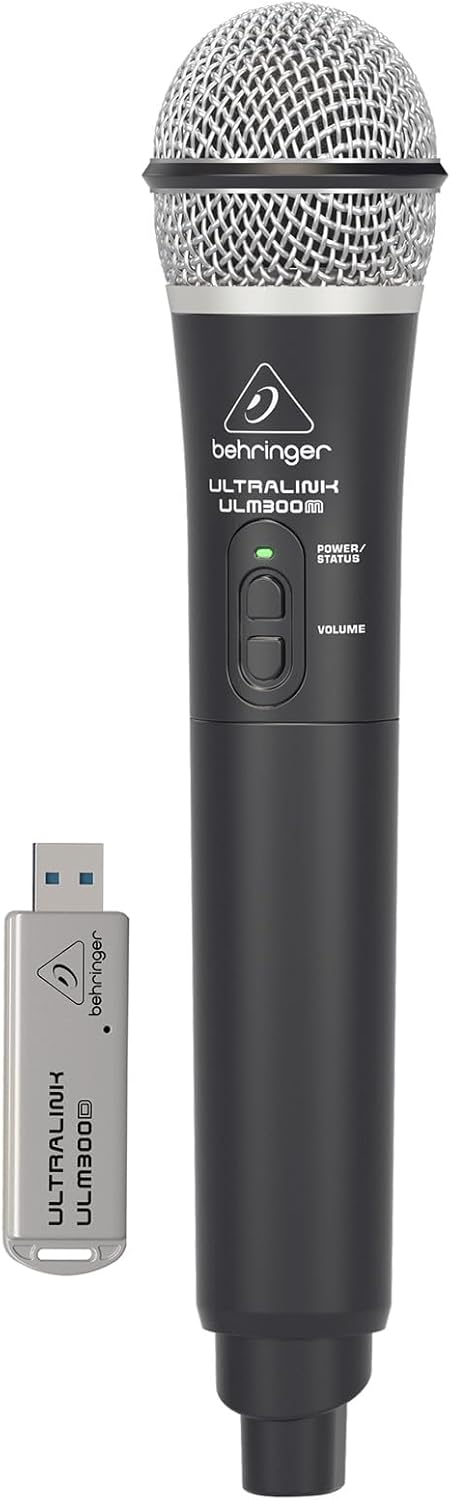
Image: The Behringer ULM300M wireless microphone shown with its USB receiver, the ULM300USB.
- Insert the ULM300USB receiver into the SYSTEM WIRELESS USB port on the MPA200BT.
- Ensure the ULM300M wireless microphone has fresh batteries installed.
- Power on the wireless microphone. The status LED on both the microphone and the receiver should indicate a successful connection (usually a solid green light).
- Adjust the microphone's volume using the controls on the microphone itself and the MPA200BT's input gain settings.
Remote Control via Smartphone App

Image: A smartphone screen showing the graphical user interface of the Behringer remote control application, used to manage the PA system settings.
The MPA200BT can be controlled remotely using a dedicated smartphone application. This allows for adjustments to volume, EQ, and effects from a distance.
- Download the official Behringer MPA200BT control app from your device's app store (iOS/Android).
- Ensure your smartphone is connected to the MPA200BT via Bluetooth (as described in the "Bluetooth Audio Streaming" section).
- Open the app. It should automatically detect and connect to your MPA200BT unit.
- Use the app's interface to control various parameters of the PA system.
Gweithrediad Batri
The MPA200BT features an internal rechargeable battery for portable use.
- The battery charges automatically when the unit is connected to AC power.
- A battery level indicator on the display shows the remaining charge.
- For optimal battery life, fully charge the unit before its first use and periodically when not in use for extended periods.
Cynnal a chadw
- Glanhau: Defnyddiwch frethyn meddal, sych i lanhau tu allan yr uned. Peidiwch â defnyddio glanhawyr sgraffiniol na thoddyddion.
- Storio: When not in use, store the MPA200BT in a cool, dry place, away from direct sunlight and extreme temperatures.
- Gofal Batri: If storing for extended periods, ensure the battery is partially charged (around 50%) and recharge it every few months to prevent deep discharge.
- Awyru: Ensure that the ventilation openings are not obstructed during operation to prevent overheating.
Datrys problemau
| Problem | Achos Posibl | Ateb |
|---|---|---|
| Dim pŵer | Power cable not connected; unit not switched on; battery depleted. | Check power cable connection; ensure power switch is ON; charge battery. |
| Dim allbwn sain | Volume too low; input source not connected or selected; faulty cable; microphone off. | Increase master volume and input gain; check input connections; test cables; ensure microphone is powered on and paired. |
| Mae paru Bluetooth yn methu | MPA200BT not in pairing mode; device too far; interference. | Press Bluetooth button to enter pairing mode; move device closer; restart both devices. |
| Meicroffon diwifr ddim yn gweithio | USB receiver not connected; microphone off; depleted batteries in microphone; interference. | Ensure ULM300USB is fully inserted; power on microphone; replace microphone batteries; ensure clear line of sight. |
| Squealing/Feedback | Microphone too close to speaker; microphone gain too high. | Move microphone further from speaker; reduce microphone input gain. |
Manylebau
| Nodwedd | Manylyn |
|---|---|
| Model | EUROPORT MPA200BT |
| Allbwn Wattage | 200 Wat |
| Ffynhonnell Pwer | Battery Powered / AC Power |
| Technoleg Cysylltedd | Bluetooth |
| Nifer y Sianeli | 2 |
| Pwysau Eitem | 12.1 kg (26.6 pwys) |
| Dimensiynau Cynnyrch (L x W x H) | 11.02 x 10.11 x 16.53 modfedd |
| Math Mowntio | Pen bwrdd |
| Dyfeisiau Cydnaws | Ffôn clyfar |
| Gwneuthurwr | Llwyth Cerddoriaeth yr Unol Daleithiau |
Gwarant a Chefnogaeth
Am wybodaeth fanwl am warant a chymorth technegol, cyfeiriwch at y Behringer swyddogol websafle neu cysylltwch â'u gwasanaeth cwsmeriaid. Cadwch eich derbynneb prynu fel prawf o brynu.
Adnoddau Ar-lein: www.behringer.com
Gwneuthurwr: Llwyth Cerddoriaeth yr Unol Daleithiau
Fideos Cynnyrch Swyddogol
No relevant official product videos from the seller were found in the provided data for embedding.


