1. Rhagymadrodd
This manual provides detailed instructions for the proper use, setup, and maintenance of your Genius HS-920BT Bluetooth Headset. Please read this manual thoroughly before using the device to ensure optimal performance and longevity.
The Genius HS-920BT is a versatile Bluetooth headset designed for wireless audio streaming and hands-free communication with compatible devices such as smartphones, tablets, and PCs.
2. Cynnwys Pecyn
Gwiriwch fod yr holl eitemau yn bresennol yn eich pecyn:
- Genius HS-920BT Bluetooth Headset
- Cebl Codi Tâl USB
- Multi-language User Manual (this document)
3. Cynnyrch Drosview
The HS-920BT headset features an adjustable headband and comfortable earcups, integrating controls for audio playback and call management.
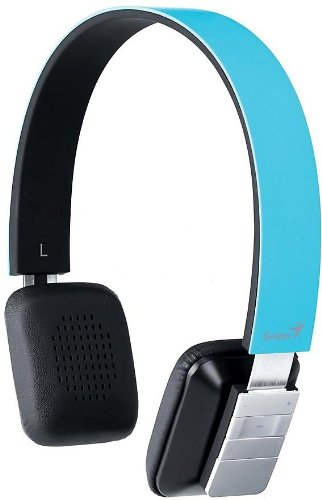
Figure 1: Genius HS-920BT Bluetooth Headset (Blue)
This image displays the Genius HS-920BT Bluetooth Headset in blue, viewed from an angle, highlighting its adjustable headband and earcup design.
Nodweddion Allweddol:
- Wireless Bluetooth connectivity for audio and calls (A2DP support)
- Integrated rechargeable Lithium-Ion battery
- Meicroffon adeiledig ar gyfer cyfathrebu heb ddwylo
- On-ear controls for volume adjustment, track skipping (AVRCP support)
- Band pen addasadwy ar gyfer ffit cyfforddus
- 40 mm driver units for clear sound
4. Gosod
4.1 Gwefru'r Clustffon
Before initial use, fully charge the headset. Use the provided USB charging cable.
- Connect the small end of the USB charging cable to the charging port on the headset.
- Cysylltwch ben mwy y cebl USB â phorthladd USB â phŵer (e.e., cyfrifiadur, addasydd wal USB).
- The LED indicator on the headset will illuminate during charging and change color or turn off when fully charged. Refer to the headset's LED behavior for specific indications.
Mae gwefr lawn fel arfer yn cymryd tua 2-3 awr.
4.2 Paru â Dyfais Bluetooth
To use the HS-920BT wirelessly, you must pair it with your Bluetooth-enabled device.
- Pŵer Ymlaen: Press and hold the Power button on the headset until the LED indicator flashes, usually alternating blue and red, indicating pairing mode.
- Gweithredu Bluetooth: On your smartphone, tablet, or PC, enable Bluetooth functionality.
- Chwiliwch am Dyfeisiau: In your device's Bluetooth settings, search for available devices. The headset should appear as "HS-920BT".
- Dewis a Pharu: Select "HS-920BT" from the list. If prompted for a passcode, enter "0000" (four zeros).
- Cadarnhad: Once paired, the headset's LED indicator will typically flash blue slowly, and your device will confirm the connection.
The headset will automatically attempt to reconnect to the last paired device when powered on, if that device's Bluetooth is active and within range.
5. Cyfarwyddiadau Gweithredu
The HS-920BT features intuitive controls located on the earcup.

Figure 2: Earcup Controls of HS-920BT
This image shows a close-up of the right earcup of the Genius HS-920BT Bluetooth Headset, detailing the control buttons for power, volume, and track navigation.
5.1 Pŵer Ymlaen/Diffodd
- Pŵer Ymlaen: Pwyswch a daliwch y botwm Pŵer am tua 3 eiliad nes bod y dangosydd LED yn fflachio'n las.
- Pwer i ffwrdd: Pwyswch a daliwch y botwm Pŵer am tua 3 eiliad nes bod y dangosydd LED yn diffodd.
5.2 Chwarae Cerdd
- Chwarae/Seibiant: Pwyswch y botwm Chwarae/Seibiant unwaith.
- Trac Nesaf: Press the "Next Track" button (usually marked with a forward arrow).
- Trac Blaenorol: Press the "Previous Track" button (usually marked with a backward arrow).
5.3 Rheoli Galwadau
- Ateb / Diwedd Galwad: Press the Multi-function button (often the same as Play/Pause) once during an incoming call to answer, or once during a call to end it.
- Gwrthod Galwad: Pwyswch a daliwch y botwm Aml-swyddogaeth am tua 2 eiliad yn ystod galwad sy'n dod i mewn.
- Ail-redeg Rhif Diwethaf: Double-press the Multi-function button when not on a call.
5.4 Rheoli Cyfaint
- Cynyddu Cyfrol: Press the Volume Up button (+).
- Gostwng y Gyfrol: Press the Volume Down button (-).
6. cynnal
Proper care ensures the longevity of your headset.
- Glanhau: Defnyddiwch frethyn meddal, sych i lanhau'r clustffonau. Peidiwch â defnyddio glanhawyr sgraffiniol na thoddyddion.
- Storio: Storiwch y clustffon mewn lle oer, sych i ffwrdd o olau haul uniongyrchol a thymheredd eithafol.
- Gofal Batri: Er mwyn cynnal oes y batri, osgoi rhyddhau'r batri'n llwyr yn aml. Gwefrwch y clustffon yn rheolaidd, hyd yn oed os nad yw'n cael ei ddefnyddio am gyfnodau hir.
- Amlygiad Dŵr: Nid yw'r clustffon yn dal dŵr. Osgowch ddod i gysylltiad â dŵr neu leithder gormodol.
7. Datrys Problemau
If you encounter issues with your HS-920BT headset, refer to the following common solutions:
| Problem | Ateb Posibl |
|---|---|
| Nid yw'r clustffon yn troi ymlaen. | Ensure the battery is charged. Connect the headset to a power source using the USB cable. |
| Cannot pair the headset with a device. |
|
| Dim sain na chyfaint isel. |
|
| Mae ansawdd yr alwad yn wael. |
|
8. manylebau
| Enw'r Model: | HS-920BT |
| Technoleg Di-wifr: | Bluetooth |
| Unedau Gyrwyr: | 40 mm |
| Batri: | Lithiwm-Ion Ailwefradwy Mewnol |
| Math o reolaeth: | Volume Control, Track Navigation, Call Management |
| Meicroffon: | Adeiledig |
| Cefnogwyd Profiles: | A2DP, AVRCP |
| Llwyfan Caledwedd: | PC, Smartphone, Tablet |
| Pwysau Eitem: | 110 gram |
| Dimensiynau (LxWxH): | 13.6 x 17.3 x 2.9 cm |
9. Gwarant a Chefnogaeth
For warranty information and technical support, please refer to the warranty card included with your product or visit the official Genius websafle. Cadwch eich derbynneb prynu fel prawf o brynu.
For further assistance, you may contact Genius customer service through their official channels.


