1. Rhagymadrodd
The Sony Cyber-Shot DSC-H300 is a versatile 20.1-megapixel compact digital camera featuring a powerful 35x optical zoom lens. Designed for ease of use, it includes Optical SteadyShot image stabilization to reduce blur, various shooting modes, and the ability to capture HD videos. Its DSLR-like body provides a comfortable grip for stable shooting.
2. Beth sydd yn y Bocs
Gwiriwch fod yr holl eitemau canlynol wedi'u cynnwys yn eich pecyn:
- Sony Cyber-Shot DSC-H300 Camera Body
- Batris AA (x4)
- Strap Ysgwydd
- Cap Lens
- Lens Strap
- Cebl USB Aml
- Llawlyfr Cyfarwyddiadau (y ddogfen hon)
3. Camera Drosview
Familiarize yourself with the main components and controls of your DSC-H300 camera.
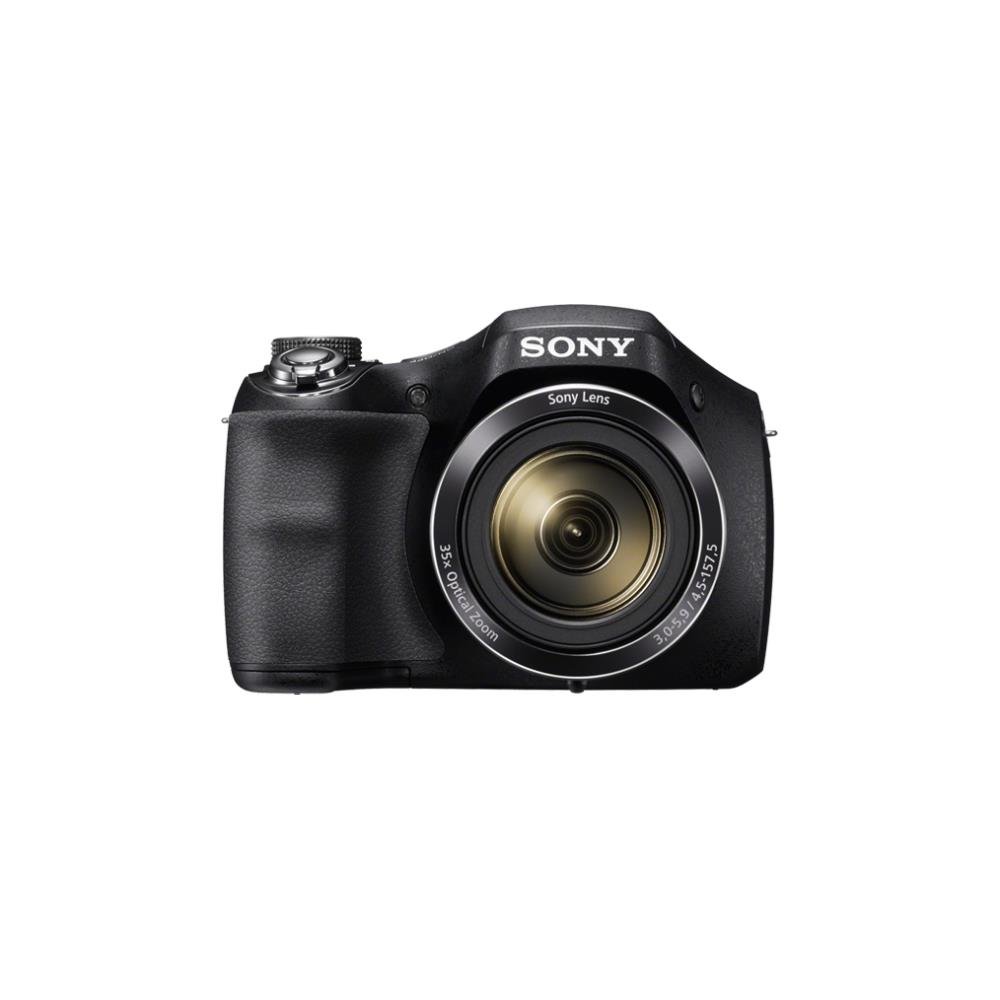
Ffigur 1: Blaen view of the Sony Cyber-Shot DSC-H300 digital camera, illustrating its compact size with a width of 12.75 cm (5.06 inches) and a height of 8.9 cm (3.504 inches).
Cydrannau Allweddol:
- Lens: Features 35x optical zoom.
- gafael: Ergonomically designed for comfortable handling.
- Botwm Caead: Ar gyfer tynnu lluniau.
- Zoom Lever (W/T): Controls optical and digital zoom.
- Deialu Modd: Selects various shooting modes (Auto, Program, Manual, Scene, Movie, etc.).
- Botwm YMLAEN/DIFFODD: Yn troi'r camera ymlaen neu i ffwrdd.
- LCD Screen (3.0 inches): For framing shots, reviewing delweddau, a llywio dewislenni.
- Botymau Rheoli: For menu navigation, flash settings, display options, and playback.
- Movie Button: Dedicated button for starting and stopping video recording.
4. Gosod
4.1 Mewnosod Batris
- Agorwch glawr adran y batri sydd wedi'i leoli ar waelod y camera.
- Mewnosodwch bedwar batri AA, gan sicrhau'r polaredd cywir (+/-) fel y nodir y tu mewn i'r adran.
- Caewch y clawr adran batri yn ddiogel.
4.2 Mewnosod Cerdyn Cof
- Agorwch glawr y slot cerdyn cof, sydd fel arfer wedi'i leoli ger adran y batri.
- Insert a compatible memory card (e.g., SD, SDHC, SDXC, Memory Stick PRO Duo) with the label facing the correct direction until it clicks into place.
- Caewch glawr slot y cerdyn cof.
4.3 Attaching the Shoulder Strap and Lens Cap
- Thread the shoulder strap through the strap eyelets on the camera body and secure it.
- Attach the lens cap to the lens using the provided lens strap to prevent loss.
5. Gweithredu'r Camera
5.1 Pŵer Ymlaen/Diffodd
Gwasgwch y YMLAEN / I FFWRDD button to power the camera on or off. The lens will extend when powered on.
5.2 Dewis Modd Saethu
Cylchdroi y Dial Modd to select your desired shooting mode:
- Auto Deallus (iA): Camera automatically optimizes settings for various scenes.
- Rhaglen Awtomatig (P): Camera sets exposure, but you can adjust other settings.
- Blaenoriaeth Caead (S): You set the shutter speed, camera adjusts aperture.
- Blaenoriaeth Agorfa (A): You set the aperture, camera adjusts shutter speed.
- Llawlyfr (M): You control both shutter speed and aperture.
- Dewis Golygfa (SCN): Choose from various scene modes (e.g., Portrait, Landscape, Night Scene).
- Modd Ffilm: Ar gyfer recordio fideos.
- Modd Panorama: For capturing wide panoramic shots.
5.3 Tynnu Lluniau
- Frame your shot: Use the LCD screen to compose your image.
- Ffocws: Hanner gwasgwch y Botwm Caead to activate autofocus. The camera will beep and the focus indicator will turn green when focus is achieved.
- Dal: Fully press the Botwm Caead i dynnu'r llun.
- Chwyddo: Defnyddiwch y Zoom Lever (W/T) to adjust the focal length. 'W' for wide-angle, 'T' for telephoto.
- Fflach: Press the flash control button to cycle through flash modes (Auto, Fill-flash, Slow Sync, Flash Off, Advanced Flash).
- Sefydlogi Delwedd: Optical SteadyShot image stabilization is built-in to reduce blur caused by camera shake.
5.4 Recordio Fideos
- Ensure the camera is in Modd Ffilm (selected via the Mode Dial) or simply press the dedicated Botwm Ffilm.
- Gwasgwch y Botwm Ffilm again to start recording. A red recording indicator will appear on the screen.
- Gwasgwch y Botwm Ffilm unwaith eto i stopio recordio.
- The camera records in 720p HD with clear audio captured by the built-in microphone.
5.5 Panorama Mode
Dewiswch y Modd Panorama on the Mode Dial. Press the shutter button and sweep the camera horizontally or vertically across the scene to capture a wide panoramic image.
5.6 ViewDileu a Dileu Delweddau/Fideos
Gwasgwch y Botwm Chwarae (usually indicated by a play icon) to enter playback mode. Use the navigation buttons to scroll through your captured photos and videos. To delete an item, select it and press the Botwm Dileu (eicon bin sbwriel).
6. cynnal
6.1 Cleaning the Camera Body
Sychwch gorff y camera gyda lliain meddal, sych. Ar gyfer baw ystyfnig, sychwch ychydigampen the cloth with water and then wipe dry. Avoid using organic solvents like alcohol or thinner.
6.2 Glanhau'r Lens
First, use a lens brush or blower to remove dust and small particles. Then, gently wipe the lens surface with a clean, soft lens cleaning cloth. Do not use excessive force or abrasive materials.
6.3 Glanhau'r Sgrin LCD
Use a soft, lint-free cloth specifically designed for LCD screens. Gently wipe the screen to remove smudges or dust.
6.4 Gofal Batri
Always use fresh AA batteries. Remove batteries from the camera if it will not be used for an extended period to prevent leakage and damage.
6.5 Storio
Store the camera in a cool, dry place away from direct sunlight, high temperatures, and humidity. Keep it in a camera bag or case to protect it from dust and scratches.
7. Datrys Problemau
If you encounter issues with your camera, try the following basic troubleshooting steps:
- Nid yw'r camera yn troi ymlaen: Ensure batteries are correctly inserted and fully charged. Try new batteries.
- Mae'r delweddau'n aneglur: Check that the lens is clean. Ensure the camera is focusing correctly (half-press shutter). Use a faster shutter speed in low light or for moving subjects. Optical SteadyShot is active to help.
- Fflach ddim yn tanio: Check flash mode settings; ensure it's not set to 'Flash Off'.
- Gwall cerdyn cof: Turn off the camera, remove and reinsert the memory card. Ensure the card is compatible and not full.
- Mae'r camera'n rhewi: Remove the batteries, wait a few seconds, and reinsert them to reset the camera.
For more detailed troubleshooting and solutions, please refer to the comprehensive user manual provided with your product or visit the official Sony support websafle.
8. manylebau
| Nodwedd | Manyleb |
|---|---|
| Enw Model | DSC H300 |
| Datrysiad Synhwyrydd Ffotograffau | 20.1 AS |
| Chwyddo Optegol | 35x |
| Chwyddo Digidol | 70x |
| Sefydlogi Delwedd | Digital, Optical (SteadyShot) |
| Maint Sgrin | 3 Modfedd (LCD) |
| Datrysiad Fideo | 720p |
| Math Synhwyrydd | CCD |
| Isafswm Cyflymder Caead | 30 Eiliad |
| Uchafswm Cyflymder Caead | 30 Eiliad |
| Ystod ISO | 100 - 3200 (Expanded) |
| Ffynhonnell Pwer | Batris 4x AA |
| Cysylltedd | USB |
| Cardiau Cof Cydnaws | Memory Stick Duo, SD Memory Card, SDHC Memory Card, SDXC Memory Card, microSD Memory Card, microSDHC Memory Card, microSDXC Memory Card |
| Pwysau Eitem | 495 gram |
9. Gwarant a Chefnogaeth
Your Sony Cyber-Shot DSC-H300 digital camera comes with a manufacturer's warranty. Please refer to the warranty card included in your product packaging for specific terms, conditions, and duration of coverage.
For technical support, customer service, driver downloads, and additional detailed manuals, please visit the official Sony support websafle: