1. Rhagymadrodd
The Logitech C920 HD Pro Webcam is designed to deliver high-definition video and clear audio for video calls, streaming, and recording. Featuring Full HD 1080p video capture and a 78-degree field of view, hwn webcam connects via USB for easy integration with your computer system. This manual provides instructions for setting up, operating, maintaining, and troubleshooting your C920 webcam.

Ffigur 1: Blaen view of the Logitech C920 HD Pro Webcam. The camera lens is centered, flanked by stereo microphones, with the Logitech logo on the right.
2. Cynnwys Pecyn
Gwiriwch fod yr holl eitemau yn bresennol yn eich pecyn:
- Logitech C920 HDPro Webcam
- Cebl USB integredig
- Llawlyfr Defnyddiwr (y ddogfen hon)
3. Cyfarwyddiadau Gosod
Follow these steps to set up your Logitech C920 HD Pro Webcam:
- Dadbacio'r Webcam: Tynnwch y webcam and its integrated USB cable from the packaging.
- Swydd y Webcam:
The C920 features a versatile clip/stand that allows it to be mounted on various surfaces:
- Ar Sgrin Monitor/Gliniadur: Agorwch y clip a gosodwch y webcam on top of your monitor or laptop screen. Adjust the clip to securely grip the back of the screen.
- Ar dripod: Mae'r webcam includes a standard tripod thread on the bottom of its stand. Screw the webcam onto a compatible tripod for more flexible positioning.
- On a Desk: Fold the clip into a flat stand and place the webcam on a stable, flat surface.

Figure 2: Logitech C920 Webcam with its multi-position clip/stand unfolded, ready for mounting on a monitor or tripod.
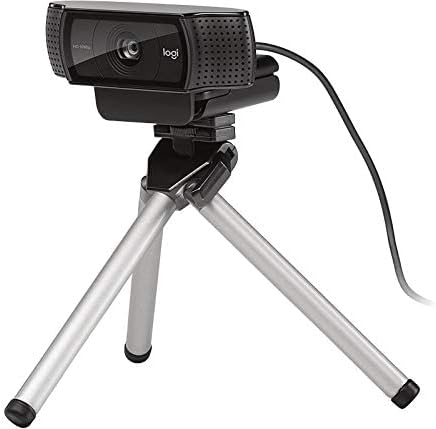
Figure 3: Logitech C920 Webcam securely mounted on a small tripod, demonstrating its versatility.
- Cysylltu â Chyfrifiadur: Plug the integrated USB cable into an available USB port on your computer. The webcam is a plug-and-play device and typically does not require additional driver installation on most modern operating systems (Windows, macOS, Chrome OS).
- Gosod Meddalwedd (Dewisol): For advanced features and settings, you may download the Logitech Capture software from the official Logitech websafle (www.logitech.com/support/c920).
- Profwch y Webcam: Open a video conferencing application (e.g., Zoom, Skype, Google Meet) or your computer's camera application to verify that the webcam is recognized and functioning correctly.
4. Cyfarwyddiadau Gweithredu
The Logitech C920 HD Pro Webcam is designed for ease of use. Once connected, it functions as a standard video input device for most applications.
4.1. Video Calls and Conferencing
- Launch your preferred video conferencing application (e.g., Zoom, Microsoft Teams, Google Meet, Skype).
- Navigate to the application's settings or preferences.
- Select "Logitech C920" as your video input device and, if applicable, as your microphone input device. The C920 features dual stereo microphones for clear audio.
- Adjust your position and lighting for optimal video quality. The C920 includes automatic light correction.
4.2. Recordio Fideo
- Open a video recording application (e.g., Windows Camera app, QuickTime Player on macOS, or Logitech Capture software).
- Ensure the C920 is selected as the video source.
- Start recording. The C920 supports Full HD 1080p video recording at 30 frames per second.
4.3. Advanced Settings (with Logitech Capture)
If you have installed Logitech Capture software, you can access additional features:
- Custom Resolution and Frame Rate: Adjust video resolution (up to 1080p) and frame rate.
- Rheolyddion Camera: Pan, tilt, and zoom digitally.
- Addasiadau Delwedd: Fine-tune brightness, contrast, saturation, and white balance.
- Newid Ffynhonnell: Easily switch between multiple cameras or screen sharing.
5. cynnal
To ensure the longevity and optimal performance of your Logitech C920 HD Pro Webcam, follow these simple maintenance guidelines:
- Glanhau'r Lens: Sychwch lens y camera yn ysgafn gyda lliain meddal, di-flwff. Ar gyfer staeniau ystyfnig, sychwch ychydigampen the cloth with water or a lens cleaning solution. Avoid abrasive materials or harsh chemicals.
- Glanhau'r Corff: Defnyddiwch lliain meddal, sych i lanhau'r webcam's body. Do not use liquid cleaners directly on the device.
- Storio: Pan nad yw'n cael ei ddefnyddio, storiwch y webcamera mewn lle glân, sych i ffwrdd o dymheredd eithafol a golau haul uniongyrchol.
- Gofal Cebl: Avoid bending or twisting the USB cable excessively. Do not pull the cable to disconnect the webcamera; gafaelwch yn y cysylltydd USB bob amser.
6. Datrys Problemau
If you encounter issues with your Logitech C920 HD Pro Webcam, cyfeiriwch at y problemau a'r atebion cyffredin canlynol:
| Problem | Achos Posibl | Ateb |
|---|---|---|
| Webcam heb ei ganfod gan gyfrifiadur. | Cysylltiad USB llac, porthladd USB diffygiol, problem gyrrwr. |
|
| No video or black screen in applications. | Anghywir webcam selection, privacy settings, application conflict. |
|
| Poor video quality (blurry, dark, grainy). | Insufficient lighting, dirty lens, incorrect settings. |
|
| Dim sain neu ansawdd sain gwael. | Incorrect microphone selection, microphone muted, environmental noise. |
|
7. manylebau
Key technical specifications for the Logitech C920 HD Pro Webcam:
| Nodwedd | Manylyn |
|---|---|
| Rhif Model | 960-000764 |
| Datrysiad Dal Fideo | Full HD 1080p at 30fps (H.264 video compression) |
| Datrysiad Fideo Uchaf | FHD |
| Technoleg Synhwyrydd Ffotograffau | BSI CMOS |
| Maes o View | lletraws 78 gradd |
| Ffocws awtomatig | Oes |
| Meicroffon | Dual stereo microphones with automatic noise reduction |
| Technoleg Cysylltedd | USB 2.0 (USB 3.0 ready) |
| Llwyfan Caledwedd | Gliniadur, Bwrdd Gwaith |
| Pwysau Eitem | 5.6 owns (tua 158.7 gram) |
| Dimensiynau Pecyn | 3.98 x 3.31 x 2.24 modfedd |
| Lliw | Du |
| OS â Chymorth | Windows 7 or later, macOS 10.10 or later, Chrome OS, Android v 5.0 or above |
8. Gwarant a Chefnogaeth
Logitech products are manufactured to high quality standards and are designed to provide superior performance. For detailed warranty information, please refer to the warranty card included with your product or visit the official Logitech websafle.
Gwybodaeth Gwarant:
- Typically, Logitech offers a limited hardware warranty for its webcams. The duration and terms may vary by region.
- Cadwch eich prawf prynu ar gyfer hawliadau gwarant.
Cefnogaeth i Gwsmeriaid:
For technical assistance, driver downloads, FAQs, and further support, please visit the Logitech support websafle:
You can also find contact information for Logitech customer service in your region on their websafle.


