Rhagymadrodd
This manual provides comprehensive instructions for the proper setup, operation, and maintenance of your Aktiv Pak AP400 Camera Backpack. Designed for photographers who carry camera gear and a notebook computer, this backpack offers organized storage and comfortable transport. Please read this manual thoroughly to ensure optimal use and longevity of your product.
Cynnyrch Drosview
The Aktiv Pak AP400 is a compact backpack engineered to distribute the weight of your photography equipment and laptop across your back and shoulders comfortably. It features dedicated, foam-padded compartments to protect your gear.
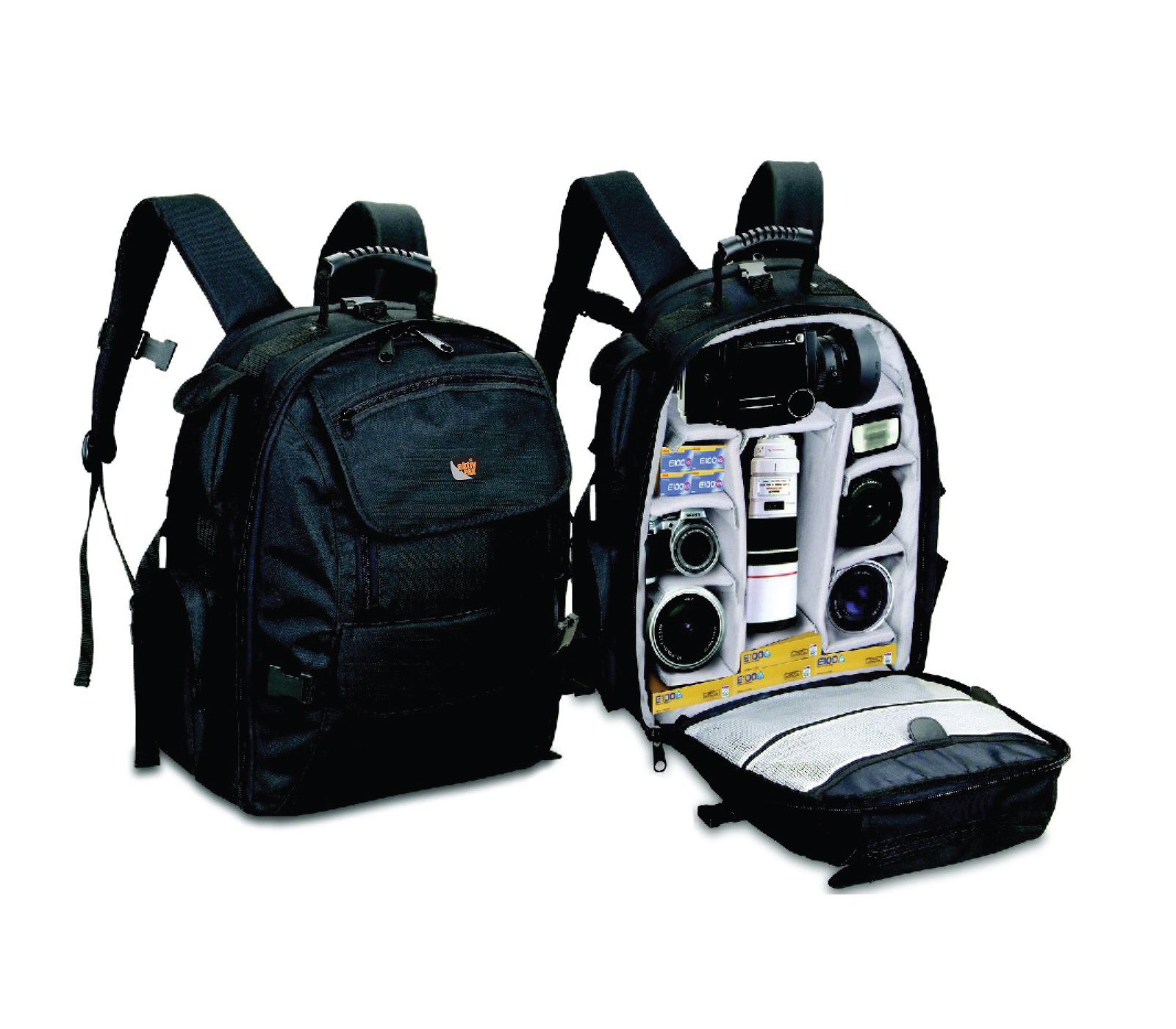
Ffigur 1: Blaen view of the Aktiv Pak AP400 Camera Backpack.
Nodweddion Allweddol:
- All-Weather Cover: Integrated cover for protection against elements.
- Cydnawsedd gliniadur: Accommodates laptops up to 17 inches.
- Rhanwyr Addasadwy: Foam-padded, removable dividers for customized equipment organization.
- Cynhwysedd Uchel: Maximum carry capacity of 350 lbs (158.8 kg).
- Prif Adran Eang: Designed to hold a full range of cameras, lenses, and related gear, including an SLR with an attached lens up to 11 inches long.
- Ergonomic Harness: Contoured and thickly foam-padded straps for comfortable all-day wear.
- Pocedi Affeithiwr: Mesh pockets within the main compartment for small items like filters.
Gosod
1. Customizing Internal Compartments
- Open the main compartment zipper.
- Identify the removable foam-padded dividers. These are attached with hook-and-loop fasteners.
- Carefully detach the dividers and reposition them to create custom-sized compartments for your camera body, lenses, and other accessories. Ensure a snug fit to prevent movement during transport.
- Place your camera with an attached lens (up to 11 inches long) in the central area, then arrange other lenses and equipment around it.
2. Loading Your Laptop
- Locate the dedicated laptop compartment, typically at the back of the backpack.
- Carefully slide your laptop (up to 17 inches) into the padded sleeve.
- Ensure the laptop is fully seated and the compartment is securely closed.
3. Adjusting Harness Straps
- Put on the backpack and adjust the shoulder straps so the weight is evenly distributed and the pack sits comfortably on your back.
- Utilize the sternum strap and waist belt (if present) for additional stability and weight distribution, especially when carrying heavy loads.
Cyfarwyddiadau Gweithredu
Using the All-Weather Cover
- Locate the all-weather cover, typically stored in a dedicated pocket at the bottom of the backpack.
- Unfold the cover and stretch it over the entire backpack, ensuring all sides are protected from rain, dust, or other elements.
- After use, allow the cover to dry completely before folding and storing it back in its pocket to prevent mildew.
Accessing Gear
- The main compartment provides full access to your camera gear.
- Utilize the mesh pockets on the front panel inside the main compartment for quick access to smaller accessories like memory cards, batteries, or filters.
Cynnal a chadw
Cleaning Your Backpack
- Glanhau Spot; For minor dirt or stains, use a damp cloth with mild soap. Gently rub the affected area.
- Glanhau dwfn: For more extensive cleaning, empty the backpack completely. Use a soft brush and mild detergent with lukewarm water. Avoid harsh chemicals or bleach, as these can damage the fabric and coatings.
- Sychu: Air dry the backpack completely in a shaded, well-ventilated area. Do not machine wash or tumble dry, and avoid direct sunlight or heat, which can degrade materials.
Zipper and Buckle Care
- Keep zippers free of dirt and debris. If a zipper becomes stiff, apply a small amount of zipper lubricant or wax.
- Inspect buckles and straps regularly for wear and tear. Replace any damaged components to ensure secure carrying.
Datrys problemau
Problemau ac Atebion Cyffredin:
- Discomfort when carrying:
- Ensure shoulder straps are properly adjusted to distribute weight evenly.
- Utilize the sternum strap and waist belt to transfer some weight to your hips.
- Avoid overloading the backpack beyond its recommended capacity.
- Gear not fitting securely:
- Re-adjust the foam-padded dividers to create snug compartments for each item.
- Ensure larger items like camera bodies with lenses are placed centrally and securely.
- Zippers sticking:
- Clean any dirt or debris from the zipper teeth.
- Apply a small amount of zipper lubricant or a graphite pencil to the teeth.
Manylebau
| Nodwedd | Manylyn |
|---|---|
| Rhif Model | AP400 |
| Dimensiynau Cynnyrch (L x W x H) | 13.5 x 6 x 18 modfedd |
| Internal Dimensions (W x H x D) | 12.0 x 17.0 x 4.0 modfedd (30.4 x 43.1 x 10.1 cm) |
| Pwysau Eitem | 3.5 pwys |
| Maximum Carry Capacity | 350 pwys (158.8 kg) |
| Cydnawsedd gliniaduron | Hyd at 17 modfedd |
| Gwneuthurwr | AKTIV PAK |
| ASIN | B001OXSLJE |
| Dyddiad Ar Gael Cyntaf | Ionawr 3, 2009 |
Gwarant a Chefnogaeth
For information regarding warranty coverage, product support, or to inquire about replacement parts, please contact Aktiv Pak customer service directly. Refer to the product packaging or the manufacturer's official websafle am y manylion cyswllt diweddaraf.


