
Rhagymadrodd
This manual provides detailed instructions for the setup, operation, and maintenance of your iGPSPORT BSC200S Cycle Computer. Please read this manual thoroughly before using the device to ensure optimal performance and safety.
Cynnwys Pecyn
Gwiriwch fod yr holl eitemau a restrir isod wedi'u cynnwys yn eich pecyn:
- BSC200S Bike Computer x 1
- CAD70 Cadence Sensor x 1
- SPD70 Speed Sensor x 1
- Bike Computer Mount x 1
- Achos Amddiffynnol x 1
- Cebl Codi Tâl Math-C x 1
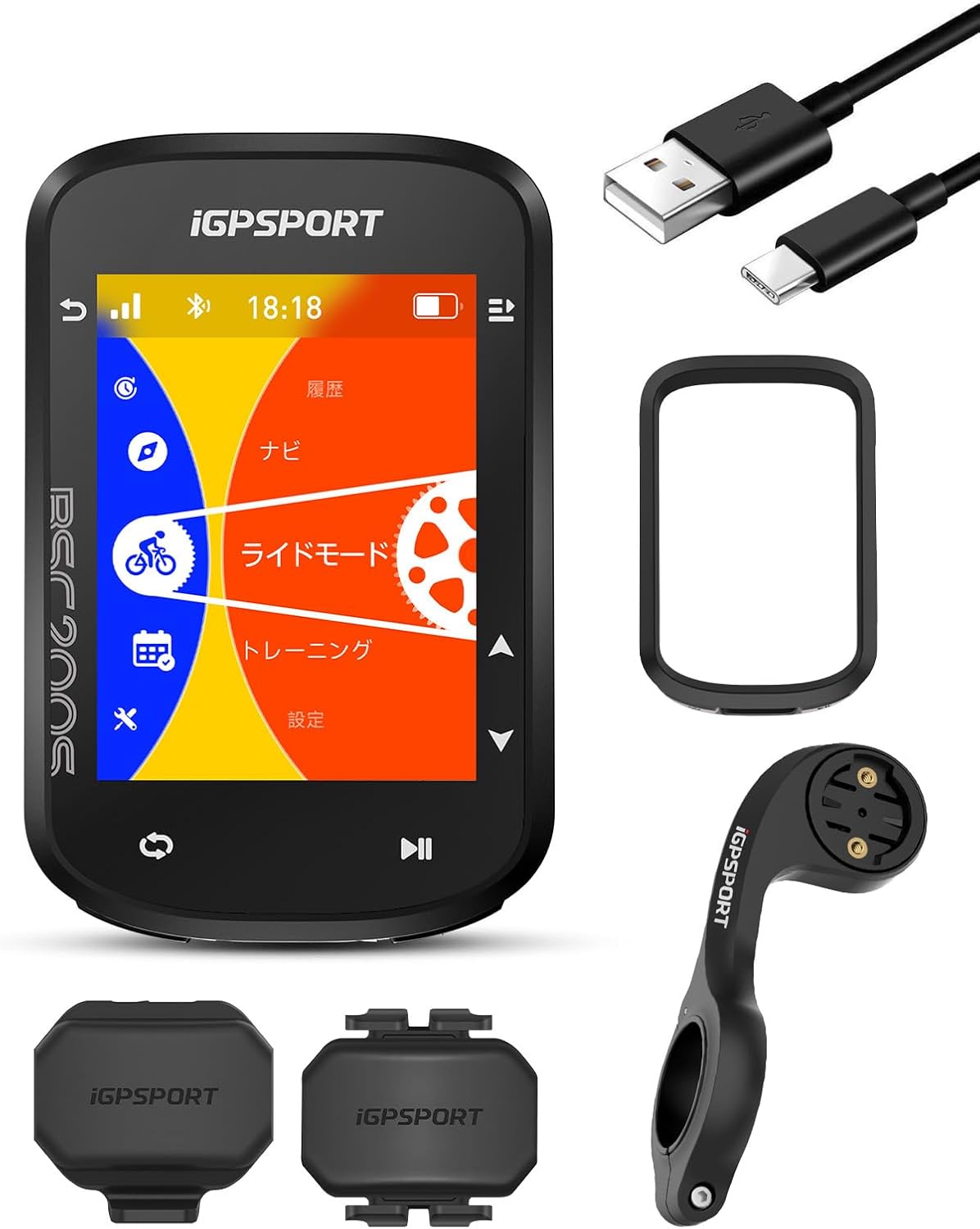
Image: The iGPSPORT BSC200S Cycle Computer shown with its various included accessories, such as sensors, mount, and cables.
Gosod
1. Mowntio'r Dyfais
Attach the bike computer mount to your bicycle's handlebar. Ensure it is securely fastened to prevent movement during your ride. The BSC200S can then be twisted onto the mount until it clicks into place.
Video: This video demonstrates the unboxing and mounting process for the iGPSPORT BSC300T, which uses a similar mounting system to the BSC200S.
2. Initial Power-On and Language Selection
Press and hold the power button to turn on the device. Follow the on-screen prompts to select your preferred language and complete the initial setup.
3. Pairing Sensors
The BSC200S supports both Bluetooth 5.0 and ANT+ for connecting external sensors. To pair a sensor:
- Ensure your sensor (e.g., heart rate monitor, cadence sensor, speed sensor, power meter) is active and within range.
- Navigate to the 'Sensor Pairing' menu on your BSC200S.
- Select the type of sensor you wish to pair. The device will scan for available sensors.
- Select your sensor from the list and confirm pairing.

Image: The BSC200S screen showing various sensor connection icons, indicating compatibility with multiple external devices.
4. Cysylltiad App
Download the iGPSPORT app on your smartphone. Connect your BSC200S to the app via Bluetooth to manage settings, create routes, and sync data.

Image: The BSC200S device shown alongside a smartphone displaying the iGPSPORT app interface, highlighting seamless integration.
Cyfarwyddiadau Gweithredu
1. Arddangosfa a Rhyngwyneb
The BSC200S features a 2.4-inch transflective color display, ensuring clear visibility of important data such as speed, distance, gradient, and heart rate, even in direct sunlight. The automatic backlight adjusts for optimal viewing ddydd neu nos.

Image: A close-up of the iGPSPORT BSC200S display, showing real-time cycling metrics like speed, heart rate, and average values.
2. Navigation Features
The BSC200S supports 5-star GNSS (GPS, GLONASS, Galileo, BeiDou, QZSS) for accurate positioning. You can import GPX files or create routes directly from the iGPSPORT app, Strava, Komoot, and TrainingPeaks. The device provides turn-by-turn guidance, displays remaining distance, and alerts you if you go off-course.
Video: This video showcases the navigation capabilities of the iGPSPORT BSC300T, which offers similar navigation features to the BSC200S.

Image: The BSC200S displaying a detailed route map with turn indicators and current position, assisting with navigation.
3. Cofnodi Data
The device records over 100 types of cycling data. It features a continuous ride function, allowing you to pause and resume recording across multiple days, consolidating long rides into a single activity. Motion detection automatically starts recording when you begin your ride, ensuring no data is missed.

Image: The BSC200S screen showing multiple data fields, including speed, average speed, maximum speed, and other performance metrics.
4. Sensor Connectivity
The BSC200S connects to a wide range of external devices via Bluetooth 5.0 and ANT+. This includes heart rate monitors, cadence sensors, speed sensors, power meters, ANT+ compatible radar tail lights, smart lights, smart trainers, and electronic shifting systems. Real-time data from these sensors enhances your training and riding safety.
5. Integreiddio App
The iGPSPORT app serves as a central hub for your cycling data. Use it to create and transfer routes to your device, customize display settings, and sync your ride data with popular platforms like Strava, Komoot, and TrainingPeaks for analysis and sharing.
Cynnal a chadw
The iGPSPORT BSC200S has an IPX7 waterproof rating, meaning it can withstand immersion in water up to 1 meter for 30 minutes. However, it is not recommended for prolonged underwater use. To maintain your device:
- Glanhewch y ddyfais yn rheolaidd gyda meddal, damp brethyn.
- Ceisiwch osgoi defnyddio cemegau llym neu lanhawyr sgraffiniol.
- Ensure the Type-C charging port cover is securely closed to maintain water resistance.
- Storiwch y ddyfais mewn lle oer, sych pan nad yw'n cael ei ddefnyddio.
Datrys problemau
If you encounter any issues with your iGPSPORT BSC200S, please refer to the following general troubleshooting tips:
- Dyfais ddim yn pweru ar: Ensure the device is fully charged. Connect it to the Type-C charging cable and a power source.
- Problemau signal GPS: Gwnewch yn siŵr eich bod mewn ardal agored gyda golau clir view of the sky. Avoid areas with tall buildings or dense foliage.
- Sensor not connecting: Check that the sensor's battery is not depleted and that it is properly activated. Ensure the sensor is within range of the BSC200S. Try re-pairing the sensor.
- Data sync issues with app: Ensure your smartphone's Bluetooth is enabled and the iGPSPORT app is up to date. Try restarting both the device and the app.
For more detailed troubleshooting or specific error messages, please visit the official iGPSPORT support website or consult the comprehensive PDF manuals available online.
Manylebau
| Nodwedd | Manyleb |
|---|---|
| Brand | iGPSPORT |
| Model | BSC200S |
| Dimensiynau Cynnyrch (L x W x H) | 8.2 x 5.3 x 1.5 cm |
| Pwysau Cynnyrch | 0.23 kg |
| Maint Arddangos | 2.4 modfedd |
| Math Arddangos | LCD |
| Datrysiad Brodorol | 320 x 240 |
| Bywyd Batri | 25 Awr |
| Cyfansoddiad Batri | Ion Lithiwm |
| Cysylltedd | ANT, Bluetooth 5.0 |
| Math Synhwyrydd | Synhwyrydd Cyflymder, Synhwyrydd Cadans |
| Math Mowntio | Mynydd y bar llaw |
| Mewnbwn Rhyngwyneb Dynol | Botymau |
| Gwrthiant Dŵr | IPX7 |
| Gwlad Tarddiad | Tsieina |
Gwarant a Chefnogaeth
The iGPSPORT BSC200S Cycle Computer comes with a Gwarant gwneuthurwr 2 mlynedd. This warranty covers defects in materials and workmanship under normal use. For warranty claims or technical support, please contact iGPSPORT customer service through their official websafle neu'r manwerthwr lle prynoch chi'r cynnyrch.
For additional resources, including updated firmware, detailed FAQs, and further product information, please visit the official iGPSPORT websafle: www.igpsport.com