
1. Drosview
The Philips TAZ2200 is a versatile portable sound machine designed for enjoying various audio formats. It features a top-loading CD player, a front-loading cassette player, FM radio, Bluetooth 6.0 connectivity, USB playback, and a 3.5mm audio input. Equipped with dynamic bass boost and 6W stereo speakers, it delivers rich sound. The unit can be powered by AC mains or batteries and includes a carrying handle for portability.
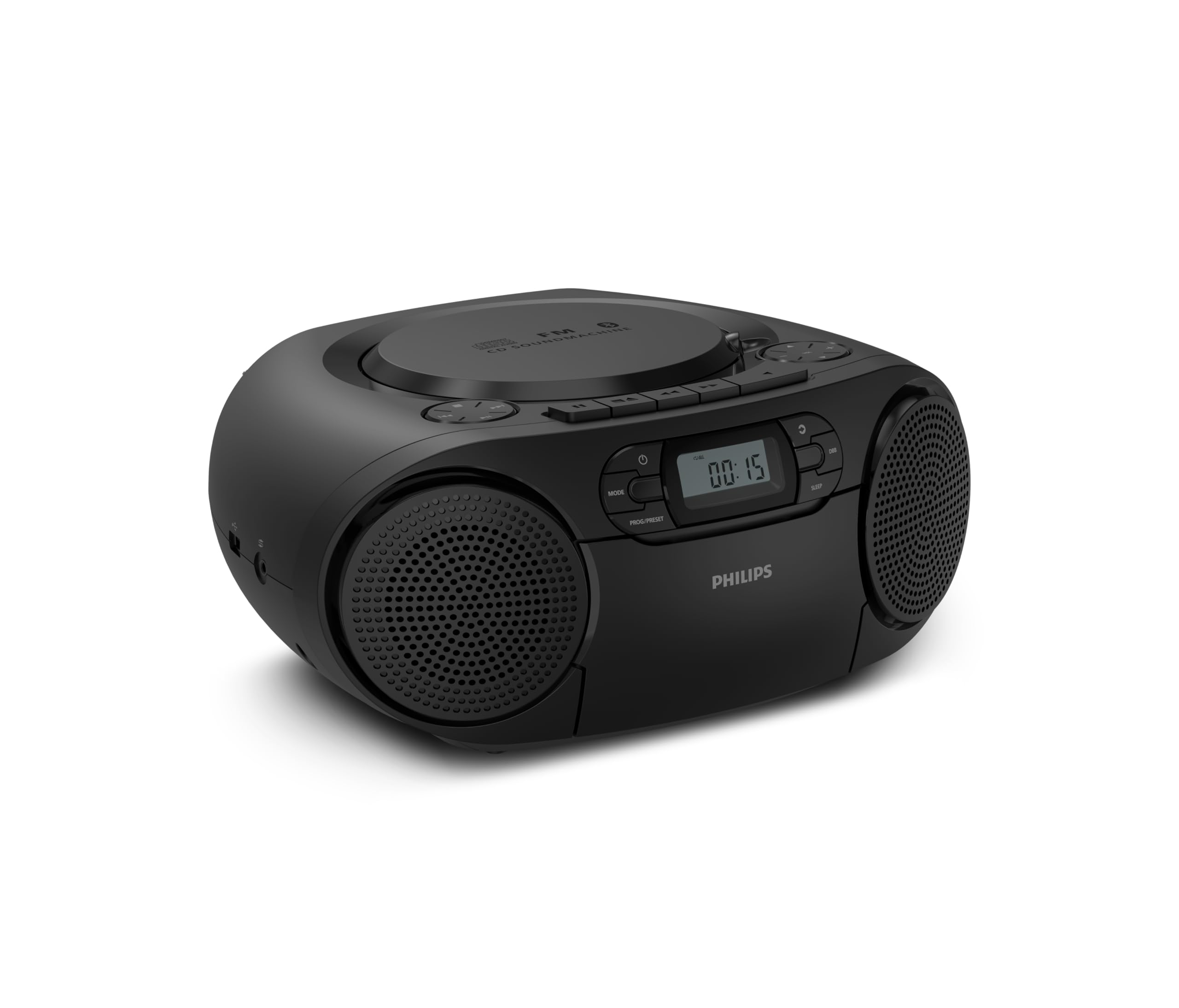
Blaen view of the Philips TAZ2200 CD Soundmachine, showing the main display and control buttons.
2. Gwybodaeth Diogelwch
Please read these safety instructions carefully before using your device and keep them for future reference. Incorrect use may result in hazards.
- Ffynhonnell Pwer: Defnyddiwch yr addasydd pŵer neu'r batris penodedig yn unig. Sicrhewch fod y cyfainttagmae e yn cyd-fynd â gofynion yr uned.
- Dŵr a lleithder: Peidiwch ag amlygu'r uned i law, lleithder, diferion, na sblasio. Peidiwch â gosod gwrthrychau sy'n llawn hylifau, fel fasys, ar yr uned.
- Awyru: Ensure adequate ventilation. Do not block any ventilation openings. Maintain a minimum distance around the unit for sufficient ventilation.
- Gwres: Peidiwch â gosod yr uned ger ffynonellau gwres fel rheiddiaduron, cofrestri gwres, stofiau, neu offer arall (gan gynnwys amplifyddion) sy'n cynhyrchu gwres.
- Batris: Follow correct polarity when inserting batteries. Do not mix old and new batteries, or different types of batteries. Remove batteries if the unit is not used for a long period.
- Glanhau: Unplug the unit from the power outlet before cleaning. Use a soft, dry cloth. Do not use liquid cleaners or aerosol cleaners.
- Gwasanaethu: Peidiwch â cheisio gwasanaethu'r cynnyrch hwn eich hun. Cyfeiriwch yr holl wasanaethu at bersonél gwasanaeth cymwys.
3. Beth sydd yn y Bocs
Wrth ddadbacio, gwnewch yn siŵr bod yr holl eitemau a restrir isod yn bresennol:
- Philips TAZ2200 CD Soundmachine
- Cebl pŵer
- Canllaw cychwyn cyflym
- Llyfryn gwarant
- Taflen diogelwch
4. Rheolaethau a Chysylltiadau
Rheolaethau Panel Blaen
The front panel features the main display, power button, mode selection, program/preset buttons, and dynamic bass boost (DBB) control. Playback controls for CD and USB are also located here.

Blaen manwl view showing the display, power, mode, program/preset, and DBB buttons.
Cysylltiadau Ochr a Chefn
The side of the unit provides a USB port for digital audio playback and a 3.5mm audio input jack for connecting external devices.

Ochr view illustrating the USB port and Audio Input jack.
The top of the unit houses the CD compartment and additional playback controls, while the rear features the AC power input and the FM antenna.

Brig view showing the CD compartment and associated controls.

Cefn view displaying the AC power input and the telescopic FM antenna.
5. Gosod
5.1 Cyflenwad Pŵer
Pŵer AC
- Sicrhewch fod yr uned wedi'i diffodd.
- Connect the supplied power cable to the AC IN socket on the rear of the sound machine.
- Plug the other end of the power cable into a wall power outlet.
Pŵer Batri
For portable use, the unit can operate on 6 x C-type batteries (not included).
- Agorwch y gorchudd compartment batri sydd wedi'i leoli ar waelod yr uned.
- Insert 6 C-type batteries, ensuring correct polarity (+/-) as indicated inside the compartment.
- Caewch y clawr adran batri yn ddiogel.
5.2 Addasiad Antena
For optimal FM radio reception, fully extend the telescopic antenna located at the rear of the unit. Adjust its position and angle to achieve the clearest signal.
6. Cyfarwyddiadau Gweithredu
6.1 Gweithrediad Cyffredinol
- Pŵer ymlaen / i ffwrdd: Gwasgwch y GRYM botwm i droi'r uned ymlaen neu i ffwrdd.
- Rheoli cyfaint: Defnyddiwch y VOL+ or CYF - botymau i addasu lefel y gyfrol.
- Hwb Bas Dynamig (DBB): Gwasgwch y Dbb button to activate or deactivate the dynamic bass boost feature for enhanced bass sound.
- Dewis Modd: Gwasgwch y MODD button repeatedly to switch between CD, Cassette, FM Radio, Bluetooth, USB, and Audio Input modes.
6.2 Chwarae CD
- Open the CD compartment cover on top of the unit.
- Place a CD (CD, CD-R, or CD-RW) with the label side facing up onto the spindle.
- Caewch glawr y compartment CD.
- Gwasgwch y MODD botwm i ddewis modd CD.
- Gwasgwch y CHWARAE/SEIBIANT botwm i ddechrau chwarae.
- Defnyddiwch y SGIP botymau (botymau (|< or >> |) i hepgor traciau.
- Pwyswch a dal |< or >> | to search within a track.
- Gwasgwch y AROS botwm i atal chwarae.
6.3 Chwarae Casét
- Open the cassette compartment door on the front of the unit.
- Mewnosodwch dâp casét gyda'r ymyl agored yn wynebu i fyny.
- Caewch ddrws yr adran casét.
- Gwasgwch y MODD botwm i ddewis modd Casét.
- Gwasgwch y CHWARAE botwm i ddechrau chwarae.
- Defnyddiwch y YMLAEN GYFLYM or AILWIN buttons to quickly advance or rewind the tape.
- Gwasgwch y AROS botwm i atal chwarae.
Radio 6.4 FM
- Gwasgwch y MODD botwm i ddewis modd Radio FM.
- Sgan Auto: Pwyswch a dal y PROG/PRESET botwm i sganio a storio gorsafoedd FM sydd ar gael yn awtomatig.
- Tiwnio â Llaw: Gwasgwch y DYNIO botymau (botymau (|< or >> |) to manually tune to a desired frequency.
- Rhagosodiadau Arbed: After tuning to a station, press PROG/PRESET once, then use |< or >> | i ddewis rhif rhagosodedig, a phwyswch PROG/PRESET eto i gadarnhau.
- Dwyn i gof Rhagosodiadau: Yn y modd FM, pwyswch PROG/PRESET repeatedly to cycle through saved preset stations.
6.5 Chwarae Bluetooth
- Gwasgwch y MODD button to select Bluetooth mode. The display will show 'BT' and flash, indicating it's in pairing mode.
- Ar eich dyfais sydd wedi'i galluogi gan Bluetooth (ffôn clyfar, tabled), galluogwch Bluetooth a chwiliwch am ddyfeisiau sydd ar gael.
- Select "Philips TAZ2200" from the list of devices.
- Once paired, the unit will emit a confirmation sound, and 'BT' will stop flashing.
- Start playing audio on your connected device. The sound will be streamed to the sound machine.
Chwarae USB 6.6
- Insert a USB flash drive into the USB port on the side of the unit.
- Gwasgwch y MODD botwm i ddewis modd USB.
- Bydd yr uned yn canfod ac yn dechrau chwarae sain gydnaws yn awtomatig files (MP3, WAV, WMA).
- Defnyddiwch y rheolyddion chwarae (CHWARAE/SEIBIANT, SGIP, AROS) as you would for CD playback.
6.7 Audio Input (AUX)
- Connect one end of a 3.5mm audio cable (not included) to the AUDIO IN jack on the side of the sound machine.
- Connect the other end of the audio cable to the headphone jack or audio output of your external device (e.g., MP3 player, turntable).
- Gwasgwch y MODD button to select Audio Input mode.
- Start playing audio on your external device. The sound will be played through the sound machine.
7. cynnal
- Glanhau'r Uned: Wipe the exterior of the unit with a soft, slightly damp brethyn. Peidiwch â defnyddio glanhawyr neu doddyddion sgraffiniol.
- Gofal Chwaraewr CD: Keep the CD compartment clean. If the lens is dirty, use a specialized CD lens cleaner. Avoid touching the lens.
- Gofal Chwaraewr Casét: Glanhewch bennau'r tâp a'r rholeri pinsio o bryd i'w gilydd gyda swab cotwm yn ysgafn.ampyn cynnwys alcohol isopropyl.
- Amnewid Batri: If using batteries, replace all 6 C-type batteries when the unit's performance diminishes or if the unit will not be used for an extended period.
- Storio: Pan nad yw'n cael ei ddefnyddio, storiwch yr uned mewn lle glân, sych i ffwrdd o olau haul uniongyrchol a thymheredd eithafol.
8. Datrys Problemau
If you encounter any issues with your Philips TAZ2200, please refer to the table below for common problems and solutions.
| Problem | Achos Posibl | Ateb |
|---|---|---|
| Dim pŵer | Cebl pŵer heb ei gysylltu; Batris wedi'u gwagio neu wedi'u mewnosod yn anghywir. | Check AC power connection; Replace batteries or ensure correct polarity. |
| Dim sain | Volume too low; Incorrect mode selected; Headphones connected. | Increase volume; Select the correct source mode (CD, FM, BT, etc.); Disconnect headphones. |
| CD ddim yn chwarae | CD wedi'i fewnosod yn anghywir; mae'r CD yn fudr neu wedi'i grafu; ni chefnogir fformat y CD. | Insert CD with label side up; Clean or replace CD; Ensure CD is CD-R/RW compatible. |
| Casét ddim yn chwarae | Cassette inserted incorrectly; Tape is damaged. | Insert cassette correctly; Try a different cassette. |
| Derbyniad FM gwael | Antenna not extended or positioned correctly; Weak signal. | Estynnwch ac addaswch yr antena telesgopig yn llawn; Rhowch gynnig ar symud yr uned i leoliad gwahanol. |
| Bluetooth ddim yn cysylltu | Unit not in pairing mode; Bluetooth device too far; Device already paired with another unit. | Ensure unit is in Bluetooth mode and flashing; Move device closer; Disconnect from other devices. |
| Problemau chwarae USB | Gyriant USB heb ei fewnosod yn gywir; Anghydnaws file fformat; gyriant USB wedi'i llygru. | Ail-osodwch yriant USB; Sicrhewch files are MP3, WAV, or WMA; Try a different USB drive. |
9. manylebau
| Nodwedd | Manyleb |
|---|---|
| Brand | PHILIPS |
| Rhif Model | TAZ2200/10 |
| Technoleg Cysylltedd | Bluetooth 6.0, USB, Audio Input (3.5mm) |
| Math o Siaradwr | Stereo (2 speakers) |
| Pŵer Allbwn | 6 Watts (mwyafswm) |
| Cyfryngau â Chymorth | CD, CD-R, CD-RW, Cassette, USB (MP3, WAV, WMA) |
| Tiwniwr Radio | Digital FM with 20 presets |
| Ffynhonnell Pwer | AC (wired), 6 x C-type batteries (not included) |
| Dimensiynau (LxWxH) | 24.5 x 28.5 x 12.5 cm |
| Pwysau | 1.35 Cilogram |
| Lliw | Arian |
10. Gwarant a Chefnogaeth
10.1 Gwarant Cynnyrch
This Philips TAZ2200 CD Soundmachine comes with a Gwarant 2 mlynedd o ddyddiad y pryniant. Cadwch eich prawf prynu ar gyfer hawliadau gwarant. Mae'r warant yn cwmpasu diffygion gweithgynhyrchu a chamweithrediadau o dan amodau defnydd arferol.
10.2 Cefnogaeth i Gwsmeriaid
For technical assistance, troubleshooting beyond this manual, or warranty service, please refer to the contact information provided in the warranty booklet included with your product. You can also visit the official Philips support website for your region for further assistance and FAQs.