
1. Hysbysiad Pwysig
Please carefully check the store name and ensure you are purchasing products sold by "LUZHAN." We have received customer feedback stating that products received did not match the description and were of poor quality. Upon investigation, we found that these customers did not purchase the products from us. To prevent such incidents from happening again in the future and to avoid unnecessary misunderstandings, please carefully verify the store name LUZHAN.

Image: Important notice to verify seller name LUZHAN for authentic products.
2. Drosview
The XIAOMI POCO X8 Pro Max 5G is a high-performance smartphone designed for advanced users. It features a powerful Mediatek Dimensity 9500s processor, a vibrant 1.5K 120Hz AMOLED display, a large 8500mAh battery with 100W HyperCharge, and a 50 MP Light Fusion 600 camera system with OIS. This manual provides essential information for setting up and operating your device.

Delwedd: Blaen a chefn view of the POCO X8 Pro Max 5G smartphone.
Fideo: Dros benview of the POCO X8 Pro Series, highlighting key features and design.
3. Gosod
3.1 Beth sydd yn y Bocs
- XIAOMI POCO X8 Pro Max 5G Smartphone
- Gwefrydd
- Screen Protector (pre-applied or included)
3.2 Gosod Dyfais Cychwynnol
- Pŵer Ymlaen: Press and hold the power button located on the side of the device until the XIAOMI logo appears.
- Iaith a Rhanbarth: Dilynwch yr awgrymiadau ar y sgrin i ddewis eich iaith a'ch rhanbarth dewisol.
- Cysylltu â Wi-Fi: Select your Wi-Fi network and enter the password to connect to the internet. This is necessary for initial setup and software updates.
- Cyfrif Google: Mewngofnodwch gyda'ch cyfrif Google neu crëwch un newydd. Mae hyn yn hanfodol i gael mynediad i'r Google Play Store a gwasanaethau Google eraill.
- Trosglwyddo Data: If you are upgrading from another device, you may have the option to transfer your data (apps, photos, contacts) during this stage.
- Gosod diogelwch: Set up your preferred security method, such as a PIN, pattern, password, or fingerprint. The device supports an ultrasonic fingerprint sensor.
- Gosodiad Cyflawn: Follow any remaining prompts to finalize the setup process.
3.3 SIM Card and eSIM Setup
The POCO X8 Pro Max 5G supports physical SIM cards and eSIM functionality.
- Physical SIM: Use the provided SIM ejector tool to open the SIM tray. Insert your Nano-SIM card(s) into the tray, ensuring proper orientation. Close the tray securely.
- eSIM: For eSIM activation, navigate to Gosodiadau > Rhwydwaith a'r rhyngrwyd > SIMs and follow the instructions to add an eSIM profile provided by your carrier.
4. Cyfarwyddiadau Gweithredu
4.1 Nodweddion Arddangos
Your device features a 6.83-inch 1.5K ultra-bright AMOLED display with a 120Hz refresh rate for smooth visuals and a 24x super resolution touch for enhanced responsiveness. It also includes eye protection features and Corning Gorilla Glass 7i for durability.
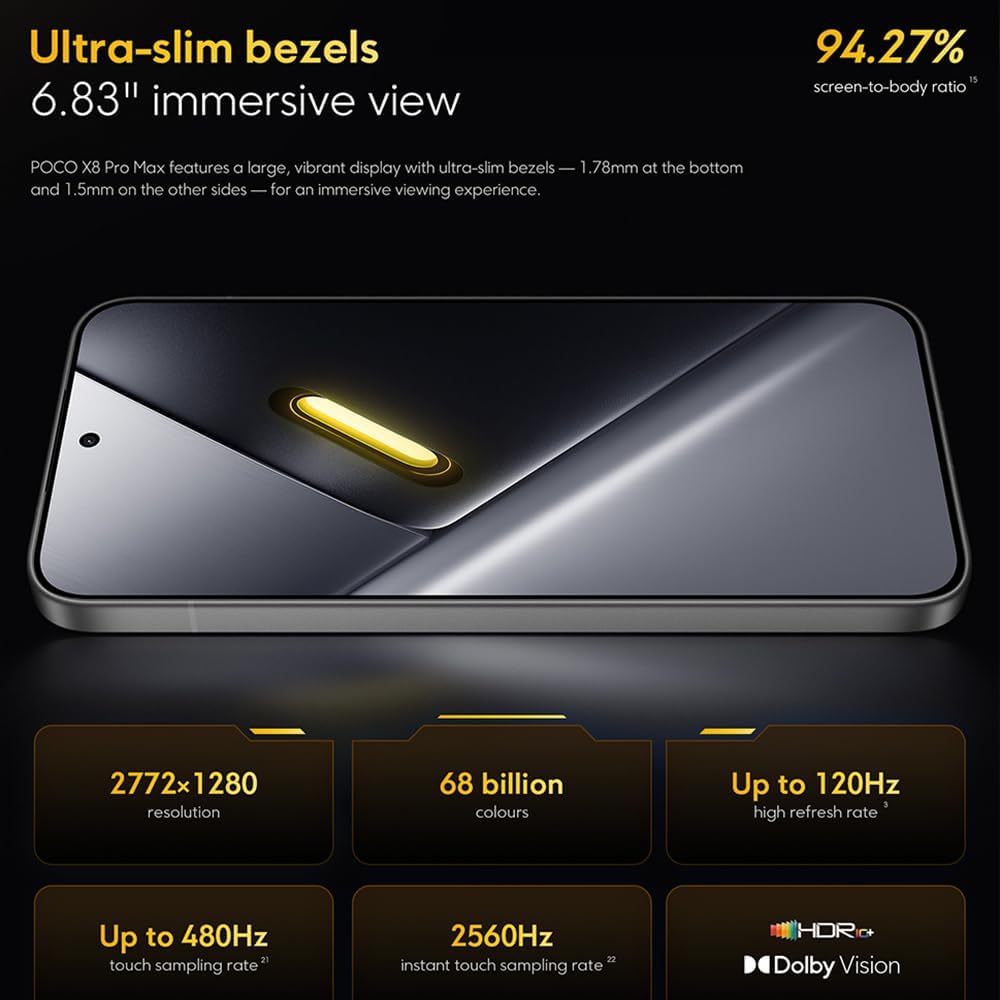
Image: The 6.83-inch 1.5K ultra-bright AMOLED display with minimal bezels.
4.2 Perfformiad
Powered by the Mediatek Dimensity 9500s chipset (3nm, 4+4 All Big Core architecture, NPU890 AI processor), the POCO X8 Pro Max 5G delivers high performance. The POCO 3D IceLoop cooling system ensures efficient heat dissipation, maintaining optimal performance during intensive tasks like gaming.

Image: Diagram illustrating the Mediatek Dimensity 9500s flagship platform.

Image: Illustration of the 5800mm² ultra-large LHP area for cooling.
4.3 System Camera
The device features a 50 MP Light Fusion 600 main camera with OIS (Optical Image Stabilization) and an 8 MP ultra-wide camera. It supports portrait mode with bokeh + HDR and dynamic video-to-still conversion.

Image: Close-up of the 50 MP main camera and 8 MP ultra-wide camera system.
4.4 Batri a Chodi Tâl
Equipped with a massive 8500 mAh (typical) battery, the POCO X8 Pro Max 5G offers extended usage. It supports 100W HyperCharge, allowing for rapid recharging. A 16% ultra-high carbon-silicon content contributes to its high energy density.

Image: Illustration highlighting the massive 8500mAh battery capacity.

Image: Visual representation of the 100W HyperCharge technology.
4.5 Sain
The device features symmetrical dual stereo speakers (1115F) for a balanced and immersive audio experience.
4.6 Software
The POCO X8 Pro Max 5G comes with Xiaomi HyperOS 3 installed, offering an optimized and user-friendly interface based on Android 16.
5. cynnal
5.1 Glanhau Eich Dyfais
- Defnyddiwch frethyn meddal, di-lint i sychu'r sgrin a'r panel cefn.
- Osgowch ddefnyddio cemegau llym, deunyddiau sgraffiniol, neu chwistrellau aerosol.
- Ar gyfer smwtshis ystyfnig, ychydig yn dampgolchwch y lliain gyda dŵr neu lanhawr sgrin a gynlluniwyd ar gyfer electroneg.
5.2 Dust and Water Resistance
The device is certified for IP68 dust and water resistance. This means it can withstand immersion in up to 2 meters of water for 30 minutes under specific laboratory conditions. However, water and dust resistance may deteriorate over time with normal wear and tear. The warranty does not cover liquid damage. Avoid exposing the device to hot water, saltwater, or other liquids.

Image: Visual representation of the IP68 dust and water resistance.
5.3 Diweddariadau Meddalwedd
Chwiliwch yn rheolaidd am ddiweddariadau meddalwedd a'u gosod i sicrhau bod gan eich dyfais y nodweddion, y clytiau diogelwch a'r gwelliannau perfformiad diweddaraf. Fel arfer gallwch ddod o hyd i'r opsiwn hwn yn Gosodiadau > Ynglŷn â'r ffôn > Diweddariad system.
6. Datrys Problemau
6.1 Materion ac Atebion Cyffredin
- Dyfais ddim yn troi ymlaen: Gwnewch yn siŵr bod y batri wedi'i wefru. Cysylltwch y ddyfais â'r gwefrydd ac aros ychydig funudau cyn ceisio ei throi ymlaen eto.
- Sgrin yn anymatebol: Try restarting the device by holding the power button for an extended period (e.g., 10-15 seconds) until it reboots.
- Apiau'n chwalu: Clirio storfa'r ap problemus (Gosodiadau > Apiau > [Enw'r Ap] > Storio > Clirio'r storfa) or reinstall the app. Ensure your device software is up to date.
- Bywyd batri gwael: Check background app usage, reduce screen brightness, disable unnecessary features like GPS or Bluetooth when not in use, and ensure your software is updated.
- Problemau cysylltedd rhwydwaith: Restart your device. Check if your SIM card is properly inserted. Toggle Airplane Mode on and off. Reset network settings (Gosodiadau > System > Dewisiadau ailosod > Ailosod Wi-Fi, ffôn symudol a Bluetooth).
6.2 Ailosod Ffatri
If you encounter persistent issues, a factory reset may be necessary. Rhybudd: This will erase all data on your device. Back up important data before proceeding. Go to Gosodiadau > System > Ailosod opsiynau > Dileu'r holl ddata (ailosod ffatri) a dilynwch y cyfarwyddiadau ar y sgrin.
7. manylebau
| Nodwedd | Manyleb |
|---|---|
| Brand | XIAOMI |
| Enw Model | POCO X8 Pro Max 5G |
| System Weithredu | Android 16 (with Xiaomi HyperOS 3) |
| Cynhwysedd Storio Cof | 512 GB |
| Maint Sgrin | 6.83 modfedd |
| Math Arddangos | AMOLED, 1.5K, 120Hz refresh rate |
| Technoleg Cellog | 5G |
| Lliw | Noir (Black) |
| Math o Gysylltydd | USB Math C |
| Diogelwch Biometrig | Fingerprint Recognition (Ultrasonic) |
| Gallu Batri | 8500 mAh (Lithium-polymer) |
| Codi tâl | HyperCharge 100W |
| Prif Camera | 50 MP Light Fusion 600 with OIS |
| Camera Ultra-eang | 8 AS |
| Prosesydd | Mediatek Dimensity 9500s |
| Gwrthsefyll Llwch a Dŵr | IP68 |
| Blwyddyn y Model | 2025 |
| Gwlad Tarddiad | Tsieina |
8. Gwarant a Chefnogaeth
For detailed warranty information and customer support, please refer to the warranty card included with your product or visit the official XIAOMI websafle. Cadwch eich prawf prynu ar gyfer hawliadau gwarant.
Online resources and FAQs may also be available on the XIAOMI support portal.