
Rhagymadrodd
This manual provides detailed instructions for the safe and proper installation, operation, and maintenance of your PERLESMITH PSAT3B Tilting TV Wall Mount. Please read this manual thoroughly before beginning installation and retain it for future reference. This wall mount is designed for televisions ranging from 42 to 100 inches and supports a maximum weight of 160 lbs.
Gwybodaeth Diogelwch
RHYBUDD: Improper installation may result in serious personal injury and property damage. If you do not understand these instructions or have doubts about the safety of the installation, please contact a qualified installer.
- This product is intended for installation on wood studs (16"-24" spacing), solid concrete, or brick walls only. Do not install on drywall alone.
- Ensure the mounting surface can safely support the combined weight of the mount and your television.
- Peidiwch â bod yn fwy na'r capasiti pwysau uchaf o 160 pwys (72.5 kg).
- Verify your TV's VESA pattern (mounting hole spacing) is compatible with the mount (200x200mm to 600x600mm).
- Defnyddiwch ganfyddwr stydiau bob amser i leoli stydiau pren yn gywir.
- Gwisgwch offer diogelwch priodol, gan gynnwys amddiffyniad llygaid, yn ystod y gosodiad.
- Cadwch blant ac anifeiliaid anwes i ffwrdd o'r ardal waith yn ystod y gosodiad.

The PERLESMITH PSAT3B Tilting TV Wall Mount provides a secure and flexible viewing solution for large televisions.
Cynnwys Pecyn
Please check to ensure all components are present and undamaged before installation. Refer to the included hardware bags for specific screw sizes and quantities.
- Cynulliad Plât Wal
- Bracedi Teledu (2)
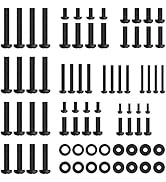
- Pecyn Caledwedd Mowntio (sgriwiau amrywiol, golchwyr, bylchwyr, angorau)
- Lefel
- Llawlyfr Cyfarwyddiadau
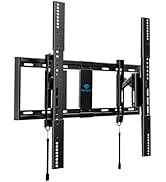
Drosoddview of the PERLESMITH PSAT3B wall mount components and included hardware.
Manylebau
| Nodwedd | Manyleb |
|---|---|
| Rhif Model | PSAT3B |
| Math Mowntio | Wal Mount |
| Math o Symudiad | Swivel, Tilt |
| Deunydd | Dur aloi |
| Lliw | Du |
| Dyfeisiau Cydnaws | Teledu |
| Maximum Supported Screen Size | 100 modfedd |
| Minimum Supported Screen Size | 42 modfedd |
| Cynhwysedd Llwyth Uchaf | 160 pwys (72.5 kg) |
| Cydnawsedd VESA | 200x200mm i 600x600mm |
| Ongl Tilt | +5°/-15° |
| Ongl troi | ±5° |
| Estyniad o'r Wal | 3" (wedi'i dynnu'n ôl) i 6.5" (wedi'i ymestyn) |

This diagram illustrates the available VESA patterns and compatible wall types for the mount. Do not install on drywall alone.
Gosod a Gosod
Follow these steps carefully to ensure a secure installation. It is recommended to have two people for TV mounting.
Cam 1: Gwirio Cyn Gosod
- Gwirio Math o Wal: Ensure your wall is suitable for mounting (16"-24" wood studs, concrete, or brick).
- Gwiriwch faint y teledu: Confirm your TV is between 42-100 inches.
- Gwirio Patrwm VESA: Measure the horizontal and vertical distance between the mounting holes on the back of your TV. This must be between 200x200mm and 600x600mm.
Always perform these checks before beginning the installation process.
Step 2: Attach Brackets to TV Back
- Rhowch eich teledu wyneb i lawr yn ofalus ar arwyneb meddal, glân i atal y sgrin rhag cael ei difrodi.
- Align the TV brackets with the mounting holes on the back of your TV.
- Select the appropriate screws, washers, and spacers from the hardware kit that fit your TV's VESA holes.
- Securely fasten the brackets to the TV using a screwdriver, ensuring they are centered and tight. Do not overtighten.
Cam 3: Gosodwch y Plât Wal
- Determine the desired height for your TV. Use a pencil to mark the center of the desired location on the wall.
- Use a stud finder to locate the center of two adjacent wood studs (for wood stud installation) or mark drill points for concrete/brick.
- Hold the wall plate against the wall, aligning the center with your mark and ensuring it is level using the included bubble level. Mark the drill holes.
- Drill pilot holes at the marked locations. For wood studs, drill 7/32" (5.5mm) holes. For concrete/brick, drill 3/8" (10mm) holes and insert concrete anchors.
- Attach the wall plate to the wall using the lag bolts and washers. Tighten securely.
Cam 4: Crogwch y teledu ar y plât wal
- Gyda chymorth, codwch y teledu yn ofalus gyda'r cromfachau sydd ynghlwm.
- Hook the TV brackets onto the top edge of the wall plate.
- Gently lower the TV until the brackets fully engage with the wall plate.
- Engage the safety latches located at the bottom of the TV brackets to secure the TV to the wall plate. The magnetic pull tabs can be used to lock or release the TV.

Simplified three-step installation process for the PERLESMITH TV mount.

The mount extends 6.5 inches from the wall for easy cable access and retracts to 3 inches for a low-profile edrych.
Video demonstrating the ease of installation and functionality of the PERLESMITH Tilting TV Wall Mount.
Cyfarwyddiadau Gweithredu
Addasiad Tilting
The PERLESMITH PSAT3B mount allows for a tilt range of +5° to -15°. To adjust the tilt, loosen the tilt knobs on the side of the TV brackets, adjust the TV to your desired angle, and then tighten the knobs securely. This helps reduce glare and optimize viewing onglau.
Addasiad Troelli
The mount offers a ±5° swivel adjustment. This feature allows for minor horizontal adjustments to achieve a perfectly level screen after installation. Simply grasp the sides of the TV and gently rotate it to the desired position.
Addasiad Lefelu
After installation, you can fine-tune your TV's alignment with a ±2° leveling adjustment. This ensures your TV is perfectly horizontal, even if the wall plate was not installed perfectly level.

The mount offers a ±5° swivel for optimal viewing hyblygrwydd.

Achieve a perfectly level TV with the ±2° leveling adjustment feature.

The secure latch system with magnetic pull tabs allows for quick and tool-free locking and unlocking of the TV.
Sioe fideoasing the tilting functionality of the PERLESMITH TV Wall Mount.
Cynnal a chadw
Mae cynnal a chadw rheolaidd yn sicrhau hirhoedledd a gweithrediad diogel eich mownt wal teledu.
- Glanhau: Sychwch y mowntiad gyda lliain meddal, sych. Osgowch lanhawyr neu doddyddion sgraffiniol.
- Gwiriadau Cyfnodol: Gwiriwch yr holl sgriwiau a bolltau o bryd i'w gilydd i sicrhau eu bod yn dal yn dynn. Ail-dynhau os oes angen.
- Archwilio am Ddifrod: Regularly inspect the mount for any signs of wear, damage, or corrosion. If any issues are found, discontinue use and contact customer support.
Datrys problemau
If you encounter issues during or after installation, refer to the following common solutions.
- Teledu Ddim yn Lefel: Use the ±2° leveling adjustment feature to fine-tune the TV's horizontal position. Ensure the wall plate was installed as level as possible.
- Anhawster Gogwyddo: Ensure the tilt knobs on the TV brackets are sufficiently loosened before attempting to adjust the tilt. Tighten them firmly after adjustment.
- TV Feels Loose: Double-check that all mounting bolts to the wall and screws to the TV are securely tightened. Ensure the safety latches are engaged.
- Nid yw Tyllau Mowntio yn Alinio: Verify your TV's VESA pattern against the mount's specifications. If incompatible, the mount cannot be used.
- Rhannau Coll: If any parts are missing from the package, contact PERLESMITH customer support immediately.
Fideo ynglŷn âview highlighting the features and installation process, which may assist with troubleshooting common issues.
Gwarant a Chefnogaeth
This PERLESMITH product comes with a 5-year warranty. For warranty claims or technical assistance, please contact PERLESMITH customer support. You can typically find contact information on the product packaging or the official PERLESMITH websafle.
For additional support, you may visit the PERLESMITH store on Amazon: Siop PERLESMITH