
1. Rhagymadrodd
This manual provides essential instructions for setting up, operating, and maintaining your Nothing Phone (4a) Pro. Please read this guide thoroughly to ensure proper use and to maximize the performance of your device.
2. Gosodiad Cychwynnol
2.1. Dadbocsio a Chydrannau
Wrth agor y pecyn, gwiriwch fod yr holl gydrannau yn bresennol:
- Nothing Phone (4a) Pro device
- Clustffon
Note: A USB Type-C cable and SIM ejector tool may be sold separately or included depending on region. A power adapter is typically sold separately.
2.2. Mewnosod y Cerdyn SIM
- Lleolwch y hambwrdd cerdyn SIM ar ochr eich ffôn.
- Insert a SIM ejector tool (not always included) into the small hole next to the tray and press gently until the tray pops out.
- Rhowch eich cerdyn(iau) Nano-SIM yn y hambwrdd gyda'r cysylltiadau aur yn wynebu i lawr.
- Ail-osodwch y hambwrdd yn ofalus i'r ffôn nes ei fod yn clicio i'w le.
2.3. Pweru Ymlaen a Chyfluniad Cychwynnol
- Press and hold the Power button until the Nothing logo appears.
- Dilynwch yr awgrymiadau ar y sgrin i ddewis eich iaith, cysylltu â rhwydwaith Wi-Fi, a mewngofnodi gyda'ch cyfrif Google.
- Complete the setup process, including data transfer (if applicable) and security settings.
3. Gweithredu Eich Ffôn
3.1. Arddangosfa a Rhyngwyneb Defnyddiwr
The Nothing Phone (4a) Pro features a 6.83-inch 1.5K Flexible AMOLED Display gyda a Cyfradd adnewyddu 144Hz, providing vibrant colors and smooth scrolling. Navigate the interface using touch gestures.
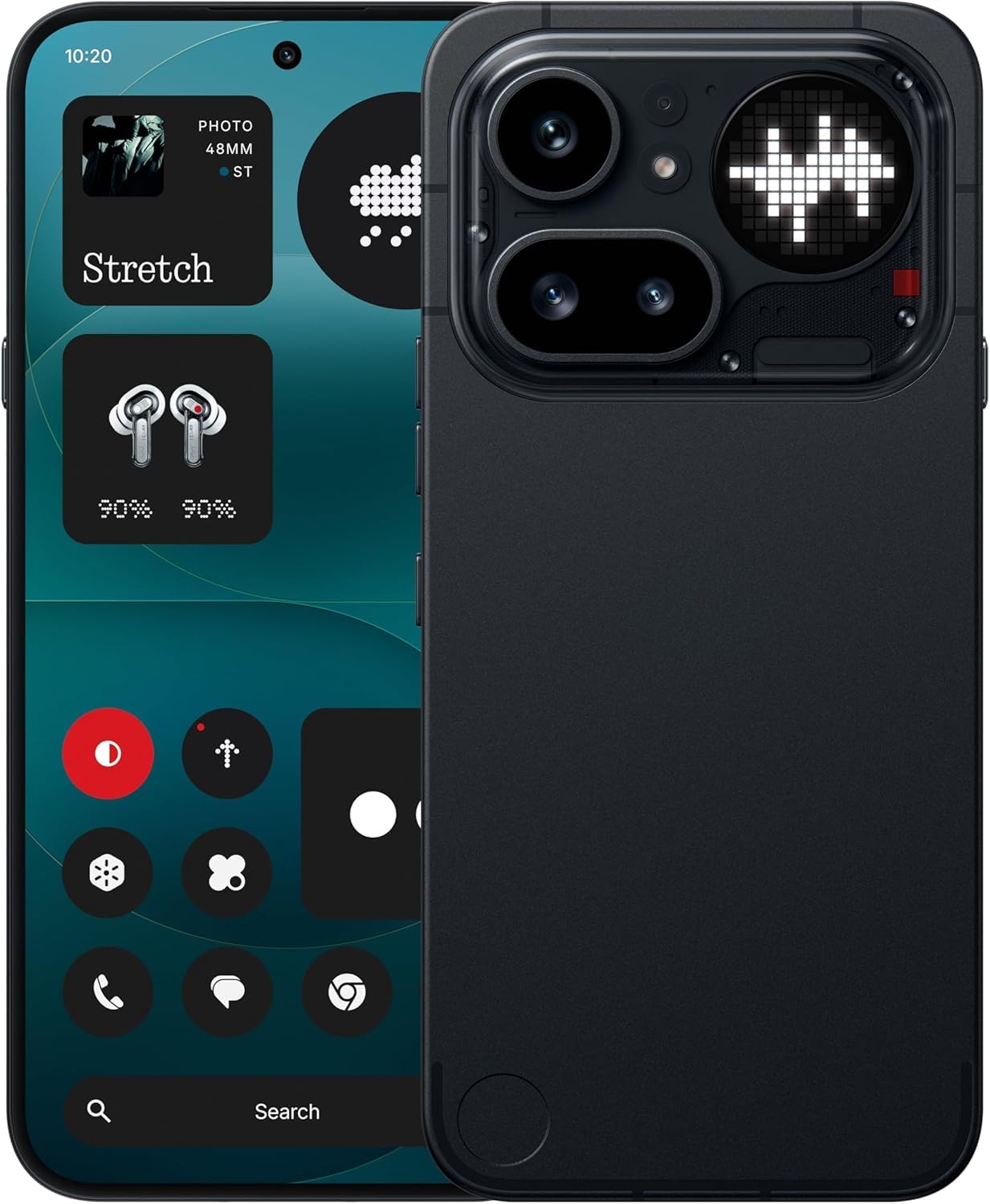
Image: The Nothing Phone (4a) Pro showcasing its flexible AMOLED display and sleek design.
3.2. System Camera
Your device is equipped with a Triple Camera System, allowing for versatile photography. The camera supports up to 140x ultra zoom for capturing distant subjects.
Image: Detail of the triple camera module and a screen showing 140x zoom capability.
3.3. Perfformiad
The Nothing Phone (4a) Pro is powered by the Snapdragon 7 Gen 4 processor, ensuring smooth multitasking and efficient performance for demanding applications and games. It comes with 12GB RAM for enhanced responsiveness.
Image: A visual representation of the Snapdragon 7 Gen 4 processor, highlighting the device's core performance component.
3.4. Batri a Chodi Tâl
Mae'r ddyfais yn cynnwys a Batri 5080 mAh, providing extended usage times. It supports Tâl Cyflym 50W technology, allowing for quick recharging.
Delwedd: Delwedd fewnol view of the phone, showing the battery component with its specifications.
3.5. Nodweddion Meddalwedd a Deallusrwydd Artiffisial
Your Nothing Phone (4a) Pro runs on Nothing OS, based on Android 14, offering a clean and intuitive user experience. It integrates Essential AI tools a nodweddion Google Gemini + ChatGPT Integration for advanced assistance and productivity.
Image: Screenshots depicting the Nothing OS home screen, an AI tools interface, and the Google Gemini + ChatGPT integration menu.
3.6. Cysylltedd
Mae'r ddyfais yn cefnogi 5G cellular technology for high-speed internet access. It uses a USB Math-C (USB 2.0) connector for charging and data transfer.
4. cynnal
4.1. Glanhau Eich Dyfais
To clean your phone, use a soft, lint-free cloth. Avoid abrasive materials or harsh chemicals. For stubborn smudges, slightly dampgolchwch y lliain gyda dŵr neu lanhawr sgrin a gynlluniwyd ar gyfer electroneg.
4.2. Diweddariadau Meddalwedd
Chwiliwch am ddiweddariadau meddalwedd a'u gosod yn rheolaidd i sicrhau bod gan eich dyfais y nodweddion, y clytiau diogelwch a'r gwelliannau perfformiad diweddaraf. Ewch i Gosodiadau > System > Diweddariad Meddalwedd i wirio am ddiweddariadau sydd ar gael.
4.3. Gofal Batri
To prolong battery life, avoid exposing your phone to extreme temperatures. It is recommended to keep the battery charge between 20% and 80% for optimal long-term health.
5. Datrys Problemau
5.1. Problemau Cyffredin ac Atebion
- Dyfais ddim yn troi ymlaen: Gwnewch yn siŵr bod y batri wedi'i wefru. Cysylltwch â gwefrydd am o leiaf 15 munud, yna ceisiwch droi ymlaen eto.
- Apiau'n chwalu: Cliriwch storfa'r ap problemus (Gosodiadau > Apiau > [Enw'r Ap] > Storio a storfa > Clirio storfa). Os yw'r broblem yn parhau, ailosodwch yr ap.
- Signal rhwydwaith gwael: Check if your SIM card is properly inserted. Try restarting the phone or toggling Airplane Mode on and off.
- Batri yn draenio'n gyflym: Reduce screen brightness, disable unnecessary background apps, and limit location services.
5.2. Ailosod Ffatri
Os byddwch chi'n dod ar draws problemau meddalwedd parhaus, gallai ailosodiad ffatri eu datrys. Rhybudd: Bydd hyn yn dileu'r holl ddata ar eich ffôn. Gwnewch gopi wrth gefn o ddata pwysig cyn bwrw ymlaen. Ewch i Gosodiadau > System > Ailosod opsiynau > Dileu'r holl ddata (ailosod ffatri).
6. manylebau
| Nodwedd | Manylyn |
|---|---|
| Model | Nothing Phone (4a) Pro |
| System Weithredu | Android 14 (Nothing OS) |
| Prosesydd | Snapdragon 7 Gen 4, 2.5 GHz |
| HWRDD | 12 GB |
| Storio Mewnol | 256 GB |
| Arddangos | 6.83" 1.5K Flexible AMOLED, 144Hz refresh rate |
| Gallu Batri | 5080 mAh Lithiwm-Ion |
| Codi tâl | 50W Fast Charge, USB Type-C (USB 2.0) |
| Camera | Triple Camera System, up to 140x ultra zoom |
| Cysylltedd | 5G, GSM, LTE |
| Dimensiynau | 16.4 x 7.8 x 0.8 centimetr |
| Pwysau | 250 gram |
| Cynnwys Blwch | Clustffon |
7. Gwarant a Chefnogaeth
7.1. Gwarant Cynnyrch
The Nothing Phone (4a) Pro comes with a Gwarant gwneuthurwr 1 flynedd from the date of purchase. This warranty covers manufacturing defects and workmanship under normal use. It does not cover damage caused by accidents, misuse, unauthorized modifications, or normal wear and tear.
7.2. Cefnogaeth i Gwsmeriaid
For technical assistance, warranty claims, or service inquiries, please contact Nothing customer support. Refer to the official Nothing websafle ar gyfer y wybodaeth gyswllt ddiweddaraf.
Manufacturer: Nothing
Packer/Importer Contact: Essentially Nothing