
FUNYET NY-01
FUNYET 2026 14.1-inch Laptop User Manual
Model: NY-01
Rhagymadrodd
This manual provides essential information for setting up, operating, maintaining, and troubleshooting your FUNYET 2026 14.1-inch Laptop. Please read this manual thoroughly before using your device to ensure proper function and longevity.
Beth Sydd yn y Bocs
Gwiriwch fod yr holl eitemau yn bresennol yn y pecyn:
- FUNYET 2026 14.1-inch Laptop
- Power Adapter (12V2A DC)
- Llawlyfr Cyfarwyddiadau (y ddogfen hon)
- Cerdyn Gwarant
Cynnyrch Drosview
The FUNYET 2026 laptop is designed for productivity and entertainment, featuring a powerful processor and versatile connectivity.
Nodweddion Allweddol
- System Weithredu: Pre-installed Windows 11 Pro for enhanced multitasking and security.
- Prosesydd: Intel Celeron N5095 (4 cores, 4 threads, up to 2.9 GHz) for smooth performance.
- Cof a Storio: 16GB LPDDR4 RAM and 512GB M.2 SSD, with support for up to 1TB TF Card expansion.
- Arddangos: 14.1-inch IPS Full HD (1920x1080) screen, offering clear and vibrant visuals, with a 180° foldable hinge for flexible viewing.
- Cysylltedd: Dual-band 5G Wi-Fi and Bluetooth 5.0 for fast and stable wireless connections.
- Porthladdoedd: Includes 2x USB 3.0, 1x 3.5mm Headphone Jack, 1x 3.5mm DC Adapter port, 1x Mini-HDMI, and 1x TF Card slot.
- Batri: Integrated 5000mAh battery providing 4-5 hours of normal use and over 50 hours of standby time.
- Camera & Audio: Built-in 0.3-megapixel front camera and dual microphones for video calls and online meetings.
Adnabod Cydran
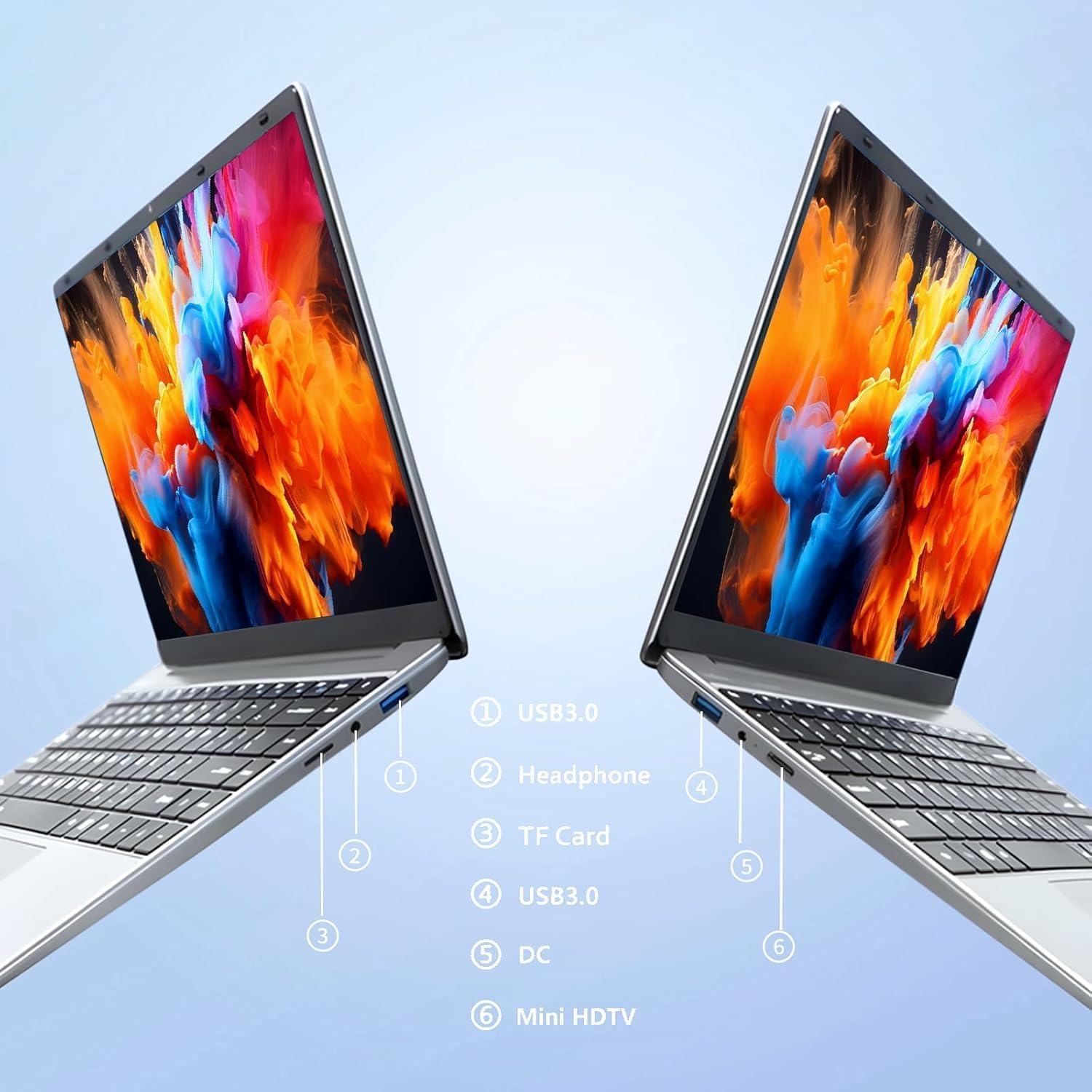
Delwedd: Ochr view of the laptop highlighting port locations.
This image illustrates the various ports available on the FUNYET 2026 laptop. On one side, you will find a USB 3.0 port, a 3.5mm headphone jack, and a TF Card slot. On the opposite side, there is another USB 3.0 port, the DC power input, and a Mini-HDMI port.

Delwedd: Laptop screen displaying its 14-inch Full HD IPS features.
The laptop features a 14-inch Full HD (1920x1080) IPS display with a 16:9 aspect ratio and ultra-narrow bezels, providing a wide perspective and vivid images.

Delwedd: Laptop demonstrating its 180-degree foldable hinge.
The laptop's hinge allows the screen to fold back 180 degrees, offering versatile viewing angles and usage modes.
Canllaw Gosod
1. Gwefru Cychwynnol
- Unpack the laptop and power adapter from the box.
- Connect the power adapter to the DC input port on the side of the laptop.
- Plygiwch yr addasydd pŵer i mewn i allfa wal.
- Allow the laptop to charge for at least 30 minutes before first use, or until the battery indicator shows a sufficient charge.
2. Troi ymlaen yn gyntaf
- Agorwch gaead y gliniadur.
- Press the power button, usually located on the keyboard deck or side.
- Follow the on-screen instructions to complete the Windows 11 Pro setup process, including language selection, network connection, and user account creation.
3. Cysylltu â Wi-Fi
- During the initial Windows setup, you will be prompted to connect to a Wi-Fi network. Select your network from the list and enter the password.
- If setting up later, click the Wi-Fi icon in the taskbar, select your network, and click "Connect".
Cyfarwyddiadau Gweithredu
Rheoli Pŵer
- Pŵer Ymlaen: Pwyswch y botwm pŵer.
- Modd Cwsg: Caewch y caead neu pwyswch y botwm pŵer yn fyr.
- Cau i Lawr: Click the Start button, then Power, then Shut down.
- Ailgychwyn: Click the Start button, then Power, then Restart.
Using the Touchpad and Touchscreen
- Touchpad: Use gestures for navigation. Single tap for left-click, two-finger tap for right-click, two-finger scroll for scrolling.
- Sgrin gyffwrdd: Tap to select, pinch to zoom, swipe to scroll.
Cysylltiad Arddangos Allanol
To connect an external monitor or projector:
- Connect a Mini-HDMI cable from the laptop's Mini-HDMI port to the external display's HDMI input.
- If necessary, use a Mini-HDMI to HDMI adapter (not included).
- Gwasgwch Allwedd Windows + P to open the Project menu and select your desired display mode (Duplicate, Extend, Second screen only).
Using TF Card Expansion
Insert a TF card into the designated slot for additional storage. The laptop supports up to 1TB TF card expansion.
Gofal a Chynnal a Chadw
- Glanhau: Defnyddiwch frethyn meddal, di-flwff i lanhau'r sgrin a'r siasi. Ar gyfer marciau ystyfnig, rhwbiwch ychydigampgolchwch y lliain gyda dŵr neu lanhawr sgrin. Osgowch gemegau llym.
- Gofal Batri: Er mwyn ymestyn oes y batri, osgoi rhyddhau'r batri'n llwyr yn aml. Storiwch y gliniadur mewn lle oer, sych os na chaiff ei ddefnyddio am gyfnodau hir.
- Tymheredd: Operate the laptop within a temperature range of 5°C to 35°C (41°F to 95°F). Avoid direct sunlight or extreme heat/cold.
- Awyru: Ensure the ventilation openings are not blocked to prevent overheating. Do not place the laptop on soft surfaces like beds or sofas during operation.
- Diweddariadau Meddalwedd: Regularly update Windows and drivers to ensure optimal performance and security.
Datrys problemau
Materion Cyffredin ac Atebion
| Problem | Ateb Posibl |
|---|---|
| Nid yw'r gliniadur yn troi ymlaen. | Ensure the power adapter is securely connected and plugged into a working outlet. Check if the battery is charged. Try holding the power button for 10-15 seconds for a hard reset. |
| Problemau cysylltiad Wi-Fi. | Check if Wi-Fi is enabled in Windows settings. Restart your router and the laptop. Ensure you are within range of the Wi-Fi signal. Verify the Wi-Fi password. |
| Perfformiad araf. | Close unnecessary applications. Check for background processes in Task Manager. Ensure Windows is updated. Consider running a disk cleanup. |
| Ni chanfuwyd arddangosfa allanol. | Ensure the Mini-HDMI cable is connected correctly. Check the input source on your external display. Press Allwedd Windows + P to cycle through display modes. |
| Mae'r batri yn draenio'n gyflym. | Adjust screen brightness. Close power-intensive applications. Check power settings in Windows and select a power-saving plan. Disconnect external peripherals when not in use. |
Manylebau Technegol
| Brand | FUNYET |
| Enw Model | NY-01 |
| Maint Sgrin | 14.1 modfedd |
| Datrysiad | 1920 x 1080 (HD Llawn) |
| Technoleg Sgrin | IPS LCD |
| Prosesydd | Intel Celeron N5095 (up to 2.9 GHz) |
| HWRDD | 16 GB LPDDR4 (2400 MHz) |
| Storio | 512 GB M.2 SSD (expandable via TF Card up to 1TB) |
| System Weithredu | Windows 11 Pro |
| Graffeg | Graffeg Intel Integredig |
| Cysylltedd Di-wifr | 5G Wi-Fi (2.4 GHz, 5.8 GHz), Bluetooth 5.0 |
| Porthladdoedd | 2x USB 3.0, 1x 3.5mm Headphone, 1x 3.5mm DC Adapter, 1x Mini-HDMI, 1x TF Card Slot |
| Webcam | 0.3 Megapixel Front Camera |
| Gallu Batri | 5000 mAh / 38.5 Wh |
| Dimensiynau (L x W x H) | 32.2 x 21 x 2.1 cm (12.68 x 8.27 x 0.83 modfedd) |
| Pwysau | 1.4 KG (3.09 pwys) |
| Nodwedd Arbennig | 180° Foldable Hinge |
Gwarant a Chefnogaeth
Gwybodaeth Gwarant
Your FUNYET 2026 laptop comes with a Gwarant 2 mlynedd from the date of purchase. Please retain your proof of purchase for warranty claims. The warranty covers manufacturing defects and malfunctions under normal use. It does not cover damage caused by misuse, accidents, unauthorized repairs, or normal wear and tear.
Yn ogystal, a 6-month free exchange/return policy may apply, subject to the terms and conditions of your purchase platform.
Cefnogaeth i Gwsmeriaid
For any issues, questions, or technical assistance, please contact FUNYET customer support:
- Cymorth Ar-lein: Available 24/7. You can typically find support by logging into your Amazon account, navigating to "Your Account" -> "Your orders", and selecting "Ask Product Question" for your FUNYET laptop.
- E-bost: funyestore@outlook.com
- Ffôn: +49 800-000-7147 (Please note operating hours may vary)

Delwedd: Customer service contact details and warranty information.
This image provides a visual summary of the support options, including the 2-year warranty, 6-month exchange/return policy, and contact information for phone and email support.
Ask a question about this manual
Ask about setup, troubleshooting, compatibility, parts, safety, or missing instructions. Manuals+ will review the question and use this page’s manual context to help answer it.