
Cynnyrch Drosview
The BTMETER BT-881W is a versatile digital instrument designed to measure various environmental parameters, including wind speed, ambient temperature, humidity, and Wet Bulb Globe Temperature (WBGT). It serves as both a digital anemometer and a heat stress monitor, suitable for indoor and outdoor applications.
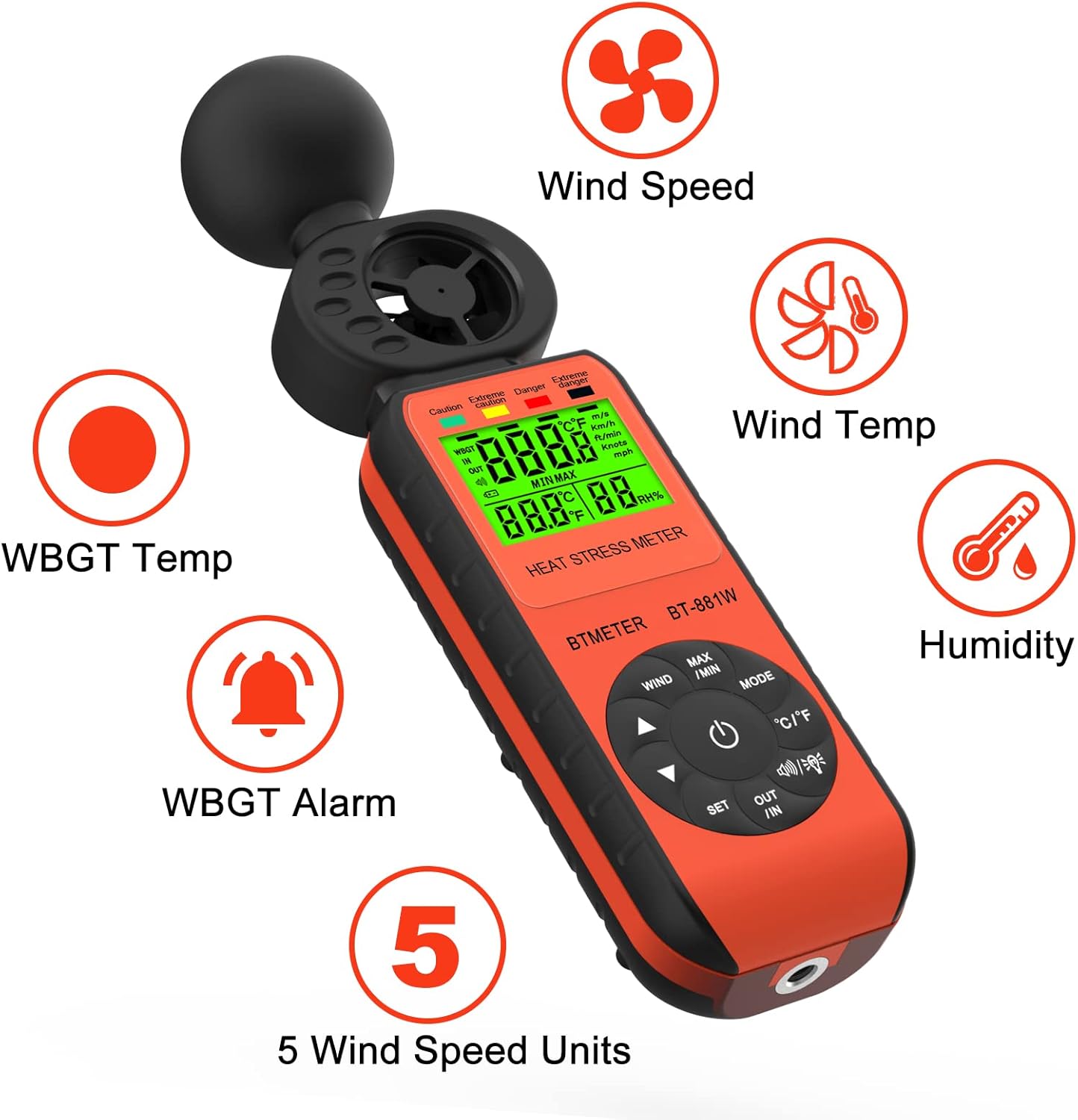
Figure 1: BTMETER BT-881W Heat Stress Meter Anemometer with its primary functions: Wind Speed, Wind Temperature, WBGT Temperature, Humidity, WBGT Alarms, and 5 Wind Speed Units.
Nodweddion Allweddol:
- Mesur Amlswyddogaethol: Measures wind speed, ambient temperature, humidity, and WBGT.
- Cywirdeb Uchel: Features upgraded wind and temperature sensors for precise readings.
- WBGT Monitoring: Includes WBGT alarms and supports indoor/outdoor WBGT measurement modes.
- Defnyddiwr-gyfeillgar: Offers 5 air velocity units, 2 temperature units, data hold, backlit LCD, and auto power-off.
- Gellir gosod trybedd: Equipped with a 1/4" screw hole for tripod installation.
Gosod
Gosod Batri:
The BT-881W requires one 9V battery (not included). To install the battery:
- Lleolwch glawr adran y batri ar gefn y ddyfais.
- Agorwch y clawr.
- Insert a 9V battery, ensuring correct polarity.
- Caewch y clawr adran batri yn ddiogel.
Gosod Tripod (Dewisol):
For stable measurements, the device can be mounted on a tripod. A 1/4" screw hole is located at the bottom of the unit.
- Locate the 1/4" screw hole at the base of the meter.
- Align the meter with your tripod's mounting screw.
- Gently twist the meter onto the tripod until it is secure.

Ffigur 2: Cefn view of the BT-881W showing the battery compartment and dimensions.
Cyfarwyddiadau Gweithredu
Pŵer ymlaen / i ffwrdd:
- Gwasgwch y Grym botwm i droi'r ddyfais ymlaen.
- The device features an auto power-off function to conserve battery life.
Mode Switching (Wind Speed / WBGT):
Gwasgwch y MODD button to switch between wind speed measurement and WBGT (Wet Bulb Globe Temperature) measurement.
Wind Speed Unit Selection:
In wind speed mode, press the GWYNT button to cycle through the 5 available air velocity units: m/s, Ft/min, Knots, Km/h, Mph.

Figure 3: Display showing various wind speed units and the tripod mounting option.
Temperature Unit Switching (°C / °F):
Gwasgwch y ° C / ° F. botwm i newid rhwng unedau tymheredd Celsius a Fahrenheit.
Indoor/Outdoor WBGT Mode:
In WBGT display mode, press the ALLAN / YN button to switch between indoor and outdoor WBGT measurement modes. This helps account for differences in temperature, humidity, and direct or radiant sunlight.
Swyddogaeth Dal Data:
Gwasgwch y MAX/MIN button briefly to activate the data hold function, which freezes the current measurement on the display. Press again to release.
WBGT Alarm Settings:
The device can alert you when the black globe temperature (TG) level reaches a set threshold (20~50°C).
- Gwasgwch y GOSOD botwm i fynd i mewn i'r modd gosod larwm.
- Defnyddiwch y botymau saeth (▲ / ▼) to adjust the alarm temperature value.
- When WBGT alarms are triggered, the backlight color changes to red.

Figure 4: WBGT alarm levels and corresponding temperature ranges (Caution, Extreme Caution, Danger, Extreme Danger).
Arddangosiad Fideo:
Video 1: Official BTMETER 881W Heat Stress Meter Anemometer demonstration, covering unboxing, basic operation, and feature highlights.
Cynnal a chadw
- Cadwch y ddyfais yn lân ac yn sych. Defnyddiwch feddal, damp brethyn ar gyfer glanhau; peidiwch â defnyddio glanhawyr sgraffiniol na thoddyddion.
- Storiwch y ddyfais yn ei phwt amddiffynnol pan nad yw'n cael ei ddefnyddio i atal difrod.
- Tynnwch y batri os na fydd y ddyfais yn cael ei defnyddio am gyfnod hir i atal gollyngiadau batri.
- Osgoi amlygu'r ddyfais i dymereddau eithafol, golau haul uniongyrchol, neu leithder uchel.
Datrys problemau
If you encounter issues with your BTMETER BT-881W, consider the following common troubleshooting steps:
- Dyfais ddim yn pweru ar: Check if the 9V battery is installed correctly and has sufficient charge. Replace the battery if necessary.
- Darlleniadau anghywir: Ensure the sensors are clean and unobstructed. Allow the device to equilibrate to the environment for several minutes, especially for WBGT measurements.
- Problemau arddangos: Os yw'r arddangosfa'n pylu neu'n fflachio, newidiwch y batri.
- WBGT alarm not working: Verify that the alarm temperature is set correctly in WBGT mode.
Am gymorth pellach, cyfeiriwch at yr adran Cymorth.
Manylebau
| Rhif Model | BT-881W |
| Dimensiynau Cynnyrch | 2.05 x 1.57 x 8.19 modfedd (5.2 x 4.0 x 20.8 cm) |
| Pwysau Eitem | 4.96 owns (0.31 pwys) |
| Ffynhonnell Pwer | Battery Powered (1 x 9V battery required, not included) |
| Math Arddangos | LCD |
| Technoleg Synhwyrydd | Ultrasonic |
| Ystod Cyflymder y Gwynt | 0 ~ 30 m/s |
| Amrediad Tymheredd Amgylchynol | 0 ~ 50 ° C (32 ~ 122 ° F) |
| Cywirdeb Tymheredd | ±0.6°C (±2°C overall) |
| Ystod Lleithder | 0.1% ~ 99.9% RH |
| WBGT Temperature Range | 32~122°F (Celsius/Fahrenheit Switchable) |
| Math o Ddeunydd | Plastig |
| Cydrannau wedi'u Cynnwys | 1*Heat Stress Meter, 1* User manual |
Gwarant a Chefnogaeth
Gwybodaeth Gwarant:
The BTMETER BT-881W comes with a Gwarant Gwneuthurwr 1 Flwyddyn. All BTMETER electrical products are strictly calibrated before shipment.
Cymorth Technegol:
BTMETER provides lifetime technical support for this product. For any technical inquiries, troubleshooting assistance, or warranty claims, please contact BTMETER customer service directly. Refer to the contact information provided with your purchase or visit the official BTMETER websafle am fanylion cymorth.