
1. Cynnyrch Drosview
The Varstrom VD18MT TFT EBike Display is designed for BAFANG 24V/36V/48V/52V UART protocol front/rear hub motors, specifically G020, G0900, and G062 motor systems. It provides a comprehensive and user-friendly interface for your electric bicycle, enhancing your riding experience with clear data and easy controls.
Nodweddion Allweddol:
- Cydnawsedd: Engineered for seamless integration with Bafang UART protocol hub motors (G020, G0900, G062).
- Arddangos: 1.45-inch TFT color touch screen for clear readability and intuitive operation.
- Gwelededd: 4-level backlight adjustment for optimal visibility in various lighting conditions.
- Smart App & Multi-Language Support: Bluetooth connectivity for real-time data tracking and navigation via smartphone app. Supports 9 languages.
- Gwydnwch: Sgôr gwrth-ddŵr IP67.
2. Gosod a Gosod
2.1 Gwiriad Cydnawsedd
Before installation, ensure your motor system uses the Bafang UART protocol and has a 5-pin female circular connector. This display is not compatible with CAN protocol motors (which typically have a 5-pin triangle connector). Using adapters or modifying connectors will not resolve compatibility issues.

Ffigur 2.1: Confirm your motor's connector matches the 5-pin circular type shown. Incorrect connector types will prevent normal operation.

Ffigur 2.2: Detailed compatibility chart for Bafang motor types. Ensure your motor is listed as compatible.
2.2 Gosod yr Arddangosfa
The display is designed to fit 25.4mm or 22.2mm handlebars. Choose a suitable position on your handlebar that allows for easy viewing and access to the touch screen without obstructing your riding. Secure the display mount firmly using the provided screws.

Ffigur 2.3: Display dimensions and handlebar mount size. Ensure your handlebar diameter is compatible.
2.3 Cysylltiad Trydanol
Connect the display's 5-pin circular connector to the corresponding 1T4 cable on your e-bike. Ensure the connection is secure and fully seated to prevent water ingress and ensure proper communication with the motor controller.
3. Cyfarwyddiadau Gweithredu
3.1 Pweru Ymlaen/Diffodd
To power on the display, press and hold the power button (usually located on the side or bottom of the display) for a few seconds. To power off, repeat the process. The display will typically power off automatically after a period of inactivity if configured to do so.
3.2 Main Interface Information
The main display screen provides essential riding data at a glance. Familiarize yourself with the layout:
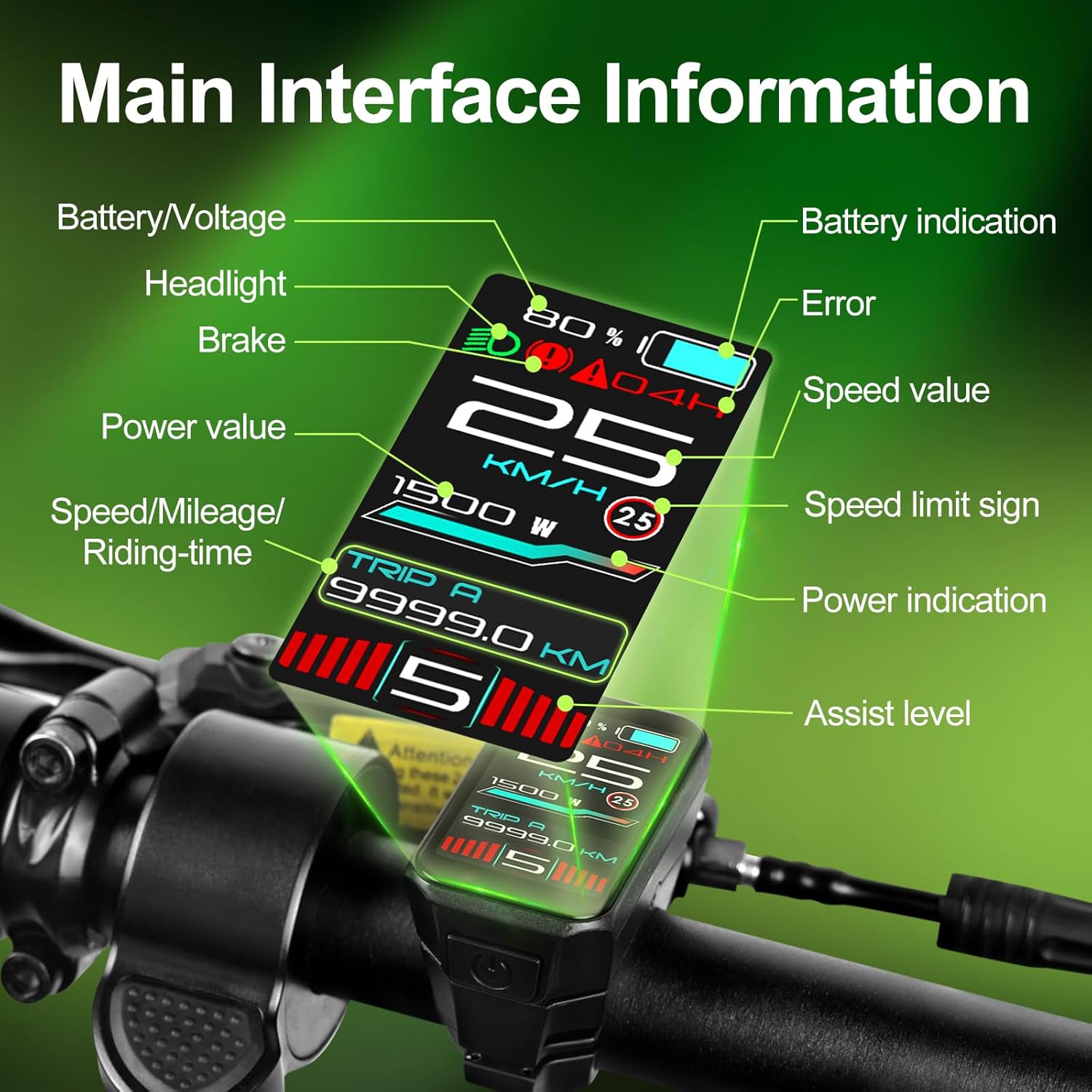
Ffigur 3.1: Main interface layout and data points. This includes battery level, current speed, assist level, power output, trip distance, and error indicators.
- Batri/Cyfroltage: Indicates current battery charge level and voltage.
- Gwerth Cyflymder: Cyflymder reidio cyfredol.
- Lefel Cynorthwyo: Current pedal assist level (0-9 PAS levels).
- Gwerth pŵer: Real-time motor power output.
- Trip A/B: Displays trip distance or riding time.
- Dangosydd Gwall: Alerts to system malfunctions.
- Headlight/Brake Indicator: Shows status of lights and brake activation.
3.3 Navigating the Touch Screen
The VD18MT features a touch screen for intuitive navigation. Swipe left or right on the screen to switch between different display modes and access setting menus. Tap on icons or menu items to select them.

Ffigur 3.2: Touch screen operation. Swipe gestures allow quick access to various data screens and settings.
3.4 Adjusting Backlight and Units
Access the settings menu by swiping or tapping. From here, you can:
- Addasiad Goleuo Cefn: Select from 4 levels of backlight intensity to optimize visibility for day or night riding.
- Newid Uned: Change speed and distance units between kilometers (km) and miles (mi).
- Wheel Size Calibration: Input your e-bike's wheel size for accurate speed and distance readings.
- Dewis Iaith: Choose from 9 available languages, including English, French, and German.

Ffigur 3.3: Display visibility in day and night conditions, and the brightness adjustment interface.
3.5 Cysylltedd Ap Clyfar
The display supports Bluetooth connectivity to sync with a dedicated smartphone app. This app allows you to track real-time speed, distance, battery life, and navigation data, turning your rides into data-driven adventures.
- Ensure Bluetooth is enabled on both the display (if applicable in settings) and your smartphone.
- Download and install the official Varstrom e-bike app from your device's app store.
- Follow the in-app instructions to pair your VD18MT display.
4. cynnal
The VD18MT display is designed for durability and features an IP67 waterproof rating, making it resistant to dust and water immersion up to 1 meter for 30 minutes. However, proper care will extend its lifespan.

Ffigur 4.1: The VD18MT display is IP67 waterproof, offering protection against water and dust.
- Glanhau: Sychwch y sgrin arddangos a'r corff gyda lliain meddal, damp brethyn. Osgowch ddefnyddio glanhawyr neu doddyddion sgraffiniol a allai niweidio'r sgrin neu'r casing.
- Storio: When not in use for extended periods, store the e-bike and display in a dry, cool place away from direct sunlight.
- Gofal Connector: Periodically check the electrical connectors for dirt or corrosion. Keep them clean and dry.
- Osgoi Effaith: While robust, avoid dropping the display or subjecting it to strong impacts.
5. Datrys Problemau
If you encounter issues with your VD18MT display, refer to the following common troubleshooting steps:
- Arddangosfa Ddim yn Troi Ymlaen:
- Check if the e-bike battery is charged and turned on.
- Ensure all electrical connections, especially the 5-pin circular connector, are securely seated.
- Verify the display's power button is functioning correctly.
- No Data Displayed (Speed, PAS, etc.):
- Confirm the display is correctly connected to the motor controller via the UART protocol.
- Check for any error codes displayed on the screen and consult the main interface diagram (Figure 3.1) for interpretation.
- Ensure the wheel size is correctly calibrated in the settings.
- Sgrin Gyffwrdd Heb Ymateb:
- Clean the screen surface to remove any dirt or moisture.
- Restart the display by powering it off and on again.
- Os bydd y broblem yn parhau, cysylltwch â'r tîm cymorth cwsmeriaid.
- Materion Cysylltedd Bluetooth:
- Ensure Bluetooth is enabled on both the display (if applicable in settings) and your smartphone.
- Make sure the Varstrom app is updated to the latest version.
- Try unpairing and re-pairing the device in your smartphone's Bluetooth settings.
- Compatibility Warning:
- If you experience issues related to motor communication, double-check that your motor is a Bafang UART protocol hub motor (G020, G0900, G062) and not a CAN protocol motor. Incompatible protocols cannot be resolved with adapters.
6. manylebau
| Nodwedd | Manylyn |
|---|---|
| Model | VD18MT |
| Brand | Varstrom |
| Maint Sgrin | 1.45 modfedd |
| Math Arddangos | TFT Lliw LCD |
| Cydweddoldeb | Bafang UART Protocol Hub Motors (G020, G062, G0900) |
| Cyftage | 24V/36V/48V/52V |
| Graddfa dal dwr | IP67 |
| Diamedr y Bar Llaw | 25.4mm / 22.2mm |
| Cysylltedd | Bluetooth (for Smart App) |
| Cydrannau wedi'u Cynnwys | Uned arddangos |
7. Gwybodaeth Gwarant
The Varstrom VD18MT Ebike Display comes with a Gwarant 1 mlynedd from the date of purchase. This warranty covers manufacturing defects and malfunctions under normal use. It does not cover damage resulting from misuse, accidents, unauthorized modifications, or improper installation.
Please retain your proof of purchase for warranty claims. For warranty service, contact Varstrom customer support.
8. Cefnogaeth i Gwsmeriaid
For further assistance, technical support, or inquiries regarding your Varstrom VD18MT Ebike Display, please refer to the official Varstrom website or contact their customer service department. Contact details can typically be found on the product packaging or the Varstrom brand store page.
Adnoddau Ar-lein:
- Ymwelwch â'r Varstrom Store on Amazon am wybodaeth a diweddariadau cynnyrch.