
1. Rhagymadrodd
The LAUNCH X431 CRP919EBT is a professional automotive diagnostic scanner designed for comprehensive vehicle system analysis. This device features bi-directional control, advanced ECU coding capabilities, and over 35 special service functions. It supports a wide range of vehicle makes and models, offering both wireless Bluetooth and wired USB connectivity for the VCI (Vehicle Communication Interface) adapter.
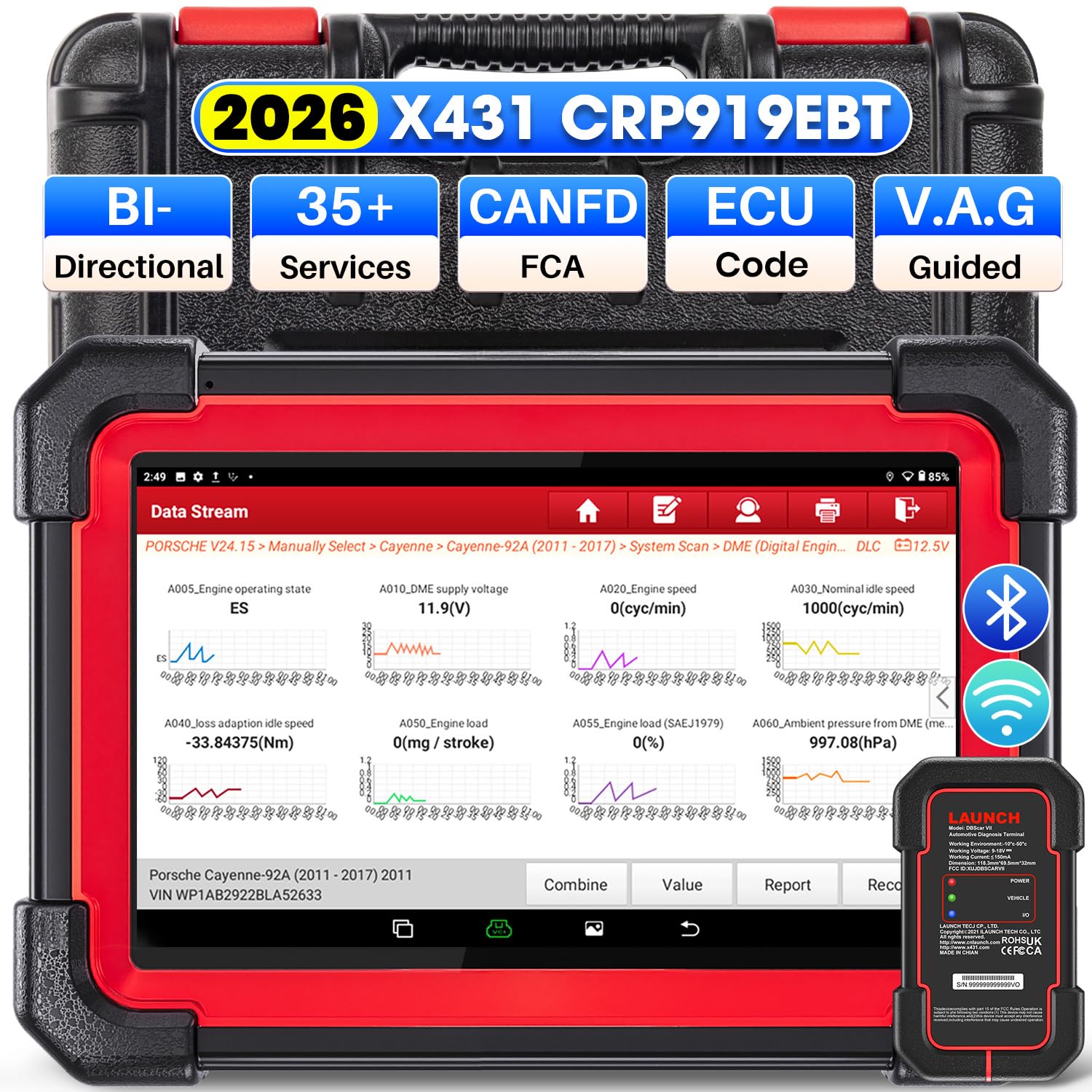
Image 1.1: LAUNCH X431 CRP919EBT Diagnostic Scanner main unit and VCI adapter.
2. Beth sydd yn y Bocs
Dadbacio'r cynnwys yn ofalus a sicrhau bod yr holl eitemau yn bresennol:
- LAUNCH X431 CRP919EBT Main Unit (Tablet)
- DBSCAR VII VCI Connector
- Diagnostic Cable (OBD-II)
- Addasydd Pŵer
- Type-A to Type-C USB Cable
- Llawlyfr Defnyddiwr / Canllaw Cychwyn Cyflym
- Achos Storio

Delwedd 2.1: Drosoddview of the LAUNCH X431 CRP919EBT package contents, including the main unit, VCI, cables, and power adapter.
3. Gosod
3.1 Codi Tâl Cychwynnol
Before first use, fully charge the CRP919EBT main unit using the provided power adapter. Connect the adapter to the device's charging port and plug it into a power outlet. The charging indicator will show the charging status.
3.2 VCI Connection to Vehicle
- Locate the vehicle's OBD-II diagnostic port, typically under the dashboard on the driver's side.
- Plug the DBSCAR VII VCI connector into the vehicle's OBD-II port. Ensure a secure connection.
- Once connected, the VCI's GRYM indicator will illuminate solid red. The CERBYD indicator will illuminate green and flash when communicating with the vehicle.
3.3 VCI Connection to Main Unit
The DBSCAR VII VCI adapter supports both wireless (Bluetooth) and wired (USB) connections to the CRP919EBT main unit.
- Cysylltiad Bluetooth: The VCI will automatically attempt to pair with the main unit via Bluetooth. The I/O indicator on the VCI will illuminate blue when wirelessly communicating with the tablet. This allows for a diagnostic range of 33-67 feet (10-20 meters).
- Cysylltiad USB: For a wired connection, use the provided Type-A to Type-C USB cable to connect the VCI to the main unit. The I/O indicator on the VCI will illuminate red when connected via USB cable.
Image 3.1: DBSCAR VII VCI Connector showing power, vehicle, and I/O indicators, along with USB and Bluetooth connectivity options.
4. Cyfarwyddiadau Gweithredu
4.1 Vehicle Selection and AutoVIN
- Turn on the CRP919EBT main unit.
- O'r brif ddewislen, dewiswch 'Diagnosis'.
- Choose 'AutoVIN' to automatically identify the vehicle's make, model, and year. Alternatively, select 'Manual Choose Model & Year' if AutoVIN is not successful.
4.2 Diagnosteg System Llawn
This function allows for a comprehensive scan of all available electronic control modules (ECMs) in the vehicle, including Engine, ABS, SRS, Transmission, TPMS, and more.
- After vehicle identification, select 'Full System Scan'.
- The tool will scan all systems and display any detected Diagnostic Trouble Codes (DTCs).
- You can then select a specific system to view detailed information, read/clear fault codes, and access live data streams.
- The device supports 8-in-1 live data streams, allowing for simultaneous monitoring of multiple parameters.

Image 4.1: Display illustrating the full system diagnostic process and bi-directional control capabilities.
4.3 Rheolaeth Dwy-gyfeiriadol (Profion Gweithredol)
Bi-directional control allows the diagnostic tool to send commands to vehicle ECUs to perform specific tests and functions, verifying component functionality without using the vehicle's controls. This includes activating components like fuel pumps, cycling ABS solenoids, or performing injector tests.
- From the diagnostic menu for a specific system, select 'Active Test' or 'Bi-directional Control'.
- Choose the component or system you wish to test.
- Follow the on-screen prompts to execute the test and observe the component's response.
4.4 Special Functions (Service Resets)
The CRP919EBT offers over 35 special service functions for various maintenance and reset procedures. These functions are typically found under 'Special Functions' within a specific vehicle system.
- Ailosod Olew
- Ailosod Brêc
- Calibradiad SAS (Synhwyrydd Ongl Llywio)
- Gwaedu ABS
- Ailosod Batri
- Codio Chwistrellydd
- Addasiad Throttle
- Ailosod TPMS
- Adfywio DPF
- Paru Blwch Gêr
Note: The availability and specific procedures for these functions vary by vehicle make, model, and year. Always confirm compatibility before performing any service.

Image 4.2: Visual representation of various special service functions available on the diagnostic tool.
4.5 ECU Coding Functions
The device supports advanced ECU coding capabilities, allowing for customization and maintenance of electronic control units.
- Codio Ar-lein: Supported for VW, Audi, Skoda, and Seat vehicles.
- Online Calibration: For precise adjustments.
- Online Account Service Login: For accessing manufacturer-specific functions.
- ECU Replacement/Recode/Matching: For adapting new or replacement ECUs.
- Swyddogaeth PMI: Allows transferring data from an original module to a new unit for module replacement (specific to Ford, Lincoln, Mazda).
- Unlock Hidden Functions: Access and activate dormant features in certain vehicles.

Image 4.3: Illustration of various ECU coding and component matching functions.
4.6 Advanced Protocols and Features
- CANFD & DOIP: Compatible with newer vehicle communication protocols, including GM (2019+), Volvo (2018+), BMW (2017+), Land Rover (2017+), and Jaguar (2017+).
- Awdurdodiad Auto FCA: Supports secure access to FCA (Fiat Chrysler Automobiles) vehicles from 2018-2026 (Fiat, Chrysler, Alfa Romeo, Dodge, Jeep, etc.) via registered AutoAuth.
- Swyddogaeth dan arweiniad VAG: Provides step-by-step instructions for performing complex functions on VW, Audi, Seat, and Skoda vehicles.

Delwedd 4.4: Drosoddview of advanced protocol support and guided functions for various car brands.
5. cynnal
5.1 Diweddariadau Meddalwedd
The CRP919EBT includes 2 years of free software updates. Regular updates ensure access to the latest vehicle coverage, bug fixes, and new features. Connect the device to a Wi-Fi network and navigate to the 'Software Update' section in the main menu to check for and install updates.
5.2 Glanhau a Storio
- Glanhewch sgrin a chorff y ddyfais gyda lliain meddal, damp brethyn. Osgowch lanhawyr neu doddyddion sgraffiniol.
- Keep the VCI connector clean and free of debris.
- Store the device and its accessories in the provided storage case in a cool, dry place when not in use.
5.3 Gofal Batri
To prolong battery life, avoid fully discharging the device frequently. Charge the device regularly, especially if it will be stored for an extended period.
6. Datrys Problemau
If you encounter issues with your CRP919EBT, refer to the following common troubleshooting tips:
- Dyfais ddim yn pweru ar: Ensure the device is fully charged. Connect it to the power adapter and try again.
- VCI not connecting to vehicle: Verify the VCI is securely plugged into the OBD-II port. Check the vehicle's ignition status (usually needs to be ON).
- VCI not connecting to main unit (Bluetooth): Ensure Bluetooth is enabled on the main unit. Try re-pairing the VCI in the device settings. Ensure the VCI is within the 33-67 feet range.
- Dim cyfathrebu â'r cerbyd: Check all connections. Ensure the vehicle's battery is adequately charged. Verify the vehicle's make, model, and year selection is correct.
- Problemau meddalwedd: Diweddarwch y feddalwedd i sicrhau bod gennych y fersiwn ddiweddaraf.
For persistent issues or advanced technical support, please contact LAUNCH customer service.
7. manylebau
The following table outlines the key specifications of the LAUNCH X431 CRP919EBT diagnostic scanner:

Image 7.1: Comparison chart highlighting the specifications of the CRP919EBT model.
| Nodwedd | Manyleb |
|---|---|
| Brand | LANSIO |
| Model | CRP919EBT |
| System Weithredu | Android 10.0 |
| Prosesydd | 4-Core High-efficiency Processor |
| RAM/ROM | 4GB RAM / 64GB ROM |
| Maint Sgrin | 7 modfedd |
| Gallu Batri | 6300mAh |
| Cysylltedd | Bluetooth (DBSCAR VII VCI), USB |
| Wi-Fi | 5G & 2.4 GHz Dual WiFi |
| Camera | Camera Cefn 8MP |
| Cwmpas Cerbyd | 150+ Brands (1996-2026) |
| Swyddogaethau Arbennig | 35+ Service Resets |
| Cyfnod Diweddaru | Diweddariad Am Ddim 2 Blynedd |
| Protocolau â Chymorth | CANFD, DOIP, OBDII/EOBD |
| Ieithoedd | 23+ Languages |
8. Gwarant a Chefnogaeth
8.1 Diweddariadau Meddalwedd
The LAUNCH X431 CRP919EBT includes 2 years of free software updates from the date of activation. After this period, updates may be available for purchase.
8.2 Optional Extension Modules
The CRP919EBT supports integration with various optional extension modules to expand its functionality:
- VSP600 Endoscope
- BST360 Battery Tester
- iTPMS/TSGUN TPMS Tool
- X-PROG3 Tool
8.3 Cefnogaeth Dechnegol
For technical assistance, product inquiries, or warranty claims, please refer to the contact information provided in your product packaging or visit the official LAUNCH websafle ar gyfer adnoddau cymorth.