
1. Rhagymadrodd
Diolch am brynuasing the Sharp PS-916 Bluetooth Party Speaker System. This system includes two identical portable Bluetooth speakers designed to deliver powerful audio with versatile connectivity options. Please read this manual carefully before using the product to ensure proper operation and to maximize your listening experience.
Cynnwys y Pecyn:
- 2 x Sharp PS-916 Party Speakers
- 1 x Cebl Codi Tâl
- 1 x Rheolaeth Anghysbell
- 1 x Llawlyfr Defnyddiwr

Image: The Sharp PS-916 system includes two speakers for a complete stereo experience.
2. Gosod
2.1 Charging the Speakers
The PS-916 speakers are equipped with rechargeable batteries, providing up to 12 hours of playback. Before initial use, fully charge both speakers.
- Connect the charging cable to the DC IN port on the rear of each speaker.
- Plug the other end of the charging cable into a suitable power adapter (not included) or USB power source.
- The charging indicator light will illuminate. It will change color or turn off once charging is complete.
2.2 Pweru Ymlaen/Diffodd
To power on or off each speaker, press and hold the ON/STAND BY INPUT botwm wedi'i leoli ar y panel rheoli.
2.3 Bluetooth Pairing (Single Speaker)
- Ensure the speaker is powered on and in Bluetooth mode. The Bluetooth indicator will flash, indicating it is ready for pairing.
- Ar eich dyfais symudol, galluogwch Bluetooth a chwiliwch am y dyfeisiau sydd ar gael.
- Select "Sharp PS-916" from the list of devices.
- Ar ôl cysylltu, bydd y dangosydd Bluetooth yn rhoi'r gorau i fflachio ac yn aros yn gadarn.
2.4 True Wireless Stereo (TWS) Pairing (Two Speakers)
TWS allows you to connect two PS-916 speakers wirelessly for a stereo sound experience.
- Power on both PS-916 speakers.
- Ensure neither speaker is currently connected to a Bluetooth device.
- Ar un o'r siaradwyr (hwn fydd y prif siaradwr), pwyswch y TWS button. The speaker will enter TWS pairing mode.
- The primary speaker will automatically search for the secondary speaker. Once connected, you will hear an audible confirmation, and the TWS indicator lights on both speakers will illuminate.
- Nawr, cysylltwch eich dyfais symudol â'r prif siaradwr drwy Bluetooth fel y disgrifir yn adran 2.3. Bydd sain yn chwarae drwy'r ddau siaradwr mewn stereo.
3. Gweithredu
3.1 Panel Rheoli Drosview

Image: Main control panel for the Sharp PS-916 speaker.
- ON/STAND BY INPUT: Power on/off, switch input modes (Bluetooth, USB, TF, AUX, FM).
- PLAY/PAUSE (►/∕∕): Chwarae neu oedi chwarae sain.
- PREVIOUS (◀◀): Neidio i'r trac blaenorol.
- NEXT (▶▶): Neidio i'r trac nesaf.
- KNOB CYFROL: Trowch i addasu'r gyfrol meistr.
- TWS: Initiate or disconnect True Wireless Stereo pairing.
- CYFARTAL: Cycle through preset equalizer modes.
- BASS: Activate or deactivate bass boost.
- GOLAU: Change or turn off the LED light effects.
- MIC CONTROL: Adjust microphone volume or echo (if applicable).
3.2 Porthladdoedd Mewnbwn
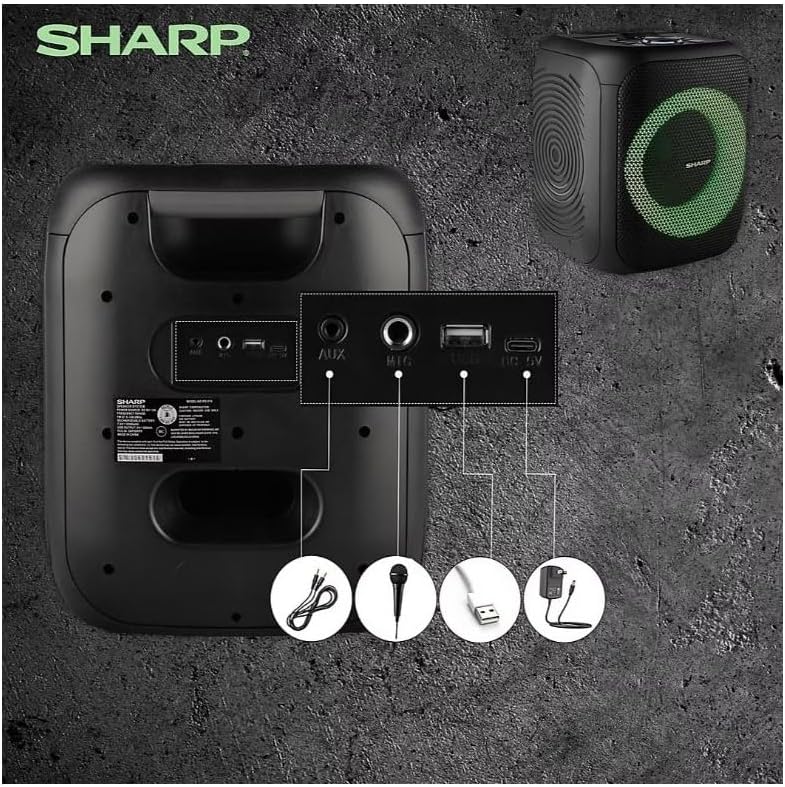
Image: Rear panel with various input and charging ports.
- AUX YN: Cysylltwch ddyfeisiau sain allanol gan ddefnyddio cebl sain 3.5mm.
- MIC YN: Connect a microphone (sold separately) for karaoke or announcements.
- USB: Mewnosodwch yriant fflach USB ar gyfer chwarae sain.
- CERDYN TF: Insert a TF (microSD) card for audio playback.
- DC YN: Connect the charging cable to power and charge the speaker.
3.3 Playing Audio from USB/TF Card
- Insert a USB flash drive or TF card into the corresponding port.
- Gwasgwch y ON/STAND BY INPUT button repeatedly until the display shows the USB or TF mode.
- Playback will begin automatically. Use the CHWARAE/SEIBIANT, PREGETH, a NESAF botymau i reoli chwarae.
3.4 Using AUX Input
- Connect one end of a 3.5mm audio cable to the AUX IN port on the speaker.
- Cysylltwch y pen arall â'r jac clustffonau neu allbwn sain eich dyfais allanol.
- Gwasgwch y ON/STAND BY INPUT button repeatedly until the display shows AUX mode.
- Rheoli chwarae a chyfaint o'ch dyfais allanol.
Gweithrediad Radio 3.5 FM

Image: The PS-916 features an integrated FM Tuner.
- Gwasgwch y ON/STAND BY INPUT button repeatedly until the display shows FM mode.
- Pwyswch a dal y CHWARAE/SEIBIANT botwm i sganio a chadw gorsafoedd FM sydd ar gael yn awtomatig.
- Defnyddiwch y PREGETH a NESAF botymau i'w llywio trwy orsafoedd sydd wedi'u cadw.
3.6 Effeithiau Golau LED
Gwasgwch y GOLAU button to cycle through different LED light modes or to turn the lights off.
4. cynnal
4.1 Glanhau
- Always power off the speaker and disconnect it from the power source before cleaning.
- Defnyddiwch frethyn meddal, sych i sychu'r arwynebau allanol.
- Do not use liquid cleaners, aerosols, or solvents, as these may damage the finish or internal components.
4.2 Storio
- Storiwch y siaradwyr mewn lle oer, sych i ffwrdd o olau haul uniongyrchol a thymheredd eithafol.
- Os ydych chi'n ei storio am gyfnod hir, gwefrwch y batri i tua 50% bob ychydig fisoedd i gynnal iechyd y batri.
5. Datrys Problemau
If you encounter issues with your Sharp PS-916 speakers, please refer to the following common problems and solutions:
| Problem | Ateb Posibl |
|---|---|
| Nid yw'r siaradwr yn troi ymlaen. | Gwnewch yn siŵr bod y batri wedi'i wefru. Cysylltwch y cebl gwefru a rhoi cynnig arall arni. |
| Dim sain gan y siaradwr. | Gwiriwch lefel y sain ar y siaradwr a'ch dyfais gysylltiedig. Gwnewch yn siŵr bod y modd mewnbwn cywir wedi'i ddewis. |
| Ni all dyfais Bluetooth baru. | Ensure the speaker is in Bluetooth pairing mode (indicator flashing). Move your device closer to the speaker. Disconnect from other Bluetooth devices. |
| Mae paru TWS yn methu. | Ensure both speakers are powered on and not connected to any other Bluetooth devices. Try initiating TWS pairing again. |
| Sain gwyrgam. | Reduce the volume on both the speaker and your connected device. Ensure the audio source is not distorted. |
6. manylebau
| Nodwedd | Manylyn |
|---|---|
| Brand | miniog |
| Enw Model | PS-916 |
| Ffurfweddiad Siaradwr | 8" Woofer, 1" Tweeter (per speaker) |
| Pŵer Allbwn Brig | 400 Watts (per speaker) |
| Pwer Allbwn RMS | 40 Watts (per speaker) |
| Technoleg Cysylltedd | Bluetooth |
| Mewnbynnau Ychwanegol | USB, TF Card, 3.5mm AUX, Microphone Input |
| Bywyd Batri | Hyd at 12 awr |
| Nodweddion Arbennig | True Wireless Stereo (TWS) Pairing, Bass Boost, LED Light Effects, FM Tuner |
| Lliw | Du |
| Pwysau Eitem | 6.5 pwys (y siaradwr) |
| UPC | 728434122111 |
| GTIN | 728434122111 |
7. Gwarant a Chefnogaeth
7.1 Gwybodaeth Gwarant
This Sharp PS-916 product comes with a 90-day limited warranty. This warranty covers manufacturing defects under normal use. It does not cover damage caused by misuse, accidents, unauthorized modifications, or normal wear and tear.
7.2 Cefnogaeth i Gwsmeriaid
For technical assistance, warranty claims, or further inquiries, please refer to the contact information provided with your purchase documentation or visit the official Sharp support websafle.