
Rhagymadrodd
Thank you for choosing the MEETION C9990 Wireless Bluetooth Keyboard and Mouse combo. This product offers versatile connectivity options (2.4GHz USB and dual Bluetooth channels), an ergonomic design for comfort, and rechargeable batteries for extended use. This manual will guide you through the setup, operation, and maintenance of your new device.
Cynnwys Pecyn
- MEETION C9990 Wireless Keyboard
- MEETION Wireless Mouse
- USB Receiver (stored in the mouse battery compartment)
- Cebl Codi Tâl USB-C
- Llawlyfr Defnyddiwr
Cynnyrch Drosview
Nodweddion Bysellfwrdd
- Cynllun Maint Llawn: Includes a numeric pad for comprehensive data entry.
- Low-Noise Scissor-Switch Keys: Provides a quiet and comfortable typing experience.
- Allweddi Amlgyfrwng: Dedicated function keys for quick access to media controls and system functions.
- Fixed Anti-Slip Stand: Ensures stability and an ergonomic typing angle.
- Dyluniad Ultra-Slim: Yn esthetig pleserusasing and space-efficient.

Image: Close-up of the keyboard keys, illustrating the low-noise scissor-switch design for quiet and comfortable typing.

Image: The keyboard features a fixed-angle anti-slip stand for enhanced stability and typing comfort.
Nodweddion Llygoden
- Ergonomic Sculpted Design: Contoured shape supports natural wrist and hand posture.
- DPI addasadwy: Four DPI settings (800-2400) for precise cursor control.
- Tilt-Scroll Wheel: Allows for horizontal and vertical scrolling.
- Newid Modd: Easily switch between 2.4GHz and Bluetooth modes.

Image: The mouse features an ergonomic sculpted design to provide comfort during extended use.

Image: Detailed diagram of the mouse highlighting its various components and functions, including buttons, scroll wheel, and switches.
Cyfarwyddiadau Gosod
1. Gwefru'r Dyfeisiau
Both the keyboard and mouse are equipped with built-in rechargeable batteries. Before first use, or when the battery indicator shows low power, charge both devices using the provided USB-C cable.
- Connect the USB-C end of the charging cable to the charging port on the keyboard and mouse.
- Cysylltwch ben USB-A y cebl gwefru â ffynhonnell pŵer USB (e.e., porthladd USB cyfrifiadur, addasydd wal USB).
- Bydd y golau dangosydd gwefru yn goleuo yn ystod gwefru ac yn diffodd pan fydd wedi'i wefru'n llawn.
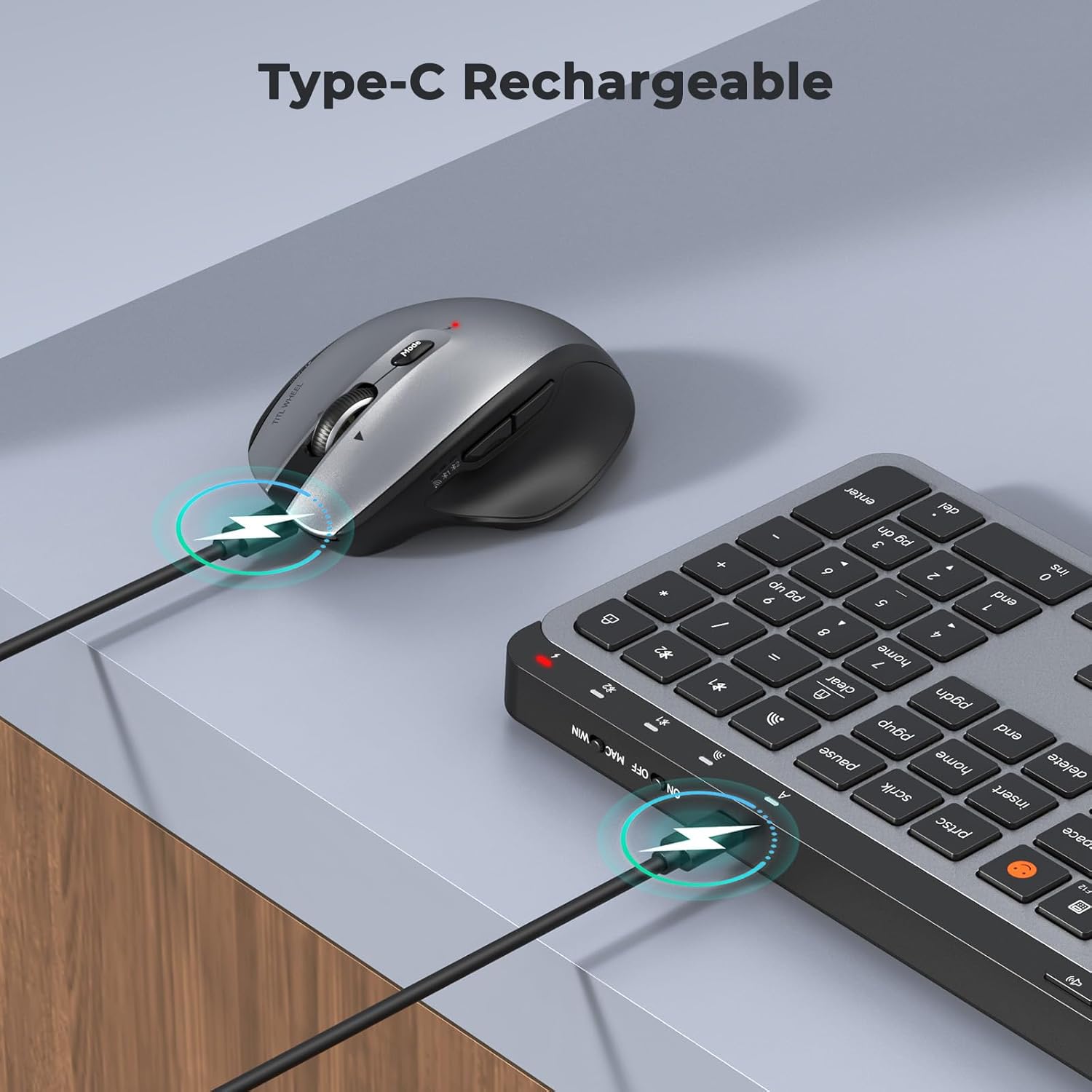
Image: Both the keyboard and mouse are rechargeable via USB-C, ensuring convenience and eliminating the need for disposable batteries.
2. Cysylltu â Dyfeisiau
The C9990 combo supports three connection modes: 2.4GHz wireless (via USB receiver) and two Bluetooth channels (BT1, BT2).
2.1. Cysylltiad Di-wifr 2.4GHz
- Lleolwch y derbynnydd USB, sydd fel arfer wedi'i storio yn adran batri'r llygoden.
- Plygiwch y derbynnydd USB i mewn i borth USB sydd ar gael ar eich cyfrifiadur.
- Trowch y bysellfwrdd a'r llygoden ymlaen gan ddefnyddio eu switshis pŵer priodol.
- For the keyboard, press the 2.4G button (usually indicated by a USB icon) to switch to 2.4GHz mode.
- For the mouse, switch the mode selector to the 2.4G sefyllfa.
- The devices should connect automatically.
2.2. Cysylltiad Bluetooth (BT1 / BT2)
- Trowch y bysellfwrdd a'r llygoden ymlaen.
- Ar gyfer Bysellfwrdd: Pwyswch a dal y BT1 or BT2 button for 3-5 seconds until the indicator light flashes rapidly, indicating pairing mode.
- Ar gyfer Llygoden: Switch the mode selector to the BT1 or BT2 position, then press and hold the Bluetooth pairing button (often located on the underside) until the indicator light flashes.
- On your device (laptop, tablet, smartphone), go to Bluetooth settings and search for new devices.
- Select "MEETION Keyboard" and "MEETION Mouse" from the list to pair.
- Repeat for the second Bluetooth channel (BT2) if connecting to another device.
3. Newid Rhwng Dyfeisiau
The C9990 allows seamless switching between up to three connected devices (one 2.4GHz and two Bluetooth).
- Ar gyfer Bysellfwrdd: Pwyswch y bwrpasol 2.4G, BT1, neu BT2 button to switch to the desired connected device.
- Ar gyfer Llygoden: Use the mode switch on the underside of the mouse to select 2.4G, BT1, neu BT2.

Image: The keyboard and mouse can switch between three devices (PC, tablet, phone) with a single click, indicated by the Bluetooth and 2.4G icons.
Cyfarwyddiadau Gweithredu
Swyddogaethau Allweddell
- Multimedia Keys (F1-F12): These keys provide quick access to functions like brightness control, display window, home, dictation, sleep, app switcher, screen mirroring, screen capture, music player, email, and calculator. Functions may vary slightly depending on the operating system.
- Emoji Key: The dedicated emoji key supports Windows, macOS, iPad (iPadOS), and Android Samsung devices. It does not support iPhone (iOS).

Image: The keyboard features a row of multimedia keys (F1-F12) for quick access to various system functions.
Swyddogaethau Llygoden
- Addasiad DPI: Press the DPI switch button (usually located near the scroll wheel) to cycle through the available DPI settings (800, 1200, 1600, 2400). Adjust to your preference for cursor speed and precision.
- Tilt-Scroll Wheel: In addition to vertical scrolling, tilt the scroll wheel left or right for horizontal scrolling in applications that support it (e.g., spreadsheets).
- Botymau Ymlaen/Yn Ôl: Use the side buttons for quick navigation in web porwyr a file fforwyr.
Cynnal a chadw
- Glanhau: Defnyddiwch frethyn meddal, sych i lanhau arwynebau'r bysellfwrdd a'r llygoden. Ar gyfer baw ystyfnig, sychwch ychydigampgolchwch y brethyn gyda dŵr neu doddiant glanhau ysgafn. Osgowch gemegau llym neu ddeunyddiau sgraffiniol.
- Gofal Batri: To prolong battery life, avoid fully discharging the devices frequently. Charge them when the low battery indicator appears. If storing for an extended period, charge them to about 50% and recharge every few months.
- Storio: Storiwch y dyfeisiau mewn lle oer, sych i ffwrdd o olau haul uniongyrchol a thymheredd eithafol.
Datrys problemau
Materion Cysylltiad
- Dyfais ddim yn cysylltu: Ensure both the keyboard and mouse are powered on and fully charged. Check that the correct connection mode (2.4G, BT1, or BT2) is selected on both devices. For Bluetooth, ensure your host device's Bluetooth is enabled and the devices are in pairing mode.
- Cysylltiad ysbeidiol: Move the devices closer to your computer. Avoid using them near strong electromagnetic interference sources (e.g., Wi-Fi routers, other wireless devices).
- 2.4GHz receiver not recognized: Try plugging the USB receiver into a different USB port. Ensure the receiver is fully inserted.
Materion Ymarferoldeb
- Keys or mouse unresponsive: Recharge the devices. Restart your computer or device. Re-pair the devices if using Bluetooth or re-insert the USB receiver for 2.4GHz.
- Cyrchwr y llygoden yn afreolaidd: Clean the mouse sensor. Ensure you are using the mouse on a suitable surface (not highly reflective or transparent). Adjust DPI settings.
Manylebau
| Rhif Model | C9990 |
| Technoleg Cysylltedd | Bluetooth, USB (Di-wifr 2.4GHz) |
| Cynllun Bysellfwrdd | QWERTY, Full Size |
| Canfod Symudiad Llygoden | Optegol |
| Gosodiadau DPI Llygoden | 800, 1200, 1600, 2400 |
| Ffynhonnell Pwer | Wedi'i bweru gan fatri (Gellir ei ailwefru drwy USB-C) |
| Systemau Gweithredu Cydnaws | Windows, macOS, Linux, Chrome OS, Android |
| Pwysau Eitem | 1.16 Kilograms (combined) |
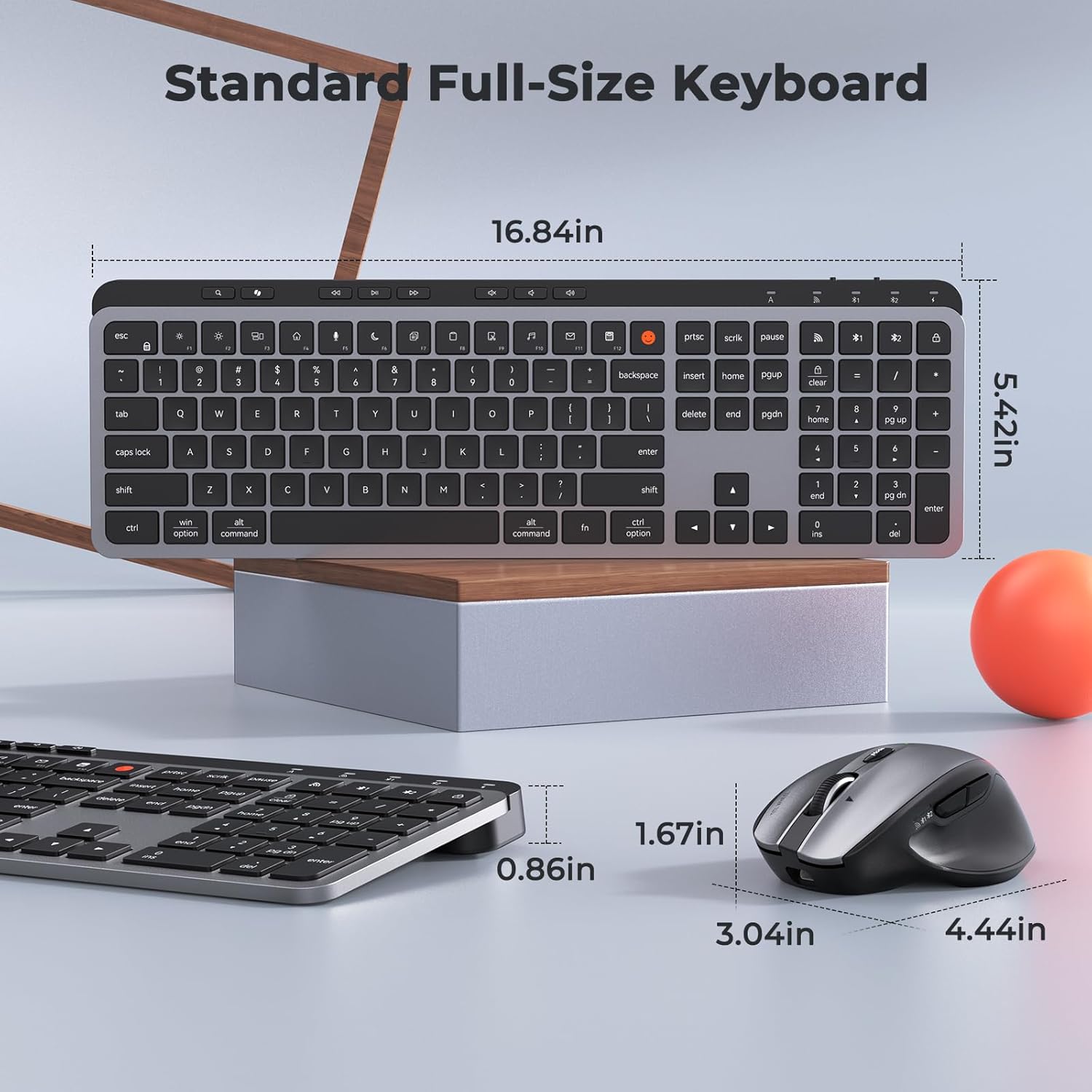
Image: Dimensions of the MEETION C9990 keyboard and mouse for reference.
Gwarant a Chefnogaeth
The MEETION C9990 Wireless Bluetooth Keyboard and Mouse comes with a Gwarant 1 Flynedd o ddyddiad y pryniant. Mae'r warant hon yn cwmpasu diffygion gweithgynhyrchu o dan ddefnydd arferol.
For technical support, troubleshooting assistance, or warranty claims, please contact MEETION customer service through the retailer where you purchased the product or visit the official MEETION websafle ar gyfer gwybodaeth cyswllt.
Gwybodaeth Diogelwch
- Do not expose the devices to water, moisture, or extreme temperatures.
- Osgowch ollwng y dyfeisiau neu eu rhoi dan effeithiau cryf.
- Do not attempt to disassemble or repair the devices yourself. Refer to qualified service personnel.
- Cadwch allan o gyrraedd plant.
- Gwaredu batris a chydrannau electronig yn gyfrifol yn unol â rheoliadau lleol.