
1. Rhagymadrodd
This manual provides detailed instructions for the installation, operation, and maintenance of your Hodozzy 9-inch Incell Touch Screen Double Din Car Stereo. This unit is designed for Ford Focus models from 2005 to 2008 and features Wireless Carplay, Wireless Android Auto, GPS Navigation, Bluetooth, DSP, WiFi, FM RDS, and camera support. Please read this manual thoroughly before use to ensure proper functionality and safety.
2. Gwybodaeth Diogelwch
- Gosodiad Proffesiynol a Argymhellir: Due to the complexity of car electrical systems, professional installation is highly recommended to prevent damage to the unit or vehicle.
- Cyflenwad Pŵer: Gwnewch yn siŵr bod yr uned wedi'i chysylltu â chyflenwad pŵer 12V DC gyda thir negyddol.
- Gwifrau: Gall gwifrau anghywir achosi difrod. Cyfeiriwch at y diagram gwifrau yn ofalus.
- Diogelwch Gyrru: Peidiwch â gweithredu'r uned mewn ffordd sy'n tynnu eich sylw oddi wrth yrru. Rhowch flaenoriaeth i ddiogelwch ar y ffyrdd bob amser.
- Tymheredd: Osgowch amlygu'r uned i dymheredd eithafol neu olau haul uniongyrchol am gyfnodau hir.
3. Cynnyrch Drosview
The Hodozzy car stereo is an advanced infotainment system designed to upgrade your driving experience. Key features include:
- Perfformiad Uchel: Equipped with 4GB RAM and 128GB ROM, running on Android 15 for fast operation and ample storio.
- Incell Touch Screen: A 9-inch 1280x720 Incell panel provides a high-definition capacitive touchscreen with improved clarity and responsiveness.
- Cysylltedd di-dor: Supports Wireless CarPlay, Wireless Android Auto, and Mirror Link for smartphone integration.
- Sain Uwch: Features a 36-band DSP equalizer and 4x50W amplifier output for studio-grade sound. Includes FM/RDS tuner.
- Llywio: Built-in GPS with support for offline maps and online navigation via Wi-Fi.
- Multifunction Integration: Compatible with steering wheel controls, parking sensors, climate control interfaces, and supports rear-view camerâu.
4. Cynnwys Pecyn
Gwiriwch fod yr holl eitemau a restrir isod wedi'u cynnwys yn eich pecyn:
- Uned Stereo Car 9-modfedd Hodozzy
- Cebl Pŵer
- RCA Cable
- Offeryn Gosod
- Camera Cefn
- Meicroffon (MIC)
- Antena GPS
- Llawlyfr Defnyddiwr
- USB Cable (Dual USB ports)
- Cebl Mewnbwn Camera Cefn
- Antena Radio
- Addasydd Antena

Image: Contents of the Hodozzy car stereo package, including the main unit, various cables, installation tools, and accessories. The image also displays the product dimensions.
5. Gosod
Proper installation is crucial for the performance and longevity of your car stereo. It is recommended to have this unit installed by a qualified professional.
5.1 Gwiriad Cyn Gosod
- Gwnewch yn siŵr bod tanio'r cerbyd i ffwrdd a bod y batri wedi'i ddatgysylltu cyn dechrau'r gosodiad.
- Confirm compatibility with your Ford Focus (2005-2008) dashboard.
- Casglwch yr holl offer a chydrannau angenrheidiol o'r pecyn.
5.2 Removing the Original Radio
Carefully remove the existing car radio and dashboard trim. Refer to your vehicle's service manual for specific instructions on trim removal.

Image: A visual comparison showing the original Ford Focus dashboard before installation and the dashboard after the Hodozzy car stereo has been installed.
5.3 Cyfarwyddiadau Gwifro
Connect the provided cables to the corresponding ports on the car stereo and your vehicle's wiring harness. Pay close attention to the wiring diagram.

Delwedd: Manwl view of the rear panel of the Hodozzy car stereo, indicating the locations for power cable, USB cables, RCA cable, GPS antenna, and rear camera input.

Image: Comprehensive wiring diagram illustrating connections for audio output, video output, auxiliary input, subwoofer, microphone, and the main power harness, including reverse camera wiring.
5.4 Mowntio'r Uned
Once wiring is complete, carefully slide the car stereo into the dashboard opening and secure it using the provided mounting brackets. Reattach the dashboard trim.
6. Cyfarwyddiadau Gweithredu
6.1 Pŵer Ymlaen/Diffodd a Rhyngwyneb Sylfaenol
Press the power button to turn the unit on or off. The 9-inch Incell touch screen provides a responsive interface for navigating through applications and settings. The system supports various UI themes and a drag-and-drop home screen for customization.
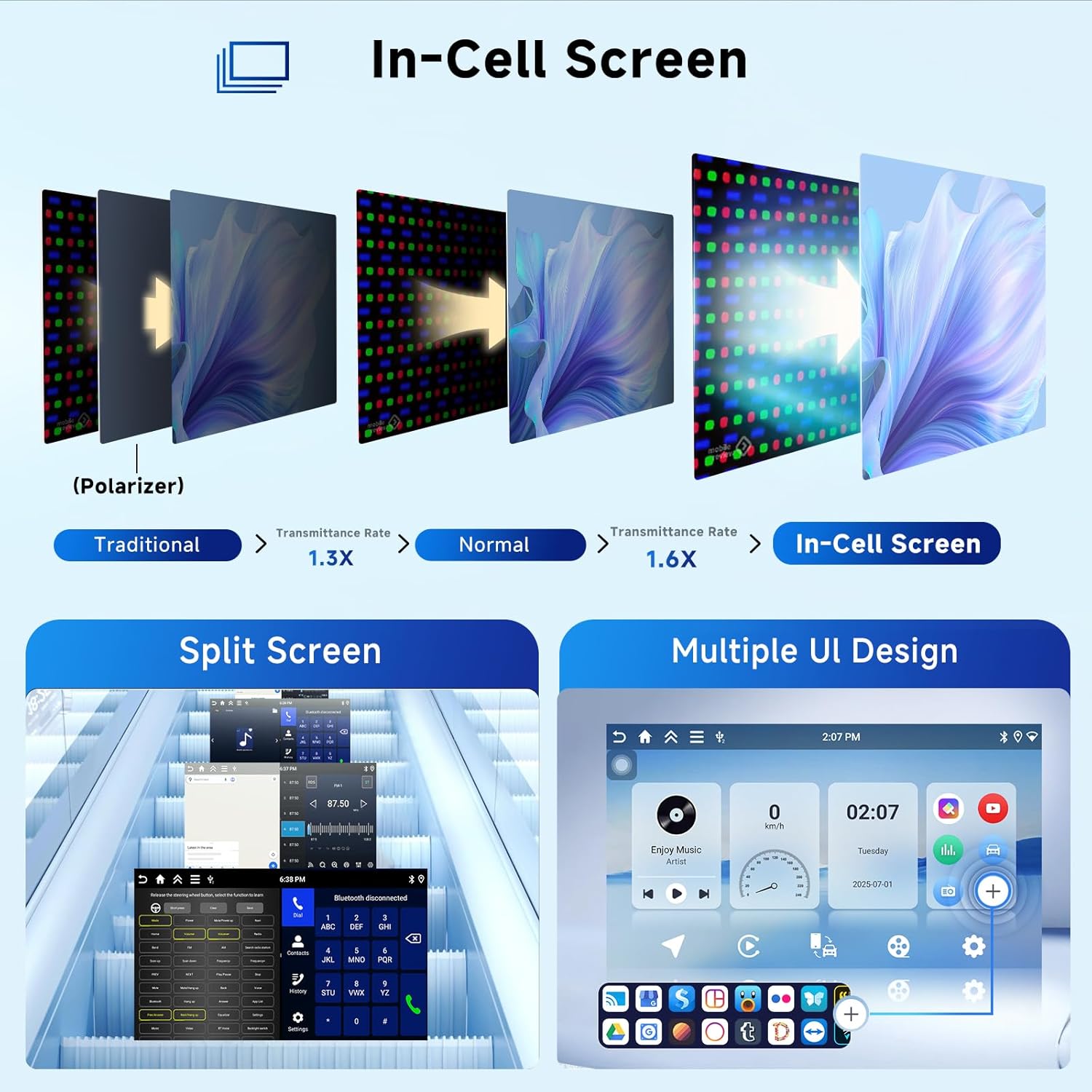
Image: Illustrates the In-Cell screen technology, demonstrating improved light transmittance. Also shows the split-screen functionality and various customizable user interface designs available on the unit.
6.2 Wireless CarPlay / Android Auto / Mirror Link
Connect your smartphone wirelessly via Bluetooth for CarPlay or Android Auto. This allows access to navigation, music, calls, and messages directly from the car stereo display. Mirror Link functionality is also available for both iOS and Android devices.
- Cysylltiad diwifr: Enable Bluetooth on your phone and pair with the car stereo. Follow on-screen prompts to activate CarPlay or Android Auto.
- Cysylltiad â gwifrau: For a stable connection, you can also use a USB cable to connect your phone.

Image: Depicts the wireless connectivity options, including Apple CarPlay, Android Auto, and Mirror Link, showing how smartphones integrate with the car stereo display.
6.3 Llywio GPS a Wi-Fi
The unit comes with pre-installed offline maps. For real-time traffic and online navigation, connect the unit to a Wi-Fi hotspot (e.g., from your smartphone). You can download additional navigation apps from the app store.
- Mapiau All-lein: Access pre-loaded maps for navigation without an internet connection.
- Cysylltiad Wi-Fi: Go to Settings > Wi-Fi to connect to an available network.

Image: Shows the GPS navigation interface with map display, icons for various navigation apps, Wi-Fi connection indicator, and a comparison chart illustrating the faster running speed of the Android system.
6.4 Audio Features (DSP, FM/RDS, Bluetooth Audio)
Utilize the built-in 36-band DSP equalizer to customize your audio experience. The FM/RDS tuner provides clear radio reception with multi-language display of track titles. Bluetooth A2DP support allows for wireless music streaming and hands-free calling.
- Cyfartalydd DSP: Access the DSP settings to adjust sound profiles, bass, and other audio parameters.
- Radio FM/RDS: Scan for radio stations and view station information (if broadcasted).
- Bluetooth Calling/Music: Pair your phone via Bluetooth to make calls and stream audio. Contacts can be synced automatically.
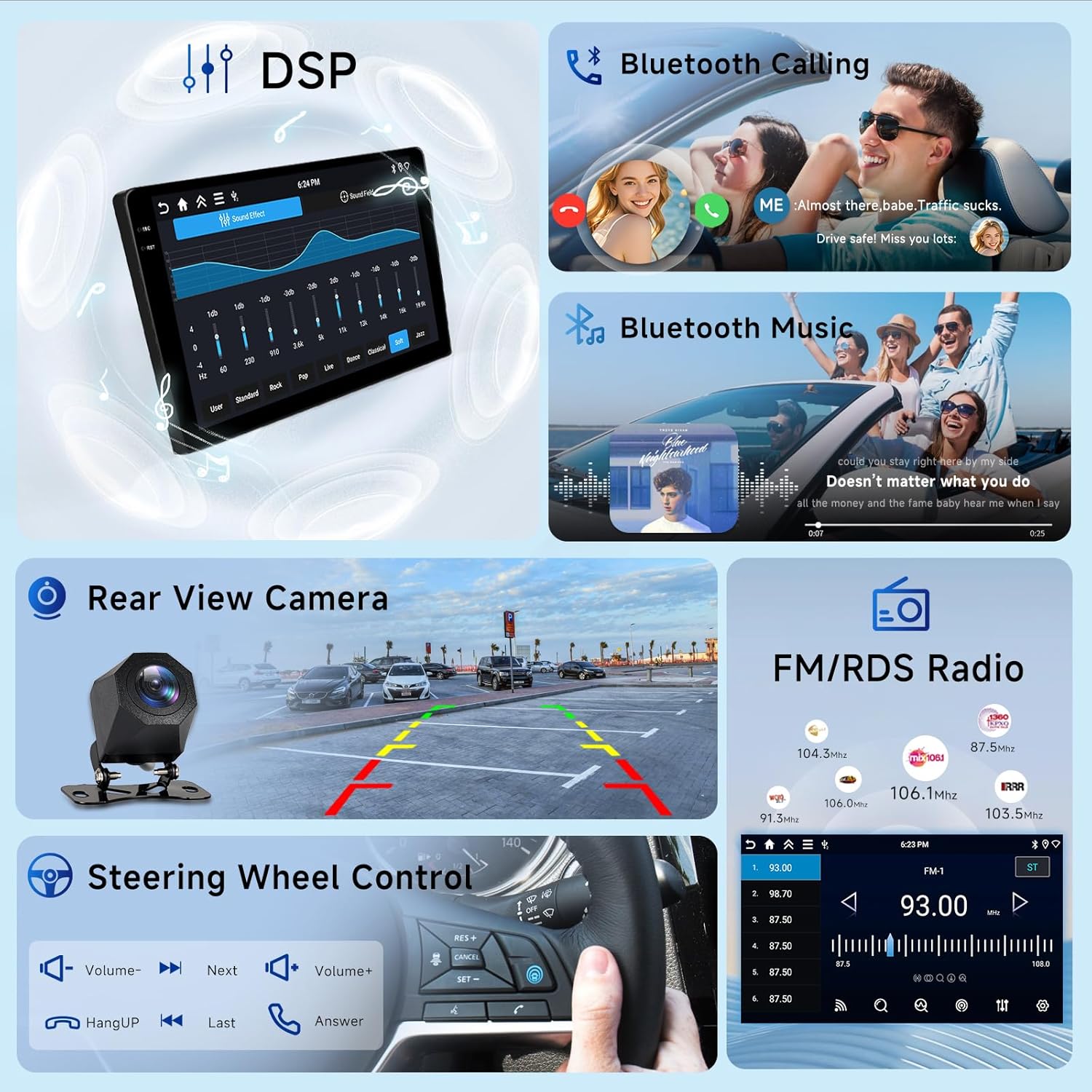
Image: Displays various features including the DSP equalizer interface, Bluetooth calling screen, Bluetooth music playback, a rear view camera feed, FM/RDS radio interface, and steering wheel control buttons.
6.5 Cefn View Camera and Steering Wheel Control (SWC)
The unit supports a rear-view camera, which automatically displays the camera feed when the vehicle is in reverse. Integrate your vehicle's steering wheel controls to manage audio and calls without taking your hands off the wheel.
- Camera Cefn: Ensure the rear camera is properly installed and connected to the 'REVERSE' input for automatic activation.
- SWC Setup: Access the steering wheel control settings in the unit's menu to program the buttons according to your preference.
7. cynnal
- Glanhau'r sgrin: Use a soft, lint-free cloth to gently wipe the screen. Avoid abrasive cleaners or solvents.
- Diweddariadau Meddalwedd: The unit supports Over-The-Air (OTA) updates. Connect to Wi-Fi and check for available system updates periodically in the settings menu to ensure optimal performance and access to new features.
- Ailosod System: If the unit experiences issues, a soft reset can often resolve them. Refer to the troubleshooting section or contact support for instructions on a factory reset if necessary.
8. Datrys Problemau
If you encounter problems with your car stereo, refer to the following common issues and solutions:
- Dim pŵer:
- Check power cable connections and ensure they are secure.
- Gwiriwch nad yw ffiws y cerbyd ar gyfer y radio wedi chwythu.
- Dim Sain:
- Gwiriwch gysylltiadau gwifren y siaradwr.
- Gwnewch yn siŵr nad yw'r gyfrol wedi'i mud neu wedi'i gosod yn rhy isel.
- Gwiriwch osodiadau allbwn sain yn y ddewislen system.
- GPS Signal Lost/Inaccurate:
- Gwnewch yn siŵr bod yr antena GPS wedi'i osod yn iawn a bod ganddi olwg glir view o'r awyr.
- Gwiriwch osodiadau GPS yn y ddewislen system.
- Problemau Cysylltiad Bluetooth:
- Ensure Bluetooth is enabled on both the car stereo and your phone.
- Dileu parau blaenorol ac ail-baru'r dyfeisiau.
- Ailgychwynwch stereo'r car a'ch ffôn.
- CarPlay/Android Auto Ddim yn Cysylltu:
- Gwnewch yn siŵr bod system weithredu eich ffôn yn gyfredol.
- Check for updates for the CarPlay/Android Auto app on your phone.
- Try a different USB cable if using a wired connection.
- Sgrin Gyffwrdd Heb Ymateb:
- Perform a soft reset of the unit (refer to the user manual for specific steps).
- Gwnewch yn siŵr bod y sgrin yn lân ac yn rhydd o falurion.
For issues not covered here, please contact Hodozzy customer support.
9. manylebau
| Brand | Hodozzi |
| Model | 4G+128G |
| Maint Sgrin | 9 modfedd |
| Cydraniad Sgrin | 1280x720 (Incell Panel) |
| System Weithredu | Android 15 |
| HWRDD | 4 GB |
| ROM (Storio) | 128 GB |
| Technoleg Cysylltedd | Bluetooth, USB, Wi-Fi |
| Nodweddion Arbennig | Android Auto, Apple Carplay, Bluetooth, Touchscreen, GPS Navigation, DSP, FM RDS, Rear Camera Support, Steering Wheel Control |
| Math o Fap | Worldwide (Offline maps included) |
| AmpAllbwn lifier | 4x50W |
| Cyflenwad Pŵer | 12V DC (Tir Negyddol) |
10. Gwarant a Chefnogaeth
This Hodozzy car stereo comes with a standard manufacturer's warranty. For specific warranty details, including duration and coverage, please refer to the warranty card included in your package or contact Hodozzy customer support directly.
For technical assistance, troubleshooting, or warranty claims, please visit the official Hodozzy website or contact their customer service department using the contact information provided with your product documentation.


