
Rhagymadrodd
This manual provides detailed instructions for the proper setup, operation, and maintenance of your Monstrum Beast 4-16x44 SFP Rifle Scope. Please read this manual thoroughly before using your scope to ensure optimal performance and longevity.

Delwedd: Blaen view of the Monstrum Beast 4-16x44 SFP Rifle Scope with included offset mount.
Cynnyrch Drosview
The Monstrum Beast 4-16x44 SFP Rifle Scope is a mid-power variable optic designed for precision. Key features include:
- Chwyddiad: 4-16x variable magnification with a 44mm objective lens for enhanced light transmission and a wide field of view.
- Fiber Optic Reticle: Features a FIB01 fiber optic reticle with a fiber optic tube that channels light from an LED source to the center, providing a daylight-bright center dot.
- Side Focus Parallax Adjustment: A dedicated dial for sharper target focus, parallax elimination, and range estimation.
- Second Focal Plane (SFP) Reticle: The reticle maintains its size across all magnification levels, ensuring consistent visibility.
- Adeiladu: 30mm tube configuration, includes a Monstrum one-piece cantilever scope mount, and bikini lens covers.

Delwedd: Ochr view of the Monstrum Beast 4-16x44 SFP Rifle Scope, highlighting its robust construction and included mount.
Gosod
Mowntio'r Cwmpas
- Gwnewch yn siŵr bod eich arf tanio wedi'i ddadlwytho ac yn ddiogel.
- Attach the included Monstrum one-piece cantilever scope mount to your firearm's Picatinny or Weaver rail. Tighten the mounting screws securely according to manufacturer specifications.
- Place the scope into the rings of the mount. Ensure the reticle is level and the eye relief is appropriate for your shooting position.
- Tighten the scope ring screws evenly and gradually to avoid stressing the scope tube. Do not overtighten.
Addasiad Diopter
The diopter adjustment allows you to fine-tune the reticle focus to your individual eyesight.
- Point the scope at a plain, bright background (e.g., a clear sky or a blank wall).
- Look through the scope and quickly glance away. Then, look back through the scope.
- Adjust the diopter ring (located at the eyepiece) until the reticle appears sharp and clear instantly.
- Once adjusted, the reticle should remain sharp without needing to refocus.

Image: Close-up of the eyepiece showing the diopter adjustment ring.
Operating the Scope
Addasiad Chwyddiad
The magnification ring allows you to adjust the zoom level from 4x to 16x. Rotate the ring to your desired magnification. The included throw lever provides tactile control for quick adjustments.
Reticle Goleuo
The FIB01 reticle features fiber optic illumination for a bright center dot. The illumination control is typically integrated with the side parallax knob. Rotate the illumination dial to turn the reticle on/off and adjust brightness levels.

Image: Diagrams illustrating the FIB01, FIB02, and FIB03 reticle patterns with MOA measurements. The FIB01 reticle is featured in this scope.

Image: Comparison showing the visibility of a standard wire frame reticle versus a fiber optic reticle in an outdoor setting at 120 yards.
Parallax Adjustment (Side Focus)
Parallax refers to the apparent shift in the reticle's position relative to the target when your eye moves. The side focus dial eliminates parallax and sharpens the target image.
- Estimate the distance to your target.
- Rotate the side focus dial to the corresponding distance marking.
- Look through the scope and make fine adjustments to the dial until the target image is sharp and clear, and the reticle does not appear to shift when you move your head slightly.

Image: Visual explanation of parallax and how the adjustable objective (side focus) helps to eliminate it and sharpen focus.
Pwysig: If the side focus dial setting does not match the actual range, the target may appear blurry or out of focus.
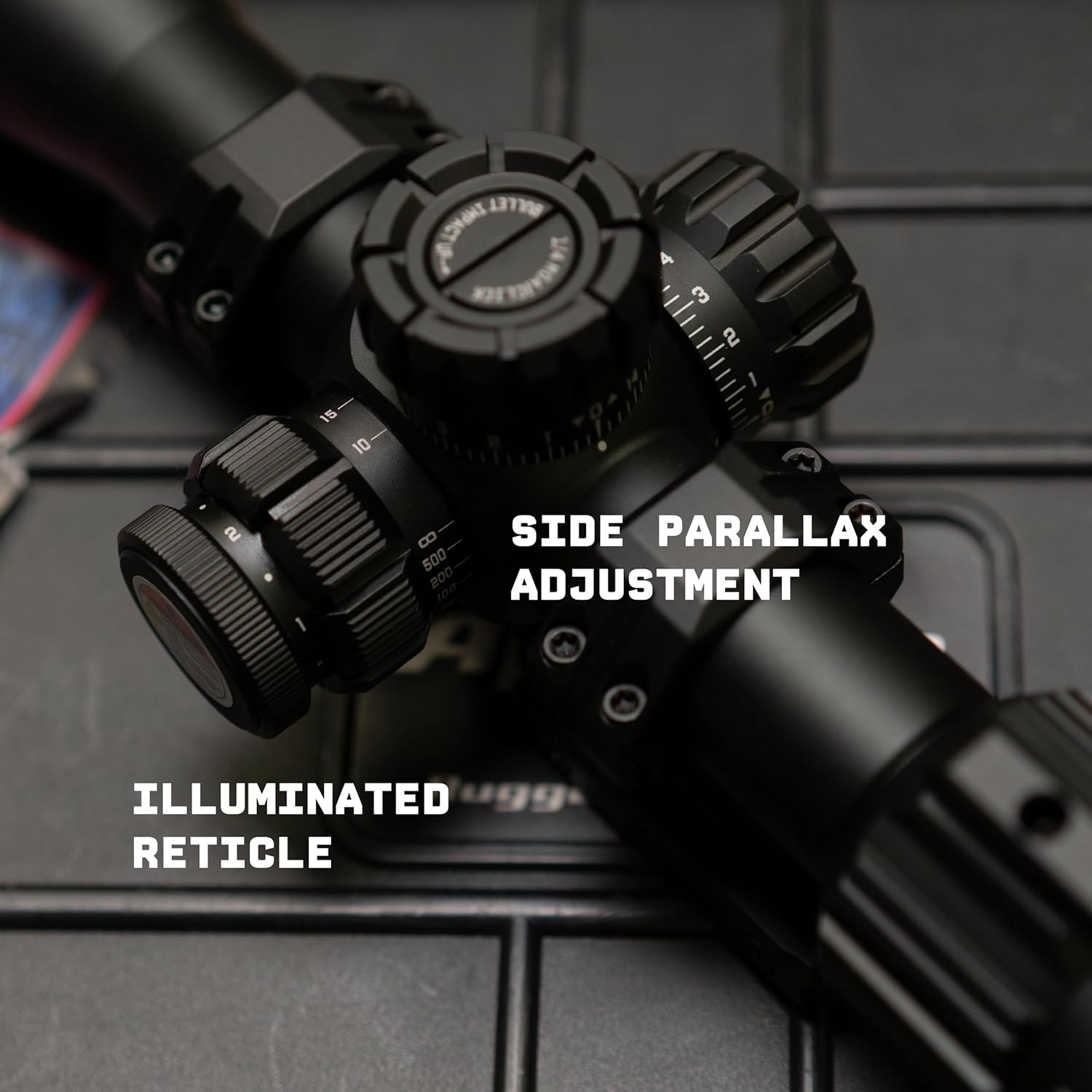
Image: Detail of the side parallax adjustment dial, which also integrates the illuminated reticle control.
Gwyntedd ac Addasiad Uchder
The windage (horizontal) and elevation (vertical) turrets adjust the point of impact. Each click typically represents 1/4 MOA (Minute of Angle).
- Tynnwch y capiau tyred.
- Rotate the elevation turret (top) to adjust vertical impact. "UP" typically moves the point of impact up.
- Rotate the windage turret (side) to adjust horizontal impact. "R" typically moves the point of impact right.
- After making adjustments, replace the turret caps to protect the mechanisms.
Cynnal a chadw
Glanhau'r Lensys
- Use a soft brush or compressed air to remove loose dust and debris.
- Apply a small amount of lens cleaning solution to a microfiber lens cloth.
- Gently wipe the lens surfaces in a circular motion, starting from the center and moving outwards.
- Avoid using harsh chemicals or abrasive materials, as these can damage the lens coatings.
Gofal Cyffredinol a Storio
- Keep the scope protected with the included lens covers when not in use.
- Store the scope in a cool, dry place, away from direct sunlight and extreme temperatures.
- Periodically check all mounting screws and rings for tightness.
Datrys problemau
| Problem | Achos Posibl | Ateb |
|---|---|---|
| Delwedd aneglur | Incorrect diopter setting, incorrect parallax adjustment, dirty lenses. | Adjust diopter, adjust side focus parallax, clean lenses. |
| Reticle heb ei oleuo | Illumination turned off, low battery. | Turn on illumination, replace battery (if applicable, though fiber optic reticles often use ambient light or a small LED). |
| Point of impact shift | Loose mounting screws, scope damage, improper zeroing. | Check and tighten all mounting hardware, re-zero the scope, contact Monstrum support if damage is suspected. |
Manylebau
| Brand | Monstrum |
| Rhif Model | SBA41644B-FIB01 |
| Chwyddiad | 4-16x |
| Diamedr Lens Amcan | 44mm |
| Math o Reticle | FIB01 Fiber Optic (Second Focal Plane) |
| Diamedr Tiwb | 30mm |
| Addasiad Parallax | Ffocws Ochr |
| Cliciwch Gwerth | 1/4 MOA |
| Lliw | Du |
| Dimensiynau Pecyn Eitem (L x W x H) | 15 x 4 x 3 modfedd |
| Pwysau Pecyn | 30 owns |
| UPC | 810198401790 |
Gwarant a Chefnogaeth
For warranty information or technical support, please refer to the official Monstrum website or contact Monstrum customer service directly. Keep your purchase receipt for warranty claims.
Monstrum Official Websafle: Visit the Monstrum Store on Amazon