
1. Rhagymadrodd
Welcome to your new xinwld A97 Pro Wireless Earbuds. These earbuds are designed to provide a high-fidelity audio experience with deep bass, advanced Bluetooth 5.4 connectivity, and effective environmental noise cancellation (ENC) for clear calls. This manual will guide you through the setup, operation, and maintenance of your earbuds.
Nodweddion Allweddol:
- Bluetooth 5.4: Ar gyfer cysylltiad diwifr sefydlog ac effeithlon.
- HiFi Stereo Sound with Deep Bass: Delivers rich audio quality.
- Hyd at 40 Awr o Amser Chwarae: Gwrando estynedig gyda'r cas gwefru.
- 4 ENC Noise Cancelling Microphones: Ensures clear calls by reducing ambient noise.
- Gwrthiant Dŵr IP7: Protects earbuds from water splashes and sweat (earbuds only).
- Rheolaethau Cyffwrdd sythweledol: Rheoli cerddoriaeth a galwadau yn hawdd.
- Arddangosfa Ddigidol LED: Shows battery level of the charging case and earbuds.
2. Cynnwys Pecyn
Gwiriwch y pecyn am yr eitemau canlynol:
- xinwld A97 Pro Wireless Earbuds (Left and Right)
- Achos Codi Tâl
- Cebl Codi Tâl USB-C
- Llawlyfr Defnyddiwr
- (Optional) Various Sizes of Eartips
3. Cynnyrch Drosview
Familiarize yourself with the components of your xinwld A97 Pro Wireless Earbuds.
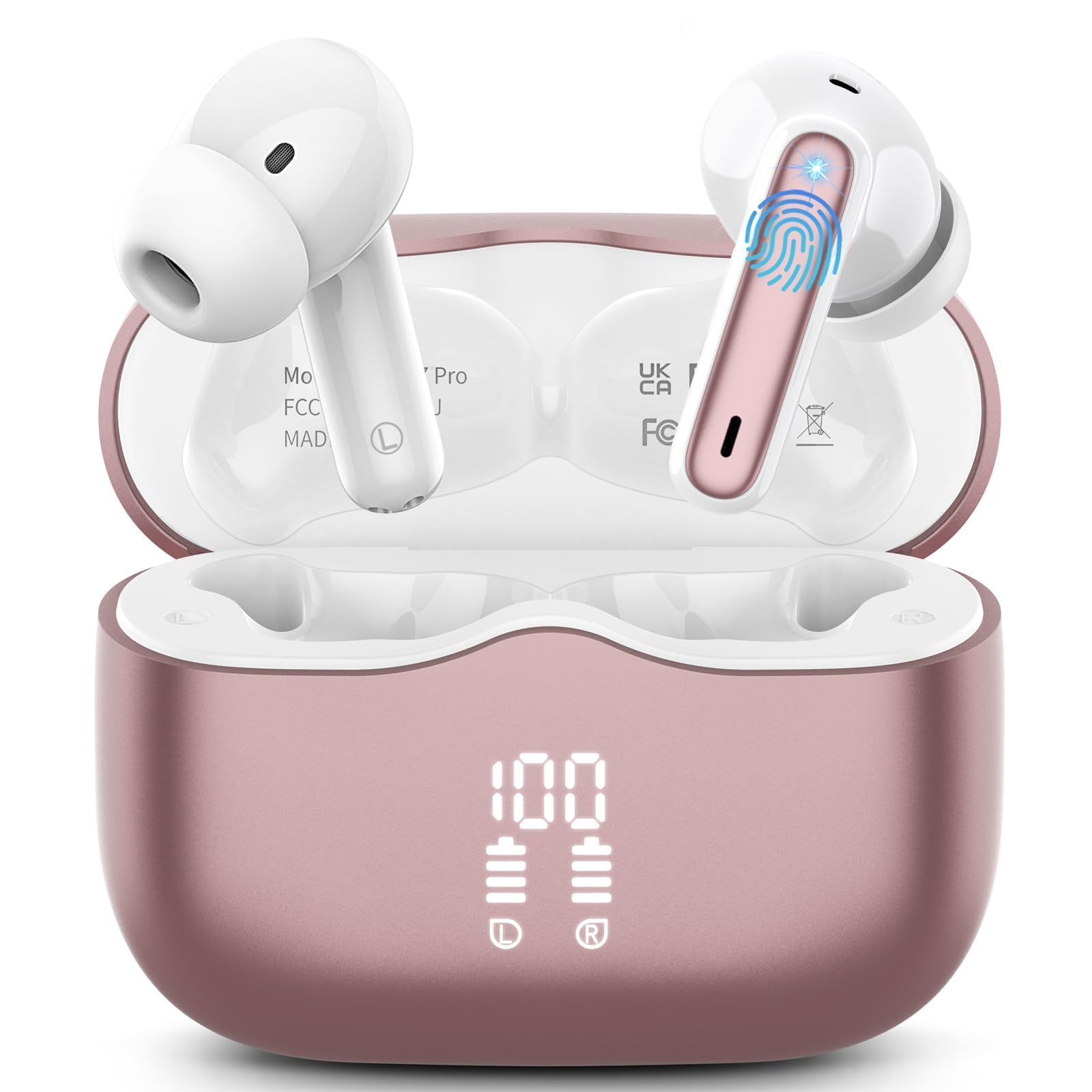
Delwedd 1: xinwld A97 Pro Wireless Earbuds and Charging Case. The image shows the black earbuds placed inside their charging case, which features a digital LED display on the front indicating battery levels.
Cydrannau Clustffonau:
- Ardal Rheoli Cyffwrdd: For managing playback, calls, and voice assistant.
- Meicroffon: For calls and ENC functionality.
- Cysylltiadau Codi Tâl: Yn cysylltu â'r cas gwefru i gael pŵer.
- Blaen y glust: Provides comfort and sound isolation; replaceable.
Cydrannau'r Achos Gwefru:
- Arddangosfa Ddigidol LED: Shows the battery level of the case and charging status of the earbuds.
- Porthladd codi tâl USB-C: Am godi tâl ar yr achos.
- Slotiau Gwefru Clustffonau: Holds and charges the earbuds when placed inside.
4. Canllaw Gosod
4.1. Gwefru Cychwynnol
Cyn ei ddefnyddio gyntaf, gwefrwch y clustffonau a'r cas gwefru yn llawn.
- Rhowch y ddau earbuds yn yr achos gwefru.
- Connect the USB-C charging cable to the charging port on the case and the other end to a USB power adapter (not included).
- The LED display on the charging case will show the battery percentage. The charging indicators for the earbuds will also be visible.
- Ar ôl ei wefru'n llawn, datgysylltwch y cebl gwefru.
4.2. Paru â'ch Dyfais
- Sicrhewch fod y clustffonau wedi'u gwefru.
- Open the charging case. The earbuds will automatically power on and enter pairing mode, indicated by flashing lights.
- Ar eich dyfais (ffôn clyfar, tabled, ac ati), ewch i osodiadau Bluetooth a throwch Bluetooth ymlaen.
- Chwiliwch am available devices. Select "xinwld A97 Pro" from the list.
- Once connected, you will hear a confirmation sound, and the earbud indicator lights will turn off or flash slowly.
- Os bydd paru’n methu, rhowch y clustffonau yn ôl yn y cas, caewch y caead, arhoswch ychydig eiliadau, ac yna ailadroddwch y camau.
5. Cyfarwyddiadau Gweithredu
5.1. Pŵer Ymlaen / I ffwrdd
- Pŵer Ymlaen: Open the charging case, and the earbuds will automatically power on. Alternatively, press and hold the touch control area on both earbuds for 3 seconds.
- Pwer i ffwrdd: Place the earbuds back into the charging case and close the lid. They will automatically power off and begin charging. Alternatively, disconnect them from Bluetooth, and they will power off after 5 minutes of inactivity.
5.2. Gwisgo'r Clustffonau
Insert the earbuds into your ears and gently rotate them to find a comfortable and secure fit. Ensure the microphones are facing downwards for optimal call quality. Experiment with different eartip sizes (if included) for the best seal and sound.
5.3. Rheolaethau Cyffwrdd
The xinwld A97 Pro earbuds feature intuitive touch controls on each earbud. The functions are generally mirrored on both earbuds unless specified.
| Swyddogaeth | Gweithred |
|---|---|
| Chwarae/Seibiant Cerddoriaeth | Tap sengl ar y naill glust neu'r llall |
| Trac Nesaf | Tap dwbl ar y naill earbud |
| Trac Blaenorol | Tapiwch driphlyg ar y naill glustffon neu'r llall |
| Ateb/Diwedd Galwad | Tap sengl ar y naill glust neu'r llall |
| Gwrthod Galwad | Pwyswch a daliwch y naill glust neu'r llall am 2 eiliad |
| Actifadu Cynorthwyydd Llais | Pwyswch a daliwch y naill glust neu'r llall am 3 eiliad |
| Rheoli Cyfaint | Control via your connected device (earbuds do not have direct volume control) |
5.4. Environmental Noise Cancellation (ENC)
The earbuds feature 4 ENC microphones to reduce ambient noise during calls, ensuring clearer conversations for both you and the person you are speaking with. This feature is automatically active during phone calls.
6. Cynnal a Chadw a Gofal
6.1. Glanhau
- Glanhewch y clustffonau a'r cas gwefru yn rheolaidd gyda lliain meddal, sych, heb lint.
- Do not use harsh chemicals, cleaning solvents, or strong detergents, as these may damage the product.
- Gently clean the charging contacts on both the earbuds and inside the case to ensure proper charging and connectivity.
6.2. Gwrthiant Dŵr (IP7)
The earbuds are rated IP7 water-resistant, meaning they can withstand immersion in water up to 1 meter for 30 minutes. This rating applies to the earbuds only, not the charging case.
- Peidiwch â trochi'r cas gwefru mewn dŵr.
- Avoid using the earbuds in saunas, steam rooms, or during water sports.
- If the earbuds get wet, dry them thoroughly with a soft cloth before placing them back in the charging case to prevent damage to the charging contacts.
6.3. Storio
When not in use, store the earbuds in their charging case to protect them from dust, scratches, and accidental damage.
6.4. Gofal Batri
To prolong battery life, avoid fully discharging the earbuds and charging case frequently. Charge them regularly, even if not in constant use, to maintain optimal battery health.
7. Datrys Problemau
Os byddwch chi'n dod ar draws unrhyw broblemau, cyfeiriwch at yr atebion cyffredin canlynol:
7.1. Earbuds not pairing with device:
- Sicrhewch fod Bluetooth wedi'i alluogi ar eich dyfais.
- Make sure the earbuds are charged and out of the charging case.
- Try forgetting "xinwld A97 Pro" from your device's Bluetooth list and re-pairing.
- Ailgychwyn eich dyfais.
- Rhowch y clustffonau yn ôl yn y cas, caewch y caead, arhoswch 10 eiliad, yna agorwch i ailymuno â'r modd paru.
7.2. Only one earbud working:
- Sicrhewch fod y ddau glustffon wedi'u gwefru.
- Rhowch y ddau glustffon yn ôl yn y cas gwefru, caewch y caead, ac yna ei agor eto.
- Glanhewch y cysylltiadau gwefru ar y ddau glustffon a thu mewn i'r cas.
7.3. Earbuds not charging:
- Gwnewch yn siŵr bod y cebl gwefru wedi'i gysylltu'n ddiogel â'r cas a'r ffynhonnell bŵer.
- Gwiriwch a yw'r cysylltiadau gwefru ar y clustffonau a thu mewn i'r cas yn lân ac yn rhydd o falurion.
- Rhowch gynnig ar gebl USB-C gwahanol neu addasydd pŵer.
7.4. Poor sound quality:
- Gwnewch yn siŵr bod y clustffonau wedi'u gosod yn iawn yn eich clustiau.
- Rhowch gynnig ar glustffonau o wahanol feintiau i gael sêl well.
- Clean any earwax or debris from the earbud nozzles.
- Ensure your device's volume is not too low.
- Symudwch yn agosach at eich dyfais gysylltiedig i osgoi ymyrraeth.
8. manylebau
| Nodwedd | Manylyn |
|---|---|
| Brand | xinwld |
| Enw Model | A97 Pro |
| Rhif Model | A97 |
| Technoleg Cysylltedd | Diwifr (Bluetooth) |
| Fersiwn Bluetooth | 5.4 |
| Lleoliad Clust | Mewn Clust |
| Math o Reoli | Rheoli Cyffwrdd |
| Graddfa Gwrthiant Dŵr | IP7 (Clustffonau yn unig) |
| Amser chwarae | Hyd at 40 awr (gydag achos codi tâl) |
| Meicroffonau | 4 Meicroffon Canslo Sŵn ENC |
| Deunydd | Plastig |
9. Gwarant a Chefnogaeth
9.1. Gwybodaeth Gwarant
Your xinwld A97 Pro Wireless Earbuds come with a limited warranty. Please refer to the warranty card included in your package or visit the official xinwld website for detailed warranty terms and conditions. The warranty period is typically 1 year from the date of purchase, covering manufacturing defects.
9.2. Cefnogaeth i Gwsmeriaid
For any questions, technical assistance, or warranty claims, please contact xinwld customer support through the following channels:
- E-bost: Please check your product packaging or the official xinwld website for direct customer support email.
- Websafle: Visit the xinwld Store on Amazon (for general inquiries or to find official contact information).
When contacting support, please have your product model (A97 Pro) and purchase details ready to expedite assistance.