
Rhagymadrodd
This manual provides essential information for setting up, operating, and maintaining your Roku 32-Inch Select Series 1080p Full HD Smart TV. Designed for a delightful streaming experience, this TV offers excellent picture quality, clear sound, and automatic updates. Please read this manual thoroughly before using your television.
Beth Sydd yn y Bocs
Gwiriwch fod yr holl gydrannau yn bresennol yn y pecyn:
- Roku 32-Inch Select Series 1080p Full HD Smart TV
- Rheolaeth Anghysbell
- Stand (2 ddarn)
- Sgriwiau Stand (4 darn)
- Cebl Pŵer
- Llawlyfr Defnyddiwr (y ddogfen hon)

Image: Contents of the Roku TV box, showing the television, remote control, two stand pieces, and four screws.
Cyfarwyddiadau Gosod
1. Cysylltu'r stondin deledu
- Carefully place your TV face-down on a soft, clean surface to prevent damage to the screen.
- Aliniwch ddarnau'r stondin gyda'r tyllau sgriw ar waelod y teledu.
- Secure each stand piece with two screws using a Phillips head screwdriver. Do not overtighten.
2. Cysylltu Pŵer a Dyfeisiau
- Cysylltwch y cebl pŵer â mewnbwn pŵer y teledu ac yna ag allfa wal.
- Connect your external devices (e.g., cable box, gaming console, Blu-ray player) to the available HDMI ports on the back of the TV. This model features 3 HDMI ports.
- For older devices, use the AV input ports (yellow, white, red).
- An optical audio output is available for connecting to soundbars or home theater systems.
- A USB port is provided for media playback.

Delwedd: Cefn view of the Roku TV displaying HDMI, AV, Antenna, USB, Optical, and Headphone ports.
3. Troi ymlaen yn gychwynnol a chysylltiad rhwydwaith
- Pwyswch y botwm pŵer ar y teclyn rheoli o bell neu'r teledu.
- Dilynwch y cyfarwyddiadau ar y sgrin i ddewis eich iaith a chysylltu â'ch rhwydwaith Wi-Fi.
- Activate your Roku account or create a new one. This is required to access streaming channels and features.
Cyfarwyddiadau Gweithredu
1. Rhyngwyneb System Weithredu Roku
The Roku OS provides a simple and intuitive home screen for accessing all your entertainment. Easily navigate between streaming apps, live TV, and connected devices.

Image: The Roku TV home screen with a menu on the left and app icons on the right, including Netflix, Disney+, Apple TV, and Roku Channel.
2. Voice Remote
Your Roku TV comes with a voice remote for convenient control. Use your voice to search for content, launch apps, and control playback.
- Chwiliad Llais: Press the voice button and speak your command (e.g., "Find comedies," "Open Netflix").
- Llwybrau byr ap: Mae botymau pwrpasol yn darparu mynediad cyflym i wasanaethau ffrydio poblogaidd.
- Rheoli cyfaint: Adjust volume using the side buttons.
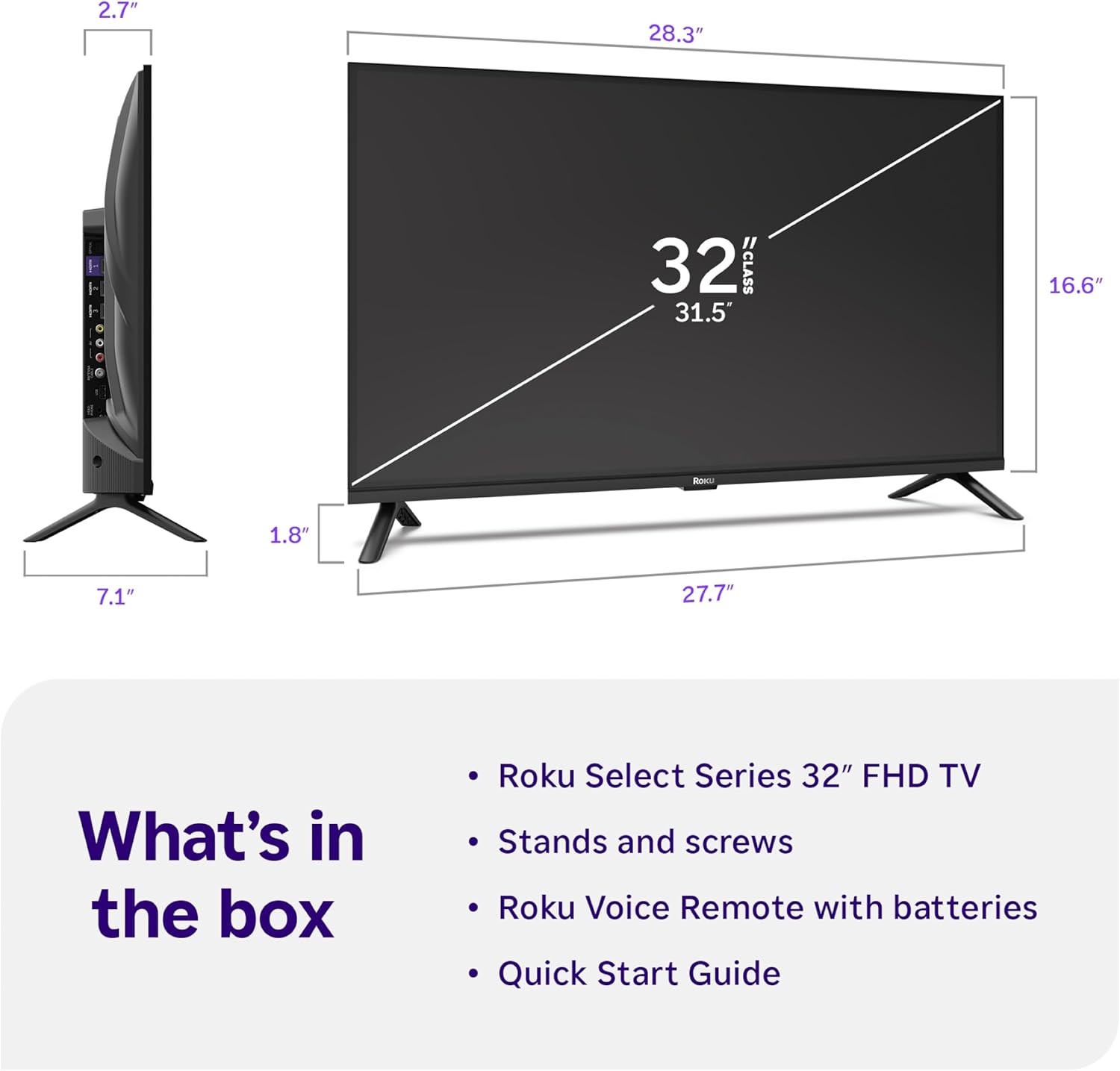
Image: Close-up of the Roku Voice Remote, highlighting buttons for TV power, volume, mute, voice search, instant replay, options, and dedicated app shortcuts.
3. Streaming Apps and Live TV
Access thousands of streaming channels, including Netflix, Disney+, Hulu, Prime Video, and Apple TV+. The Roku Channel also offers free live TV and on-demand content.

Image: A vibrant Roku TV home screen displaying a selection of popular streaming applications and recommended shows.
4. Gosodiadau Llun
Optimeiddio eich viewprofiad gyda gwahanol osodiadau llun:
- Llun Clyfar Roku: Automatically adjusts picture mode for optimal viewing.
- Dulliau Llun: Choose from presets like Movie, Sports, Vivid, Standard, or Low Power.
- Addasu: Adjust brightness, contrast, sharpness, color, and tint for a personalized picture.
5. Gosodiadau Sain
Gwella eich profiad sain:
- Sain Dolby: Enjoy clear speech and louder sound.
- Moddau Sain: Select from Standard, Dialogue, Movie, Music, or Night mode.
- Modd Clustffonau Bluetooth: Connect your wireless headphones to listen without disturbing others.

Image: A child wearing wireless headphones while watching the Roku TV, demonstrating the Bluetooth Headphone Mode.
6. Integreiddio Cartref Clyfar
Your Roku TV is compatible with various smart home ecosystems:
- Rheoli llais: Use Roku Voice, Siri, Alexa, or Google Assistant for hands-free control.
- Apple AirPlay: Effortlessly share videos, photos, and music from your Apple devices.
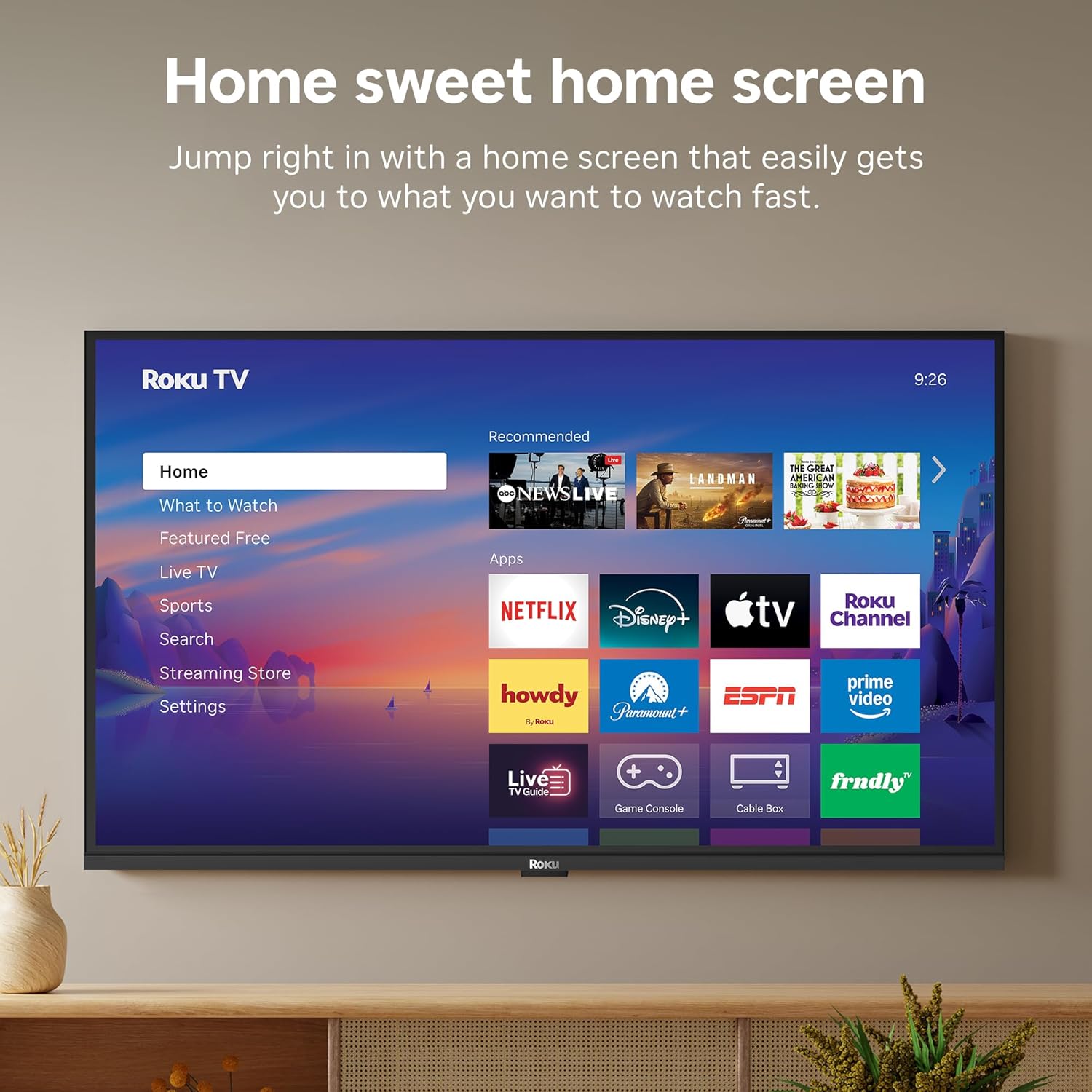
Image: The Roku TV screen displaying smart home compatibility logos for Roku Smart Home, Apple AirPlay, Apple Home, Alexa, and Google Home, with a smart speaker nearby.
7. Rheolaethau Rhieni
Manage content access with built-in parental controls, including V-Chip technology, to ensure a safe viewamgylchedd i blant.
Fideo Cynnyrch Swyddogol
Fideo: Dros benview of the Roku TV OS, demonstrating its user-friendly interface, app selection, and smart features. This video is provided by Roku, Inc.
Manylebau
- Maint y sgrin:
- 32 modfedd
- Penderfyniad:
- 1080p HD Llawn
- Technoleg Arddangos:
- LED
- Cyfradd Adnewyddu:
- 60 Hz
- Nodweddion arbennig:
- Bluetooth Headphone Mode, Dolby Audio, Voice Remote, Roku Smart Picture
- Technoleg Cysylltedd:
- Bluetooth, WiFi
- Rhyngwyneb Caledwedd:
- 3 HDMI Ports, 1 USB Port, S/PDIF (Optical Audio Out)
- System Weithredu:
- Roku OS
- Dimensiynau'r Cynnyrch (D x L x U):
- 7.1"D x 28.3"W x 18.4"H
- Pwysau Eitem:
- 7.7 Pounds (with stand)
- Safon Mount VESA:
- 200 x 200 mm
- Rhif Model:
- 32R3E5
- UPC:
- 829610009469
Datrys problemau
If you encounter issues with your Roku TV, please refer to the following common solutions:
- Dim pŵer: Gwnewch yn siŵr bod y cebl pŵer wedi'i gysylltu'n ddiogel â'r teledu ac allfa drydan sy'n gweithio. Rhowch gynnig ar allfa wahanol.
- Dim Llun/Sain: Verify that the correct input source is selected on your TV. Check all cable connections (HDMI, AV, etc.) for looseness.
- Ddim yn Ymateb o Bell: Replace the batteries in your remote control. Ensure there are no obstructions between the remote and the TV.
- Problemau Cysylltiad Rhwydwaith: Restart your Wi-Fi router and modem. Go to the TV's Settings > Network > Check connection to diagnose and reconnect.
- App Not Loading: Restart the app. If the issue persists, try removing and reinstalling the app from the Roku Channel Store.
For more detailed troubleshooting, visit the official Roku support websafle.
Cynnal a chadw
Er mwyn sicrhau hirhoedledd a pherfformiad gorau posibl eich teledu Roku, dilynwch y canllawiau cynnal a chadw hyn:
- Glanhau'r sgrin: Sychwch y sgrin yn ysgafn gyda lliain microffibr meddal, sych. Ar gyfer smotiau ystyfnig, sychwch yn ysgafnampgolchwch y lliain gyda dŵr neu doddiant glanhau sgrin sydd wedi'i gynllunio'n benodol ar gyfer electroneg. Peidiwch â chwistrellu hylif yn uniongyrchol ar y sgrin.
- Glanhau Corff y Teledu: Use a soft, dry cloth to wipe the exterior of the TV. Avoid abrasive cleaners or solvents.
- Awyru: Ensure the TV's ventilation openings are not blocked to prevent overheating. Maintain adequate space around the TV for air circulation.
- Diweddariadau Meddalwedd: Your Roku TV automatically receives software updates. Ensure your TV is connected to the internet to receive the latest features and performance improvements.
- Rheoli Pwer: Datgysylltwch y teledu o'r soced pŵer yn ystod stormydd mellt a fellten neu pan fydd yn cael ei adael heb oruchwyliaeth am gyfnodau hir.
Gwarant a Chefnogaeth
Gwybodaeth Gwarant
Roku warrants the hardware of this device against defects in materials and workmanship under normal use for a period of one (1) year from the date of purchase ("Warranty Period"). If Roku determines that the device’s hardware is defective during the Warranty Period, Roku’s sole obligation, and your exclusive remedy, will be to either repair or replace the unit with either a new or rebuilt device, at its option. This warranty applies if the device is used in accordance with the provided documentation.
Important information about warranty returns and replacements is available on the Roku support site. You may also return a device for any reason, subject to the terms of the applicable return policy: 1) Within thirty (30) days from the date of purchase from Roku; or 2) within the applicable return period if purchased from an authorized reseller or distributor. Additional details regarding product returns can be found on the Roku support site.
Cefnogaeth i Gwsmeriaid
For further assistance, technical support, or to access the full range of support resources, please visit the official Roku support websafle. Gallwch ddod o hyd i Gwestiynau Cyffredin, canllawiau datrys problemau, a gwybodaeth gyswllt ar gyfer gwasanaeth cwsmeriaid yno.