
1. Rhagymadrodd
Thank you for choosing the Thomson 24-inch HD LED Smart TV, model 24HT2S15. This manual provides essential information to help you set up, operate, and maintain your new television. Please read it thoroughly before use and retain it for future reference.

Delwedd: Blaen view of the Thomson 24-inch HD LED Smart TV, showcasing its frameless design and key features like HD resolution and Dolby Audio.
Nodweddion Allweddol:
- TiVo OS with Voice Control: Intuitive interface combining live TV and streaming apps, personalized recommendations, and voice commands.
- Arddangosfa Di-wifr: Mirror your smartphone, tablet, or laptop screen to the TV.
- Sain Dolby: Enhanced sound experience with improved dialogue, detail, and surround effects.
- HDR10: Sharper contrast and realistic colors for an immersive viewing profiad.
- Rheolydd o Bell wedi'i Olau: Easy navigation in low light with direct access buttons for popular streaming services.
- Adjustable Side Feet: Flexible positioning options for the TV.
- Tiwniwr Triphlyg: Integrated tuners for cable, satellite, and antenna reception.
2. Beth sydd yn y Bocs
Wrth ddadbacio, gwnewch yn siŵr bod yr holl eitemau canlynol yn bresennol:
- Thomson 24-inch HD LED Smart TV (Model 24HT2S15)
- Rheolaeth Anghysbell
- Addasydd Pŵer
- Llawlyfr Defnyddiwr
- Cerdyn Gwarant
- Adjustable Side Feet (2x)
If any items are missing or damaged, please contact your retailer or Thomson customer support.
3. Gosod
3.1 Dadbacio a Lleoli
Carefully remove the TV from its packaging. It is recommended to have two people for this process. Place the TV on a stable, flat surface or mount it on a wall using a compatible VESA mount (not included).
Sicrhewch fod digon o awyru o amgylch y teledu. Peidiwch â rhwystro agoriadau awyru.
3.2 Atodi'r Stondin
If you are not wall-mounting the TV, attach the included side feet:
- Rhowch y teledu wyneb i lawr ar frethyn meddal, glân i atal difrod i'r sgrin.
- Aliniwch bob stondin â'r tyllau sgriw cyfatebol ar waelod y teledu.
- Secure the stands using the provided screws. The feet are adjustable from 30 cm to 60 cm distance.

Image: The Thomson 24-inch Smart TV showing its dimensions, including a screen diagonal of 60 cm (24 inches), width of 53 cm, and height of 37 cm with the stand. The adjustable stand feet are also illustrated.
3.3 Cysylltu Perifferolion
Connect your external devices to the TV's ports. Refer to the diagram below for port locations.

Delwedd: Manwl view of the rear connection panel of the Thomson 24-inch Smart TV, illustrating various ports including 2x USB 2.0, Antenna input, Satellite input, 3x HDMI 1.4 (one with ARC), Service port, Headphone jack, AV IN, Digital Optical Audio Out, and LAN port.
- Pwer: Connect the power adapter to the TV and then to a wall outlet.
- Antena/Lloeren: Connect your antenna or satellite cable to the respective input.
- HDMI: Defnyddiwch geblau HDMI i gysylltu dyfeisiau fel chwaraewyr Blu-ray, consolau gemau, neu flychau pen set. Mae HDMI 1.4/ARC yn cefnogi Sianel Dychwelyd Sain.
- USB: Mewnosodwch yriannau USB ar gyfer chwarae cyfryngau neu ddiweddariadau meddalwedd.
- LAN: Cysylltwch gebl Ethernet ar gyfer cysylltiad rhyngrwyd â gwifrau.
- AV YN: Ar gyfer dyfeisiau hŷn sy'n defnyddio fideo cyfansawdd a sain stereo.
- Clustffon: Cysylltu clustffonau ar gyfer gwrando preifat.
- Allbwn Sain Optegol Digidol: Connect to an external sound system for digital audio.
3.4 Troi Ymlaen Cychwynnol a Gosod Tro Cyntaf
- Plygiwch y teledu i mewn i soced pŵer.
- Pwyswch y botwm pŵer ar y teclyn rheoli o bell neu'r teledu.
- Follow the on-screen instructions to select your language, country, and perform channel scanning for your triple tuner (cable/satellite/antenna).
- Connect to your Wi-Fi network by selecting it from the list and entering the password.
- Complete the TiVo OS setup, including signing in or creating an account.
4. Gweithredu Eich Teledu
4.1 Swyddogaethau Rheoli o Bell
The backlit remote control provides easy access to all TV functions, even in dim lighting. It includes dedicated buttons for popular streaming services.

Image: The Thomson Smart TV remote control, highlighting its backlit buttons, voice control microphone, and direct access buttons for Netflix, YouTube, Prime Video, Disney+, and Canal+.
- Botwm Pŵer: Yn troi'r teledu ymlaen / i ffwrdd.
- Botymau Rhif: Dewiswch sianeli yn uniongyrchol.
- Pad Llywio (I Fyny/I Lawr/Chwith/Dde/Iawn): Llywio bwydlenni a dewis opsiynau.
- Yn ôl / Gadael: Dychwelwch i'r sgrin flaenorol neu gadewch ddewislen.
- Cyfrol i fyny/i lawr: Addaswch lefel y cyfaint.
- Sianel i fyny/i lawr: Newid sianeli teledu.
- Tewi: Treiglo neu ddatgymalu'r sain.
- Cartref: Access the TiVo OS home screen.
- Botwm Rheoli Llais: Activate voice commands (microphone icon).
- Botymau Mynediad Uniongyrchol: Launch Netflix, YouTube, Prime Video, Disney+, Canal+ instantly.
4.2 TiVo OS and Smart Features
The TiVo OS provides a unified platform for live TV and streaming content. Explore personalized recommendations and access your favorite apps.

Image: The Thomson Smart TV screen showing various streaming application icons like Netflix, YouTube, Disney+, Prime Video, Plex, DAZN, Canal+, and Pluto TV, indicating integrated smart TV capabilities.
- Mynediad Ap: Navigate to the home screen to find and launch pre-installed apps or download new ones from the app store.
- Rheoli llais: Press the voice control button on your remote and speak commands to search for content, launch apps, or control TV functions.
- Arddangosfa Di-wifr: Use the Wireless Display feature to mirror content from your compatible smartphone, tablet, or laptop directly to your TV screen.

Image: An illustration demonstrating the voice control feature of the Thomson Smart TV, showing a remote control with a microphone icon and examples of voice commands like "Open Netflix" or "Play movies with Tom Hanks."

Image: The Thomson Smart TV displaying content mirrored from a smartphone, illustrating the Wireless Display and Google Cast features for seamless content sharing.
4.3 Gwelliannau Llun a Sain
- HDR10: Experience improved contrast, brightness, and color accuracy with HDR10 content. This technology enhances both bright and dark scenes for a more dynamic picture.
- Sain Dolby: Enjoy rich, clear, and powerful sound. Dolby Audio optimizes dialogue, enhances detail, and provides an immersive surround sound experience.

Image: A side-by-side comparison of picture quality, demonstrating the enhanced contrast and color vibrancy of HDR10 on the right compared to standard SDR on the left, with a building and landscape scene.

Image: An illustration depicting sound waves emanating from a TV screen, with the Dolby Audio logo prominently displayed, signifying enhanced audio quality for an immersive viewing profiad.
5. cynnal
5.1 Glanhau Eich Teledu
- Sgrin: Sychwch y sgrin yn ysgafn gyda lliain meddal, di-flwff. Ar gyfer marciau ystyfnig, sychwch ychydigampgolchwch y lliain gyda dŵr neu lanhawr sgrin arbenigol. Peidiwch byth â chwistrellu hylif yn uniongyrchol ar y sgrin.
- Cabinet: Sychwch gabinet a stand y teledu gyda lliain meddal, sych.
- Rheolaeth Anghysbell: Glanhewch y teclyn rheoli o bell gyda lliain meddal, sych.
Rhybudd:
- Datgysylltwch y teledu bob amser cyn glanhau.
- Peidiwch â defnyddio glanhawyr sgraffiniol, cwyrau na thoddyddion.
5.2 Diweddariadau Meddalwedd
Your Smart TV may receive software updates to improve performance and add new features. It is recommended to enable automatic updates or check for updates periodically through the TV's settings menu to ensure optimal functionality and security.
6. Datrys Problemau
Os byddwch chi'n dod ar draws problemau gyda'ch teledu, cyfeiriwch at y problemau a'r atebion cyffredin canlynol:
| Problem | Achos Posibl | Ateb |
|---|---|---|
| Dim pŵer | Cebl pŵer wedi'i ddatgysylltu; problem allfa bŵer | Gwnewch yn siŵr bod y cebl pŵer wedi'i gysylltu'n ddiogel. Profwch y soced gyda dyfais arall. |
| Dim llun, ond mae sain yn bresennol | Incorrect input source; faulty cable | Check the input source (e.g., HDMI 1, Antenna). Ensure cables are connected correctly. |
| Dim sain, ond mae llun yn bresennol | Sain wedi'i mudo neu'n rhy isel; problem gyda'r system sain allanol | Unmute the TV or increase volume. Check audio settings and external audio connections. |
| Rheolaeth bell ddim yn gweithio | Dead batteries; obstruction; remote not paired | Replace batteries. Remove any obstructions. Re-pair the remote if necessary (refer to TV settings). |
| Methu cysylltu â Wi-Fi | Cyfrinair anghywir; problem gyda'r llwybrydd; teledu yn rhy bell o'r llwybrydd | Verify Wi-Fi password. Restart your router. Move TV closer or use a wired LAN connection. |
| Smart features not responding | Network issue; temporary software glitch | Check internet connection. Restart the TV by unplugging it for a minute and plugging it back in. |
If the problem persists after trying these solutions, please contact Thomson customer support.
7. manylebau
Detailed technical specifications for the Thomson 24HT2S15 Smart TV:
| Nodwedd | Manylyn |
|---|---|
| Brand | Thomson |
| Rhif Model | 24HT2S15 |
| Maint Sgrin | 24 modfedd (60 cm) |
| Technoleg Arddangos | LED |
| Datrysiad | 768p (1366 x 768 picsel) |
| Cyfradd Adnewyddu | 60 Hz |
| Cymhareb Agwedd | 16:9 |
| Technoleg Cysylltedd | Ethernet, HDMI, USB, Wi-Fi |
| Nodweddion Arbennig | Parental Controls, TiVo OS, Voice Control, HDR10, Dolby Audio |
| Dimensiynau'r Cynnyrch (gyda stondin) | 8P x 53h x 37U cm (tua 8 x 53 x 37 cm) |
| Pwysau | 3.33 kg |
| Cydrannau wedi'u Cynnwys | Power Adapter, User Manual, Warranty Card, Remote Control |
| Ieithoedd a Gefnogir | French, English, Italian, Spanish, German |
| Dosbarth Effeithlonrwydd Ynni | E |
| Gwybodaeth am Gynnyrch EPREL | https://eprel.ec.europa.eu/qr/1969520 |
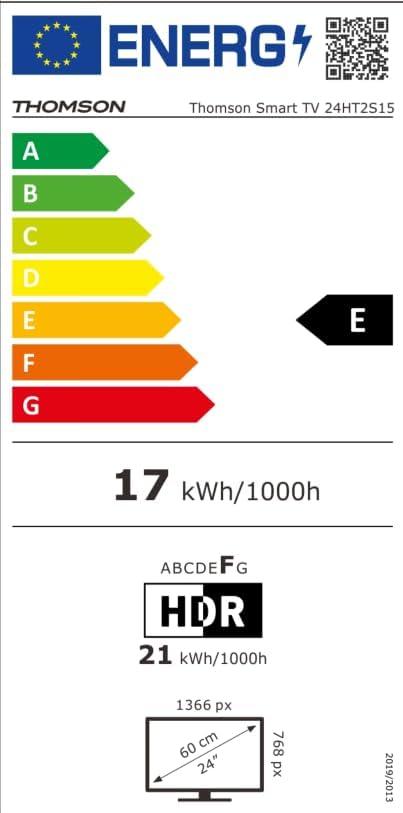
Image: The EU Energy Label for the Thomson Smart TV 24HT2S15, showing an energy efficiency class of E and energy consumption of 17 kWh/1000h for SDR and 21 kWh/1000h for HDR.
8. Gwarant a Chefnogaeth
8.1 Gwybodaeth Gwarant
Thomson products are covered by a 3-year warranty. For detailed information regarding warranty claims, returns, or defective products, please refer to the warranty card included in your package or visit the Thomson support websafle.
For specific information on purchases made via Amazon, consult Amazon's help pages regarding returns and defective products.
8.2 Cefnogaeth i Gwsmeriaid
If you require further assistance or have questions not covered in this manual, please contact Thomson customer support:
- Gwneuthurwr: Ffrwdview GmbH
- E-bost: cyswllt@ffrwdview.com
- Websafle: www.streamview.com
- Ffôn: +4318900066
Please have your model number (24HT2S15) and purchase details ready when contacting support.