
1. Rhagymadrodd
Welcome to the user manual for your Hisense 32C35R 32-inch Smart Full HD TV. This television is designed to provide a rich entertainment experience with its Full HD display, smart features, and advanced audio processing. This manual will guide you through the setup, operation, and maintenance of your new TV, ensuring you get the most out of its capabilities.
2. Gwybodaeth Diogelwch
Before operating your TV, please read all safety instructions carefully. Keep this manual for future reference. Always disconnect the power cord from the wall outlet before cleaning or servicing the TV. Do not expose the TV to rain or moisture to prevent fire or electric shock. Ensure proper ventilation and avoid blocking ventilation openings.
3. Cynnwys Pecyn
Gwiriwch fod yr holl eitemau wedi'u cynnwys yn eich pecyn:
- Hisense 32C35R 32-inch Smart Full HD TV
- Rheolaeth Anghysbell
- Cord Pŵer
- TV Stand and Screws
- Anti-tip bracket (for TV stand installation)
- Llawlyfr Defnyddiwr (y ddogfen hon)
4. Gosod
4.1 Gosod Corfforol
Place the TV on a stable, flat surface or mount it on a wall using a compatible VESA mount (sold separately). If using the included stand, attach it securely to the TV using the provided screws. For added safety, install the anti-tip bracket to prevent accidental tipping.
Nodyn: Ensure the installation location is prepared in advance. Removal of existing products or wall mounts is not supported by the installation service.
4.2 Cysylltu Ceblau
Connect the necessary cables to your TV:
- Antenna Cable: Connect your terrestrial digital, BS, or CS antenna cable to the TV's antenna input.
- llinyn pŵer: Plygiwch y llinyn pŵer i'r teledu ac yna i mewn i soced wal.
- Dyfeisiau Allanol: Connect any external devices such as Blu-ray players, game consoles, or sound systems using HDMI or other appropriate ports.
Nodyn: Antenna cables and other connection cables are not included and must be prepared by the customer.
4.3 Gosodiad Cychwynnol
After connecting all cables and powering on the TV for the first time, follow the on-screen instructions for initial setup:
- Insert the B-CAS card (if applicable).
- Set your region and postal code.
- Perform initial channel scanning and other basic settings.
Nodyn: Network connection settings are not covered by the installation service and must be configured by the user.
5. Cyfarwyddiadau Gweithredu
5.1 Rheolaeth o Bell Drosview
Familiarize yourself with the TV remote control. It provides access to all TV functions, including power, volume, channel selection, smart TV apps, and voice control.
5.2 Nodweddion Teledu Clyfar (VIDAA OS)
Your Hisense 32C35R TV runs on VIDAA OS, offering quick access to popular streaming services like YouTube, Netflix, and more. It also supports AirPlay2 for seamless content sharing from Apple devices and Bluetooth for wireless audio.

Image: The Hisense TV displaying its VIDAA OS home screen with various streaming applications and content recommendations. The interface is designed for quick navigation and access to online videos.

Image: A close-up of the Hisense TV remote control, highlighting dedicated buttons for popular streaming services and a voice control button for easy access to smart features.
5.3 HI-VIEW Engine 2K+ (Image Quality)
The HI-VIEW Engine 2K+ enhances image quality, especially for online video content. It features a rich video menu allowing you to select optimal picture settings for different content types, such as sports, games, or PC monitor use. The TV also includes an automatic sensor that adjusts screen brightness based on room lighting conditions.

Image: A detailed diagram illustrating the Hisense HI-VIEW Engine 2K+ chip, which is responsible for advanced image processing and enhancing visual clarity, particularly for 4K content.
5.4 Nodweddion Sain
Experience high-quality audio with the TV's 2.0 speaker configuration and 12W practical maximum audio output. It incorporates eilex sound processing and supports Dolby Audio for an immersive sound experience.

Image: The Hisense TV screen showing various sound processing features such as Auto Volume for automatic volume adjustment, Clear Voice for enhanced dialogue, Sound Remaster for improved audio quality, and VIR Filter for better sound range.
5.5 Screen Share & Bluetooth
The TV supports screen sharing to display content from your smartphone. With Bluetooth connectivity, you can enjoy audio wirelessly through devices like soundbars, speakers, headphones, or wireless earphones without disturbing others.
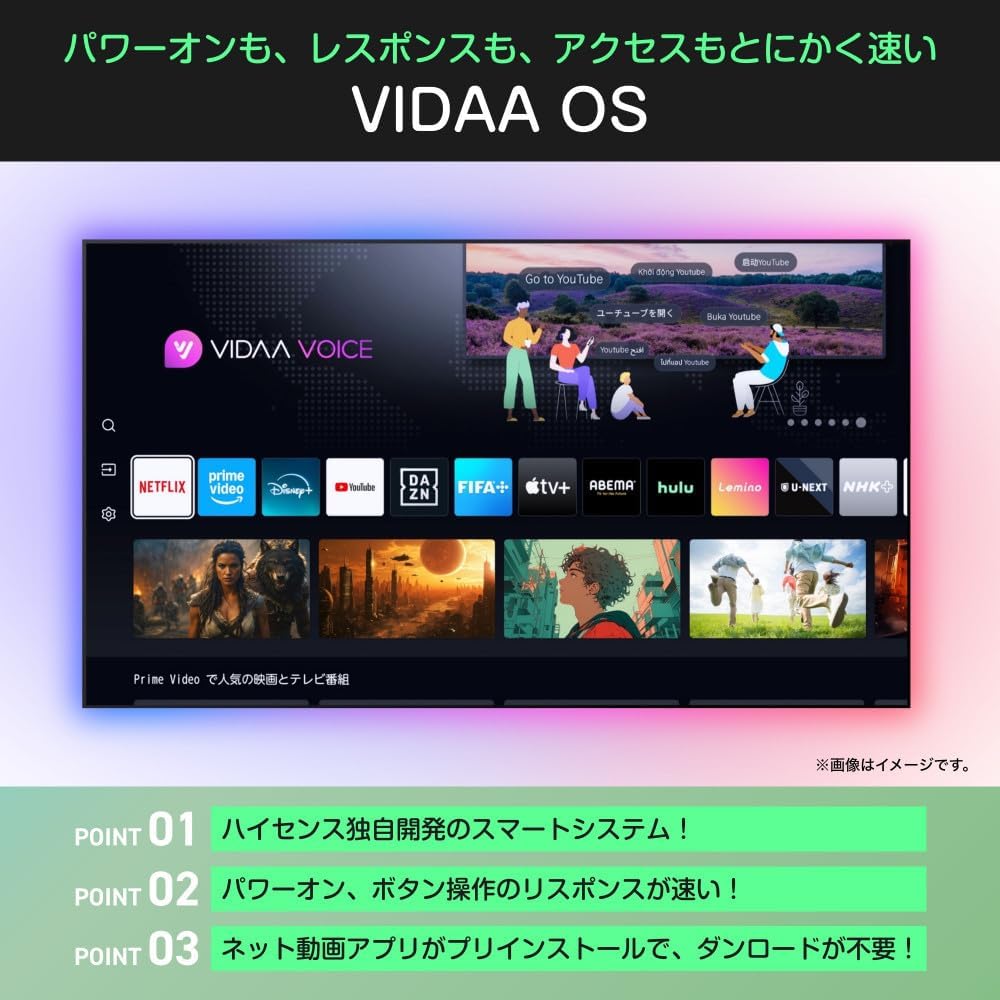
Image: An illustration demonstrating the TV's Bluetooth capabilities, allowing users to connect wireless headphones, soundbars, and speakers for private listening or enhanced audio.
5.6 Rheoli Llais (Alexa)
The Hisense 32C35R is compatible with Alexa voice control. By speaking to an Alexa-enabled smart speaker (sold separately), you can control TV functions such as power on/off, volume adjustment, and launching streaming services.

Image: A diagram illustrating the integration of the Hisense TV with Alexa. A user can issue voice commands to an Alexa smart speaker to control the TV, such as changing channels, while performing other tasks.
5.7 Game Mode (ALLM)
For gamers, the TV features a low-latency game mode and ALLM (Auto Low Latency Mode) support, ensuring a smoother and more responsive gaming experience by minimizing input lag.
5.8 Google TV Video
This video demonstrates the features and user experience of Google TV, which is integrated into some Hisense models, showcasing content aggregation, personalized recommendations, and voice search capabilities.
Fideo: Sioe fideo gwerthwr swyddogolasing the Google TV interface, its ability to consolidate streaming services, personalized content recommendations, family profiles, and voice control features. It highlights how users can easily find and enjoy content across various platforms.
6. cynnal
Er mwyn sicrhau hirhoedledd a pherfformiad gorau posibl eich teledu Hisense, dilynwch y canllawiau cynnal a chadw hyn:
- Glanhau'r sgrin: Sychwch y sgrin yn ysgafn gyda lliain meddal, sych, heb lint. Ar gyfer marciau ystyfnig, sychwch ychydigampgolchwch y lliain gyda dŵr neu lanhawr sgrin arbenigol. Peidiwch byth â chwistrellu hylif yn uniongyrchol ar y sgrin.
- Glanhau'r Cabinet: Defnyddiwch frethyn meddal, sych i lanhau cabinet y teledu. Osgowch ddefnyddio glanhawyr neu doddyddion sgraffiniol.
- Awyru: Gwnewch yn siŵr nad yw'r agoriadau awyru ar gefn y teledu wedi'u blocio i atal gorboethi.
- llinyn pŵer: Gwiriwch y llinyn pŵer yn rheolaidd am unrhyw ddifrod. Os yw wedi'i ddifrodi, amnewidiwch ef ar unwaith.
7. Datrys Problemau
If you encounter any issues with your TV, refer to the following common troubleshooting steps:
| Problem | Ateb Posibl |
|---|---|
| Dim pŵer | Check if the power cord is securely plugged into the TV and the wall outlet. Press the power button on the remote or TV. |
| Dim llun, ond mae sain yn bresennol | Gwiriwch y ffynhonnell fewnbwn. Gwnewch yn siŵr bod dyfeisiau allanol wedi'u troi ymlaen ac wedi'u cysylltu'n gywir. Rhowch gynnig ar gebl HDMI gwahanol. |
| Dim sain, ond mae llun yn bresennol | Check the volume level and mute settings. Ensure external audio devices are connected and configured correctly. |
| Rheolaeth bell ddim yn gweithio | Amnewidiwch y batris. Gwnewch yn siŵr nad oes unrhyw rwystrau rhwng y teclyn rheoli o bell a'r teledu. |
| Methu cysylltu â Wi-Fi | Gwiriwch eich llwybrydd a'ch modem. Gwnewch yn siŵr bod y cyfrinair Wi-Fi yn gywir. Rhowch gynnig ar ailgychwyn y teledu a'ch offer rhwydwaith. |
8. manylebau
| Nodwedd | Manyleb |
|---|---|
| Rhif Model | 32C35R |
| Maint Sgrin | 32 modfedd |
| Technoleg Arddangos | LCD |
| Datrysiad | HD Llawn (1920 x 1080) |
| Cyfradd Adnewyddu | 60 Hz |
| Peiriant Delwedd | HI-VIEW Engine 2K+ |
| Golau cefn | LED uniongyrchol |
| Ffurfweddiad Siaradwr | 2.0 Sianel |
| Allbwn Sain | 12W (Practical Max) |
| Prosesu Sain | eilex Sound Processing, Dolby Audio |
| Nodweddion Smart | VIDAA OS, YouTube, Netflix, AirPlay2, Bluetooth, Alexa Voice Control, Game Mode (ALLM) |
| Defnydd Pŵer Cyfradd | 55W |
| Defnydd Pŵer Blynyddol | 60 kWh y flwyddyn |
| Main Unit Weight (without stand) | 3.4 kg |
| Main Unit Dimensions (W x H x D, without stand) | 725 x 429 x 78 mm |
| Pwysau (gyda stand) | 3.5 kg |
| Dimensions (W x H x D, with stand) | 725 x 472 x 183 mm |
9. Gwarant a Chefnogaeth
9.1 Gwybodaeth Gwarant
Your Hisense 32C35R TV comes with a Gwarant 3 mlynedd from the date of purchase. Please retain your proof of purchase for warranty claims. The warranty covers manufacturing defects under normal use. It does not cover damage caused by misuse, accidents, unauthorized repairs, or natural disasters.
9.2 Cefnogaeth i Gwsmeriaid
For technical assistance, troubleshooting, or warranty inquiries, please contact Hisense customer support. Refer to the contact information provided with your product documentation or visit the official Hisense websafle am y manylion cymorth diweddaraf.


