
Rhagymadrodd
Thank you for choosing the LIORQUE Wireless Weather Station YGH6208. This device provides accurate indoor and outdoor temperature and humidity readings, weather forecasts, and features a DCF radio-controlled clock with alarm functions. This manual will guide you through the setup, operation, and maintenance of your weather station.
Cynnwys Pecyn
- 1 x LIORQUE Wireless Weather Station (Main Unit)
- 1 x Synhwyrydd Awyr Agored
- 3 x Batris AAA (ar gyfer y Prif Uned)
- 2 x AAA Batteries (for Outdoor Sensor)
- 1 x Llawlyfr Defnyddiwr (y ddogfen hon)
Cynnyrch Drosview
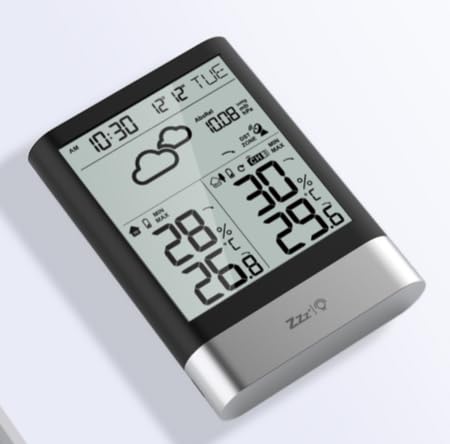
Delwedd 1: LIORQUE Wireless Weather Station Main Unit. This image shows the front view of the main display unit, highlighting its LCD screen and compact design.
Prif Nodweddion Uned:
- 4.3-inch LCD screen with backlight
- Arddangosfa tymheredd a lleithder dan do
- Arddangosfa tymheredd a lleithder awyr agored
- Eiconau rhagolygon y tywydd
- DCF radio-controlled clock with manual setting option
- Double alarm clock with snooze function
- Calendar and day of the week display (7 languages)
- Max/Min temperature and humidity records
- Air pressure display and weather trend
- Arddangosfa amser 12/24 awr
Outdoor Sensor Features:
- Wireless transmission up to 100m (open area)
- Mesur tymheredd a lleithder
- Supports hanging or standing placement
- Data updated every 30 seconds
- Supports up to 3 sensors (one included)
Gosod
1. Gosod Batri
- Synhwyrydd Awyr Agored: Open the battery compartment cover on the back of the outdoor sensor. Insert 2 x AAA batteries, ensuring correct polarity (+/-). Close the cover.
- Prif Uned: Agorwch glawr adran y batri ar gefn y prif uned. Mewnosodwch 3 batri AAA, gan sicrhau'r polaredd cywir (+/-). Caewch y clawr.
- The main unit will power on and display indoor readings.
2. Paru Synwyryddion
After installing batteries in both units, the main unit will automatically search for the outdoor sensor. The outdoor temperature and humidity should appear on the main unit's display within a few minutes. If the outdoor readings do not appear:
- Ensure both units are within range (up to 100m in open air).
- Press the "TX" button inside the outdoor sensor's battery compartment to manually send a signal.
- On the main unit, press and hold the "CHANNEL" button to initiate a manual search for the sensor.
3. Initial Settings (Time, Date, Units)
The weather station will attempt to synchronize with the DCF radio signal for automatic time setting. This may take several hours, especially in areas with weak signals. You can manually set the time and date if needed.
- Gosod Amser â Llaw: Press and hold the "MODE" button to enter time setting mode. Use the "UP" and "DOWN" buttons to adjust values and "MODE" to confirm and move to the next setting (e.g., 12/24 hour format, hour, minute, year, month, day, language for day of week).
- Unedau Tymheredd: Pwyswch y botwm "°C/°F" i newid rhwng Celsius a Fahrenheit.
- Air Pressure Units: Press the "BARO" button to cycle through air pressure units (e.g., hPa, inHg).
Cyfarwyddiadau Gweithredu
Gwybodaeth Arddangos
The 4.3-inch LCD screen displays various information:
- Amser a Dyddiad: Current time, date, and day of the week.
- Darlleniadau Dan Do: Current indoor temperature and humidity.
- Darlleniadau Awyr Agored: Current outdoor temperature and humidity from the connected sensor.
- Rhagolwg y Tywydd: Icons indicating predicted weather conditions (e.g., sunny, cloudy, rainy).
- Pwysedd aer: Current atmospheric pressure and trend.
- Golau cefn: The screen backlight activates with a light touch and returns to normal brightness after 10 seconds to conserve battery.
Swyddogaeth Cloc Larwm
The weather station features a double alarm clock with snooze.
- Gosod Larymau: Pwyswch y botwm "ALARM" i view Alarm 1. Press "ALARM" again to view Alarm 2. Hold "ALARM" to enter alarm setting mode. Use "UP" and "DOWN" to adjust the hour and minute, and "ALARM" to confirm.
- Actifadu/Dadactifadu Larymau: Tra viewing an alarm, press "UP" to toggle it on or off. An alarm icon will appear when active.
- Swyddogaeth Snooze: When an alarm sounds, press any button (except "ALARM OFF") to activate snooze. The alarm will sound again after a set interval. Press "ALARM OFF" to stop the alarm completely.
Uchafswm ac Isafswm Cofnodion
The weather station records the maximum and minimum indoor/outdoor temperature and humidity values.
- Press the "MAX/MIN" button once to display maximum recorded values.
- Press "MAX/MIN" again to display minimum recorded values.
- Press "MAX/MIN" a third time to return to current readings.
- To clear records, hold the "MAX/MIN" button while viewgan gynnwys y cofnodion.
Cynnal a chadw
- Amnewid Batri: Rhowch y batris newydd yn y prif uned a'r synhwyrydd awyr agored pan fydd y dangosydd batri isel yn ymddangos ar yr arddangosfa. Bob amser, newidiwch yr holl fatris ar yr un pryd.
- Glanhau: Clean the display and unit surfaces with a soft, damp brethyn. Peidiwch â defnyddio glanhawyr neu doddyddion sgraffiniol.
- Lleoliad Synhwyrydd Awyr Agored: For optimal performance and longevity, install the outdoor sensor in a shaded area, protected from direct sunlight and rain. Ensure it is within the 100m wireless range of the main unit.
Datrys problemau
| Problem | Ateb Posibl |
|---|---|
| No outdoor temperature/humidity display. |
|
| Arddangosfa amser anghywir. |
|
| Mae'r arddangosfa'n dywyll neu'n wag. |
|
| Mae rhagolygon y tywydd yn ymddangos yn anghywir. |
|
Manylebau
- Model: YGH6208
- Brand: LIORQUE
- Math Arddangos: LCD
- Power Source (Main Unit): 3 x batris AAA (wedi'u cynnwys)
- Power Source (Outdoor Sensor): 2 x batris AAA (wedi'u cynnwys)
- Ystod Diwifr: Hyd at 100m (ardal agored)
- Cywirdeb Tymheredd: ±0.5 °C
- Technoleg Synhwyrydd: Funk (Wireless)
- Nodweddion arbennig: DCF Radio Clock, Alarm, Snooze, Weather Forecast, Max/Min Records, Backlight
- Cydrannau wedi'u Cynnwys: Weather Station Main Unit, Outdoor Sensor
Gwarant a Chefnogaeth
LIORQUE products are designed for reliability and performance. For warranty information or technical support, please refer to the contact details provided with your purchase or visit the official LIORQUE websafle. Cadwch eich prawf prynu ar gyfer hawliadau gwarant.