
1. Rhagymadrodd
This manual provides comprehensive instructions for the Hodozzy 9-Inch 6G+128G Double Din Car Stereo. It covers installation, operation, and maintenance to ensure optimal performance and user experience. Please read this manual thoroughly before using the device.

Image 1.1: Hodozzy 9-Inch Android Touch Screen Car Stereo Overview.
2. Cynnwys Pecyn
The following items are included in your Hodozzy 9-Inch 6G+128G Double Din Car Stereo package. Please verify all components are present upon unboxing.
- Cebl Pŵer
- 4/6Pin USB Cable
- Cebl Mewnbwn Camera Cefn
- RCA Cable
- Braced
- Antena GPS
- Llawlyfr Defnyddiwr
- MIC & Camera (Backup camera)

Image 2.1: Included components and device dimensions.
3. Canllaw Gosod
Proper installation is crucial for the functionality and safety of your car stereo. It is recommended that installation be performed by a qualified professional.
3.1 Diagram Gwifro
Cyfeiriwch at y diagram canlynol am gysylltiadau gwifrau cywir. Gwnewch yn siŵr bod yr holl gysylltiadau'n ddiogel i atal camweithrediadau.

Image 3.1: Detailed wiring connections for the car stereo.
3.2 Gosod Camera Gwrthdroi
Dilynwch y camau hyn i osod y camera gwrthdroi:
- Connect the red cable (A) to the positive pole of the car reversing light cable.
- Connect the black cable (B) to the negative pole of the car reversing light cable.
- Connect the reversing trigger wire cable (D, pink color) to the red cable (A). This is an extension of the video input wire.
- Connect the video input wire from the camera to the designated input on the car stereo.

Image 3.2: Reversing camera wiring and connection points.
4. Cyfarwyddiadau Gweithredu
This section details the operation of your Hodozzy car stereo's various functions.
4.1 Pŵer Ymlaen/Diffodd
The unit powers on automatically with the vehicle's ignition. To manually power off or on, press and hold the power button located on the front panel.
CarPlay Di-wifr 4.2 ac Android Auto
Connect your smartphone wirelessly via Wi-Fi and Bluetooth to access navigation, music, and messaging apps directly on the car stereo display.
- Sicrhewch fod Bluetooth a Wi-Fi wedi'u galluogi ar eich ffôn clyfar.
- Pair your phone with the car stereo via Bluetooth.
- Follow the on-screen prompts to initiate Wireless CarPlay or Android Auto.

Image 4.1: Wireless CarPlay and Android Auto connectivity.
4.3 Cyswllt Drych
The Wireless Mirror Link function allows you to display your smartphone's screen directly on the car stereo. This feature supports most applications on your phone.
4.4 Audio Settings (DSP, HIFI, FM/RDS)
The integrated Digital Signal Processor (DSP) and HIFI audio technology allow for precise sound customization. Access the audio settings menu to adjust equalizer presets, balance, fader, and other sound parameters. The FM/RDS radio provides clear reception and displays station information where available.

Image 4.2: Audio control interface including DSP and radio functions.
4.5 Navigation (GPS, Offline Maps)
The unit includes a built-in GPS antenna for navigation. You can download offline maps for use without an internet connection. Access navigation applications through the main menu.
4.6 Personalized Features (Split Screen, UI Themes)
Customize your user experience with various features:
- Sgrin Hollti: View two applications simultaneously, such as navigation and music playback.
- Theme UI Library: Select from a range of user interface themes to personalize the display.
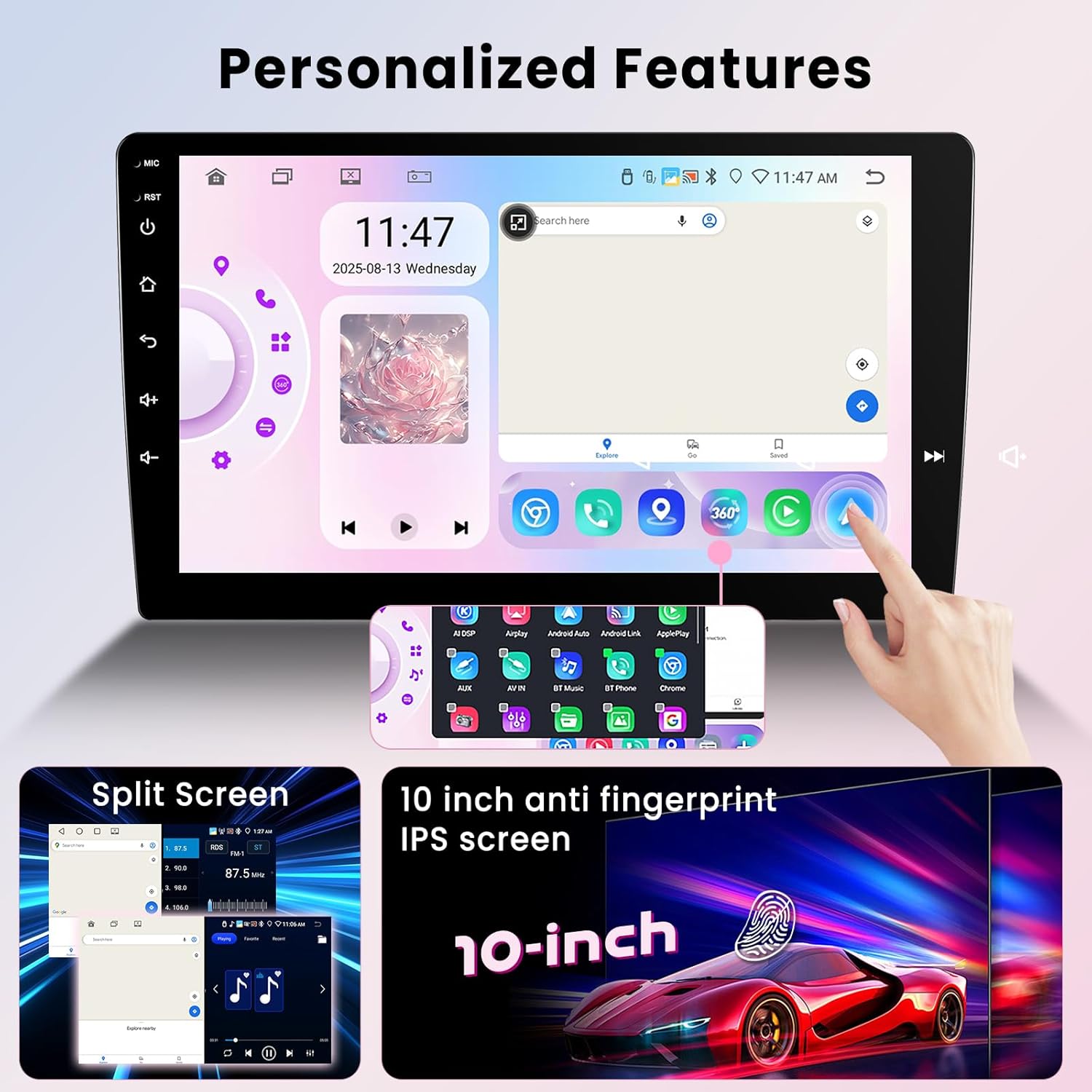
Image 4.3: Split screen mode and customizable interface.
4.7 Panoramig 360° View (Optional Camera)
When connected to compatible 360-degree cameras (sold separately), the car stereo can display a panoramic view around your vehicle, assisting with parking and maneuvering by eliminating blind spots.
4.8 Rheolydd Olwyn Lywio (SWC)
The unit supports integration with your vehicle's factory steering wheel controls. This allows you to manage audio, calls, and other functions without taking your hands off the wheel. Configuration may be required in the system settings.

Image 4.4: Reversing camera view and steering wheel control integration.
5. Perfformiad Drosview
The Hodozzy car stereo features an 8-core processor, 6GB RAM, and 128GB ROM, running on Android 15. This configuration provides responsive performance for multitasking and running various applications. It includes built-in 5G Wi-Fi for fast internet connectivity.

Image 5.1: Internal hardware specifications for high operational performance.
6. cynnal
Er mwyn sicrhau hirhoedledd a pherfformiad gorau posibl stereo eich car, dilynwch y canllawiau cynnal a chadw hyn:
- Glanhau: Defnyddiwch frethyn meddal, sych i lanhau'r sgrin a'r tu allan. Osgowch lanhawyr neu doddyddion sgraffiniol.
- Tymheredd: Osgowch amlygu'r uned i dymheredd eithafol, poeth ac oer, am gyfnodau hir.
- Diweddariadau Meddalwedd: Periodically check for and install available software updates to ensure system stability and access to new features.
- Cysylltiadau: Ensure all cables and connections remain secure. Loose connections can lead to intermittent issues.
7. Datrys Problemau
Os byddwch chi'n dod ar draws problemau gyda'ch stereo car Hodozzy, cyfeiriwch at y problemau a'r atebion cyffredin canlynol:
| Problem | Achos Posibl | Ateb |
|---|---|---|
| Nid yw'r uned yn pweru ymlaen | Gwifrau anghywir, ffiws wedi chwythu, problem pŵer cerbyd | Check power cable connections, inspect vehicle fuses, consult a professional installer. |
| Screen freezes or is unresponsive | Software glitch, temporary system error | Perform a soft reset (refer to device settings for reset option) or disconnect and reconnect power to the unit. |
| Backup camera not displaying image | Loose camera connection, faulty camera, incorrect wiring | Verify all camera wiring connections (refer to Section 3.2), test with a known working camera if possible. |
| GPS signal is weak or unavailable | GPS antenna obstruction, damaged antenna, poor satellite reception | Ensure GPS antenna is placed in an unobstructed location, check antenna connection, replace antenna if damaged. |
| CarPlay/Android Auto diwifr ddim yn cysylltu | Bluetooth/Wi-Fi off on phone, incorrect pairing, software issue | Ensure phone's Bluetooth and Wi-Fi are active, delete previous pairings and re-pair, restart both phone and car stereo. |
8. manylebau
Detailed technical specifications for the Hodozzy 9-Inch 6G+128G Double Din Car Stereo:
- Pwysau Eitem: 2.2 pwys
- Dimensiynau Pecyn: 3.94 x 3.94 x 3.94 modfedd
- Maint Arddangos: 9 modfedd
- ASIN: B0FSZ49CMP
- Brand: Hodozzi
- Technoleg Cysylltedd: Bluetooth, WiFi
- Nodweddion arbennig: Android Auto, Apple CarPlay, Built-In Bluetooth, GPS, DSP, 360° Panoramic View Support, Split Screen
- System Weithredu: Android 15
- RAM: 6GB
- ROM: 128GB
- Prosesydd: 8-Craidd
9. Gwarant a Chefnogaeth
Your Hodozzy 9-Inch 6G+128G Double Din Car Stereo is covered by a Gwarant 2 mlynedd. For technical support, troubleshooting assistance, or to inquire about warranty claims, please contact Hodozzy Direct.
I gysylltu â chefnogaeth:
- Locate the product listing on Amazon.
- Click on the seller name, "Hodozzy Direct".
- On the seller's page, click the "Ask a question" button to send a message.

Image 9.1: Guide to contacting Hodozzy Direct for support.


