
Rhagymadrodd
The MOZA RS062 Truck Table Clamp is engineered for serious truck simulator enthusiasts who demand stability and precision. Constructed from high-strength steel, this clamp provides a solid foundation for your MOZA wheelbase and accessories, ensuring a secure and flex-free setup even during intense driving sessions. With adjustable height and universal compatibility across the MOZA ecosystem, this clamp allows you to customize your rig for maximum comfort and control. It is ideal for sim racing setups requiring versatility, durability, and ease of installation, offering the strength and flexibility needed for a professional-grade experience.
Nodweddion Allweddol:
- Adeiladu Gwydn: Made from high-strength steel for long-lasting durability and stability.
- Uchder Addasadwy: Easily adjust the clamp height for an optimal driving position.
- Cydnawsedd Cyffredinol: Works with all MOZA wheelbases and accessories for a seamless fit within the MOZA ecosystem.
- Mowntio stabl: Prevents wobbling or shifting for a realistic and immersive truck simulation experience.
- Gosodiad Hawdd: Features a straightforward design for simple assembly and adjustment.
- Dylunio Gradd Broffesiynol: Suitable for both casual players and serious sim racing enthusiasts.

Delwedd: Blaen view of the MOZA RS062 Truck Table Clamp. This image shows the overall structure and design of the clamp o'r tu blaen.
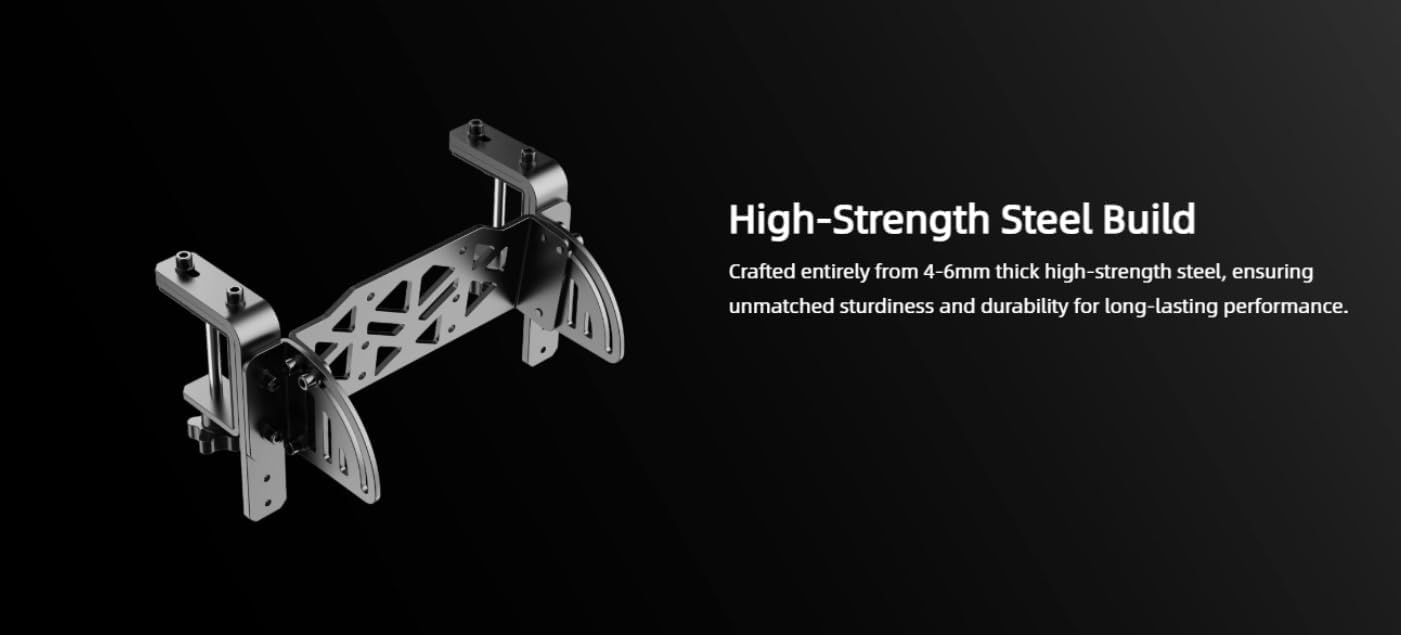
Image: High-Strength Steel Build. The MOZA RS062 clamp is crafted from 4-6mm thick high-strength steel, ensuring exceptional sturdiness and durability for long-lasting performance.
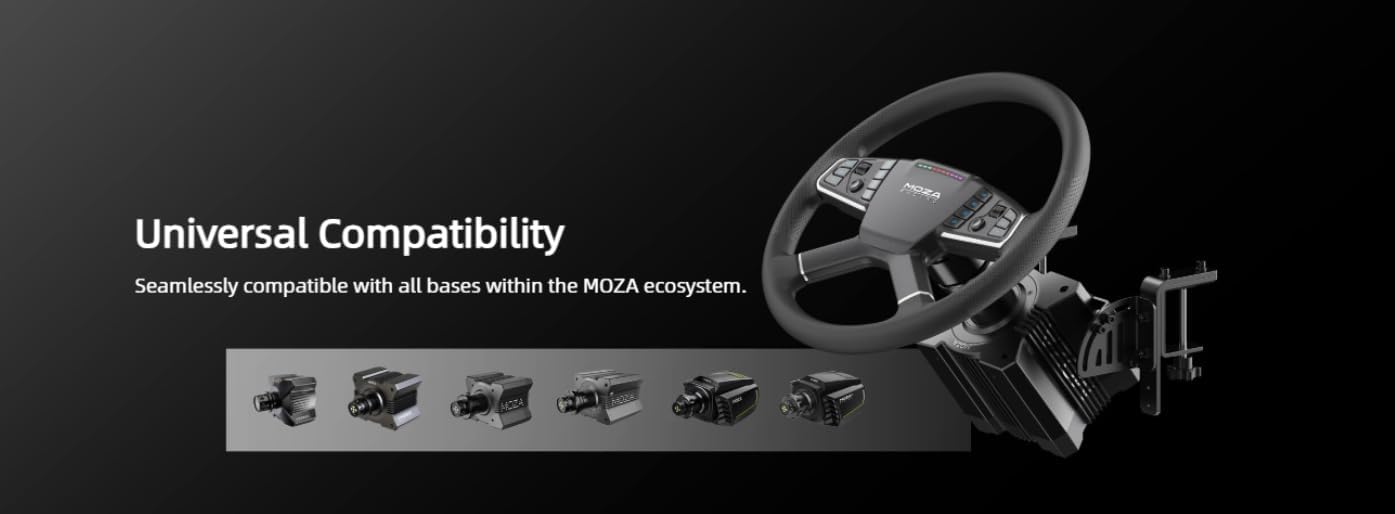
Image: Universal Compatibility. The clamp is seamlessly compatible with all wheelbases within the MOZA ecosystem, allowing for flexible integration into your existing setup.
Gosod a Gosod
Follow these steps to properly set up your MOZA RS062 Truck Table Clamp.
Cynnwys y Pecyn:
- MOZA RS062 Truck Table Clamp (1 darn)
- Mounting hardware (screws, knobs, etc.)
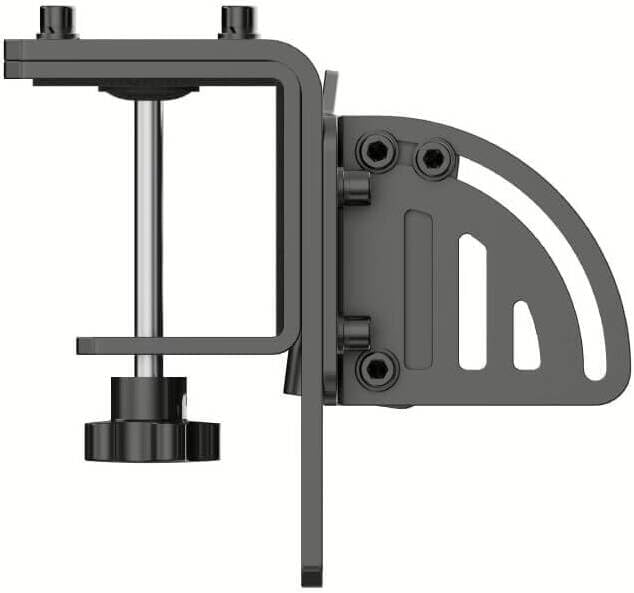
Delwedd: Ochr view of the MOZA RS062 Truck Table Clamp. hwn view highlights the vertical posts and locking mechanisms used for height adjustment.
Opsiynau Gosod:

Image: Flexible Installation Options. The clamp can be installed by clamping onto desktops or mounting onto aluminum profiles.
Option 1: Desktop Clamping (3-70mm thickness)
- Atodwch Clamp cromfachau: Sicrhewch y ddau clamp brackets to the main plate of the RS062 using the provided screws. Ensure they are oriented correctly for desk clamping.
- Position on Desk: Rhowch y cl wedi'i ymgynnullamp onto the edge of your desktop. Ensure the desk thickness is between 3mm and 70mm.
- Tynhau Clamps: Use the adjustable knobs on the clamp brackets to firmly secure the clamp to the desk. Turn the knobs clockwise until the clamp is stable and does not move. Do not overtighten.
- Mount Wheelbase: Attach your MOZA wheelbase to the mounting plate of the RS062 clamp using the appropriate screws provided with your wheelbase. Refer to your wheelbase manual for specific mounting patterns.
Option 2: Aluminum Profile Mowntio
- Prepare Clamp: Os oes angen, addaswch y clamp brackets or remove them if your aluminum profile mounting requires direct attachment to the main plate.
- Attach to Profile: Secure the RS062 clamp to your aluminum profile rig using T-nuts and bolts (not included with the clamp, typically supplied with your aluminum profile rig). Ensure the clamp is aligned and securely fastened.
- Mount Wheelbase: Attach your MOZA wheelbase to the mounting plate of the RS062 clamp using the appropriate screws provided with your wheelbase.
Addasu Ongl ac Uchder:

Image: Versatile Angle Adjustment. The clamp allows for angle adjustments ranging from 0 to 75 degrees, enabling precise customization of your steering wheel position.
The MOZA RS062 allows for versatile angle and height adjustments to optimize your driving experience.
- Addasiad Ongl: Loosen the bolts on the side of the clamp that control the angle. Adjust the mounting plate to your desired angle (0-75 degrees) and then firmly retighten the bolts to secure the position.
- Addasiad Uchder: The vertical posts of the clamp allow for height adjustment. Loosen the locking mechanisms on the posts, slide the mounting plate to the desired height, and then firmly tighten the locking mechanisms to secure it.
Gweithrediad
Once the MOZA RS062 Truck Table Clamp is securely installed and your MOZA wheelbase is mounted, ensure all connections are tight before beginning your simulation session.
- Gwiriad Cyn Gweithredu: Before each use, verify that the clamp is securely fastened to your desk or aluminum profile and that your wheelbase is firmly attached to the clamp. Check for any loose screws or wobbling.
- Adjustments During Use: If you need to adjust the angle or height during a session, ensure your simulation is paused and the wheelbase is not in active use. Loosen the necessary bolts/knobs, make the adjustment, and retighten securely.
- Sefydlogrwydd: The robust design of the RS062 ensures maximum stability. If you experience any movement or flex, re-check all mounting points and tighten them appropriately.
Cynnal a chadw
Regular maintenance helps ensure the longevity and optimal performance of your MOZA RS062 Truck Table Clamp.
- Glanhau: Sychwch y cl i lawramp with a soft, dry cloth to remove dust and debris. Avoid using abrasive cleaners or solvents that could damage the finish.
- Gwiriad Fastener: Periodically inspect all screws, bolts, and knobs for tightness. Over time, vibrations from use can cause fasteners to loosen. Tighten any loose components to maintain stability.
- Storio: If storing the clamp for an extended period, ensure it is clean and dry. Store in a cool, dry place away from direct sunlight.
Datrys problemau
This section addresses common issues you might encounter with your MOZA RS062 Truck Table Clamp.
| Problem | Achos Posibl | Ateb |
|---|---|---|
| Clamp yn ansefydlog neu'n siglo. | Loose desk clamp knobs or mounting bolts. | Ensure all desk clamp knobs are fully tightened. If mounted to an aluminum profile, check all bolts for tightness. |
| Difficulty adjusting height or angle. | Locking mechanisms are too tight or components are stiff. | Loosen the relevant bolts/knobs sufficiently before attempting to adjust. Apply a small amount of silicone lubricant to moving parts if stiffness persists (avoiding contact with electrical components). |
| Wheelbase feels loose on the clamp. | Wheelbase mounting screws are not tight. | Verify that the screws attaching the wheelbase to the RS062 mounting plate are securely tightened. |
Manylebau
| Nodwedd | Manylyn |
|---|---|
| Rhif Model | RS062 |
| Brand | RASIO MOZA |
| Deunydd | High-Strength Steel (as described in product features) |
| Dimensiynau Cynnyrch (LxWxH) | 25.51 x 11.5 x 23 cm |
| Pwysau Eitem | 1.5 kg |
| Ystod Ongl Addasadwy | 0-75 gradd |
| Bwrdd Gwaith Clamp Ystod Trwch | 3-70 mm |
| Cydweddoldeb | All MOZA wheelbases and accessories |
Gwarant a Chefnogaeth
For detailed warranty information, please refer to the warranty card included with your product or visit the official MOZA RACING website. MOZA RACING products typically come with a limited warranty covering manufacturing defects.
If you encounter any issues or require technical assistance, please contact MOZA RACING customer support through their official website or the contact information provided in your product packaging. When contacting support, please have your product model (RS062) and purchase details ready.
Official MOZA RACING Websafle: www.mozaracing.com


