
Cynnyrch Drosview
The Monstrum Nitro+ is a compact pistol red dot sight featuring an integrated rear sight, Shake Awake motion sensing technology, and a 3 MOA red dot reticle. It is designed for efficient target acquisition and extended battery life. This optic is compatible with RMR cut red dot footprint patterns and includes a low-profile Picatinny rail adapter for versatile mounting options.
The integrated rear sight allows for co-witnessing with the red dot reticle, providing a familiar aiming reference alongside the speed of a red dot.
Gosod
1. Mounting the Optic
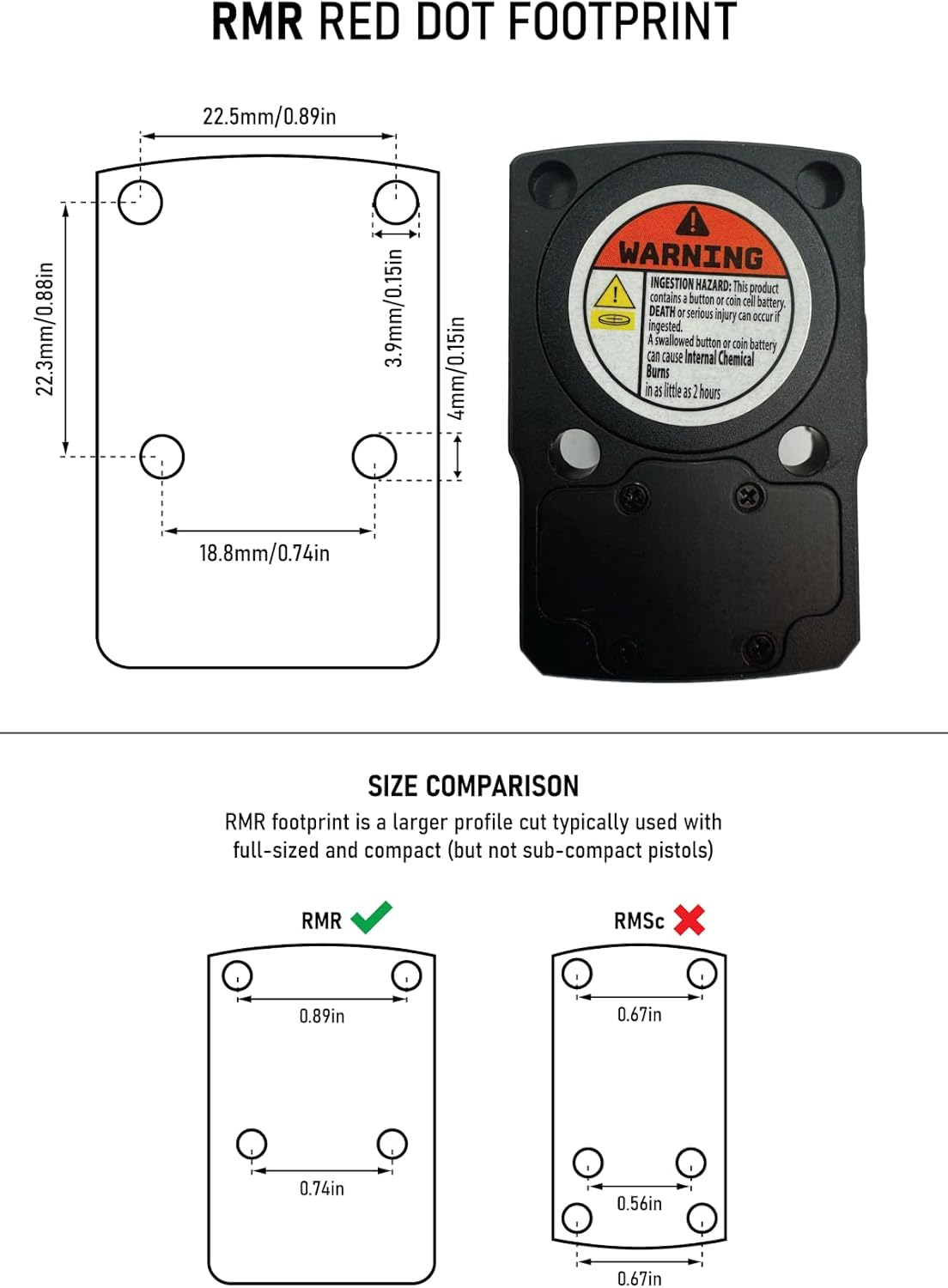
The Nitro+ is compatible with pistols and adapters utilizing the RMR cut red dot footprint pattern. A low-profile Picatinny rail adapter is also included for mounting on Picatinny platforms.
- Sicrhewch fod yr arwyneb mowntio yn lân ac yn rhydd o falurion.
- Select the appropriate screws from the included screw sets based on your firearm or adapter.
- Securely attach the red dot sight to the mounting platform. Refer to your firearm's manual for specific torque specifications.
2. Gosod Batri
The Nitro+ uses a single 3V CR2032 lithium-ion battery. The top-loading battery design allows for battery replacement without removing the sight from the firearm.
- Locate the top-loading battery cap on the optic.
- Dadsgriwio'r cap batri.
- Mewnosodwch fatri CR2032 newydd gyda'r ochr bositif (+) yn wynebu i fyny.
- Securely replace the battery cap.

3. Included Screw Sets
The Nitro+ includes various screw sets to ensure compatibility with different mounting applications:
- #6-32 9mm length: Compatible with RMR Cut Full Sized and Compact Glock MOS models (e.g., G17, G19, G26, G34).
- M3 5mm length: For MOS adapter to optics-ready Glock.
- #4-40 5.5mm length: Compatible with RMR Cut Brownell's and other aftermarket slides.
- M3.5 11mm length: Compatible with many RMR Picatinny, 45-degree, or piggyback mounts.

4. RMR Footprint and Size Comparison
The Nitro+ utilizes the RMR footprint, which is a larger profile cut typically used with full-sized and compact pistols. It is not designed for sub-compact pistols that may require an RMSC footprint.
Cyfarwyddiadau Gweithredu
1. Power On and Reticle Adjustment
The Nitro+ features a parallax-free 3 MOA red dot reticle with button-controlled illumination intensity settings. Press the power button to activate the red dot and adjust brightness.
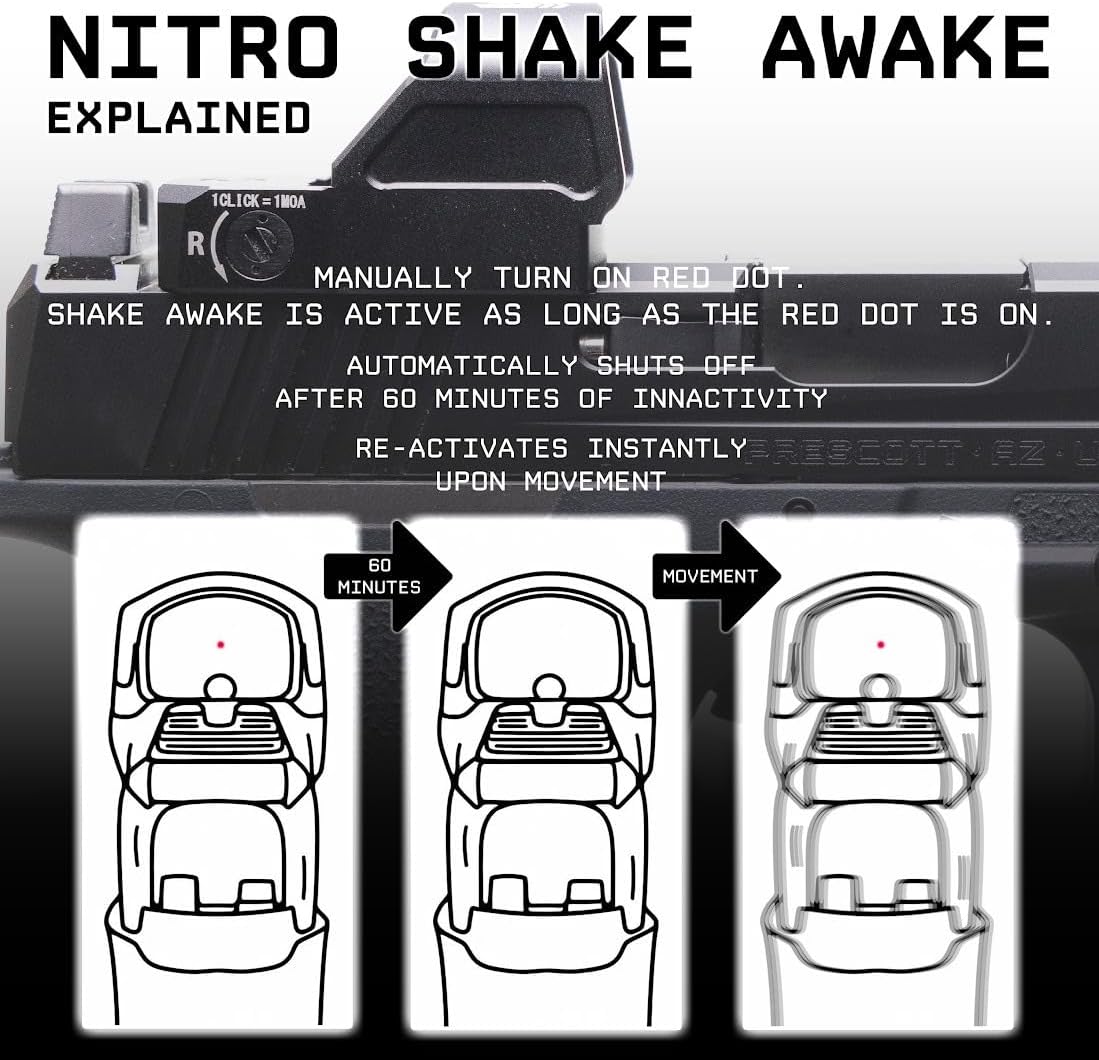
2. Shake Awake Technology
The Shake Awake motion sensing technology helps conserve battery life. Once the red dot is manually turned on, Shake Awake mode is active. The dot will automatically shut off after one hour of inactivity and instantly re-activate upon movement.
3. Integrated Rear Sight
The Nitro+ includes an integrated rear sight at the rear of the optic housing. This allows users to retain the use of a rear sight for co-witnessing with the red dot reticle, providing a backup aiming solution or a familiar sight picture.

4. Window Size
The optical system features a window size of approximately 23.42mm x 16.43mm, providing a clear field of view for target acquisition.

Cynnal a chadw
1. Glanhau
To maintain optimal performance, keep the lenses and housing clean. Use a soft, lint-free cloth to wipe the lenses. For stubborn smudges, a small amount of lens cleaning solution designed for optics can be used. Avoid abrasive materials or harsh chemicals.
2. Amnewid Batri
Replace the CR2032 battery when the reticle appears dim or flickers. The top-loading design allows for quick replacement without dismounting the optic. Refer to the "Battery Installation" section under Setup for detailed steps.
Datrys problemau
- Red Dot Flickers or is Dim: This typically indicates a low battery. Replace the CR2032 battery with a fresh one. Ensure the battery is inserted correctly with the positive (+) side facing up.
- Red Dot Does Not Turn On: Check battery installation and ensure the battery is fresh. If the issue persists, contact customer support.
- Zero Shift: Ensure the optic is securely mounted to the firearm. Check all mounting screws for proper torque. If the optic was dropped, re-zeroing may be necessary.
- Difficulty Co-witnessing: Ensure your firearm's iron sights are suppressor height if required for co-witnessing with the integrated rear sight.
Manylebau
| Brand | Monstrum |
| Enw Model | Nitro+ |
| Rhif Rhan | RD270R |
| Math o Reticle | 3 MOA Dot Coch |
| Chwyddiad | 1x |
| Deunydd | 6061 Grade Aluminum |
| Lliw | Coch |
| Dyfeisiau Cydnaws | Gwn llaw |
| Math Mowntio | RMR, Picatinny Mount |
| Gweledigaeth Nos Gydnaws | Nac ydw |
| Math Batri | CR2032 (3V Lithium Ion) |
| Bywyd Batri | Hyd at 50,000 awr |
| Dimensiynau Pecyn Eitem (L x W x H) | 3.66 x 3.35 x 1.77 modfedd |
| Pwysau Pecyn | 0.14 Cilogram |
Gwarant a Chefnogaeth
Gwybodaeth Gwarant
For detailed warranty information, please refer to the official Monstrum Tactical websafle neu cysylltwch â'u gwasanaeth cwsmeriaid yn uniongyrchol. Gall telerau ac amodau'r warant amrywio.
Cefnogaeth i Gwsmeriaid
If you encounter any issues or have questions regarding your Monstrum Nitro+ red dot sight, please visit the Monstrum Tactical website for support resources or contact their customer service team.
Tactegol Monster Websafle: Visit Monstrum Store


