
1. Rhagymadrodd
Thank you for choosing the LOEWE Leo Wireless Headphones. These premium headphones are designed to deliver an exceptional audio experience with advanced features such as Hi-Res Audio, adaptive noise cancellation, and real-time voice translation. This manual provides essential information for setting up, operating, and maintaining your headphones to ensure optimal performance and longevity.
2. Cynnwys Pecyn
Before use, please verify that all items are present in the package:
- LOEWE Leo Wireless Headphones
- Cebl Codi Tâl USB-C
- AUX to USB-C Audio Cable
- Achos Cario Lledr
- Achos Cario Caled
- Cable Pouch
- Llawlyfr Defnyddiwr (y ddogfen hon)
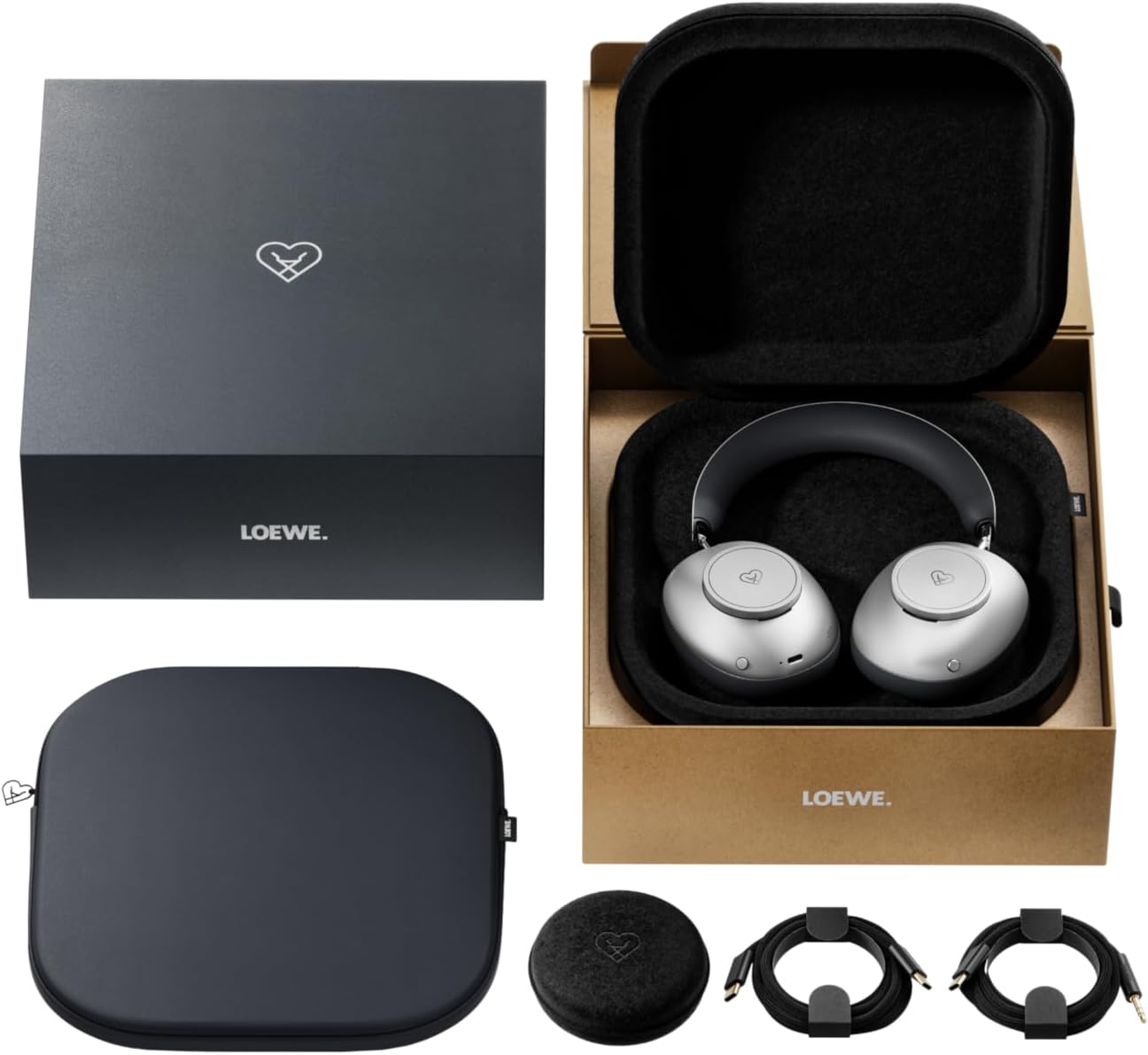
Image: The LOEWE Leo Wireless Headphones package contents, showing the headphones, USB-C cable, AUX cable, leather case, hard case, and cable pouch.
3. Cynnyrch Drosview
Familiarize yourself with the physical components and controls of your LOEWE Leo headphones.

Delwedd: Blaen view of the LOEWE Leo Wireless Headphones, showcasing y clustffonau a'r band pen.
3.1. Rheolyddion a Phorthladdoedd
The headphones feature intuitive controls for easy operation:
- Deialau Rheoli: Two precision-crafted rotary wheels for volume adjustment and navigation.
- Botymau Gweithredu: Dedicated buttons for playback control, ANC modes, and voice translation activation.
- Porthladd USB-C: For charging and wired audio connection.
- Jac 3.5mm: For traditional wired audio connection.

Delwedd: Manwl view of the earcup, highlighting the control dial, USB-C port, and 3.5mm audio jack.
4. Cychwyn Arni
4.1. Codi Tâl y Clustffonau
Before first use, fully charge your LOEWE Leo headphones. A full charge provides up to 65 hours of continuous playback.
- Cysylltwch y cebl gwefru USB-C a gyflenwir â'r porthladd USB-C ar y clustffonau.
- Cysylltwch ben arall y cebl ag addasydd pŵer USB cydnaws (heb ei gynnwys) neu borthladd USB cyfrifiadur.
- Bydd y dangosydd LED ar y clustffonau yn dangos y statws gwefru. Fel arfer, bydd yn diffodd neu'n newid lliw ar ôl iddo gael ei wefru'n llawn.
4.2. Pŵer Ymlaen / I ffwrdd
- I Bweru Ymlaen: Pwyswch a daliwch y botwm Pŵer am tua 3 eiliad nes bod y dangosydd LED yn goleuo.
- I Bweru i ffwrdd: Pwyswch a daliwch y botwm Pŵer am tua 3 eiliad nes bod y dangosydd LED yn diffodd.
4.3. Pâr Bluetooth
The LOEWE Leo headphones utilize Bluetooth Low Energy (BLE) for faster pairing and reduced power consumption.
- Sicrhewch fod y clustffonau wedi'u pweru i ffwrdd.
- Pwyswch a daliwch y botwm Pŵer am tua 5 eiliad nes bod y dangosydd LED yn fflachio'n gyflym, gan nodi modd paru.
- Ar eich dyfais (ffôn clyfar, tabled, cyfrifiadur), galluogwch Bluetooth a chwiliwch am ddyfeisiau sydd ar gael.
- Select "LOEWE Leo" from the list of found devices.
- Ar ôl ei gysylltu, bydd y dangosydd LED yn stopio fflachio ac yn aros yn las solet.
4.4. Cysylltiad Wired
For a wired audio experience, use the supplied AUX to USB-C cable.
- Connect the USB-C end of the AUX cable to the headphones.
- Connect the 3.5mm end of the AUX cable to your audio source's 3.5mm jack.
- Bydd y clustffonau'n newid yn awtomatig i'r modd gwifredig.
5. Gweithredu Eich Clustffonau
5.1. Audio Playback and Volume Control
Use the control dials and action buttons for managing your audio:
- Cyfrol i fyny/i lawr: Rotate the designated control dial.
- Chwarae/Seibiant: Press the central action button once.
- Trac Nesaf: Double-press the central action button.
- Trac Blaenorol: Triple-press the central action button.

Image: Close-up of the earcup's control dial, used for volume and navigation.
5.2. Adaptive Noise Cancellation (ANC)
The LOEWE Leo features advanced adaptive noise cancellation that continuously analyzes your environment and adjusts in real-time.
- Actifadu/Dadactifadu ANC: Press the dedicated ANC button once.
- Modd Tryloywder: Press the ANC button twice to allow ambient sounds to pass through, enhancing situational awareness.

Image: Illustration of the adaptive noise cancellation feature, depicting sound wave management.
5.3. Real-time Voice Translation
Communicate across language barriers with the integrated real-time voice translation feature.
- Ensure your headphones are connected to a device with internet access and the LOEWE companion app installed.
- Activate the translation feature via the dedicated button or the companion app.
- Speak into the headphone's microphone. The translated audio will be played back in real-time.

Image: Earcup detail showing the microphone for voice input and the 'leo' icon, representing the real-time translation function.
5.4. Dolby Atmos and Spatial Audio
Experience immersive sound with Dolby Atmos and spatial audio support. This feature is automatically enabled when compatible content is played through a connected device that supports these audio technologies.
6. Cynnal a Chadw a Gofal
6.1. Glanhau
- Sychwch y clustffonau gyda lliain meddal, sych, heb lint.
- Peidiwch â defnyddio glanhawyr sgraffiniol, alcohol na thoddyddion cemegol.
- Keep moisture away from openings.
6.2. Gofal Batri
- Osgowch ollwng y batri'n llwyr yn aml.
- Store the headphones in a cool, dry place when not in use for extended periods.
- The battery is user-replaceable, contributing to the product's longevity.
6.3. Dylunio Modiwlaidd
The LOEWE Leo headphones feature a durable modular design with replaceable components, such as ear cushions and headbands. This design allows for easy replacement of worn parts, extending the product's lifespan.

Image: The modular construction of the LOEWE Leo headphones, showing detachable earcups and headband for maintenance or replacement.
7. Datrys Problemau
If you encounter issues with your LOEWE Leo headphones, refer to the following common solutions:
- Dim pŵer: Gwnewch yn siŵr bod y clustffonau wedi'u gwefru'n llawn. Cysylltwch nhw â ffynhonnell bŵer gan ddefnyddio'r cebl USB-C.
- Dim Sain:
- Gwiriwch lefel y gyfrol ar y clustffonau a'ch dyfais gysylltiedig.
- Ensure the headphones are properly paired via Bluetooth or the AUX cable is securely connected.
- Try restarting both the headphones and the audio source device.
- Datgysylltu Bluetooth:
- Ensure the headphones are within the Bluetooth range of your device (typically 10 meters).
- Disable and re-enable Bluetooth on your device, then attempt to re-pair.
- Clear the LOEWE Leo from your device's Bluetooth history and pair again.
- ANC Ddim yn Gweithio'n Effeithiol:
- Gwnewch yn siŵr bod y cwpanau clust yn ffurfio sêl dda o amgylch eich clustiau. Addaswch y ffit os oes angen.
- Verify that ANC is activated.
- Voice Translation Issues:
- Gwiriwch gysylltiad rhyngrwyd eich dyfais.
- Ensure the LOEWE companion app is up-to-date and configured correctly.
- Siaradwch yn glir ac ar gyflymder cymedrol.
If problems persist, please contact LOEWE customer support.
8. manylebau
| Nodwedd | Disgrifiad |
|---|---|
| Enw Model | Leo |
| Rhif Model | 64641J10 |
| Technoleg Cysylltedd | Wireless (Bluetooth), Wired |
| Cyfathrebu Di-wifr | Ynni Isel Bluetooth (BLE) |
| Nodweddion Sain | Hi-Res Audio, Dolby Atmos, Spatial Audio |
| Canslo Sŵn | Adaptive Noise Reduction (ANC) |
| Nodweddion Arbennig | Real-time Voice Translation, Modular Design with Replaceable Components |
| Bywyd Batri | Hyd at 65 awr (tua) |
| Math o Reoli | Button Control, Rotary Dials |
| Dyfeisiau Cydnaws | Cellular Phone, Tablet, Computer, Laptop |
| Pwysau | 3 Kilograms (product weight as listed, may include packaging) |
9. Gwarant a Chefnogaeth
9.1. Gwarant y Gwneuthurwr
The LOEWE Leo Wireless Headphones come with a Gwarant gwneuthurwr 2 flyneddMae'r warant hon yn cwmpasu diffygion mewn deunyddiau a chrefftwaith o dan ddefnydd arferol. Cadwch eich prawf prynu ar gyfer hawliadau gwarant.
For specific terms and conditions of the warranty, please refer to the warranty card included in your product packaging or visit the official LOEWE websafle.
9.2. Cefnogaeth i Gwsmeriaid
For technical assistance, troubleshooting, or warranty inquiries, please contact LOEWE customer support through their official websafle neu'r wybodaeth gyswllt a ddarperir yn nogfennaeth eich cynnyrch.
Adnoddau Ar-lein: Visit the official LOEWE websafle ar gyfer Cwestiynau Cyffredin, diweddariadau meddalwedd, ac adnoddau cymorth ychwanegol.


